Продукт бүттүview

Image: The LTC SS-503 TWS Wireless Earbuds shown with their charging case, highlighting the sleek white design and RGB lighting on the case.
The LTC SS-503 TWS Wireless Earbuds are designed for an immersive audio experience, featuring Bluetooth 5.1 connectivity, dual music and gaming modes, and a distinctive RGB light charging case. They are built for comfort and durability, with an IPX4 waterproof rating suitable for various activities.
Негизги өзгөчөлүктөрү:
- Cool RGB Light: Customizable lighting modes on the charging case.
- IPX4 Суу өткөрбөйт: Resistant to splashes and sweat, ideal for workouts.
- Quick Charging & Long Playtime: Fast charging via USB-C or wireless, with extended battery life.
- Bluetooth 5.1 & Low Latency: Stable connection and minimal audio delay.
- Кош режим (Музыка жана оюн): Оптимизацияланган үн проfiles ар кандай максаттарда колдонулат.
- HiFi стерео үн: Delivers clear audio with deep bass and crisp treble.
- Simply Pairing & Touch Controls: Easy device connection and intuitive touch-sensitive controls.
Жайгашуу
1. Кутуда эмне бар
Upon unboxing, ensure the following components are present:
- LTC SS-503 TWS Wireless Earbuds (Left and Right)
- Зымсыз кубаттоо кутусу
- USB-C заряддоо кабели
- Колдонуучунун Колдонмосу (бул документ)
2. Баштапкы заряддоо
Биринчи колдонуудан мурун, кулакчындарды жана заряддоо кутучасын толук заряддаңыз.

Image: The charging case demonstrating both USB-C cable charging and wireless charging capabilities.
- USB-C кабели аркылуу: Connect the provided USB-C cable to the charging case and a power source. The charging case will indicate charging status.
- Зымсыз кубаттоо: Place the charging case on a compatible wireless charging pad. Ensure the case is properly aligned for efficient charging.
- Заряддоо убактысы: The charging case takes approximately 1.5 hours to fully charge. Earbuds charge when placed inside the case.
Note: Wireless charging devices with fast charging functions may adversely affect the charging case. Avoid using such devices to charge the case.
3. Түзмөгүңүз менен жупташтыруу
The earbuds support hassle-free pairing with iOS/Android phones, Mac, or Windows laptops.

Image: A smartphone displaying Bluetooth settings, showing the "SS-503" earbuds available for connection, with the charging case open beside it.
- Биринчи жолу жупташтыруу:
- Заряддоо кутучасын ачыңыз. Кулакчындар автоматтык түрдө күйүп, жупташтыруу режимине өтөт.
- Түзмөгүңүздө (смартфон, планшет, ноутбук) Bluetooth иштетиңиз жана жеткиликтүү түзмөктөрдү издеңиз.
- Select "SS-503" from the list of found devices to connect.
- Туташкандан кийин үн билдирүүсү ийгиликтүү жупташтырууну ырастайт.
- Башка түзмөктөргө туташуу:
- To connect to a new device or reset pairing, open the earbud compartment without removing the earbuds.
- Press and hold the function key (MFB) in the middle of the charging case for approximately 5 seconds until both earbud indicators light up simultaneously. This indicates a successful reset.
- When the earbud indicators begin single blinking, the headset is in pairing state and ready to connect to a new device.
Иштөө нускамалары
1. Күйгүзүү/өчүрүү
- Күйгүзүү: Open the charging case, and the earbuds will automatically power on and connect to the last paired device.
- Өчүрүү: Кулакчындарды кайра заряддоо кутусуна салып, капкагын жабыңыз. Алар автоматтык түрдө өчүп, кубаттай башташат.
2. Башкаруу элементтерине тийүү
The earbuds feature intuitive touch controls on both the left and right earbuds (MFB - Multi-Function Button).
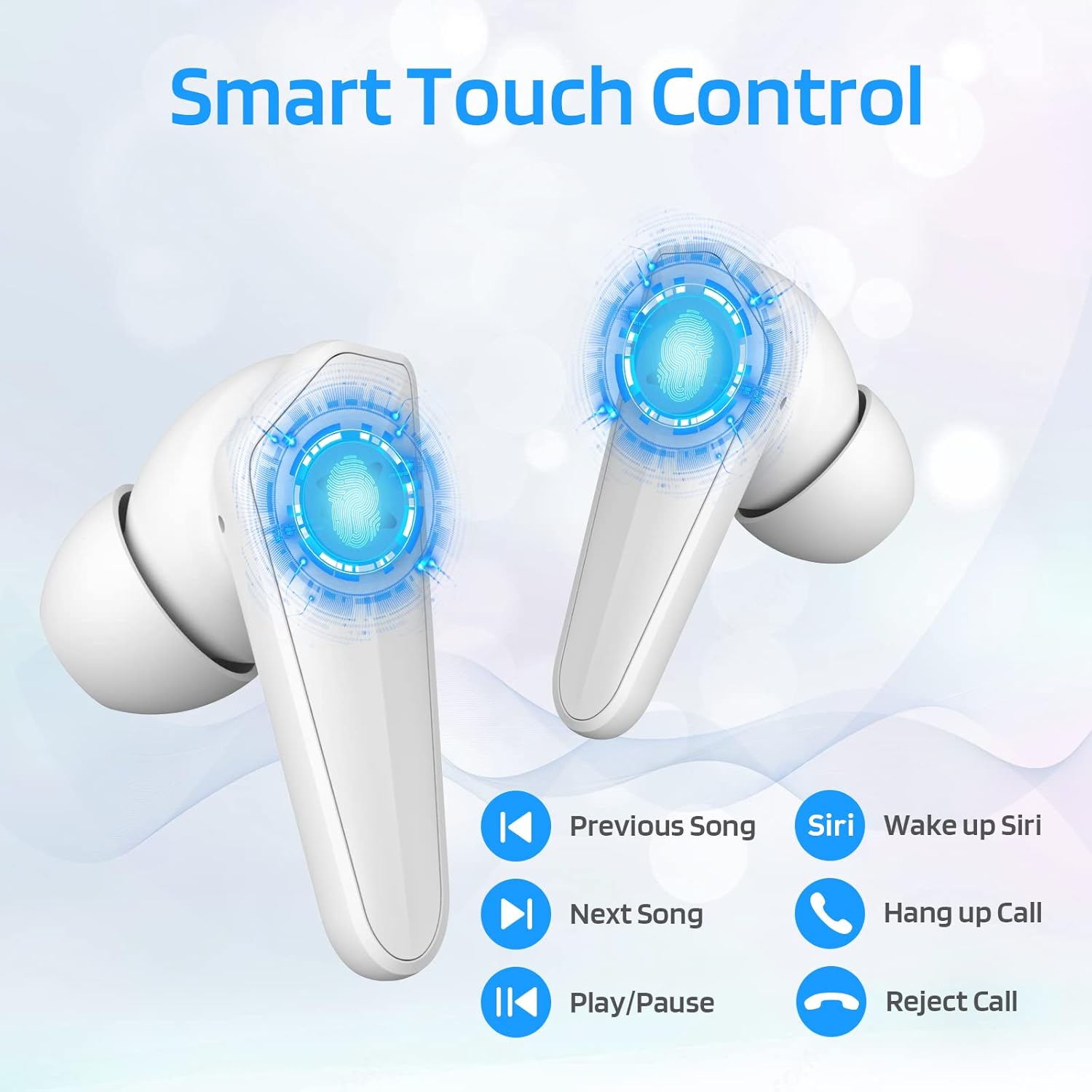
Image: Diagram illustrating the touch control functions on the earbuds, including play/pause, track navigation, call management, and voice assistant activation.
| Функция | Акция |
|---|---|
| Ойнотуу/Тыныгуу | Кулакчындарды бир жолу таптаңыз. |
| Кийинки ыр | Оң кулакчынды эки жолу таптаңыз. |
| Мурунку ыр | Сол кулакчынды эки жолу таптаңыз. |
| Чалууга жооп берүү/аяктоо | Кулакчындарды бир жолу таптаңыз. |
| Чакырууну четке кагуу | Кулакчындардын бирин 2 секунд басып туруңуз. |
| Үн жардамчысын иштетүү (Siri/Google) | Сол кулакчынды үч жолу таптаңыз. |
3. Dual Mode Switching (Music/Gaming)
The LTC SS-503 earbuds offer two distinct audio modes for optimized performance.

Image: A smartphone screen displaying both music playback and a gaming interface, with icons indicating "Music Mode" and "Gaming Mode" for the earbuds.
- Которуу режимдери: Press the right earbud's MFB for 3 seconds to switch between modes.
- Оюн режими: This mode is designed to weaken ambient sound and strengthen specific in-game audio cues, such as footsteps, providing a low-latency experience for immersive gaming.
- Музыка режими: This mode produces high-fidelity stereo sound with deep bass and clear treble, optimized for general music listening.
4. RGB Light Control (Charging Case)
The charging case features customizable RGB lighting.

Image: The charging case illuminated with vibrant RGB lights, emphasizing its colorful and fashionable design.
- Жарык режимдерин которуу: Short press the MFB (Multi-Function Button) in the middle of the charging box to cycle through 9 different light modes.
- Жарыктарды күйгүзүү/өчүрүү: Double-press the MFB in the middle of the charging box to turn the RGB lights on or off.
Техникалык тейлөө
Туура тейлөө кулакчындарыңыздын узак иштөөсүн жана оптималдуу иштешин камсыз кылат.
- Тазалоо: Regularly wipe the earbuds and charging case with a soft, dry, lint-free cloth. Avoid using abrasive materials or harsh chemicals. For ear tips, remove them and clean with mild soap and water, then dry thoroughly before reattaching.
- Суу туруктуулугу (IPX4): The earbuds are IPX4 waterproof, meaning they are resistant to splashing water from any direction. This makes them suitable for workouts and light rain. However, they are not designed for submersion in water, swimming, or showering. Do not expose them to pressurized water or high-velocity water.
- Сактагыч: When not in use, store the earbuds in their charging case to protect them and keep them charged. Store in a cool, dry place away from extreme temperatures and direct sunlight.
- Батареяга кам көрүү: Батареянын кубатын сактоо үчүн, кулакчындарды жана кубаттоочу кутучаны тез-тез толук зарядсыздандырбаңыз. Аларды көпкө колдонулбаса дагы, үзгүлтүксүз кубаттап туруңуз.

Image: The earbuds and charging case shown with water droplets, illustrating their IPX4 waterproof capability.
Проблемаларды чечүү
If you encounter issues with your LTC SS-503 earbuds, refer to the following common problems and solutions:
Issue 1: Only one earbud has sound.
This product supports a dual-host function, allowing use of a single earbud. If only one earbud has sound when both are in use, it may require a reset.
- Чечим: Place both earbuds back into the charging case. Close the lid, then open it again. This will reset and re-pair the earbuds. If the issue persists, perform a full reset as described in the "Connecting to Other Devices" section under Setup.
Issue 2: Occasional disconnection or unstable connection.
Bluetooth 5.1 technology provides a stable connection, but environmental factors can affect performance.
- Чечим:
- Ensure the effective connection distance (less than 10 meters) is maintained between the earbuds and your device.
- Avoid signal-blocking objects such as thick walls or large metal structures between your device and the earbuds.
- Ensure there is no significant electromagnetic interference from other electronic devices nearby.
- Try resetting the earbuds and re-pairing them with your device.
Issue 3: Earbuds or charging case not charging.
If your device is not charging as expected, check the following:
- Чечим:
- Verify that the USB-C cable is securely connected to both the charging case and the power adapter.
- Ensure the power adapter is functioning correctly and plugged into a live outlet.
- If using wireless charging, ensure the charging case is correctly positioned on the wireless charging pad and the pad is powered.
- Try using a different USB-C cable or power adapter to rule out faulty accessories.
- Clean the charging contacts on both the earbuds and inside the charging case with a dry cotton swab to ensure good connection.
Техникалык шарттар
Detailed technical specifications for the LTC SS-503 TWS Wireless Earbuds:
| Өзгөчөлүк | Деталь |
|---|---|
| Модель аты | Sound Slave (SS-503) |
| Байланыш технологиясы | Зымсыз (Bluetooth 5.1) |
| Bluetooth диапазону | 10 метрге чейин |
| Сууга туруктуулук деңгээли | IPX4 (Сууга туруктуу) |
| Наушниктин батареясынын иштөө мөөнөтү | 5 саатка чейин |
| Жалпы ойноо убактысы (заряддоо кутусу менен) | 20 саатка чейин |
| Заряддоо убактысы (капка) | 1.5 саат |
| Башкаруу түрү | Сенсордук башкаруу (медиа башкаруу) |
| Аудио драйвер түрү | Динамикалык драйвер |
| Жыштык диапазону | 20 Гц - 20 000 Гц |
| Материал | Пластик |
| Элемент Салмагы | 5 унция (жалпы пакет) |
| Түс | Ак |
Кепилдик жана колдоо
LTC products are manufactured with high standards of quality. For specific warranty details, please refer to the warranty card included with your product or visit the official LTC webсайт. Сатып алуу квитанциясын кепилдик дооматтары үчүн сатып алуунун далили катары сактаңыз.
For further assistance, technical support, or inquiries, please refer to the official user manual PDF available online or contact LTC customer service through their official channels. The user manual PDF can be accessed via this link: LTC SS-503 User Manual (PDF).


