1. Киришүү
Сатып алганыңыз үчүн рахматasing the eKids Cocomelon Karaoke Machine, Model CO-550. This portable Bluetooth party speaker is designed to provide hours of musical fun for children, featuring built-in Cocomelon songs, a real working microphone, and versatile connectivity options. This manual provides essential information for safe and optimal use of your new karaoke machine.
2. Продукт бүтүп калдыview
2.1 Негизги өзгөчөлүктөрү
- Bluetooth байланышы: Wirelessly stream audio from any compatible Bluetooth device.
- Камтылган ырлар: Includes 24 popular Cocomelon songs for immediate entertainment.
- USB Audio Player: Connect a USB drive to play your own MP3 music files.
- Real Working Microphone: Sing along with the included wired microphone.
- Балдарга ылайыктуу дизайн: Lightweight and portable with a built-in handle.
- Кайра заряддалуучу батарея: Enjoy portable use with the integrated rechargeable battery (USB charging cable included).
- Гарнитура уячасы: Жеке угуу үчүн.
2.2 Компоненттер
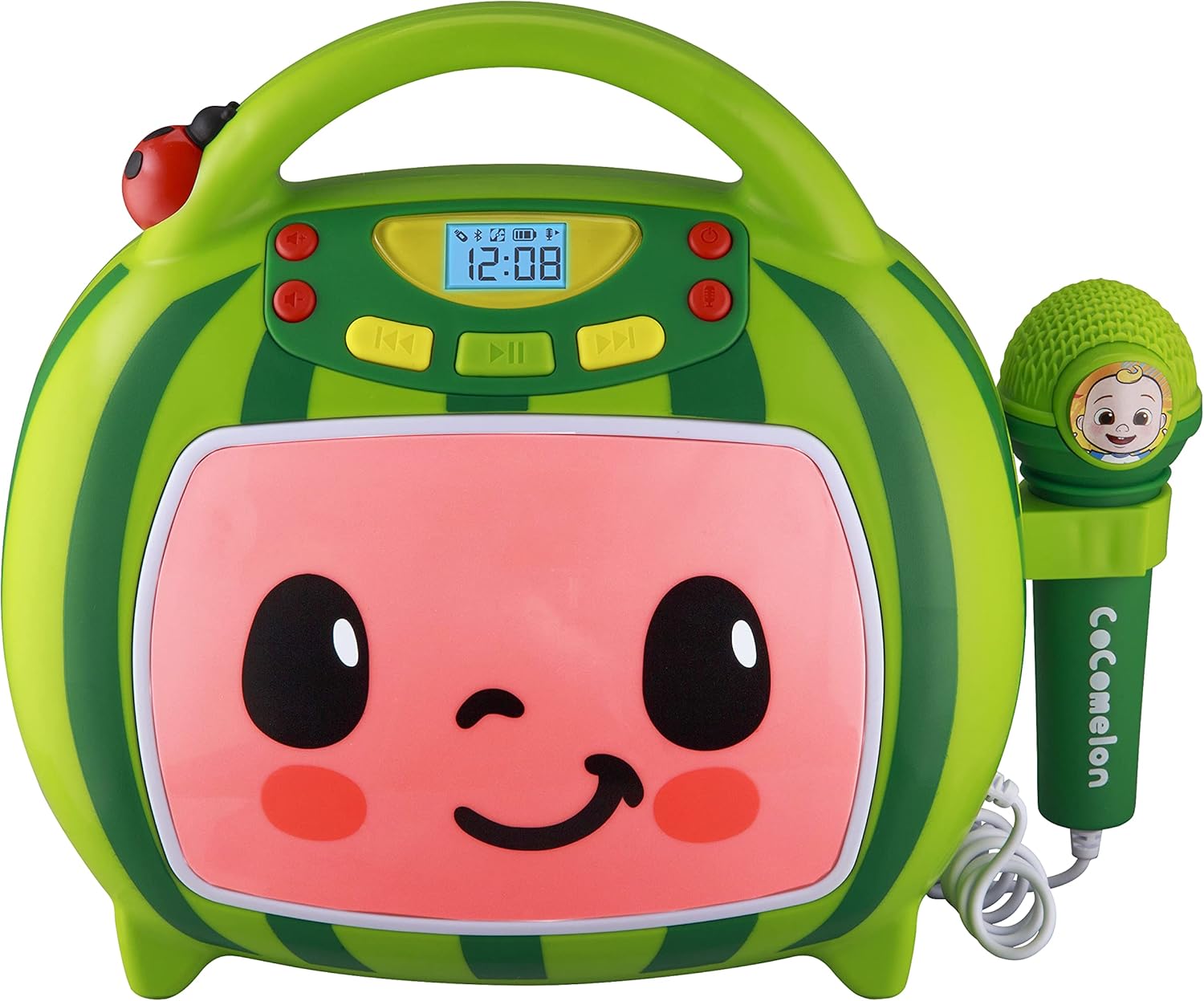
Фронт view of the eKids Cocomelon Karaoke Machine, featuring the watermelon-themed design and integrated microphone.

An annotated diagram detailing the dimensions, control buttons (volume, play/pause, power), microphone jack, USB port, and battery compartment of the karaoke machine.
Пакетке төмөнкүлөр кирет:
- eKids Cocomelon Karaoke Machine
- Зымдуу микрофон
- USB заряддоо кабели
3. Орнотуу
3.1 Батареяны орнотуу
The karaoke machine requires 1 Lithium Ion battery. Ensure the battery is correctly installed according to the polarity markings in the battery compartment, located on the back of the unit.
3.2 Баштапкы күйгүзүү
- Locate the Power ON/OFF button on the unit.
- Press and hold the Power ON/OFF button to turn on the device. The display will illuminate.
4. Иштөө нускамалары
4.1 Bluetooth жупташтыруу
- Turn on the karaoke machine. It will automatically enter Bluetooth pairing mode.
- On your compatible device (e.g., smartphone, tablet), enable Bluetooth and search for available devices.
- Select 'eKids Cocomelon' from the list of devices to pair.
- Once paired, you can stream audio wirelessly from your device to the karaoke machine.

The karaoke machine is shown with icons indicating its compatibility with various Bluetooth-enabled devices such as PCs, smartwatches, tablets, and mobile phones.
This video demonstrates the Bluetooth pairing process for the eKids Cocomelon Karaoke Machine, showing how to connect a mobile device to stream music wirelessly.
4.2 USB аудио ойнотуу
- Insert a USB drive containing MP3 music files into the USB port located on the back of the unit.
- The machine will automatically detect the USB drive and begin playing music.
- Use the playback controls (Play/Pause, Forward, Reverse) to navigate your music.
4.3 Камтылган ырлар
The karaoke machine comes pre-loaded with 24 Cocomelon songs. To play these songs, ensure no Bluetooth device is connected and no USB drive is inserted. Use the playback controls to select and play the desired song.

A visual representation of the 24 pre-loaded Cocomelon songs, including popular titles like 'Hello Song' and 'Wheels on the Bus'.
4.4 Микрофонду колдонуу
- Plug the wired microphone into the microphone jack on the side of the unit.
- Adjust the microphone volume using the dedicated controls.
- Сүйүктүү обондоруңузду коштоп ырдаңыз!

A young child engaging with the eKids Cocomelon Karaoke Machine, holding the microphone and singing along.
An overview видео шоуcasing the eKids Cocomelon Karaoke Machine in action, highlighting its portability, microphone, and various functions for children's entertainment.
4.5 Башкаруу
- Күйгүзүү/өчүрүү: Агрегатты күйгүзөт же өчүрөт.
- Volume UP/DOWN: Үндүн жалпы көлөмүн тууралайт.
- Ойнотуу/тындыруу: Ойнотууну баштайт же тындырат.
- Алга/артка: Кийинки же мурунку трекке өткөрүп жиберет.
- Микрофон КҮЙГҮЗҮҮ/ӨЧҮРҮҮ: Activates or deactivates the microphone.
5. Техникалык тейлөө
- Тазалоо: Wipe the unit with a soft, dry cloth. Do not use abrasive cleaners or immerse in water.
- Сактагыч: Караоке машинасын колдонбогон учурда салкын, кургак жерде, күн нуру түз тийбеген жерде сактаңыз.
- Батареяга кам көрүү: If the unit will not be used for an extended period, remove the battery to prevent leakage.
6. Кыйынчылыктарды
| Көйгөй | Чечим |
|---|---|
| Түзмөк күйбөйт. | Check battery installation and ensure the battery is charged. |
| Динамиктен үн жок. | Increase volume. Ensure Bluetooth device is connected and playing, or USB is inserted correctly. |
| Bluetooth туташпай жатат. | Ensure the unit is in pairing mode. Turn off and on Bluetooth on your device. Move closer to the unit. |
| Микрофон иштебей жатат. | Ensure the microphone is securely plugged in and the microphone ON/OFF switch is activated. |
7. Техникалык шарттар
| Өзгөчөлүк | Деталь |
|---|---|
| Модель номери | CO-550 |
| Элемент Салмагы | 2.12 фунт |
| Продукциянын өлчөмдөрү | 12 x 4 x 1 дюйм |
| Батареялар | 1 литий-иондук батарейка талап кылынат |
| Байланыш | Bluetooth, USB |
| Спикер саны | 1 |
| Камтылган компоненттер | USB кабели |
8. Кепилдик жана колдоо
For warranty information or technical support, please refer to the contact details provided on the product packaging or visit the official eKids webсайт. Сатып алганыңыздын далили катары сатып алуу дүмүрчөгүңүздү сактаңыз.
9. Коопсуздук маалыматы
- This product is intended for children aged 18 months and up.
- Колдонуу учурунда чоңдордун көзөмөлү сунушталат.
- Агрегатты сууга же ашыкча нымдуулукка дуушар кылбаңыз.
- Агрегатты ажыратууга же өзгөртүүгө аракет кылбаңыз.
- Keep the USB cable and microphone cord away from young children to prevent choking hazards.
- Батареяларды жергиликтүү эрежелерге ылайык таштаңыз.


