1. Киришүү
This manual provides detailed instructions for the installation, operation, and maintenance of your Mantian Android 11 Double Din Car Stereo. Please read this manual thoroughly before using the product to ensure proper functionality and safety. Keep this manual for future reference.

Figure 1.1: Mantian Android 11 Double Din Car Stereo Overview
This image displays the main unit of the Mantian Android 11 Double Din Car Stereo, featuring its 7-inch touchscreen interface with various application icons. Below the main unit, a compact backup camera and a smartphone screen demonstrating the 'Mirror Link' function are shown, highlighting key features of the system.
2. Продукциянын өзгөчөлүктөрү
- Android 11 операциялык системасы: Equipped with 2GB RAM and 16GB ROM for responsive and sensitive performance. Features a tempered glass screen for a seamless touch experience and excellent visual clarity.
- Integrated GPS/WiFi: Built-in GPS receiver with pre-installed "Here We GO" for offline maps. Supports online maps and allows downloading of various applications like YouTube, Spotify, and TikTok via WiFi connection.
- Bluetooth 4.0 туташуусу: Enables hands-free calls and media music streaming. Includes a built-in microphone for clear voice pickup and utilizes car speakers for enhanced audio during calls.
- Арткы View Камера киргизүү: Comes with a backup camera for safe parking, offering great night vision and waterproof capabilities for clear images day and night.
- Steering Wheel Control (SWC) and Mirror Link: Supports mirror link functionality for most Android phones (Android 8 and below) and iPhone 7 series and below. Retains original car steering wheel control functions for convenience.
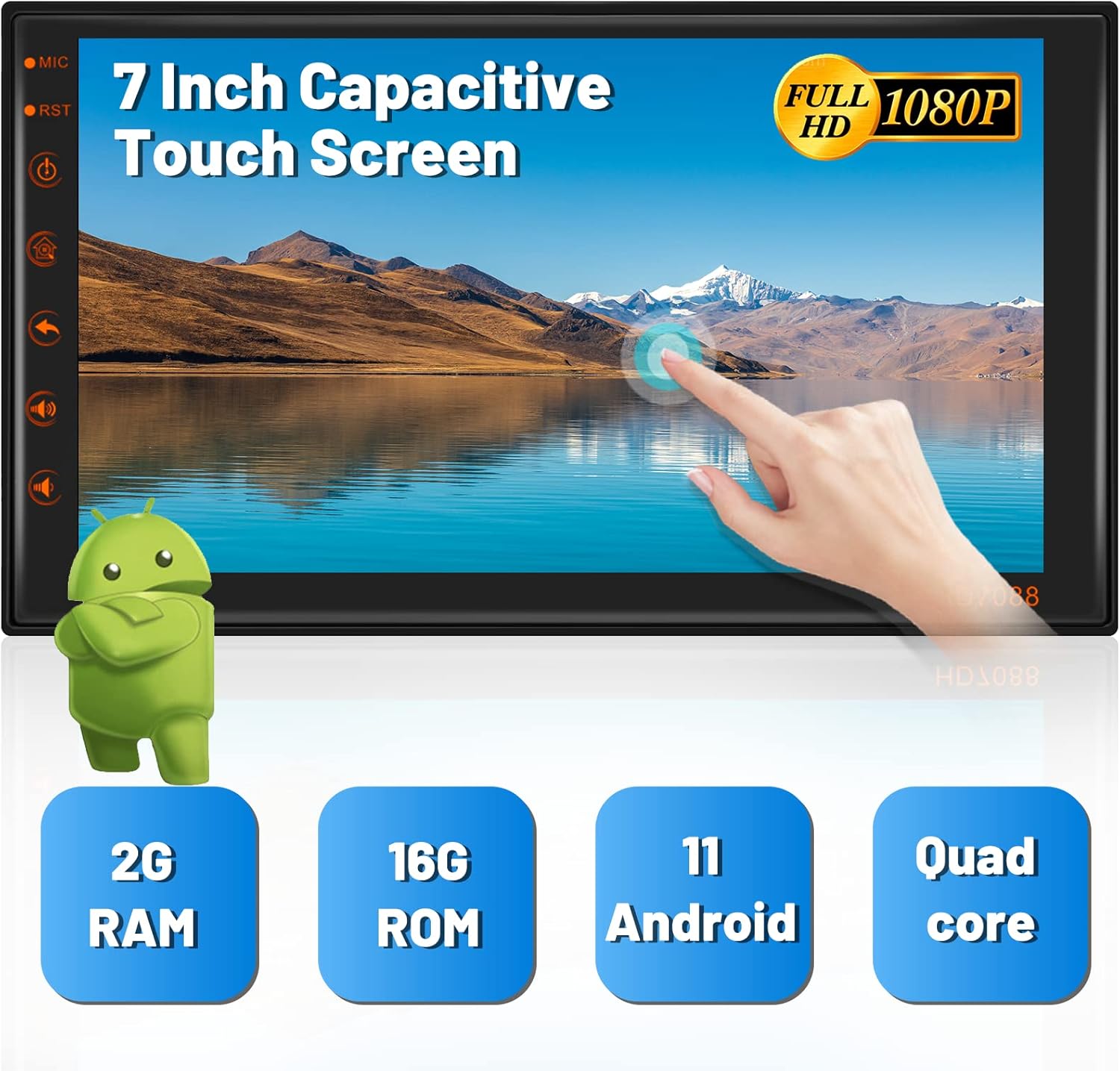
Figure 2.1: High-Resolution Touch Screen and Core Specifications
This image highlights the 7-inch capacitive touch screen, emphasizing its Full HD 1080P resolution. Below the screen, key specifications are presented: 2GB RAM, 16GB ROM, Android 11 operating system, and a Quad-core processor, indicating the unit's performance capabilities.
3. Кутуда эмне бар
The following components are included with your Mantian Android 11 Double Din Car Stereo:
- Негизги башкы блок
- Камера
- GPS антеннасы
- Орнотуу кашаа
- Электр кабели
- RCA Киргизүү/Чыгуу кабелдери
- 2 USB кабели
- Операциялык колдонмо (бул документ)

3.1-сүрөт: Пакеттин мазмуну
This image displays all the items included in the product package: the main car stereo unit, power cable, RCA input/output cables, GPS antenna, the operating manual, camera input cable, two USB cables, metal frame for installation, and the rear camera.
4. Орнотуу жана орнотуу
Туура орнотуу оптималдуу аткаруу үчүн абдан маанилүү болуп саналат. Эгер сиз унаанын аудио өткөргүчтөрүн билбесеңиз, аппаратты кесипкөй адиске орнотуу сунушталат.
4.1 Электр өткөргүч схемасы
Refer to the detailed wiring diagram below for connecting the power, speakers, camera, and other accessories.
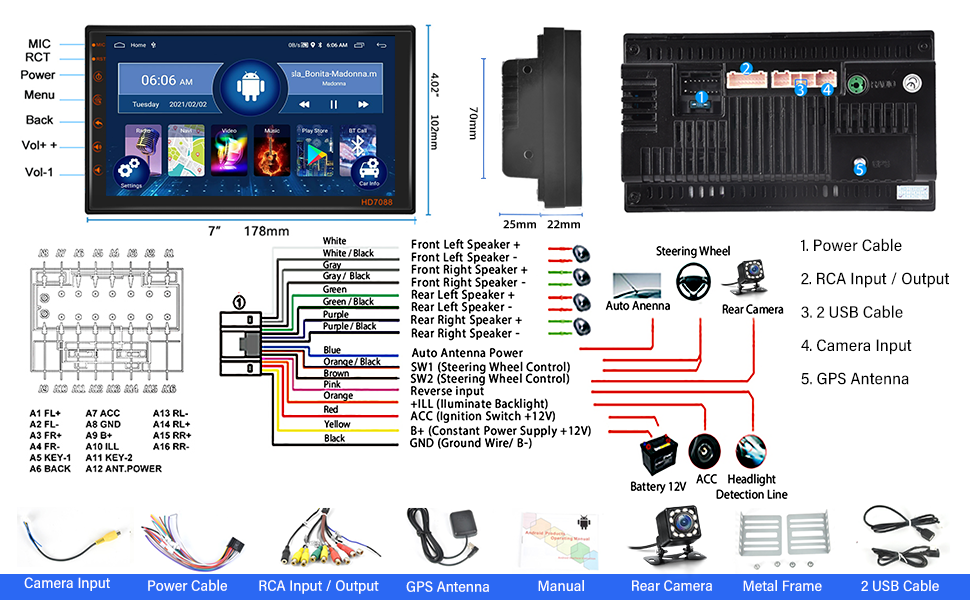
Figure 4.1: Wiring Diagram and Product Dimensions
This comprehensive image provides a detailed wiring diagram for the car stereo, illustrating connections for power, speakers, steering wheel controls, reverse camera input, and antenna. It also includes precise product dimensions (7 inches wide, 178mm, 4.02 inches high, 102mm, and depth of 25mm/22mm) and a visual representation of all included components.
4.2 Орнотуу кадамдары (Жалпы)
- Башкаруу панелин даярдаңыз: Carefully remove your existing car stereo and any necessary trim pieces to access the double din slot.
- Электр кубатын жана жерге туташтыруу: Connect the yellow wire (B+ Constant Power +12V) to your car's constant 12V power supply, the red wire (ACC Ignition Switch +12V) to the accessory power, and the black wire (GND Ground Wire/B-) to a suitable ground point.
- Динамиктерди туташтыруу: Connect the speaker wires (White, Gray, Green, Purple) to their corresponding positive (+) and negative (-) speaker terminals in your vehicle.
- GPS антеннасын туташтыруу: GPS антеннасын ачык жерге орнотуңуз view of the sky (e.g., dashboard, corner of the windshield) and connect it to the GPS antenna input on the back of the unit.
- Камераны орнотуу: Mount the backup camera at the rear of your vehicle. Connect its video output to the "Camera Input" on the stereo and its power to your car's reverse light circuit so it activates when shifting into reverse.
- USB кабелдерди туташтыруу: Utilize the provided USB cables for media playback or connecting external devices.
- Руль башкаруусу (SWC): If your vehicle supports it, connect the SWC wires (SW1, SW2) to your car's steering wheel control interface. Refer to your vehicle's manual for specific wiring.
- Агрегатты коопсуздандырыңыз: Use the included metal installation brackets to secure the car stereo firmly into the double din slot.
- Сыноо функциясы: Before reassembling the dashboard, turn on the car and test all functions of the stereo: power, audio, touch screen, GPS, Bluetooth, radio, and backup camera.
- Кайра чогултуу: Бардык функциялар текшерилгенден кийин, башкаруу панелинин жасалгасын кылдаттык менен кайра чогултуңуз.
5. Иштөө нускамалары
5.1 Сенсордук экран жана колдонуучу интерфейси
The unit features a responsive 7-inch capacitive touch screen. Navigate through menus and applications by tapping, swiping, and dragging. The Android 11 interface is intuitive and customizable. You can long-press on the home screen to change wallpapers or select from 15 different themes.

Figure 5.1: Customizable Themes
This image illustrates the car stereo's ability to customize its interface with 15 different themes. A finger is shown long-pressing the screen, indicating the action required to change the wallpaper, allowing users to personalize their display.
5.2 GPS навигациясы
The stereo comes with a built-in GPS receiver and pre-installed "Here We GO" for offline navigation. You can also use online mapping applications by connecting to WiFi.
- Оффлайн карталары: Ensure "Here We GO" maps are downloaded for your region for navigation without an internet connection.
- Онлайн карталар: Connect to a WiFi hotspot (e.g., from your smartphone) to use real-time traffic and updated maps from apps like Google Maps.
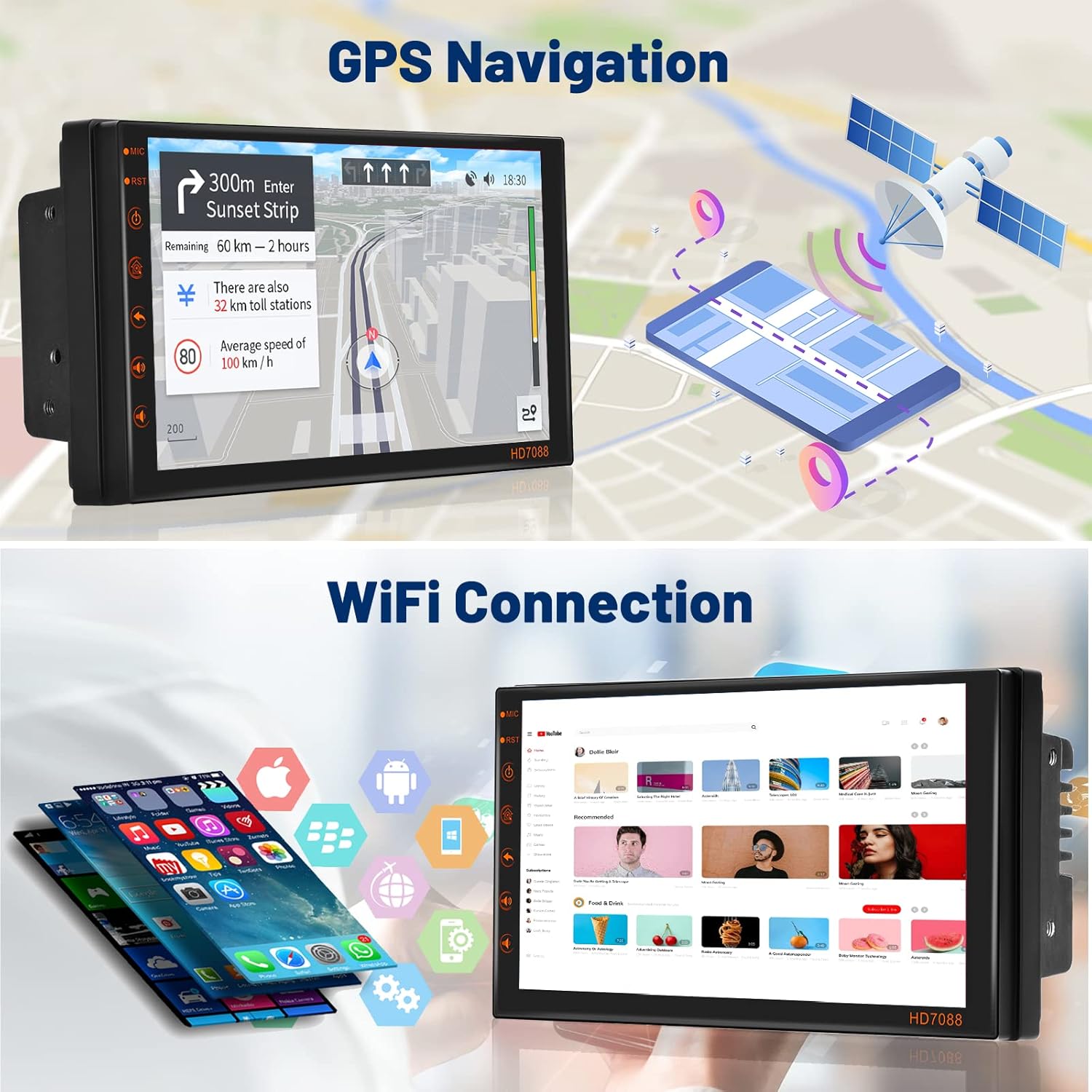
5.2-сүрөт: GPS багыттоо интерфейси
This image shows the car stereo's screen actively displaying GPS navigation, complete with a map, route details, and estimated travel time. A graphic of a satellite above the unit further emphasizes its GPS capabilities.
5.3 WiFi туташуусу
Connect the stereo to a WiFi network or a mobile hotspot to access online features, download apps, and browse the internet.
- барыңыз Орнотуулар > Тармак жана Интернет > Wi-Fi.
- Каалаган тармакты тандап, керек болсо сырсөздү киргизиңиз.
- Once connected, you can download applications from the pre-installed app store or browse the web.

Figure 5.3: WiFi and Online Content Access
This image demonstrates the car stereo's WiFi capabilities, showing the unit displaying the YouTube interface. Alongside it, a smartphone is shown with its WiFi hotspot function active, illustrating how the stereo can connect to the internet for streaming and app downloads.
5.4 Bluetooth функциясы
Телефонуңузду Bluetooth аркылуу жупташтырып, үнсүз чалуу жана аудио агымы.
- барыңыз Орнотуулар > Туташкан түзмөктөр > Bluetooth.
- Enable Bluetooth on both the stereo and your phone.
- Издөө available devices on your phone and select "HD7088" (or similar name) to pair.
- Once paired, you can make/receive calls and play music from your phone through the car speakers.

Figure 5.4: Bluetooth and Backup Camera Features
The top section of this image illustrates the Bluetooth functionality, showing the car stereo's dial pad for making calls and a graphic of people engaged in a phone conversation. The bottom section demonstrates the backup camera feature, displaying the camera's view on the stereo screen with parking guidelines, alongside an image of the physical backup camera unit.
5.5 Mirror Link
Mirror Link allows you to display your smartphone's screen on the car stereo. For Android devices, it supports two-way control (control from both phone and stereo). For iOS devices, it supports one-way control (control from phone only).
- Connect your smartphone to the stereo using a USB cable.
- Follow the on-screen prompts on the stereo and your phone to establish the Mirror Link connection.

Сүрөт 5.5: Mirror Link Functionality
This image visually compares the Mirror Link capabilities for iOS and Android devices. It shows that iOS devices offer one-way control (from the phone to the stereo), while Android devices support two-way control, allowing interaction from both the phone and the car stereo screen.
5.6 FM радиосу
Орнотулган FM тюнери менен сүйүктүү радиостанцияларыңызга кириңиз.
- Үй экранындагы "Радио" сөлөкөтүн таптаңыз.
- Use the on-screen controls to scan for stations, save presets, or manually tune to a frequency.
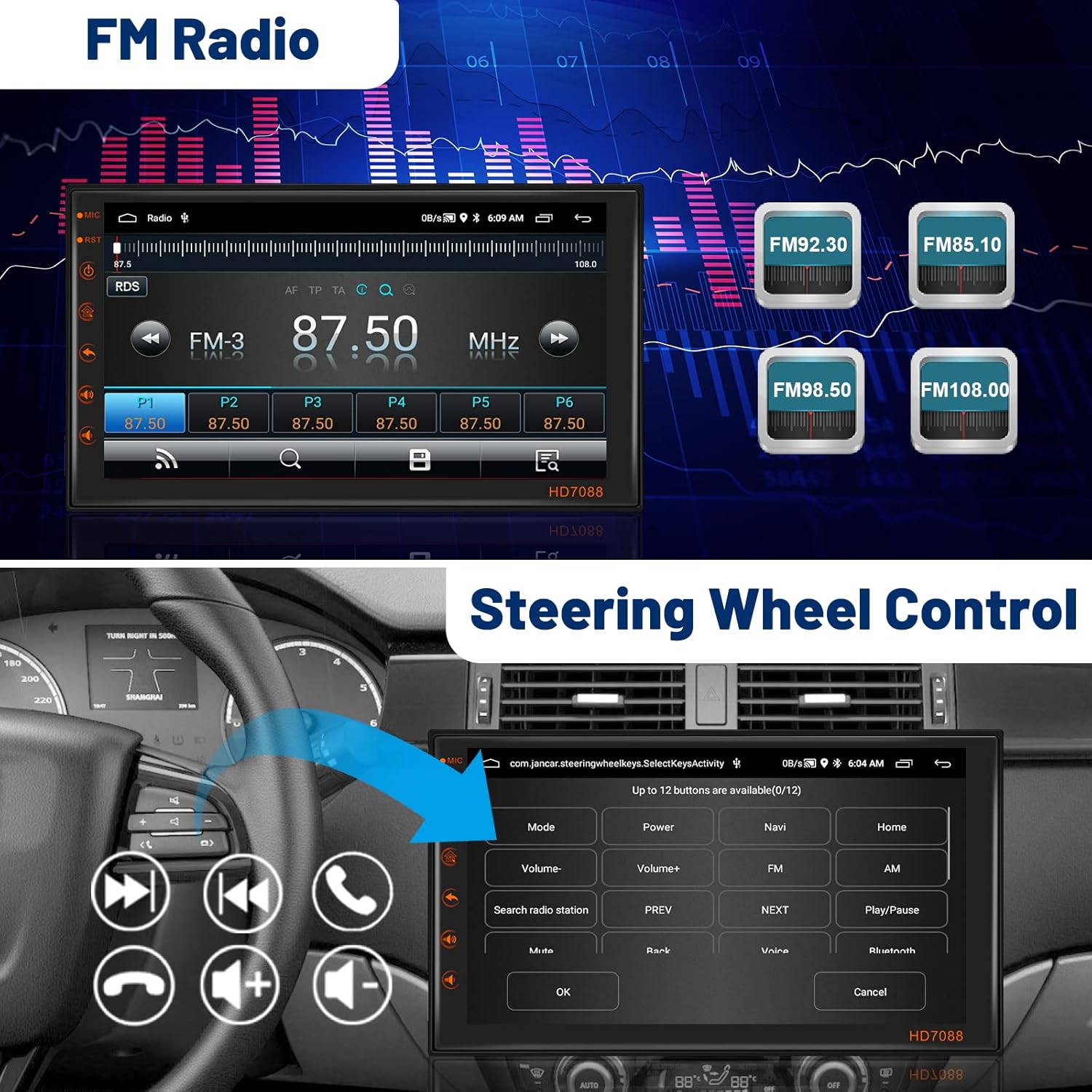
Figure 5.6: FM Radio and Steering Wheel Control
The top part of this image displays the car stereo's FM radio interface, showing current frequency and preset buttons. The bottom part illustrates the steering wheel control feature, with a steering wheel and the stereo screen displaying the customizable button mapping for various functions.
5.7 Рулду башкаруу (SWC)
If properly connected during installation, you can control basic functions of the stereo directly from your car's steering wheel buttons.
- Access the SWC settings in the stereo's menu to program or re-program the buttons according to your preference.
5.8 Камера
Унааны артка жылдырганда, стерео автоматтык түрдө төмөнкүнү көрсөтөт view from the connected backup camera, complete with parking guidelines.
6. Техникалык тейлөө
- Экранды тазалоо: Сенсордук экранды тазалоо үчүн жумшак, мамыксыз чүпүрөктү колдонуңуз. Өтө катуу тактар үчүн бир аз сүртүңүзampчүпүрөккө суу же экранды тазалоочу каражат. Абразивдүү материалдардан же катуу химиялык заттардан алыс болуңуз.
- Программалык камсыздоо жаңыртуулары: Periodically check for software updates to ensure optimal performance and access to new features. Updates may be available via WiFi.
- Жалпы кам көрүү: Түзмөктү чаңдан жана таштандылардан алыс кармаңыз. Аны узак убакыт бою өтө жогорку температурага же күндүн түз тийген таасирине дуушар кылбаңыз.
7. Кыйынчылыктарды
| Көйгөй | Мүмкүн себеп | Чечим |
|---|---|---|
| Күч жок | Туура эмес зымдар; күйгүзүлгөн сактагыч; Бошоң байланыш. | Check power (yellow, red) and ground (black) wire connections. Inspect vehicle's fuse box and the unit's fuse. Ensure all connections are secure. |
| Үн жок | Динамик зымдары туура эмес туташтырылган; Үнү өтө төмөн; Үнсүз режим функциясы иштеп турат. | Verify speaker wire connections (positive/negative). Increase volume. Check if the unit is muted. |
| GPS иштебейт | GPS antenna not connected or poorly positioned; Map data missing. | Ensure GPS antenna is securely connected and placed in a clear line of sight to the sky. Download or update map data if necessary. |
| Bluetooth туташуу маселелери | Түзмөк жупташтыруу режиминде эмес; Туура эмес жупташтыруу коду; Тоскоолдук. | Ensure both devices are in pairing mode. Try re-pairing. Move closer to the unit. Clear previous Bluetooth connections. |
| Камдык камера көрүнбөйт | Камера иштетилбейт; Видео кабели бош; Тескери триггер зымы туташкан эмес. | Check camera power supply. Ensure video cable is securely connected. Verify the reverse trigger wire is connected to the car's reverse light circuit. |
| Сенсордук экран жооп бербейт | Системанын иштебей калышы; программалык камсыздоодо көйгөй. | Perform a soft reset (locate the RST pinhole and press with a non-sharp object). If issue persists, consider a factory reset (data will be lost). |
8. Техникалык шарттар
| Өзгөчөлүк | Спецификация |
|---|---|
| Продукциянын өлчөмдөрү | 7.01 x 2.05 x 4.02 дюйм |
| Элемент Салмагы | 2.2 фунт |
| Screen Size | 7 дюйм |
| Резолюция | 1024 x 600 |
| Операция системасы | Android 11 |
| RAM | 2 ГБ |
| ROM | 16 ГБ |
| Байланыш технологиясы | Bluetooth, WiFi |
| Өзгөчөлүктөр | Bluetooth, Touchscreen, GPS, Mirror Link, Backup Camera Input, FM Radio, Steering Wheel Control |
| Карта түрү | Worldwide (via pre-installed app and online maps) |
| Аудио чыгаруу режими | Динамик, стерео |
| Монтаж түрү | Панел орнотуу |
| Унаа кызматынын түрү | Машина |
9. Кепилдик жана колдоо
Mantian products are designed and manufactured to the highest quality standards. This product is covered by a limited warranty from the date of purchase. Please retain your proof of purchase for warranty claims.
For technical support, warranty inquiries, or replacement parts, please contact Mantian customer service through the retailer where you purchased the product or visit the official Mantian webбайланыш маалыматы үчүн сайт.
Please note that unauthorized modifications or improper installation may void the product warranty.
