1. Киришүү
This manual provides essential instructions for the safe and efficient operation of your XIAOMI Soundbar 3.1ch. Please read this manual thoroughly before using the product and retain it for future reference.
The XIAOMI Soundbar 3.1ch is designed to enhance your home theater audio experience with its 3.1 channel configuration and wireless subwoofer, delivering clear sound and powerful bass.
2. Коопсуздук маалыматы
- Өрт же электр тогуна урунуп калбаш үчүн аппаратты жамгырга же нымдуулукка дуушар кылбаңыз.
- в ачпагылаasinг. Бардык тейлөөлөрдү квалификациялуу кызматкерлерге тапшырыңыз.
- Агрегаттын айланасын туура желдетүүнү камсыз кылыңыз. Эч кандай желдетүүчү тешиктерди жаап албаңыз.
- Place the soundbar and subwoofer on a stable, flat surface.
- Түзмөктү радиаторлор, жылыткычтар, плиталар же башка жылуулук булактарынан (анын ичинде ampкөтөргүчтөр) жылуулукту пайда кылуучу.
- Өндүрүүчү белгилеген тиркемелерди/аксессуарларды гана колдонуңуз.
- Аппаратты чагылгандуу бороондо же узак убакыт бою колдонбогондо электр розеткасынан ажыратыңыз.
3. Пакеттин мазмуну
Пакетте бардык буюмдар бар экенин текшериңиз:
- XIAOMI Soundbar 3.1ch (Main Unit)
- Зымсыз сабвуфер
- Электр шнур(лары)
- Алыстан башкаруу
- Колдонуучунун Колдонмосу (бул документ)
- HDMI кабели (аймакка жараша өзгөрүшү мүмкүн)
4. Продукт бүтүп калдыview
Familiarize yourself with the components of your XIAOMI Soundbar system.

4.1-сүрөт: Фронт view of the XIAOMI Soundbar 3.1ch and its accompanying wireless subwoofer. The soundbar is a long, slender unit typically placed in front of a television, while the subwoofer is a larger, rectangular unit designed to provide deep bass sounds.
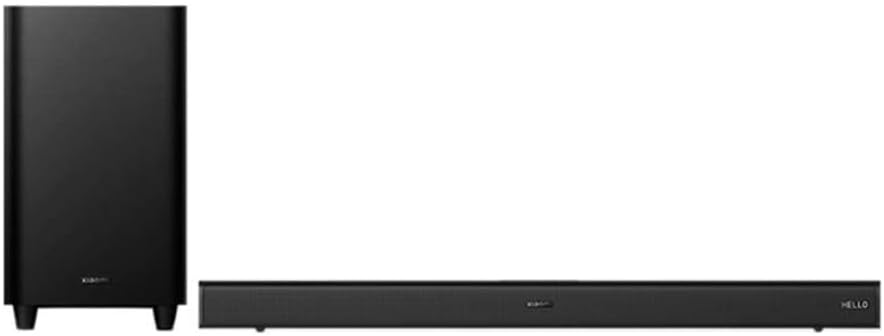
4.2-сүрөт: Бурчтуу view of the XIAOMI Soundbar 3.1ch and wireless subwoofer, showing the compact design of both units. The soundbar features a minimalist design with controls often integrated discreetly.
4.1 Soundbar Front Panel
- Кубат баскычы: Саундбарды күйгүзөт/өчүрөт.
- Үнүн жогорулатуу/төмөндөтүү: Үн деңгээлин тууралайт.
- Булак/киргизүү баскычы: Switches between input sources (HDMI, Bluetooth, Optical, etc.).
- LED көрсөткүчтөрү: Display current status or input mode.
4.2 Soundbar Rear Panel
- HDMI eARC порту: Connects to your TV for high-quality audio.
- Оптикалык киргизүү: Connects to devices with an optical audio output.
- USB порт: For firmware updates or media playback (if supported).
- Кубат киргизүү: AC кубат шнуруна туташат.
4.3 Зымсыз сабвуфер
- Кубат киргизүү: AC кубат шнуруна туташат.
- Жупташтыруу баскычы: For manual pairing with the soundbar (if automatic pairing fails).
- Статус LED: Indicates pairing status.
5. Орнотуу
5.1 Орнотуу
- Саундбар: Саундбарды телевизоруңуздун астына ортосуна коюңуз. Саундбардын алдында эч кандай тоскоолдуктар жок экенин текшериңиз.
- ЛГурченко: The wireless subwoofer can be placed anywhere in the room, ideally near a wall or corner for enhanced bass. Avoid placing it directly against a wall or in a cabinet, which can muffle the sound.
5.2 Кубатка туташуу
- Connect the power cord to the soundbar's power input, then plug it into a wall outlet.
- Connect the power cord to the wireless subwoofer's power input, then plug it into a wall outlet.
- The soundbar and subwoofer will automatically attempt to pair. The subwoofer's status LED will indicate pairing status (e.g., blinking while searching, solid when connected).
5.3 Телевизоруңузга туташуу
Төмөнкү туташуу ыкмаларынын бирин тандаңыз:
Option 1: HDMI eARC (Recommended)
- Connect one end of an HDMI cable to the HDMI eARC port on your TV.
- Connect the other end of the HDMI cable to the HDMI eARC port on the soundbar.
- On your TV, enable HDMI-CEC (Consumer Electronics Control) and eARC/ARC functions in the audio settings.
Option 2: Optical Cable
- Connect one end of an optical cable to the Optical OUT port on your TV.
- Connect the other end of the optical cable to the Optical IN port on the soundbar.
- On your TV, set the audio output to "Optical" or "PCM".
6. Иштөө нускамалары
6.1 Күйгүзүү/өчүрүү
- басыңыз Күч түзмөктү күйгүзүү же өчүрүү үчүн үн тактасындагы же алыстан башкаруу пультундагы баскычты басыңыз.
6.2 Киргизүү булагын тандоо
- басыңыз Булак or Киргизүү button on the soundbar or remote control repeatedly to cycle through available input sources (e.g., HDMI eARC, Optical, Bluetooth).
- The LED indicators on the soundbar will show the currently selected input.
6.3 Үндү башкаруу
- Басыңыз Үнүн жогорулатуу (+) or Үнүн азайтуу (-) үндү жөндөө үчүн саундбардагы же алыстан башкаруу пультундагы баскычтарды басыңыз.
- басыңыз Үнсүз үндү өчүрүү же кайра үнсүз кылуу үчүн алыстан башкаруу пультундагы баскычты басыңыз.
6.4 Bluetooth жупташтыруу
- басыңыз Bluetooth button on the remote control or cycle through inputs until "Bluetooth" mode is selected. The Bluetooth indicator will blink.
- Мобилдик түзмөгүңүздө Bluetooth иштетип, жеткиликтүү түзмөктөрдү издеңиз.
- Select "XIAOMI Soundbar 3.1ch" from the list.
- Once paired, the Bluetooth indicator on the soundbar will become solid.
6.5 NFC жупташтыруу (Жакынкы аралыктагы байланыш)
Эгер түзмөгүңүз NFCди колдосо:
- Мобилдик түзмөгүңүздө NFC иштетилгенин текшериңиз.
- Tap your NFC-enabled device gently against the NFC tag area on the soundbar (refer to product diagram for exact location).
- Confirm the pairing request on your mobile device.
7. Техникалык тейлөө
7.1 Тазалоо
- Тазалоодон мурун ар дайым саундбарды жана сабвуферди розеткадан сууруп алыңыз.
- Саундбардын жана сабвуфердин беттерин сүртүү үчүн жумшак, кургак, мамыксыз чүпүрөктү колдонуңуз.
- Do not use liquid cleaners, aerosol sprays, or abrasive cleaning agents, as they may damage the finish or internal components.
7.2 Сактоо
- Эгерде түзмөктү узак убакытка сактап жатсаңыз, аны кубат булагынан сууруп, салкын, кургак жерде, күн нуру түз тийбеген жана өтө жогорку температурадан алыс сактаңыз.
8. Кыйынчылыктарды
| Көйгөй | Мүмкүн себеп | Чечим |
|---|---|---|
| Күч жок | Электр зымы коопсуз туташкан эмес. | Ensure power cords are firmly plugged into the soundbar/subwoofer and wall outlet. |
| Үн жок | Туура эмес киргизүү булагы тандалды. Үн өтө төмөн же үнсүз. Кабелдер туура эмес туташтырылган. | Туура киргизүү булагын тандаңыз. Үнүн катуулатып, үнсүз абалын текшериңиз. Reconnect HDMI or Optical cables. |
| Сабвуфер жупташкан жок | диапазондон тышкары же кийлигишүү. Кол менен жупташтыруу талап кылынат. | Move subwoofer closer to the soundbar. Press the pairing button on the subwoofer and then on the soundbar (if available, refer to specific product instructions for manual pairing sequence). |
| Bluetooth байланышы көйгөйлөрү | Түзмөк жупташтыруу режиминде эмес. Интерференция. | Ensure soundbar is in Bluetooth pairing mode. Move Bluetooth device closer to the soundbar. Disconnect and reconnect Bluetooth. |
9. Техникалык шарттар
- Модел: Soundbar 3.1ch
- Динамик түрү: Зымсыз сабвуфер менен үн панели
- Көлөмдүү үн каналынын конфигурациясы: 3.1
- Динамиктин максималдуу чыгаруу күчү: 430 Ватт
- Байланыш технологиясы: Bluetooth, NFC, HDMI eARC, Optical
- Сабвуфер байланышы: Зымсыз
- Сабвуфердин диаметри: 6.5 дюйм
- Башкаруу ыкмасы: Алыстан
- Кубат булагы: Электр зымдары
- Продукциянын өлчөмдөрү: 11.02 x 4.33 x 9.06 дюйм
- Элемент Салмагы: 24.2 фунт
10. Кепилдик жана колдоо
XIAOMI products are manufactured to the highest quality standards. For detailed warranty information, please refer to the warranty card included with your product or visit the official XIAOMI webсайт. Сатып алганыңыздын далили катары сатып алуу дүмүрчөгүңүздү сактаңыз.
For technical support or service inquiries, please contact XIAOMI customer service through their official channels. Contact information can typically be found on the XIAOMI webсайтында же продуктунун таңгагында.


