Introduction
Thank you for choosing the AGPTEK DW11 15W Qi Wireless Charging Station. This manual provides detailed instructions for the safe and efficient use of your new wireless charger. Please read this manual thoroughly before use and retain it for future reference.

Image: The AGPTEK DW11 15W Qi Wireless Charging Station, a circular white charging pad with a rose gold edge, connected to a USB-A cable.
Продукт бүттүview
The AGPTEK DW11 is a compact and efficient wireless charging pad designed for various Qi-enabled devices. Key features include:
- Тез кубаттоо: Supports up to 15W fast charging for compatible devices.
- Өркүндөтүлгөн коопсуздук: Features battery protection, radiation shielding, foreign object detection, and temperature control.
- User-Friendly LED Indicator: A soft LED light indicates charging status without disturbing sleep.
- USB-C кубаттуулугу: Utilizes a Type-C port for stable and efficient power input.
- Ишке ыңгайлуу: Charges through phone cases up to 8mm thick (excluding cases with magnetic or metal fixings).

Image: A smartphone wirelessly charging on the AGPTEK charging pad, illustrating its sleek design and ease of use.
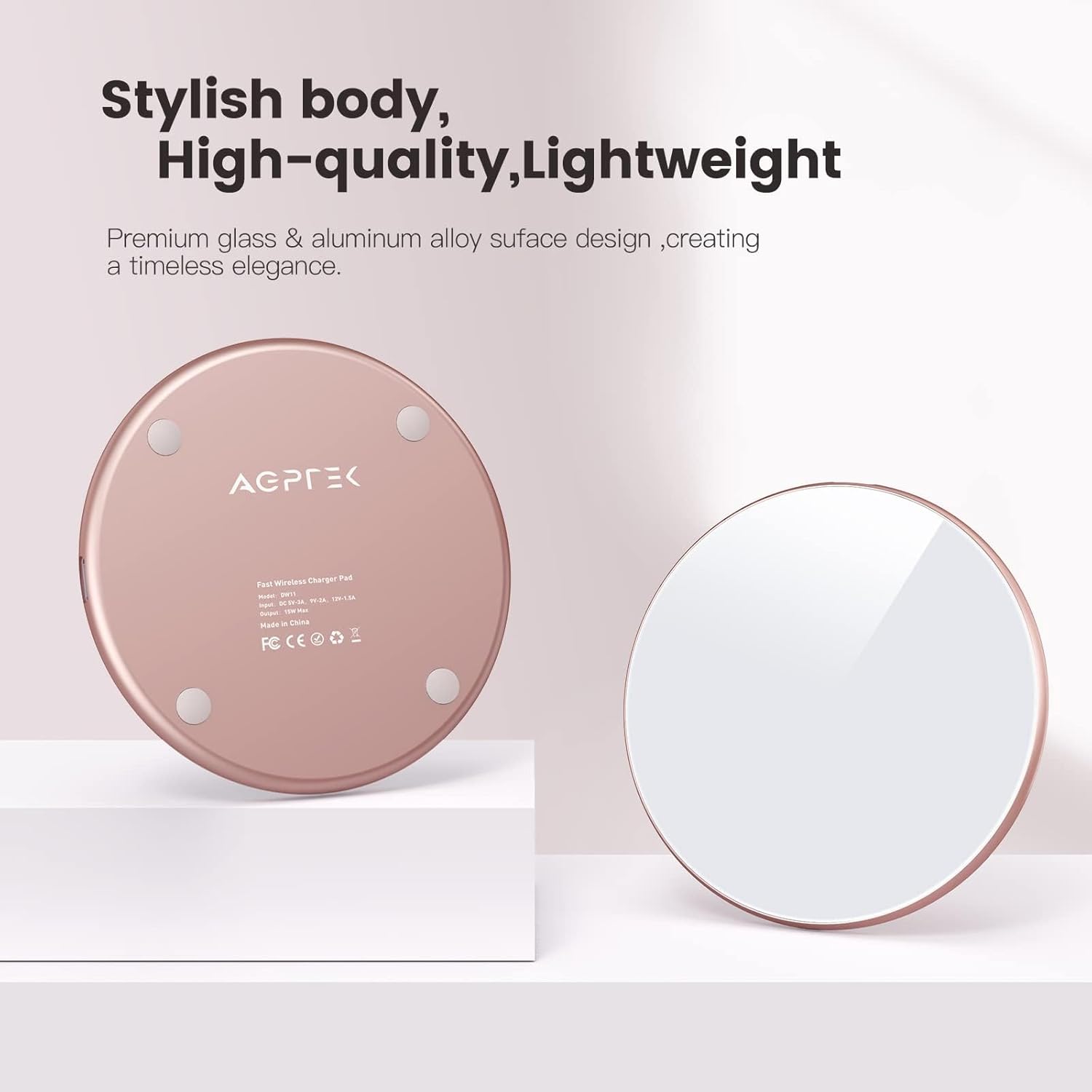
Сүрөт: арткы view of the AGPTEK wireless charger, highlighting its stylish, high-quality, and lightweight design with a rose gold finish and anti-slip pads.

Image: A smartphone charging wirelessly on a stand next to a laptop, demonstrating the charger's versatile use in various settings like an office desk.
Орнотуу нускамалары
- Заряддагычты туташтыруу: Plug the provided USB-C cable into the charging pad's USB-C port.
- Кубат адаптерине туташуу: Connect the other end of the USB-C cable to a compatible power adapter. For fast charging, a QC2.0 or QC3.0 adapter is required. Standard 5V/1A adapters will provide 5W charging.
- Күйгүзүү: Once connected to a power source, the LED indicator will briefly flash, indicating the charger is ready.

Image: A diagram illustrating the correct connection of the AGPTEK wireless charger to a QC2.0 or QC3.0 power adapter for optimal performance, contrasting it with an incompatible 5V/1A adapter.
Иштөө нускамалары
- Түзмөгүңүздү жайгаштырыңыз: Center your Qi-enabled smartphone or AirPods on the charging pad.
- Заряддоону ырастоо: The LED indicator on the charging pad will illuminate blue to confirm that charging has begun.
- Заряддоо аяктады: The LED indicator will turn green when your device is fully charged.
Маанилүү эскертүүлөр:
- Ensure your device is properly centered on the charging pad for efficient charging.
- The charger can accommodate phone cases up to 8mm thick. Remove cases with magnetic or metal attachments, as these can interfere with charging.

Image: A hand placing a smartphone onto the AGPTEK wireless charger, demonstrating its ability to charge through cases up to 8mm thick. It also shows examples of cases with magnets, metal, grips, or credit cards that should be removed.

Image: An iPhone and AirPods Pro case shown charging wirelessly on the AGPTEK pad, highlighting its compatibility with both smartphones and earbuds and its 15W charging capability via USB Type-C.
Шайкештик
The AGPTEK DW11 wireless charger is compatible with a wide range of Qi-enabled devices, offering various charging speeds:
- 15W тез кубаттоо: Huawei P30 Pro, LG V50 ThinQ, LG V40 ThinQ, and other compatible devices.
- 10W тез кубаттоо: Samsung Galaxy S21/S20/S10/S9/S8 series, Note 20/10/9 series, and other compatible Android devices.
- 7.5W тез кубаттоо: iPhone 14/13/12/11/X/8 series, iPhone SE, and other compatible Apple devices.
- 5W Standard Charging: AirPods 2, AirPods Pro, and all other Qi-enabled phones and Bluetooth earbuds.
- 11W тез кубаттоо: Google Pixel series (e.g., Pixel 3/3XL/4/4XL/5/6/6 Pro).
Note: A QC2.0/3.0 adapter is required for fast charging modes.
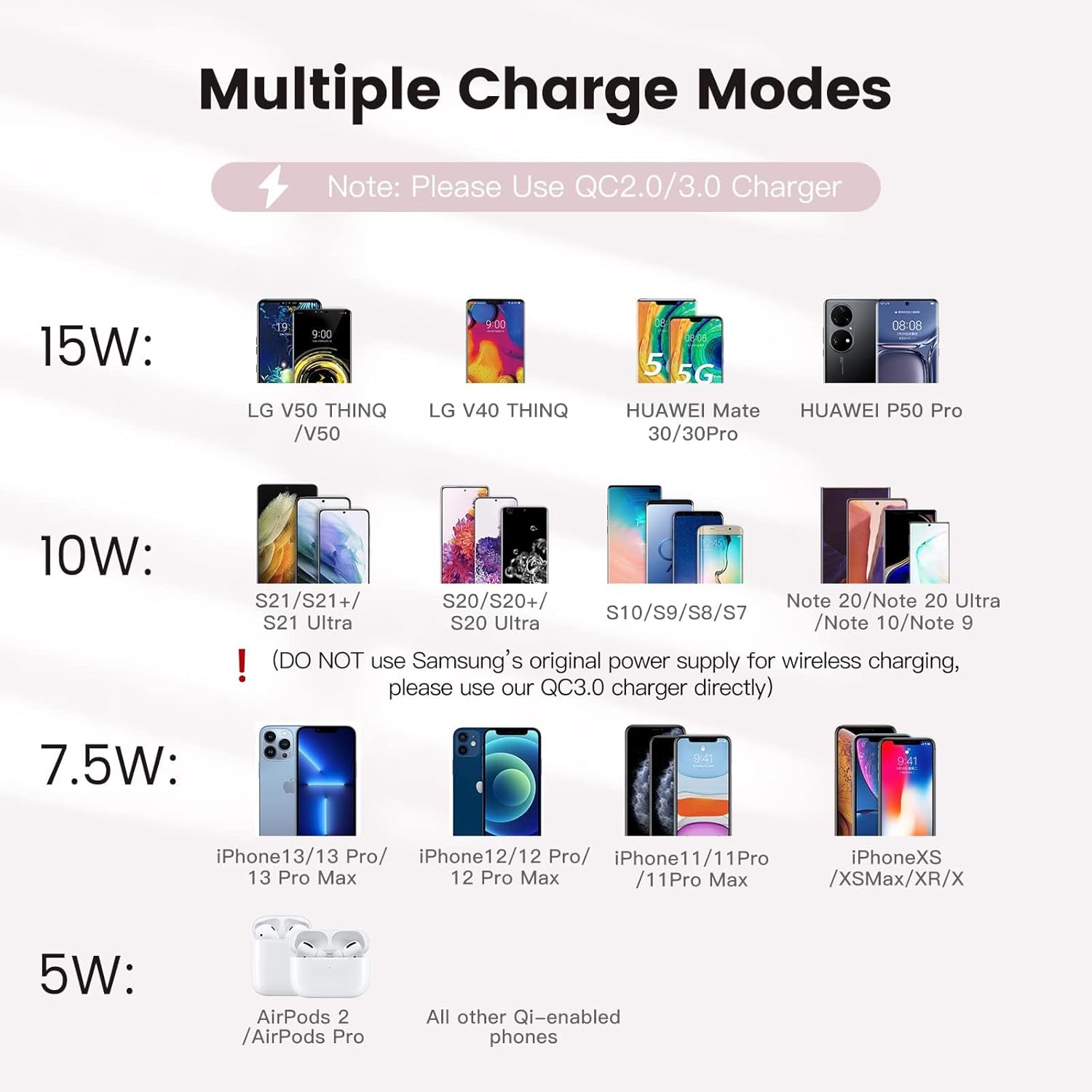
Image: A visual chart displaying various charging modes (15W, 10W, 7.5W, 5W) and examples of compatible smartphones and earbuds for each mode, emphasizing the need for a QC2.0/3.0 charger.

Image: A comparison graphic showing a smartphone charging at 15W (AGPTEK) versus 10W (others), illustrating faster charging times for Android (2-2.5h vs 3.5-4h) and iOS (3-3.5h vs 4-4.5h) with the AGPTEK charger.
Коопсуздук маалыматы
The AGPTEK DW11 is designed with multiple safety features to protect your devices and ensure safe operation:
- Батареяны коргоо: Automatically stops charging when the phone is fully charged to prevent overcharging and extend battery life.
- Radiation Shielding: Minimizes electromagnetic radiation during charging.
- Чет объектилерди аныктоо (FOD): Detects metallic foreign objects on the charging surface and prevents charging to avoid overheating.
- Температураны көзөмөлдөө: Built-in mechanisms to prevent overheating of the charger and your device.
- Тоскоолдуктан коргоо: Protects against power surges.

Image: An infographic highlighting the superior safety performance of the AGPTEK charger, including icons for battery protection, radiation shielding, foreign object detection, and temperature control, with a transparent view of the internal coil.
LED көрсөткүч колдонмосу
The LED indicator provides clear visual feedback on the charging status:
- Катуу көк жарык: Indicates normal charging is in progress.
- Катуу жашыл жарык: Indicates the charging process is complete, and the device is fully charged.
- Green & Blue Flash Once: Indicates the charger is powered on and ready.
- Көк жаркылдоо: Indicates the presence of a foreign object on the charging pad or an insufficient power supply.

Image: A person sleeping peacefully with a smartphone charging on the AGPTEK wireless pad on a bedside table, illustrating the charger's mild and sleep-friendly LED indicator.

Image: A smartphone charging on the AGPTEK wireless pad on a bedside table, with a clear guide to the mild LED indicator's colors and their meanings (Solid Blue for normal charging, Solid Green for fully charged, Green & Blue flash once for power on, Blue flashes for foreign object/insufficient power).
Проблемаларды чечүү
| Көйгөй | Мүмкүн себеп | Чечим |
|---|---|---|
| Түзмөк кубатталбай жатат же жай кубатталууда. |
|
|
| LED индикатору көк түстө күйөт. |
|
|
| Charger or device gets hot during charging. |
|
|
Техникалык шарттар
| Өзгөчөлүк | Деталь |
|---|---|
| Бренд | AGPTEK |
| Модель номери | DW11 |
| Түс | Ак |
| Туташтыргыч түрү | USB Type-C |
| Киргизүү көлөмүtage | 5 вольт |
| Ampөчүрүү | 2 А |
| Жалпы USB порттору | 1 |
| Өзгөчө өзгөчөлүк | Зымсыз заряддоо |
| Иштин шайкештиги | 8 мм чейинки кутулар аркылуу заряддалат (металл/магниттик кутуларды кошпогондо) |
Техникалык тейлөө
- Кубаттоочу пластинаны таза жана чаңдан жана таштандылардан таза кармаңыз. Тазалоо үчүн жумшак, кургак чүпүрөк колдонуңуз.
- Заряддагычты өтө жогорку температурага, нымдуулукка же суюктуктарга дуушар кылбаңыз.
- Аппаратты өзүңүз ажыратпаңыз же оңдоого аракет кылбаңыз.

Image: A person carefully placing the compact AGPTEK wireless charger into a small carrying bag, demonstrating its portability and ease of storage.
Кепилдик жана колдоо
AGPTEK products are designed for reliability and performance. For any issues or support inquiries, please refer to your purchase documentation or contact AGPTEK customer service. Please note that information regarding specific warranty periods or spare parts availability may vary by region and purchase platform.


