1. Киришүү
Thank you for choosing the Bloody G575 RGB Gaming Headset. This headset is designed to provide an immersive audio experience for gaming, featuring 7.1 virtual surround sound, a noise-cancelling microphone, and dynamic RGB lighting. This manual will guide you through the setup, operation, and maintenance of your new headset.

The Bloody G575 RGB Gaming Headset, showcasing its design and included USB cable with in-line controls.
2. Кутуда эмне бар
- Bloody G575 RGB Gaming Headset
- USB Cable (integrated with headset)
3. Продукциянын өзгөчөлүктөрү
7.1 Virtual Айлана-Саунд

Experience true directional sound, allowing you to pinpoint enemy locations and immerse yourself in virtual gaming environments.
Чууну жокко чыгаруучу микрофон

The single-directional microphone features noise cancellation for clear communication. It can be detached when not in use.
True RGB Light

Enjoy attractive RGB light flowing effects that add vibrant aesthetics to your gaming setup.
Flying Wing Suspension Headband

Soft padding and an adjustable flying wing design ensure a flexible and comfortable fit for various head shapes.
50mm Speaker Unit
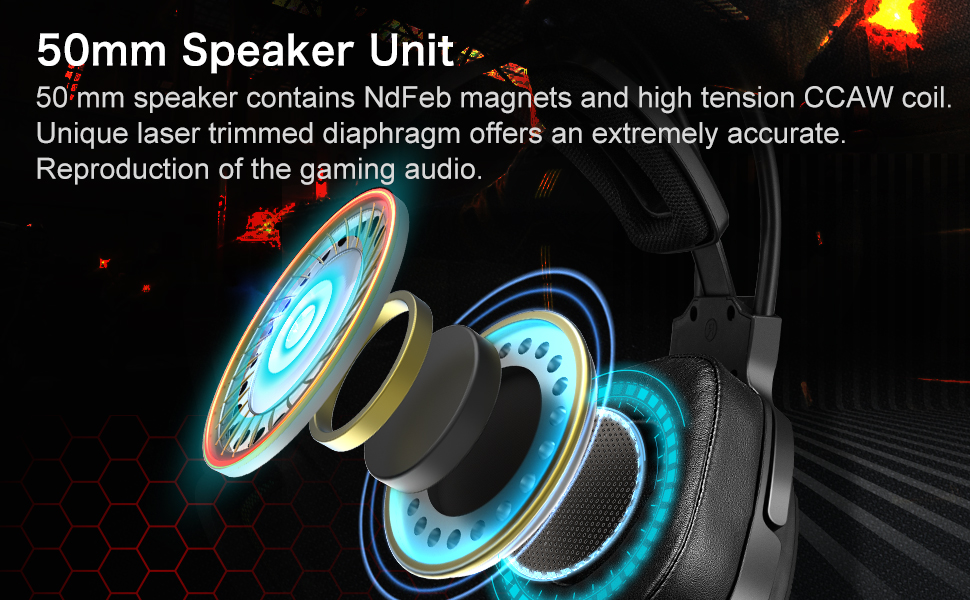
Equipped with 50mm NdFeb magnet speakers and high-tension CCAW coil for accurate audio reproduction.
Large Ear Cups

The large ear cups fully enclose your ears, contributing to a better noise-cancelling effect and enhanced comfort.
4. Орнотуу колдонмосу
4.1 Гарнитураны туташтыруу
- Locate an available USB port on your computer (PC or Laptop) or gaming console.
- Plug the USB connector of the Bloody G575 headset firmly into the USB port.
- Операциялык системаңыз керектүү драйверлерди автоматтык түрдө аныктап, орнотушу керек. Бул бир нече мүнөткө созулушу мүмкүн.
- Once installed, the headset will be ready for use. You may need to select the headset as your default audio output and input device in your system's sound settings.
4.2 Микрофонду орнотуу
- Align the microphone jack with the port on the left earcup of the headset.
- Микрофонду ордуна чыкылдаган үн чыкканча акырын портко түртүңүз.
- Adjust the flexible microphone boom to your preferred speaking position.
5. Иштөө нускамалары
5.1 In-line Control Unit

The in-line control unit provides convenient access to essential headset functions.
- Volume +/- Roller: Үндү катуулатуу үчүн өйдө түрүңүз, ал эми үндү азайтуу үчүн ылдый түрүңүз.
- Mic On/Off Switch: Slide the switch to enable or disable the microphone.
- Арткы жарык баскычы: Press this button to cycle through different RGB lighting modes or to turn the RGB lighting on/off.
5.2 Virtual 7.1 Surround Sound
The 7.1 virtual surround sound feature is automatically enabled when the headset is connected. For optimal performance, ensure your audio settings in games or applications are configured to utilize surround sound if available.
6. Техникалык тейлөө
- Тазалоо: Use a soft, dry cloth to wipe down the headset and earcups. For stubborn dirt, a slightly damp cloth can be used, but ensure no moisture enters the speaker grilles or USB connector.
- Сактагыч: Гарнитураны салкын, кургак жерде, күн нуру түз тийбеген жана өтө жогорку температурадан алыс сактаңыз. Гарнитуранын үстүнө оор буюмдарды койбоңуз.
- Кабельге кам көрүү: Гарнитураны ажыратуу үчүн кабелди тартпаңыз. Ар дайым USB туташтыргычын кармаңыз. Кабелдин кескин ийилип же кыйшайып кетишинен алыс болуңуз.
7. Кыйынчылыктарды
| Көйгөй | Мүмкүн чечим |
|---|---|
| Гарнитурадан үн жок |
|
| Микрофон иштебей жатат |
|
| RGB жарыктары иштебейт |
|
8. Техникалык шарттар
| Өзгөчөлүк | Деталь |
|---|---|
| Модель аты | G575 |
| Байланыш технологиясы | Зымдуу (USB) |
| Noise Control | Үн изоляциясы |
| Аудио драйвер түрү | Динамикалык драйвер |
| Наушник формасы | Кулак үстүндө |
| Импеданс | 16 Ом |
| Жыштык диапазону | 20Гц-20КГц |
| Материал | Пластик, кездеме, пенопласт |
| Элемент Салмагы | 2.2 фунт (болжол менен 1 кг) |
| Продукциянын өлчөмдөрү | 25.2 x 25.2 x 7.6 дюйм |
| Шайкеш түзмөктөр | Gaming Consoles, Laptops, Desktops |
9. Кепилдик жана колдоо
Bloody products are manufactured to high-quality standards. For information regarding warranty coverage and terms, please refer to the warranty card included with your product or visit the official Bloody website. If you encounter any issues or require technical assistance, please contact Bloody customer support through their official channels.
Кошумча жардам алуу үчүн, сиз иш сапары менен болот Bloody Store on Amazon.


