1. Киришүү
The Xlife R1 Wireless Ear Wax Removal Tool is an innovative device designed for safe and effective ear cleaning and inspection. Featuring a 1080P HD camera and an ultra-thin 3.5mm lens, it provides a clear, magnified view of the ear canal directly on your smartphone or tablet. This allows for precise and visual removal of earwax, enhancing personal hygiene and ear health. The kit also includes a set of blackhead remover tools for versatile skincare applications.
This manual provides comprehensive instructions for setting up, operating, and maintaining your Xlife R1 device. Please read it thoroughly before first use to ensure proper and safe operation.

Figure 1: Common ear concerns addressed by the Xlife R1.
2. Коопсуздук боюнча маанилүү маалымат
WARNING: Statements regarding dietary supplements have not been evaluated by the FDA and are not intended to diagnose, treat, cure, or prevent any disease or health condition. This device is for personal hygiene and inspection. Consult a medical professional for any persistent ear discomfort, pain, or severe wax impaction.
- Do not insert the device too deeply into the ear canal to avoid injury to the eardrum.
- Ensure the ear spoon attachment is securely fastened before use.
- Clean the ear spoon and camera lens thoroughly with rubbing alcohol before and after each use.
- Keep out of reach of children. Adult supervision is recommended for use on children.
- Avoid using the device if you experience ear pain, discharge, or hearing loss. Seek medical advice.
- Заряддоо учурунда аппаратты колдонбоңуз.
- The device may warm up slightly during extended use; this is normal. Discontinue use if it becomes uncomfortably hot.
3. Пакеттин мазмуну
Verify that all items are present in your Xlife R1 package:
- Xlife R1 Main Body (Wireless Ear Wax Removal Tool with Camera)
- Replaceable Ear Spoons (Silicone tips)
- Micro-USB заряддоо кабели
- Acne Removal Needle Set (4 pieces)
- Storage Box for tools
- Кепилдик картасы
- Xlife Package Box
- Англисче колдонуучу колдонмосу (бул документ)

Figure 2: Xlife R1 device and accessories.

Сүрөт 3: Толук пакеттин мазмуну.
4. Продукциянын өзгөчөлүктөрү
- 1080P HD камера: Provides clear, high-resolution images and video of the ear canal.
- 3.5mm Ultra-Thin Lens: Designed for safe and comfortable insertion into the ear.
- 6 Super Bright LED Lights: Illuminates the ear canal for optimal visibility.
- Зымсыз туташуу: Connects directly to your smartphone or tablet via Wi-Fi (no Bluetooth needed).
- Кеңири шайкештик: Supports iPhone, iPad, and Android phones/tablets.
- Replaceable Silicone Ear Spoons: Soft and flexible for gentle earwax removal.
- Көп функциялуу: Can be used for ear inspection and cleaning, as well as blackhead removal with included tools.
- Кайра заряддалуучу батарея: Көчмө колдонуу үчүн орнотулган 130 мАч батарейка.

Figure 4: Otoscope camera features.

Figure 5: Device design and key components.

Figure 6: Wide device compatibility.
5. Орнотуу колдонмосу
Follow these steps to set up your Xlife R1 device and connect it to your smartphone or tablet:
- Аппаратты заряддоо: Before first use, fully charge the Xlife R1 using the provided Micro-USB cable. The indicator light will show charging status.
- Колдонмону жүктөп алыңыз: Scan the QR code provided in the user manual (or on the packaging) to download the official Xlife app from your device's app store (e.g., Apple App Store for iOS, Google Play Store for Android).
- Күйгүзүү: Press and hold the power button on the Xlife R1 device until the indicator light illuminates.
- Wi-Fi'га туташуу:
- Go to your phone's Wi-Fi settings.
- Locate and select the Wi-Fi network named "Xlife-R1-XXXX" (where XXXX is a unique identifier).
- No password is required for this connection.
- Колдонмону ачуу: Launch the Xlife app. It should automatically detect and connect to the device, displaying the live camera feed. If prompted, select "Model R1".

Figure 7: Quick setup guide for Wi-Fi connection.
Эскертүү: The device creates its own Wi-Fi hotspot for direct connection to your phone/tablet. Ensure your device's Wi-Fi is enabled and connected to the Xlife R1 network, not your home Wi-Fi, during operation.
6. Иштөө нускамалары
6.1 Ear Wax Removal
The Xlife R1 allows for visual and precise earwax removal. Always ensure the silicone ear spoon is firmly attached to the device before use.
- Даярдоо: Ensure the device is charged and connected to your phone/tablet via the Xlife app.
- Кызмат орду: Gently insert the ear spoon end of the device into your ear canal. Use the live feed on your screen to guide the device.
- Байкоо: Carefully observe the ear canal and any earwax buildup. The 1080P HD camera provides a clear view.
- Remove Wax: Using slow, gentle movements, carefully scoop or dislodge earwax with the silicone ear spoon. Avoid pushing wax deeper into the canal.
- Таза: After removing wax, gently withdraw the device. Clean the ear spoon and camera lens as described in the Maintenance section.
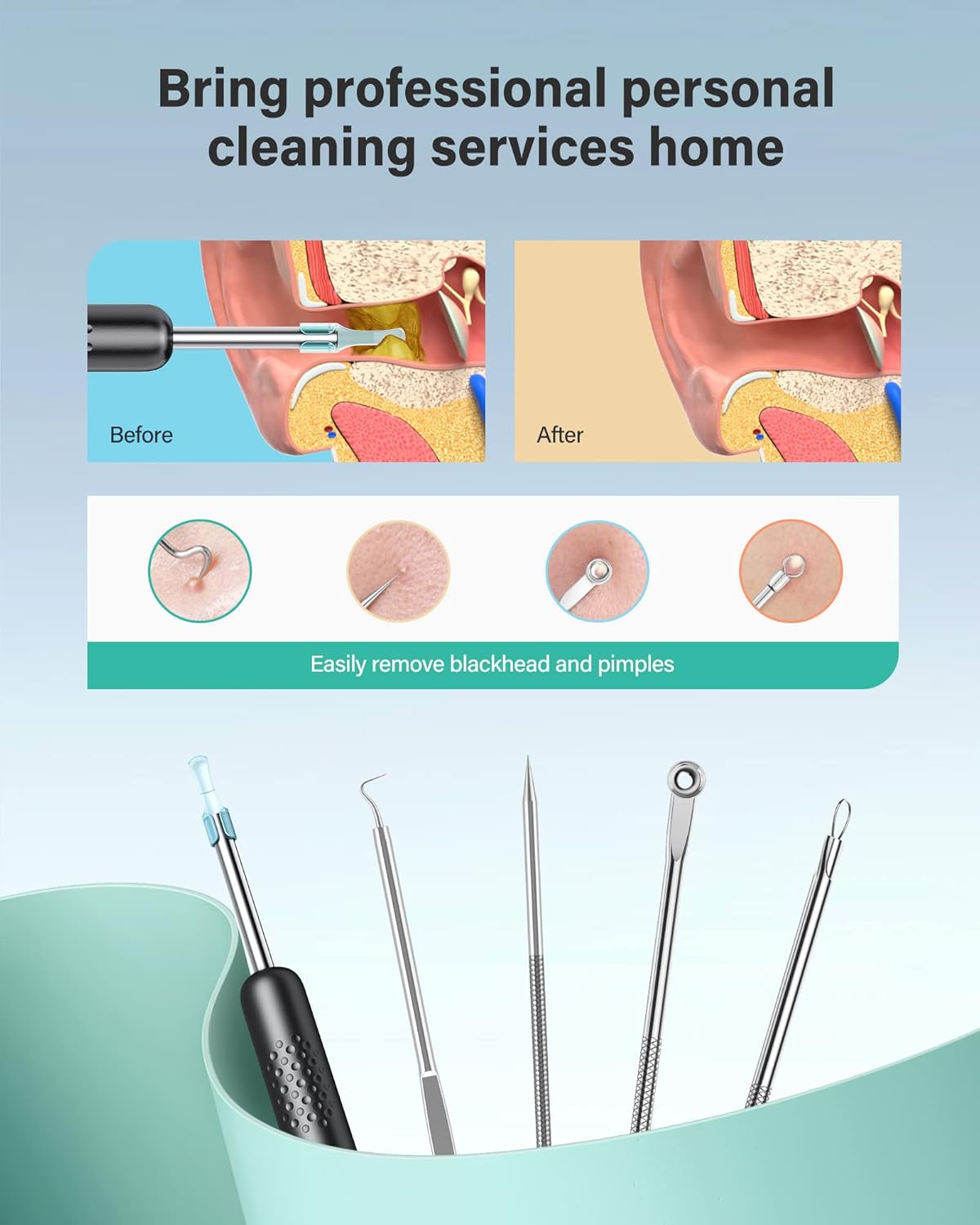
Figure 8: Visual earwax removal process.

Figure 9: Device in use for ear inspection.
Видео демонстрация: For a visual guide on using the Xlife R1 for earwax removal, please watch the official product video below:
Video 1: Xlife Earwax Removal Tool with HD Camera R1 - Usage Demonstration. This video shows the setup process, connection to a smartphone, and practical application of the device for earwax removal, highlighting the real-time visual feedback.
6.2 Blackhead Removal
The included blackhead remover tools can be used for facial skincare. Always ensure proper hygiene when using these tools.
- Терини тазалоо: Thoroughly cleanse your face and hands before using the tools.
- Sterilize Tools: Sterilize the metal blackhead remover tools with rubbing alcohol before and after each use.
- Жумшак басым: Use gentle, even pressure to extract blackheads. Avoid excessive force to prevent skin damage.
- Кийинки кам көрүү: After extraction, cleanse the area again and apply a soothing toner or moisturizer.
7. Техникалык тейлөө
Proper maintenance ensures the longevity and hygiene of your Xlife R1 device.
- Cleaning the Ear Spoon and Lens:
- Remove the silicone ear spoon from the device.
- Clean the ear spoon and the camera lens with a soft cloth dampспирт менен сүртүлөт.
- Ensure the lens is dry before reattaching the ear spoon or storing the device.
- Заряддоо:
- Connect the Micro-USB cable to the device and a compatible USB power source (e.g., computer USB port, wall adapter).
- Толук заряддоо, адатта, болжол менен 1 саатка созулат.
- The 130mAh battery provides sufficient power for multiple uses.
- Сактагыч: Store the device and all accessories in the provided storage box in a cool, dry place, away from direct sunlight and extreme temperatures.

10-сүрөт: Батарея жана кубаттоо жөнүндө маалымат.
8. Кыйынчылыктарды
| Көйгөй | Мүмкүн себеп | Чечим |
|---|---|---|
| Түзмөк күйбөйт. | Батарея аз. | Charge the device fully using the provided Micro-USB cable. |
| Wi-Fi'га туташпай жатат. | Incorrect Wi-Fi network selected or device not powered on. | Ensure the device is powered on. Go to your phone's Wi-Fi settings and select the "Xlife-R1-XXXX" network. Forget other Wi-Fi networks if interference occurs. Some users reported needing to keep the device plugged in during initial connection if issues persist. |
| No image or blurry image in the app. | Loose connection, dirty lens, or app glitch. | Ensure the device is securely connected via Wi-Fi. Clean the camera lens with rubbing alcohol. Restart the Xlife app and/or the device. Ensure the silicone tip is not obstructing the camera. |
| Image lagging or freezing. | Weak Wi-Fi signal or app performance issue. | Ensure you are close to the device for a strong Wi-Fi signal. Close other apps running in the background. Restart the Xlife app. |
| Silicone tip comes off during use. | Tip not securely attached or excessive force applied. | Ensure the silicone ear spoon is twisted on firmly. Use gentle movements during earwax removal. Replace with a new tip if it's worn. |
If problems persist, please contact Xlife customer support.
9. Техникалык шарттар
| Өзгөчөлүк | Деталь |
|---|---|
| Модел | R1 |
| Камеранын чечилиши | 1080P HD |
| Линзанын диаметри | 3.5mm Ultra-Thin |
| Диафрагма | 3.0 |
| Transfer Rate | 20 FPS |
| Жарыктандыруу | 6 Super Bright LED Lights |
| Байланыш | Direct Wi-Fi (no Bluetooth required) |
| Батарея сыйымдуулугу | 130mAh |
| Заряддоо порту | Микро-USB |
| Шайкештик | iPhone, iPad, Android Phones & Tablets |
| Пакеттин өлчөмдөрү | 7.01 x 4.25 x 1.18 дюйм |
| Салмагы | 5.61 унция |
10. Кепилдик жана колдоо
Your Xlife R1 Wireless Ear Wax Removal Tool comes with a manufacturer's warranty. Please refer to the included Warranty Card in your package for specific terms and conditions, including warranty period and coverage details.
For technical support, troubleshooting assistance, or warranty claims, please contact Xlife customer service through the contact information provided on your Warranty Card or visit the official Xlife webсайт.
Өндүрүүчү: Xlife
Биринчи жеткиликтүү болгон күнү: 14-ноябрь, 2021-жыл
We are committed to providing high-quality products and excellent customer service. Thank you for choosing Xlife.


