1. Киришүү
The FLYDIGI Vader 2 Pro is a versatile wireless game controller designed for an enhanced gaming experience across multiple platforms. This manual provides essential instructions for setting up, operating, and maintaining your controller.
The controller is compatible with Nintendo Switch, iOS, PC, and Android devices, offering a seamless transition between your preferred gaming systems.
2. Продукт бүтүп калдыview
The Vader 2 Pro controller integrates advanced features to optimize gameplay. Key components include dual vibration motors, a 6-axis gyroscope for motion sensing, and customizable RGB lighting.

Сүрөт 2.1: Алдыңкы view of the FLYDIGI Vader 2 Pro Game Controller, showcasing анын эргономикалык дизайны жана баскычтардын жайгашуусу.
Негизги өзгөчөлүктөрү:
- Көп платформа шайкештиги: Supports Nintendo Switch, iOS, PC, and Android.
- Кош титирөө моторлору: Provides immersive haptic feedback with 3 adjustable levels.
- 6-октуу гироскоп: Enables precise motion sensing for compatible games.
- Настройкаланган RGB жарыктандыруу: Personalize the controller's aesthetic with millions of color options.
- Configurable Buttons: Four additional M1-M4 buttons on the rear for personalized controls.
- Бир нече туташуу режимдери: Bluetooth, 2.4GHz wireless (with dongle), and wired USB connection.

Image 2.2: The Vader 2 Pro controller shown with various compatible devices including a Nintendo Switch, PC laptop, iOS phone, and Android phone, illustrating its multi-platform support.

Image 2.3: The controller highlighting its built-in 6-axis gyro sensor for motion control.
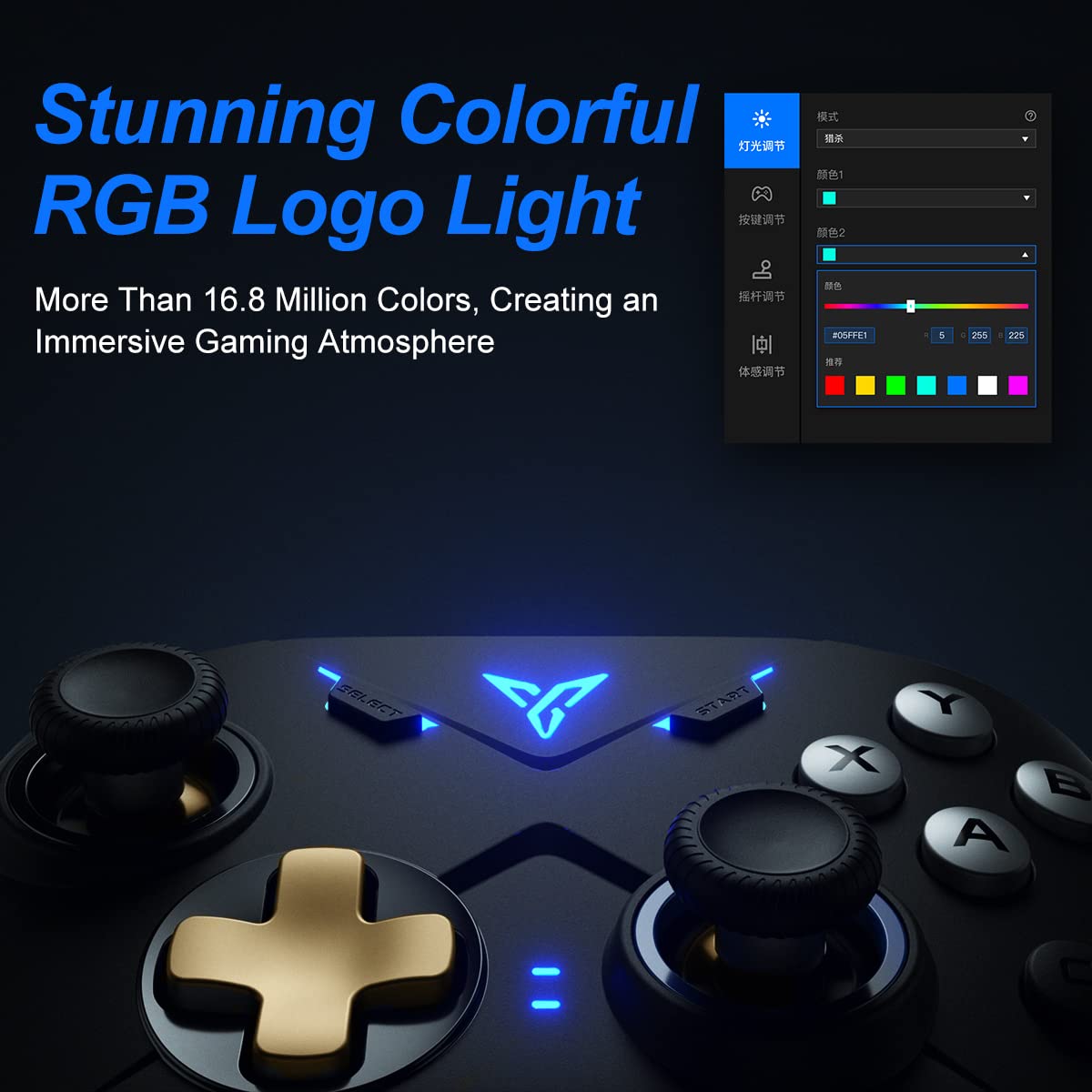
Image 2.4: Close-up of the controller's RGB logo light, demonstrating its customizable color options.

Сүрөт 2.5: Арткы view of the controller, showing the M1-M4 configurable buttons for personalized gameplay.

Image 2.6: Illustration of the controller's asymmetric dual motor design, indicating vibration feedback.
3. Орнотуу жана туташуу
The Vader 2 Pro controller offers multiple connection methods depending on your gaming platform. Refer to the table below for specific instructions.

Image 3.1: A table detailing connection instructions for Phone/Tablet, PC/Mac, and Nintendo Switch.
Туташуу көрсөтмөлөрү:
| Instruction | Connect to Phone/Tablet | Connect to PC/Mac | Switch'ге туташуу |
|---|---|---|---|
| Которуу ыкмасы | Press "+" and "B" buttons simultaneously for 3 seconds. | Press "+" and "A" buttons simultaneously for 3 seconds. | Press "+" and "X" buttons simultaneously for 3 seconds. |
| Туташуу ыкмасы | Bluetooth байланышы | 2.4GHz connector connection or USB wired connection | Bluetooth байланышы |
| Колдоо режими | Bluetooth режими | 360 mode, Android mode (Press "+" and "SELECT" to switch) | Которуу режими |
| Индикатор жарыктарынын абалы | No. 1 Indicator light on blue | No. 1 Indicator light on white (No. 2 red for Android mode) | No. 1 Indicator light on orange |
Additional Connection Notes:
- For PC/Mac, a 2.4GHz USB dongle is included for wireless connection. A USB-C to A cable is also provided for wired play.
- Ensure your device's Bluetooth is enabled when connecting wirelessly to phones, tablets, or Nintendo Switch.
- For iOS devices running iOS 13.4 or higher, follow the specific pairing instructions: Press and hold '+' and 'C' until the first light blinks orange and the second light stays red. Then, long press '+' for more than 3 seconds until the first light flashes orange. Go to your iOS Bluetooth settings and select the device to connect.

Image 3.2: The included USB wireless dongle and USB-C charging/data cable.
4. Иштөө нускамалары
4.1. Button Mapping and Customization
The FLYDIGI Vader 2 Pro controller supports extensive customization through the dedicated FLYDIGI PC Space Station software. This software allows you to:
- Remap buttons, including the M1-M4 rear buttons.
- Adjust joystick curves for precision control.
- Fine-tune motion sensing sensitivity.
- Program macro combos for complex actions.
- Change RGB light settings and effects.
Up to 4 sets of custom configurations can be saved directly on the controller. Download the software from the official FLYDIGI webсайт: flydigi.com/index/down?nav_id=2
4.2. Motion Sensing
The integrated 6-axis gyroscope provides accurate motion control in games that support this feature, enhancing your interactive experience.
4.3. Vibration пикир
The asymmetric dual vibration motors offer tactile feedback. You can adjust the vibration intensity to one of three levels to suit your preference.
4.4. RGB жарыктандыруу
The controller features a customizable RGB logo light, offering over 16.8 million colors. Use the FLYDIGI PC Space Station software to select your preferred lighting modes and colors.
5. Заряддоо жана батареянын иштөө мөөнөтү
The Vader 2 Pro controller is equipped with a rechargeable battery designed to provide up to 80 hours of gameplay on a single charge. To charge the controller, connect it to a USB power source using the provided USB-C cable.

Image 5.1: The controller positioned above a charging indicator, symbolizing its rechargeable battery.
Эскертүү: Actual battery life may vary based on usage patterns, vibration intensity, and RGB lighting settings.
6. Кыйынчылыктарды
If you encounter issues with your FLYDIGI Vader 2 Pro controller, refer to the following common solutions:
- Контроллер туташпай жатат:
- Ensure the controller is in the correct switching mode for your platform (Phone/Tablet, PC/Mac, Switch) as per Section 3.
- Verify that Bluetooth is enabled on your device or that the 2.4GHz dongle is properly inserted into your PC/Mac.
- Контроллерди да, түзмөгүңүздү да өчүрүп-күйгүзүп көрүңүз.
- For PC connections, if Bluetooth fails, try using the 2.4GHz dongle or a wired USB connection.
- Buttons Not Responding/Mapping Issues:
- Ensure the FLYDIGI PC Space Station software is correctly installed and updated.
- Check your custom profiles within the software to ensure buttons are mapped as intended.
- Reset the controller to factory settings if custom mappings are causing issues (refer to software documentation for this process).
- Кыска батареянын иштөө мөөнөтү:
- Колдонуудан мурун контроллердин толук заряддалганын текшериңиз.
- Reduce vibration intensity or RGB lighting brightness/effects to conserve battery power.
- If battery life significantly degrades over time, contact customer support.
- Unstable Wireless Connection:
- Ensure there are no significant obstructions or sources of interference between the controller and your device/dongle.
- Keep the controller within the recommended operating range.
- Update controller firmware via the FLYDIGI PC Space Station software.
7. Техникалык шарттар
| Өзгөчөлүк | Деталь |
|---|---|
| Модель номери | VADER2PRO |
| ASIN | B09LCYB48V |
| Продукциянын өлчөмдөрү | 3.5 x 7.59 x 5.5 дюйм |
| Элемент Салмагы | 15.84 унция |
| Байланыш | Bluetooth, 2.4 ГГц зымсыз, USB зымдуу |
| Шайкештик | Nintendo Switch, iOS, PC, Android |
| Өзгөчөлүктөр | Dual Vibration Motors, 6-Axis Gyroscope, RGB Lighting, Configurable M1-M4 Buttons |
| Батареянын иштөө мөөнөтү | 80 саатка чейин (болжол менен) |
| Дата биринчи жеткиликтүү | 21-декабрь, 2021-жыл |
8. Техникалык тейлөө
To ensure the longevity and optimal performance of your FLYDIGI Vader 2 Pro controller, follow these maintenance guidelines:
- Тазалоо: Контроллерди тазалоо үчүн жумшак, кургак чүпүрөктү колдонуңуз. Катуу химиялык заттарды же абразивдүү материалдарды колдонуудан алыс болуңуз.
- Сактагыч: Контроллерди түз күн нурунан жана экстремалдык температурадан алыс салкын, кургак жерде сактаңыз.
- Колдонуу: Башкаргычты түшүрүп алуудан же ага катуу сокку уруудан алыс болуңуз, анткени бул ички компоненттерге зыян келтириши мүмкүн.
- Заряддоо: Do not overcharge the battery. Disconnect the charging cable once the controller is fully charged.
9. Кепилдик жана колдоо
For warranty information, technical support, or further assistance, please visit the official FLYDIGI webсайтка же кардарларды тейлөөгө кайрылыңыз. Кепилдик дооматтар үчүн сатып алуу дүмүрчөгүңүздү сактаңыз.
Official FLYDIGI Webсайт: www.flydigi.com


