1. Киришүү
This manual provides comprehensive instructions for the Walfront 2MP Camera Module, model -F2110HDR V22 163°. This compact camera module features a 2-megapixel photosensitive chip, a 163° wide-angle lens, and a USB 2.0 interface for easy integration. It is designed for various applications including advertising machines, face recognition systems, drone aerial photography, QR code gates, and robot vision.
2. Продукциянын өзгөчөлүктөрү
- Жогорку чечилиштеги сүрөттөр: Equipped with a 2MP lens and a photosensitive chip (1/2.7in CMOS) for clear and detailed images.
- Кең талаа View: Features a 163° wide-angle lens with a 2.9mm fixed focal length, providing an expansive visual range.
- Plug and Play туташуусу: Utilizes a USB 2.0 interface with standard UVC protocol, offering driver-free operation and OTG support for convenient connection.
- Кеңири системанын шайкештиги: Supports various operating systems including WinXP, iOS, Linux, and Android.
- Hardware Wide Dynamic: Includes hardware wide dynamic range (WDR) functionality, enabling clear imaging in challenging lighting conditions, such as reversible light scenarios.
- Компакт дизайн: Product size of approximately 62 x 9 x 15.3mm (2.4 x 0.4 x 0.6in) for easy integration into diverse projects.

Сүрөт: Жакын план view of the Walfront 2MP Camera Module, showing the lens and circuit board components.
3. Пакеттин мазмуну
Пакетиңизде бардык буюмдар бар экенин текшериңиз:
- 1 x Walfront 2MP Camera Module
- 1 x USB кабели
4. Техникалык шарттар
| Спецификация | Деталь |
|---|---|
| Продукт модели | -F2110HDR V22 163° |
| пиксел | 2MP |
| Photosensitive Chip | (1/2.7in) CMOS |
| талаасы View | 163° бекитилди |
| Объективдин узундугу | 2.9мм |
| Формат | MJPG, YUY2 |
| Resolution (MJPEG) | 320x240 30FPS, 640x480 30FPS, 1024x768 30FPS, 1280x720 30FPS, 1920x1080 30FPS |
| Resolution (YUY2) | 320x240 30FPS, 640x480 30FPS, 1024x768 30FPS, 1280x720 5FPS, 1920x1080 5FPS |
| Фокус режими | Fixed (Default Factory Object Distance: Approx. 60cm / 23.6in) |
| Функция киришүү | Hardware wide dynamic, reversible light, special for laptop advertising machine integrated machine |
| Чыгуу | USB 2.0 |
| Колдоо системасы | For WinXP, for iOS, for Linux, for Android |
| Иштөө температурасы | -20 градустан 70 градуска чейин |
| Продукт өлчөмү | Болжол менен 62 x 9 x 15.3 мм / 2.4 x 0.4 x 0.6 дюйм |
| Элемент Салмагы | 0.352 унция |
| Байланыш технологиясы | USB |
| Өзгөчө өзгөчөлүк | Төмөн жарык |

Image: Top-down perspective of the Walfront 2MP Camera Module, showcasing the lens and integrated circuits.
5. Орнотуу жана орнотуу
The Walfront 2MP Camera Module is designed for simple plug-and-play operation. Follow these steps to set up your camera:
- USB кабелин туташтыруу: Take the provided USB cable and connect the smaller end (usually a micro-USB or similar connector) to the camera module's port.
- Түзмөккө туташуу: Plug the standard USB-A end of the cable into an available USB 2.0 port on your host device (e.g., computer, embedded system, advertising machine).
- Автоматтык таануу: The camera module is UVC compliant and driver-free. Your operating system (WinXP, iOS, Linux, Android) should automatically detect and install the necessary drivers.
- Программанын конфигурациясы: Open your preferred camera application or software. The camera module should appear as an available video input device. Select it to begin streaming video.
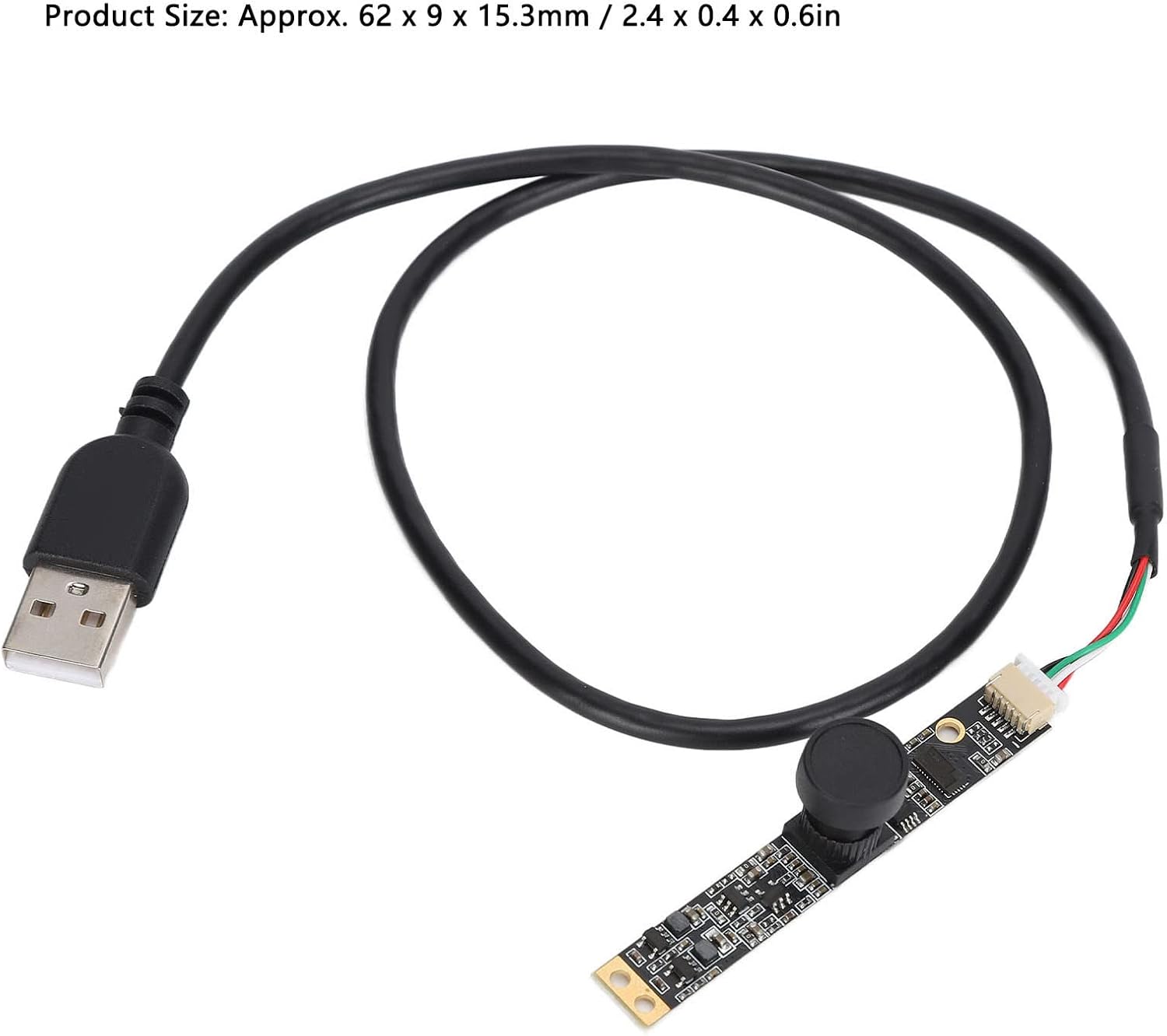
Сүрөт: Жалпысынан view of the Walfront 2MP Camera Module with its attached USB cable.

Сүрөт: деталдуу view of the USB-A connector of the Walfront 2MP Camera Module's cable.
6. Иштөө нускамалары
Once connected and recognized by your system, the camera module functions like a standard webcam. You can use it with various applications that support UVC cameras.
- Чечим жана кадр ылдамдыгы: Most camera applications allow you to select the desired resolution and frame rate. Refer to the Technical Specifications section for supported combinations (e.g., 1920x1080 at 30FPS for MJPEG, or 1920x1080 at 5FPS for YUY2).
- Фокус: The camera features a fixed focus lens with a default object distance of approximately 60cm (23.6in). Ensure your subject is within this range for optimal clarity.
- Кең динамикалык диапазон (WDR): The hardware WDR feature helps to capture balanced images in scenes with both very bright and very dark areas. This is particularly useful in environments with strong backlighting.
- OTG колдоо: For compatible Android devices, the camera supports On-The-Go (OTG) functionality, allowing direct connection and use with mobile applications.
7. Кароо жана тейлөө
To ensure the longevity and optimal performance of your camera module, follow these maintenance guidelines:
- Тазалоо: Gently clean the lens with a soft, lint-free cloth. Avoid using harsh chemicals or abrasive materials that could scratch the lens or damage the module.
- Колдонуу: Handle the camera module by its edges to avoid touching the lens or the circuit board components. Static electricity can damage electronic components.
- Сактагыч: Store the module in a dry, dust-free environment away from extreme temperatures and direct sunlight.
- Экологиялык шарттар: Operate the camera within its specified working temperature range of -20℃ to 70℃. Avoid exposing it to excessive moisture or humidity.
8. Кыйынчылыктарды
If you encounter issues with your Walfront 2MP Camera Module, refer to the following common troubleshooting steps:
- Камера аныкталган жок:
- Ensure the USB cable is securely connected to both the camera module and the host device.
- Try connecting the camera to a different USB port on your device.
- Test the camera on another computer or compatible device to rule out a device-specific issue.
- Компьютериңизди же хост түзмөгүңүздү өчүрүп-күйгүзүңүз.
- Сүрөт жок же кара экран жок:
- Verify that the correct camera is selected in your application's settings.
- Check if any privacy settings or antivirus software are blocking camera access.
- Ensure there is adequate lighting in the environment.
- Сүрөттүн сапаты начар:
- Камера линзасын жумшак чүпүрөк менен акырын сүртүңүз.
- Ensure the subject is within the fixed focus range (approx. 60cm).
- жарык шарттарын тууралоо.
- Check the resolution settings in your application; higher resolutions (e.g., 1920x1080) provide more detail.
9. Кепилдик жана Кардарларды колдоо
Warranty information for the Walfront 2MP Camera Module is typically provided by the seller or manufacturer at the time of purchase. Please refer to your purchase documentation or contact the seller directly for specific warranty terms and conditions.
For technical assistance, troubleshooting beyond this manual, or any other inquiries, please contact the seller from whom you purchased the product. You may also visit the official Walfront store on Amazon for additional resources and support: Walfront Amazon Store.


