1. Киришүү
This manual provides detailed instructions for the setup, operation, and maintenance of your NETUM NT-W6-X Bluetooth CCD 1D Wireless Barcode Scanner. Please read this manual thoroughly before using the device to ensure proper functionality and to maximize its lifespan.
2. Пакеттин мазмуну
Пакетиңизде бардык буюмдар бар экенин текшериңиз:
- NETUM NT-W6-X Barcode Scanner
- USB заряддоо кабели
- 2.4G USB кабыл алгыч
- Instruction Manual

Image 2.1: Contents of the NETUM NT-W6-X package, including the scanner, stand, USB cable, 2.4G USB receiver, and manual.
3. Продукт бүтүп калдыview
The NETUM NT-W6-X is a versatile CCD 1D barcode scanner designed for efficient data capture. It supports multiple connection modes and is compatible with various operating systems.

Сүрөт 3.1: Алдыңкы view of the NETUM NT-W6-X barcode scanner, showing the scanning window, trigger button, USB receiver, and charging cables.
3.1 Негизги өзгөчөлүктөрү
- CCD Image Scanning: Capable of reading 1D barcodes from various surfaces, including computer screens.
- Бир нече туташуу режимдери: 2.4G зымсыз, Bluetooth жана зымдуу USB байланыштарын колдойт.
- Эки жүктөө режими: Instant Upload and Storage Mode for flexible data management.
- Жогорку декоддоо мүмкүнчүлүгү: Reads damaged or blurred 1D barcodes with precision.
- Кеңири шайкештик: Works with Mac, Windows, iOS, Android, and Linux operating systems.
- Туруктуу дизайн: Eco-friendly ABS material with silicone protective cover for enhanced durability.

Image 3.2: Illustration of the CCD Image Scanning technology, showing the scanner reading a barcode from a smartphone screen.
4. Орнотуу
4.1 Сканерди кубаттоо
Before initial use, fully charge the scanner. Connect the USB charging cable to the scanner and a power source (e.g., computer USB port, USB wall adapter). A full charge typically takes 3-4 hours.
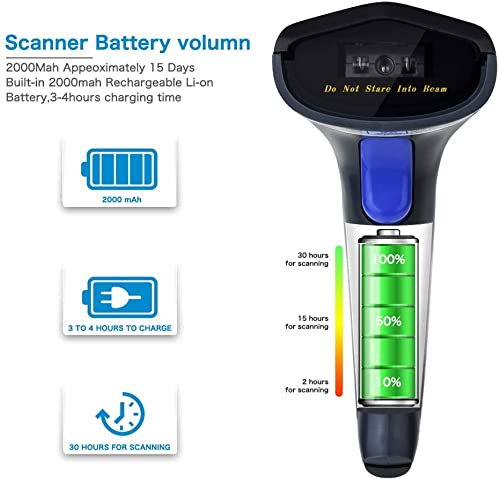
Image 4.1: Visual representation of the scanner's 2000mAh battery, indicating 3-4 hours for a full charge and approximately 30 hours of scanning time.
4.2 Туташуу режимдери
The NT-W6-X scanner offers three connection options:

Image 4.2: Diagram illustrating the three connection methods: Bluetooth (max 50m), 2.4GHz Wireless (max 100m), and Wired USB (1m cable).
4.2.1 2.4G зымсыз байланыш
This mode uses the included USB receiver for wireless communication.
- 2.4G USB ресиверди компьютериңиздеги жеткиликтүү USB портуна сайыңыз.
- The scanner will automatically connect to the receiver. No software installation is required.
The 2.4G wireless connection provides a transmission range of up to 100 meters (328 feet) in an outdoor barrier-free environment and up to 30 meters (98 feet) indoors with obstacles.
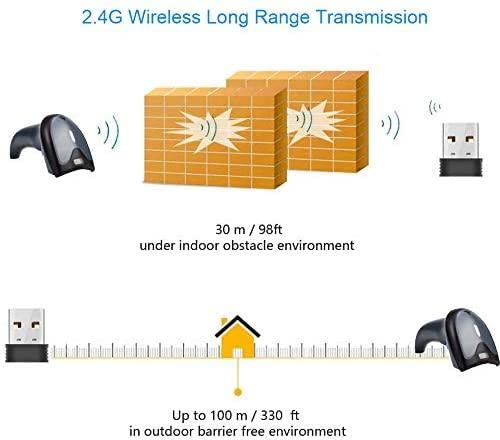
Image 4.3: Illustration of the 2.4G wireless transmission range, showing up to 30m indoors and 100m outdoors.
4.2.2 Bluetooth байланышы
This mode allows connection to Bluetooth-enabled devices such as smartphones, tablets, and computers.
- Сканерди күйгүзүңүз.
- Түзмөгүңүздө (мисалы, смартфондо, планшетте, компьютерде) Bluetooth'ду иштетиңиз.
- Издөө available Bluetooth devices and select the scanner (usually named 'NETUM Scanner' or similar).
- Pair the devices. The scanner will indicate a successful connection.
The Bluetooth connection offers a range of up to 50 meters (164 feet).

Image 4.4: The NETUM NT-W6-X scanner with a Bluetooth logo, indicating its wireless connectivity capability.
4.2.3 Зымдуу туташуу
Түз жана туруктуу туташуу үчүн USB кабелин колдонуңуз.
- Берилген USB кабелин колдонуп, сканерди компьютериңизге туташтырыңыз.
- The scanner will function as a wired device, and data will be transmitted directly.
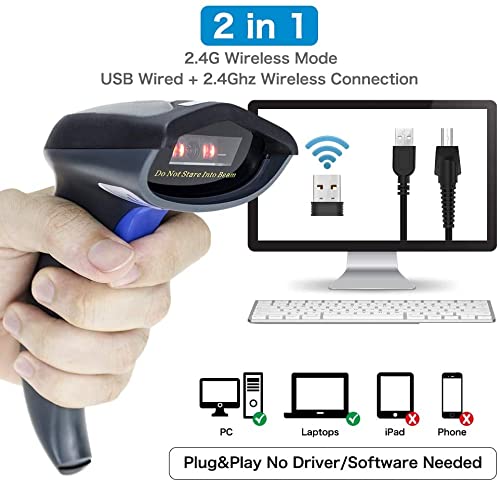
Image 4.5: Diagram showing the scanner connecting to a computer via both 2.4GHz wireless (USB dongle) and wired USB cable, highlighting compatibility with PC, Laptops, iPad, and Phones.
4.3 Шайкештик
The scanner is compatible with a wide range of devices and operating systems, including:
- Windows (7/8/10)
- Mac OS
- Linux
- Android
- iOS

Image 4.6: Icons representing compatibility with Mac OS, Linux, Windows, Android, and iOS, as well as computer, smartphone, and tablet devices.
5. Иштөө нускамалары
5.1 Штрихкоддорду сканерлөө
Point the scanner's beam at the barcode and press the trigger button. A successful scan will typically be indicated by a beep and/or a light indicator.
For optimal scanning performance, ensure the scanner is held at the correct angle: Yaw (Skew) 45°, Pitch 60°.
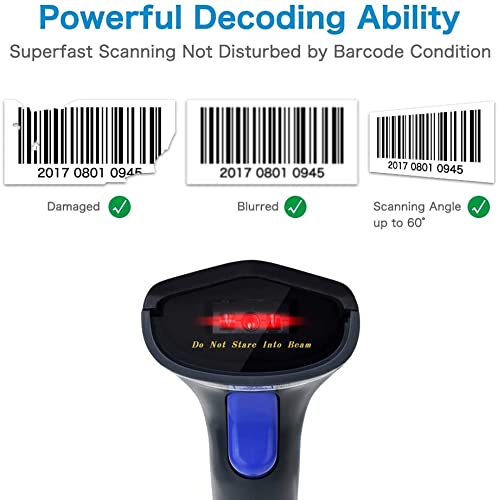
Image 5.1: Illustration demonstrating the scanner's ability to read damaged and blurred barcodes, and its effective scanning angle up to 60 degrees.
5.2 Жүктөө режимдери
Сканер эки маалыматтарды жүктөө режимин колдойт:
5.2.1 Тез жүктөө режими
In this mode, scanned barcodes are immediately transmitted to your connected device.
5.2.2 Сактоо режими
This mode allows you to scan and store barcodes in the scanner's internal memory. Data can then be uploaded in a batch to your device at a later time. The internal storage can save up to 5000 barcodes.

Image 5.2: Comparison of Instant Upload Mode, where barcodes are sent synchronously to a computer, and Storage Mode, where barcodes are saved internally and uploaded in batch.

Image 5.3: Simplified diagram showing the two upload modes: Storage Mode (upload later) and Instant Upload Mode (upload immediately).
5.3 Декоддоо мүмкүнчүлүктөрү
The scanner provides advanced decoding precision of ≥4mil (0.1mm) for 1D codes. It can achieve a fast decoding speed of up to 200 scans per second and supports various 1D barcode types, including:
- UPC / Орточо
- Код 128
- Код 39
- Толук ASCII
- Кода бар
- Industrial/Interleaved 2 of 5
- Код 93
- MSI
- Код 11
- ISBN
- ISSN
- China Post
- GS1 берилиштер тилкеси
- Код 32
6. Өркүндөтүлгөн функциялар
6.1 Auto-Induction Scanning
The scanner can be configured for auto-induction scanning, where it automatically detects and scans barcodes without requiring a trigger press when a barcode is presented within its field of view.

Image 6.1: Close-up of the scanner's head, illustrating the auto-induction scanning capability with the red scanning beam active.
6.2 Adding Prefix/Suffix
The scanner allows for the addition of custom prefixes or suffixes to scanned barcode data. This feature can be configured by scanning specific programming barcodes found in the full user manual (not included here).

Сүрөт 6.2: Мисample of adding a prefix (ABC) or suffix (ABC) to a scanned barcode number.
7. Техникалык тейлөө
7.1 Батареяга кам көрүү
The scanner is equipped with a 2000mAh built-in rechargeable Li-ion battery. To ensure optimal battery life:
- Биринчи жолу колдонуудан мурун батарейканы толук кубаттаңыз.
- Батареяны бат-баттан толук түгөтүп коюудан алыс болуңуз.
- Сканерди узак убакытка колдонбогондо салкын, кургак жерде сактаңыз.
A full charge provides approximately 20-30 hours of continuous scanning and up to 100 days of standby time.

Image 7.1: Details on the 2000mAh battery, showing 20 hours continuous scanning, 3-4 hours charging time, and 100 days standby time.
7.2 Cleaning and Durability
Clean the scanner's exterior with a soft, dry cloth. Avoid using harsh chemicals or abrasive materials. The scanner features an eco-friendly ABS material and a silicone protective cover, designed to withstand drops from up to 1.5 meters (5 feet).
8. Кыйынчылыктарды
- Сканер күйбөй жатат: Батарея заряддалганын текшериңиз. USB кабели аркылуу кубат булагына туташуу.
- Сканер туташпай жатат:
- For 2.4G wireless, ensure the USB receiver is properly inserted and recognized by the computer.
- For Bluetooth, ensure Bluetooth is enabled on your host device and the scanner is in pairing mode. Try re-pairing.
- For wired, ensure the USB cable is securely connected to both the scanner and the computer.
- Сканер штрих-коддорду окубай жатат:
- Ensure the barcode is not severely damaged or poorly printed.
- Check the scanning angle and distance.
- Verify that the barcode type is supported by the scanner.
- Сканерленген маалыматтар көрүнбөй жатат: Ensure the scanner is successfully connected to your device and the application receiving the input is active.
9. Техникалык шарттар
| Өзгөчөлүк | Спецификация |
|---|---|
| Бренд | NETUM |
| Модел | NT-W6-X (W6X 1D wireless Barcode Scanner) |
| Байланыш технологиясы | Зымсыз (2.4G, Bluetooth), Зымдуу (USB) |
| Шайкеш түзмөктөр | Компьютер, ноутбук, смартфон, планшет |
| Power Source | Battery Powered (2000mAh Li-ion) |
| Заряддоо убактысы | 3-4 саат |
| Үзгүлтүксүз сканерлөө убактысы | Болжол менен 20-30 саат |
| Күтүү убактысы | Болжол менен. 100 күн |
| Decoding Precision | ≥4mil (0.1mm) |
| Декоддошуу ылдамдыгы | Секундасына 200гө чейин сканерлөө |
| Колдоого алынган штрихкоддор | 1D: UPC/EAN, Code128, Code39, Coda bar, Industrial/Interleaved 2 of 5, Code93, MSI, Code11, ISBN, ISSN, China Post, GS1 Databar, Code32, etc. |
| 2.4G зымсыз диапазону | Up to 100m (328ft) outdoor, 30m (98ft) indoor |
| Bluetooth зымсыз диапазону | 50 м (164 фут) чейин |
| Ички сактагыч | 130 000 штрихкодго чейин |
| Продукциянын өлчөмдөрү | 20 x 10 x 5 см |
| Элемент Салмагы | 300 г |
10. Кепилдик жана колдоо
The NETUM NT-W6-X Barcode Scanner comes with a 3 айлык кепилдик from the date of purchase. This warranty covers manufacturing defects under normal use. For technical support or warranty claims, please contact your retailer or the manufacturer directly.


