1. Киришүү
This instruction manual provides comprehensive guidance for the Gvirtue Universal Vizio Control VZ-7LC remote. This remote is designed to replace your original Vizio Smart TV remote, offering broad compatibility and ease of use without requiring complex programming.
2. Негизги өзгөчөлүктөрү
- Жалпы шайкештик: Designed for a wide range of Vizio Smart TVs, including LED, QLED, LCD, 4K UHD, HDR, and SmartCast D, E, M, P, V Series.
- Программалоо талап кылынбайт: Ready to use directly out of the box with compatible Vizio TVs.
- Dedicated Quick Access Hotkeys: Features direct access buttons for popular streaming services like Vudu, Netflix, Prime Video, Xumo, Hulu, iHeartRadio, Crackle, Sleep, Redbox, and Watch Free.
- Инфракызыл технология: Ensures reliable signal transmission to your television.
- Туруктуу курулуш: Made from ABS material with soft plastic buttons for comfortable use.

Image: Gvirtue VZ-7LC remote highlighting key features such as stable performance and no programming requirement.
3. Шайкештик
The Gvirtue VZ-7LC remote is compatible with various Vizio Smart TV models and series, including but not limited to:
- Vizio SmartCast D, E, M, P, V Series
- Vizio 4K LED, LCD, HDR, UHD Smart TVs
- Vizio LED, QLED, LCD TVs of various sizes (e.g., 24, 32, 40, 43, 48, 50, 55, 60, 65, 70, 75 inches)

Image: The Gvirtue VZ-7LC remote demonstrating compatibility with different Vizio Smart TV types.
4. Getting Started: Battery Installation
To begin using your Gvirtue VZ-7LC remote, you will need to install two AAA batteries (not included). Follow these steps:
- Пульттун артындагы батарея бөлүкчөсүнүн капкагын табыңыз.
- Бөлүмдү ачуу үчүн капкакты ылдый жылдырыңыз же кулпуну (эгер бар болсо) басыңыз.
- Insert two new AAA batteries, ensuring the positive (+) and negative (-) ends align correctly with the markings inside the compartment.
- Батарея бөлүкчөсүнүн капкагын бекем чыккыча ордуна жылдырыңыз.

Сүрөт: деталдуу view of the remote's battery compartment and proper battery insertion.
5. Орнотуу жана алгачкы колдонуу
The Gvirtue VZ-7LC remote is designed for immediate use with most Vizio Smart TVs without any complex setup or programming. Simply insert the batteries, point the remote at your Vizio TV, and it should function directly.

Image: The remote ready for use with a Vizio TV, emphasizing no setup is needed.
Video: Demonstration of the Gvirtue universal remote control for Vizio Smart TVs, showing its functionality and ease of use.
6. Operating Instructions: Button Functions
The Gvirtue VZ-7LC remote features a standard layout for intuitive control of your Vizio Smart TV. Below is a general overview of the main buttons and their functions:
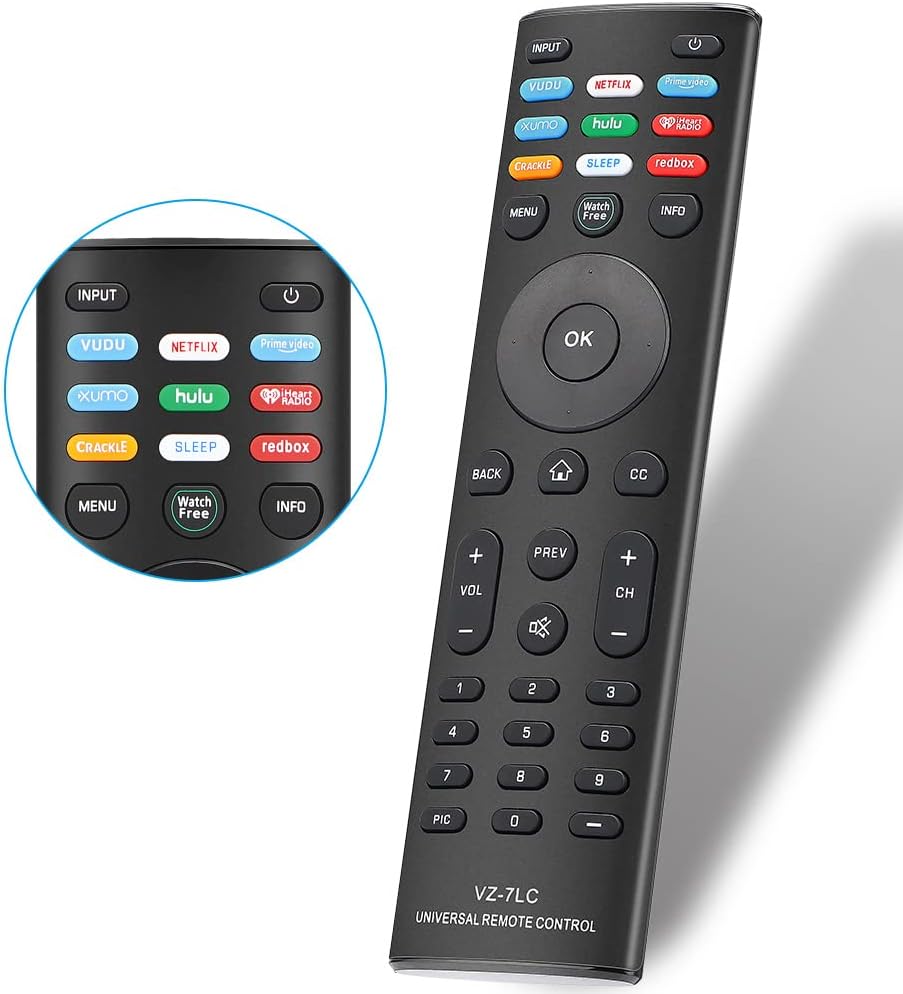
Сүрөт: алдыңкы view of the Gvirtue VZ-7LC remote, displaying all control buttons.
- Кубат баскычы (⏻): Телевизорду күйгүзөт же өчүрөт.
- Киргизүү: Cycles through available input sources (HDMI 1, HDMI 2, etc.).
- Навигация панели (Өйдө, Төмөн, Солго, Оңго, ОК): Менюларда багыттоо жана параметрлерди тандоо үчүн колдонулат.
- Артка: Мурунку экранга же менюга кайтат.
- Үй (⌂): Accesses the SmartCast home screen or main menu.
- CC (Жабык субтитрлер): Жабык коштомо жазууларды күйгүзөт же өчүрөт.
- Көлөмү (+/-): Телевизордун үнүн тууралайт.
- Үнүн басуу (🔇): Телевизордун үнүн өчүрөт же үнүн чыгарат.
- Канал (+/-): Телеканалды өзгөртөт.
- Сандык баскычтоп (0-9): Түздөн-түз канал номерлерин киргизет.
- Quick Access Hotkeys: Dedicated buttons for Vudu, Netflix, Prime Video, Xumo, Hulu, iHeartRadio, Crackle, Sleep, Redbox, and Watch Free for instant access to these applications.
- Меню: Телевизордун негизги жөндөөлөр менюсун ачат.
- Маалымат: Учурдагы программа же киргизүү жөнүндө маалыматты көрсөтөт.

Image: The remote's quick access hotkeys for popular streaming platforms.
7. Кыйынчылыктарды
If you encounter issues with your Gvirtue VZ-7LC remote, please refer to the following common troubleshooting steps:
- Алыстан жооп бербейт:
- Батареялардын туура полярдуулукта (+/-) орнотулганын текшериңиз.
- Эски батареяларды жаңы AAA батареялары менен алмаштырыңыз.
- Пульт менен телевизордун инфракызыл сенсорунун ортосундагы тоскоолдуктарды текшериңиз.
- Телевизордун натыйжалуу иштөө диапазонунда экениңизди текшериңиз.
- Атайын баскычтар иштебейт:
- Пульттун түз телевизорго багытталганын текшериңиз.
- Clean the remote's infrared emitter (the small LED at the front) and the TV's IR receiver with a soft, dry cloth.
- Телевизор күйбөй/өчпөй жатат:
- Телевизордун иштеп жаткан розеткага сайылып турганын текшериңиз.
- Try using the power button directly on the TV to rule out a TV issue.
Видео: Кыскачаview of a replacement remote for Vizio Smart TVs, demonstrating basic functionality which can be helpful for troubleshooting.
8. Техникалык шарттар
| Модель номери | VZ-7LC |
| Бренд | Gvirtue |
| Шайкеш түзмөктөр | Vizio Smart TVs (LED, QLED, LCD, 4K UHD, HDR, SmartCast D/E/M/P/V Series) |
| Байланыш технологиясы | Инфракызыл |
| Power Source | 2 x AAA Батареялар (киргизилген эмес) |
| Материал | ABS |
| Өлчөмдөр | 17.1 x 4.7 x 2.1 см (болжол менен 6.73 x 1.85 x 0.83 дюйм) |
| Салмагы | 80 г (болжол менен 2.82 унция) |

Image: Physical dimensions of the Gvirtue VZ-7LC remote.
9. Техникалык тейлөө
Алыстан башкаруу пультуңуздун узак мөөнөттүү жана оптималдуу иштешин камсыз кылуу үчүн, төмөнкү техникалык тейлөө көрсөтмөлөрүн аткарыңыз:
- Тазалоо: Пультту тазалоо үчүн жумшак, кургак чүпүрөктү колдонуңуз. Суюк тазалоочу каражаттарды же абразивдүү материалдарды колдонуудан алыс болуңуз.
- Батареяга кам көрүү: Remove batteries if the remote will not be used for an extended period to prevent leakage. Replace batteries promptly when they are depleted.
- Сактагыч: Пультту күн нурунан жана экстремалдык температурадан алыс, салкын, кургак жерде сактаңыз.
- Колдонуу: Avoid dropping the remote or exposing it to excessive force, as this can damage internal components.
10. Кепилдик жана колдоо
For any warranty claims, technical support, or further inquiries regarding your Gvirtue VZ-7LC remote control, please refer to the contact information provided with your product packaging or visit the official Gvirtue webкардарларды тейлөө кызматынын чоо-жайы үчүн сайт.


