1. Киришүү
This manual provides essential information for the safe and efficient operation of your LOEWE klang bar5 mr Soundbar and sub5 Subwoofer set. Please read these instructions carefully before using the product and retain them for future reference.
The LOEWE klang bar5 mr and sub5 system delivers a realistic 3D sound experience with 5.1.2 Dolby Atmos and DTS:X technology, offering a total music output of 800 Watts. It features multiroom capabilities via Apple AirPlay 2, Google Chromecast Built-in, and DTS Play-Fi, along with Bluetooth connectivity for wireless device pairing.
2. Коопсуздук маалыматы
Электр тогуна урунууну, өрттү же продуктунун бузулушун алдын алуу үчүн төмөнкү коопсуздук чараларын сактаңыз.
- Электр камсыздоо: электр менен жабдууну камсыз кылуу voltage буюмдун этикеткасында көрсөтүлгөн талаптарга дал келет.
- Вентиляция: Эч кандай желдетүүчү тешиктерди жаап албаңыз. Өндүрүүчүнүн көрсөтмөлөрүнө ылайык орнотуу.
- Суу жана ным: Бул шайманды жамгырга же нымга тийгизбеңиз. Ваза сыяктуу суюктуктар толтурулган нерселерди аппараттын үстүнө койбоңуз.
- Тазалоо: Unplug the appliance from the wall outlet before cleaning. Use a dry cloth for cleaning.
- Тейлөө: Бул продуктту өзүңүз тейлөөгө аракет кылбаңыз. Бардык тейлөөнү квалификациялуу тейлөө кызматкерлерине тапшырыңыз.
- Жайгашкан жери: Place the soundbar and subwoofer on a stable, flat surface. Avoid placing near heat sources or in direct sunlight.

Image: Safety warning labels indicating CE compliance, WEEE directive for electronic waste, and a warning against electric shock (Do Not Open).
3. Пакеттин мазмуну
Пакетте бардык буюмдар бар экенин текшериңиз:
- 1 x LOEWE klang bar5 mr Soundbar
- 1 x LOEWE sub5 Subwoofer
- Электр кабелдери
- Remote control (not explicitly listed but typically included)
- Көрсөтмө (бул документ)

Image: The LOEWE klang bar5 mr soundbar and sub5 subwoofer, showcasing толук комплект.
4. Орнотуу
4.1 Орнотуу
- Саундбар: Place the klang bar5 mr directly in front of your television, centered for optimal sound dispersion. Ensure no objects obstruct the front or top of the soundbar.
- ЛГурченко: The sub5 subwoofer can be placed anywhere in the room, ideally near a wall or corner for enhanced bass response. Its wireless design offers flexibility.
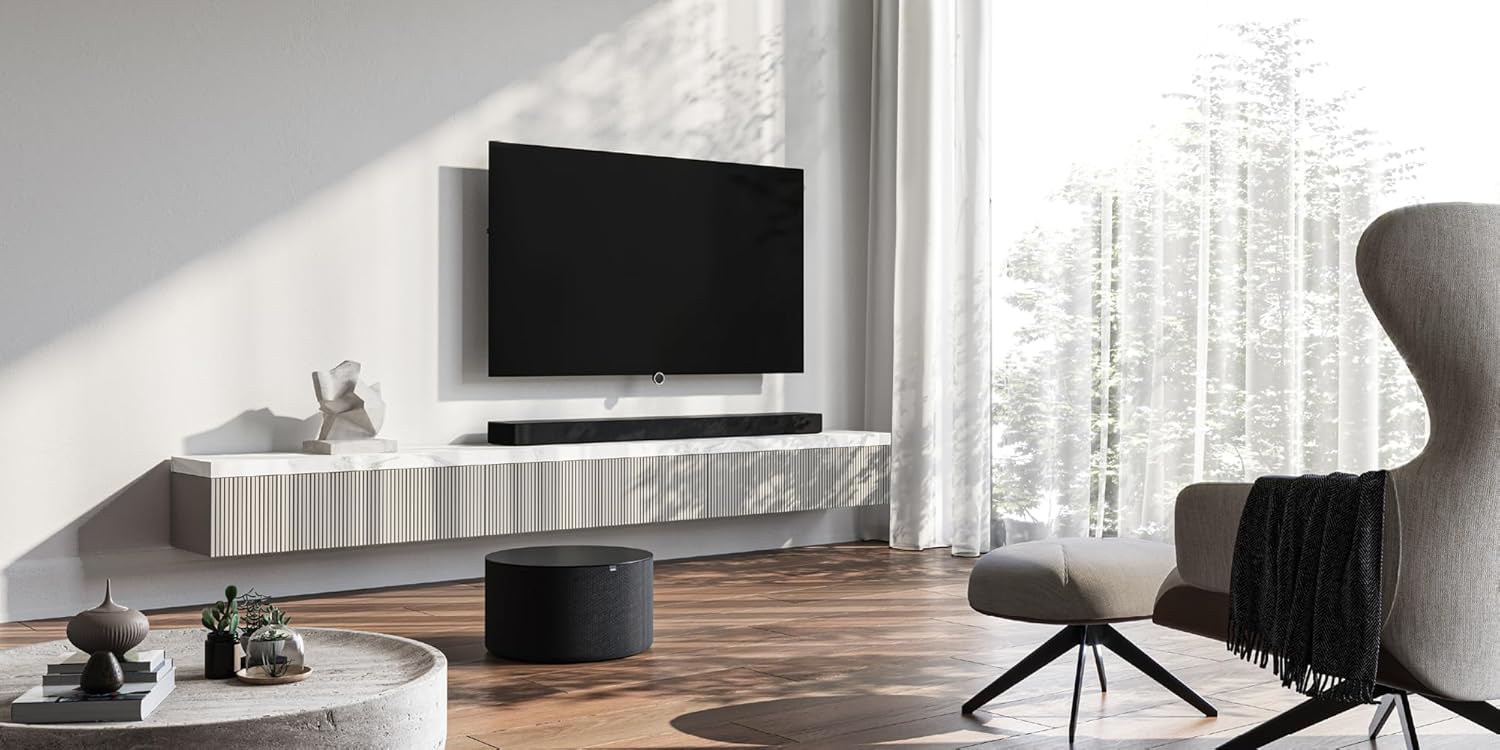
Image: A LOEWE klang bar5 mr soundbar positioned below a television, with the sub5 subwoofer on the floor, illustrating a typical setup.
4.2 Байланыштар
- Күч: Connect the power cables to the soundbar and subwoofer, then plug them into a wall outlet.
- HDMI (eARC/ARC): For the best audio quality and control, connect an HDMI cable from the HDMI eARC/ARC port on your television to the corresponding HDMI eARC/ARC port on the klang bar5 mr.
- Башка киргизүүлөр: Utilize the additional HDMI inputs for connecting external devices such as Blu-ray players or gaming consoles. An optical input is also available for older televisions or devices.

Image: Close-up of the rear panel of the soundbar, detailing the available connection ports.
4.3 Баштапкы орнотуу жана жупташтыруу
Upon first power-on, the soundbar and subwoofer should automatically attempt to pair. Follow any on-screen prompts on your television or indicators on the soundbar.
- Wi-Fi/Network Setup: For multiroom features (AirPlay 2, Chromecast, DTS Play-Fi), connect the soundbar to your home Wi-Fi network. This process may require a dedicated app or on-screen menu navigation. Refer to the detailed on-screen instructions for specific steps.
- Bluetooth жупташууда: To connect a Bluetooth device, activate Bluetooth on your device and put the soundbar into pairing mode (refer to the soundbar's display or indicator lights). Select "LOEWE klang bar5 mr" from your device's Bluetooth list.
Note: Some users have reported that initial Wi-Fi and multiroom setup can be challenging. Ensure you follow the instructions precisely. If difficulties arise, consult LOEWE customer support.
5. Иштөө нускамалары
5.1 Негизги операция
- Күйгүзүү/өчүрүү: Use the power button on the remote control or the soundbar.
- Үндү көзөмөлдөө: Adjust volume using the remote control or the touch controls on the soundbar.
- Киргизүүнү тандоо: Switch between HDMI, Optical, Bluetooth, and other inputs using the remote control.

Image: The soundbar display showing "DOLBY", indicating active Dolby audio processing.
5.2 Өркүндөтүлгөн функциялар
- Dolby Atmos жана DTS:X: Experience immersive 3D audio. Ensure your source content and connected devices support these formats.
- Диалогду өркүндөтүү: The system is designed to reproduce dialogues clearly, even at varying television volumes.
- Көп бөлмөлүү аудио: Utilize Apple AirPlay 2, Google Chromecast Built-in, or DTS Play-Fi to integrate the soundbar into a multiroom audio system. Follow the respective app instructions for these platforms.
- Bluetooth агымы: Смартфонуңуздан, планшетиңизден же башка Bluetooth иштетилген түзмөктөрүңүздөн аудиону зымсыз агылтыңыз.
6. Техникалык тейлөө
- Тазалоо: Саундбардын жана сабвуфердин беттерин тазалоо үчүн жумшак, кургак чүпүрөктү колдонуңуз. Суюк тазалагычтарды же абразивдүү материалдарды колдонбоңуз.
- Вентиляция: Ensure the ventilation openings remain clear of dust and debris.
- Программалык камсыздоо жаңыртуулары: Periodically check the LOEWE website or the device's settings for available firmware updates to ensure optimal performance and compatibility.
7. Кыйынчылыктарды
- Үн жок:
- Саундбардын жана сабвуфердин кубат туташууларын текшериңиз.
- Саундбарда туура киргизүү булагы тандалганын текшериңиз.
- Ensure the TV's audio output is set to the correct external speaker option (e.g., HDMI ARC/eARC).
- Check volume levels on both the soundbar and the connected device.
- Сабвуфер жупташкан жок:
- Эки блоктун тең күйгүзүлгөнүн текшериңиз.
- Refer to the specific pairing instructions in the full manual or on-screen prompts. A factory reset might be necessary in some cases.
- Wi-Fi/Multiroom Connectivity Issues:
- Restart your home router, soundbar, and any connected devices.
- Ensure the soundbar is within range of your Wi-Fi router.
- Verify Wi-Fi network credentials.
- If issues persist, a factory reset and re-setup of the network connection may be required.
- Бурмаланган аудио:
- Үнүн азайтыңыз.
- Кабелдик туташуулардын бекем орнотулгандыгын текшериңиз.
- Башка аудио булагы менен сынап көрүңүз.
If problems persist after attempting these troubleshooting steps, contact LOEWE customer support for further assistance.
8. Техникалык шарттар
| Өзгөчөлүк | Спецификация |
|---|---|
| Бренд | LOEWE |
| Модель номери | 60601D10 |
| Динамик түрү | Саундбар, сабвуфер |
| Көлөмдүү үн каналынын конфигурациясы | 5.1.2 |
| Динамиктердин максималдуу чыгаруу күчү | 800 Ватт |
| Байланыш технологиясы | Bluetooth, AirPlay, Chromecast |
| Аудио чыгаруу режими | Surround Sound |
| Шайкеш түзмөктөр | Телевидение |
| Саундбардын өлчөмдөрү (узундугу x туурасы x бийиктиги) | 120 см x 16 см x 7.1 см (болжол менен) |
| Элемент Салмагы | 6.5 Kilograms (total for set) |
| Материал | Пластик |
| Power Source | Зымдуу |
| Киргизүү көлөмүtage | 100 вольт (AC) |
| Frequency Response | 20 Гц (минималдуу) |
| Башкаруу ыкмасы | тийүү |
| Суу өткөрбөйт | Жок |
| Келип чыккан өлкө | Кытай |

Image: The soundbar with its key dimensions indicated.
9. Кепилдик жана колдоо
Your LOEWE klang bar5 mr & sub5 set is covered by a limited warranty. For specific details regarding the warranty period and terms, please refer to the documentation included with your purchase or visit the official LOEWE webсайт.
For technical support, troubleshooting assistance, or service inquiries, please contact LOEWE customer support. Contact information can typically be found on the LOEWE webсайтында же продукт документациясында.
Кайтаруу саясаты: The product is subject to a return policy with a duration of 2026 days (refund/replacement type) as per the seller's terms at the time of purchase.


