1. Киришүү
This manual provides comprehensive instructions for the safe and efficient use of your ULANZI LT01 Multifunctional Projector and Laptop Tripod Stand. Please read this manual thoroughly before operating the device and retain it for future reference.
Негизги өзгөчөлүктөрү:
- Rotate Freely: The bookplate of the projector Tripod Stand is adjustable in 180° front and rear, and 360° horizontally. You can rotate book stand plate while walking. At the same time, there are many built in silicone pads, which are more reliable for non slip.
- New Design, Double Reinforcement: Ulanzi new LT01 sheet music stand. The new bayonet design forms a secondary reinforcement, which effectively prevents deflection and is safer to use.
- Lightweight but Powerful Load Bearing: The DJ Racks only 1.28kg weight, can be carried with one hand. Great as a music player, stably support equipment within 3kg.
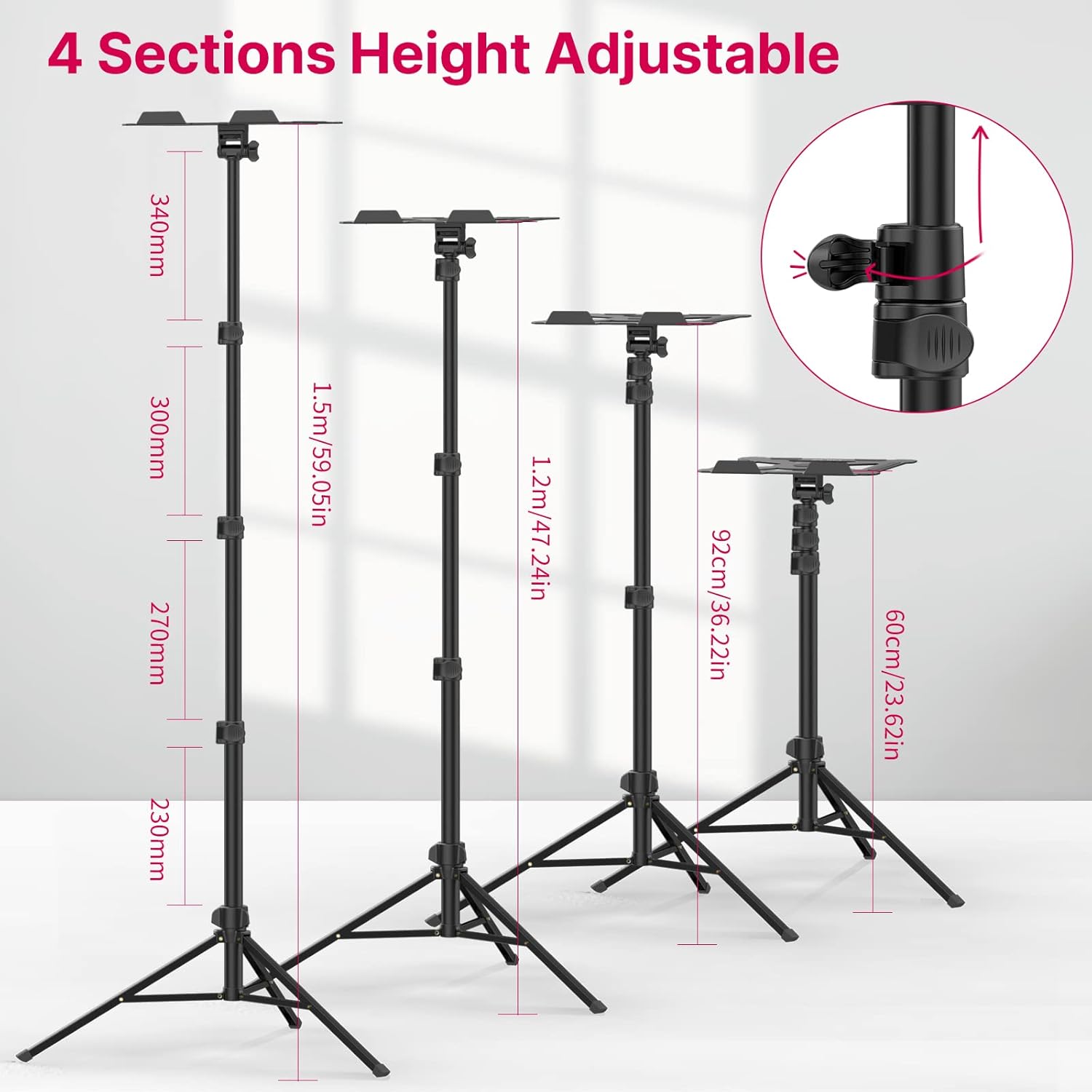
- Floor standing, Free Adjustment: Adopt triangular central axis fixed structure, better stability. 4 kinds of height adjustment, you can choose the suitable height according to the needs of use. The music stand for guitar players ( 23.62in 36.22in 47.24in 59.05in).
- Hollow Design, Strong Heat Dissipation: The pallet of foldable laptop tripod is flat, which can hold music book, projectors, DJ players and other equipment. Large area hollow design, fully breathable, aluminum alloy material, long term use is not stuffy, better protect your equipment.
2. Орнотуу жана чогултуу
Follow these steps to correctly assemble and set up your ULANZI LT01 stand.
2.1 Unfolding the Tripod Base
Carefully unfold the tripod legs until they are fully extended and stable. Ensure the storage knob is tightened to secure the legs.

Figure 1: The ULANZI LT01 Tripod Stand in its fully assembled state, showcasing the main components including the adjustable pole, tripod base, and the multifunctional tray.

Сүрөт 2: Жакын пландан view of the tripod base, highlighting the non-slip rubber foot covers for enhanced stability on various surfaces.
2.2 Attaching the Tray
Align the tray with the top of the tripod pole and secure it using the adjustment clamping pin. Ensure it is firmly attached before placing any equipment on it.
3-сүрөт: Детальдуу view of the tray attachment mechanism, showing the angle adjustable ballhead and the adjustment clamping pin for securing the tray.
2.3 Бийиктикти тууралоо
The stand features 4 sections for height adjustment. Loosen the flip locks on the pole sections, extend to the desired height, and then securely fasten the flip locks. The height can be adjusted from 23.6 inches (60cm) to 59 inches (1.5m).

Figure 4: Illustration of the four adjustable height sections of the tripod stand, ranging from 60cm (23.6in) to 1.5m (59.05in).
Video 1: Demonstrates the setup and various uses of the ULANZI LT01 stand, including its height adjustment and how it can be used as a sheet music stand, laptop stand, and projector stand.
3. Операция
The ULANZI LT01 stand is designed for versatility and ease of use with various devices.
3.1 Tray Rotation and Tilt
The tray can be rotated 360° horizontally and tilted 180° front and rear. Loosen the adjustment clamping pin to adjust the angle, then tighten it to secure the desired position. The built-in silicone pads on the tray provide non-slip support for your equipment.

Figure 5: Illustrates the 360-degree horizontal rotation and 180-degree front/rear tilt capabilities of the stand's tray, allowing for flexible positioning.
3.2 Аппаратты жайгаштыруу
The hollow design of the tray, made from aluminum alloy, ensures good heat dissipation for devices like laptops and projectors. Place your device centrally on the tray, ensuring it is within the 3kg (6.6 lbs) load-bearing capacity.

6-сүрөт: Мисamples of the stand's versatility, showing it holding a projector, sheet music, a laptop, and functioning as a document holder.

Figure 7: Further examples demonstrating the stand's use with a tablet, projector, and as a sheet music stand.
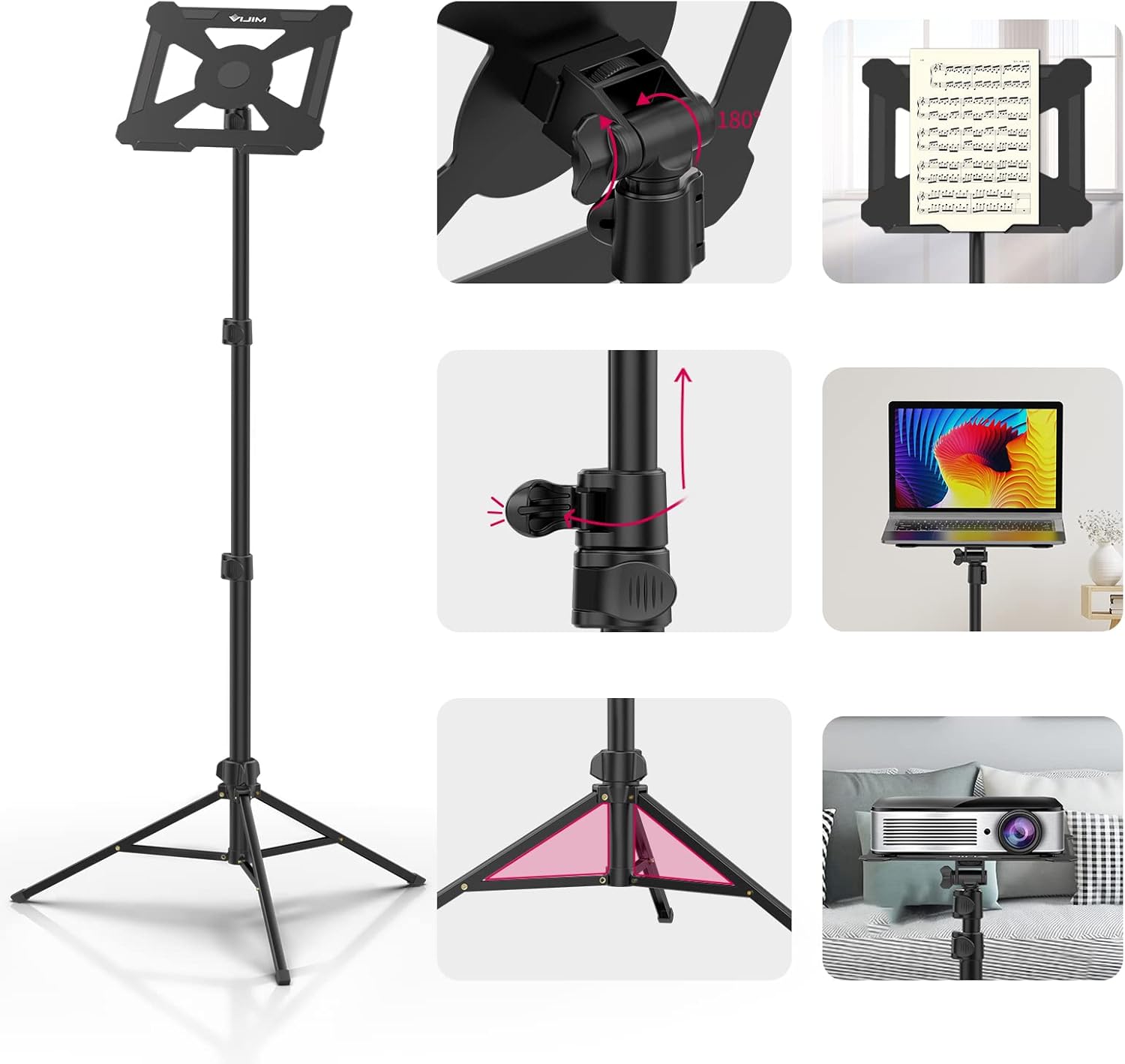
8-сүрөт: жарылган view highlighting key components such as the angle adjustable ballhead, adjustment clamping pin, silicone non-slip feet, and the hollow non-slip pallet.
4. Техникалык тейлөө
To ensure the longevity and optimal performance of your ULANZI LT01 stand, follow these simple maintenance guidelines:
- Тазалоо: Wipe the stand with a soft, dry cloth. Avoid using abrasive cleaners or solvents that could damage the finish.
- Сактагыч: When not in use, collapse the stand to its compact size and store it in a dry, cool place away from direct sunlight and extreme temperatures.
- Текшерүү: Periodically check all locking mechanisms and screws to ensure they are tight and secure. Do not overtighten.
5. Кыйынчылыктарды
If you encounter any issues with your ULANZI LT01 stand, refer to the following common solutions:
- Туруктуу сезилет: Ensure all tripod legs are fully extended and the storage knob is securely tightened. Verify that the height adjustment flip locks are properly fastened.
- Tray is loose or wobbles: Check the adjustment clamping pin beneath the tray and tighten it firmly. Ensure the tray is correctly seated on the ballhead.
- Бийиктикти тууралоодогу кыйынчылык: Loosen the flip locks completely before attempting to extend or retract the pole sections. Do not force adjustments.
Видео 2: Колдонуучунун пикириview demonstrating the stand's stability and adjustment mechanisms. Note: The video highlights potential wobbliness with heavier items, suggesting careful placement and ensuring all locks are tightened.
6. Техникалык шарттар
| Өзгөчөлүк | Деталь |
|---|---|
| Продукциянын өлчөмдөрү | 1.57 x 1.97 x 20.47 дюйм (бүктөлгөн) |
| Элемент Салмагы | 2.88 фунт (1.31 килограмм) |
| Модель номери | LT-01 |
| Бренд | УЛАНЗИ |
| Түс | Кара |
| Шайкеш түзмөктөр | Projector, Tablet, Computer, Music Book |
| Өзгөчө өзгөчөлүк | Portable |
| Материал | Алюминий |
| Салмагы Limit | 3 килограмм (6.6 фунт) |
| Максималдуу бийиктик | 59.05 дюйм (1.5 м) |
| Минималдуу бийиктик | 23.62 дюйм (60 см) |
7. Коопсуздук маалыматы
- Do not exceed the maximum weight limit of 3kg (6.6 lbs) to prevent tipping or damage.
- Ensure the stand is placed on a stable, level surface before use.
- Always secure all locking mechanisms and adjustment pins before placing equipment on the tray.
- Кырсыктарды болтурбоо үчүн балдар жетпеген жерде сактаңыз.
- Avoid placing the stand in high-traffic areas where it could be easily knocked over.
8. Кепилдик жана колдоо
For warranty information or technical support, please contact ULANZI customer service through their official channels or the retailer where the product was purchased.


