1. Киришүү
The FOREVER SB-315 Fitband Smartwatch is a versatile activity tracker designed to help you monitor your fitness and stay connected. Featuring a heart rate sensor, step counter, distance tracker, and sleep monitor, it provides comprehensive insights into your daily activity. Its discreet and lightweight design, coupled with a long-lasting battery, ensures maximum comfort and convenience.
This manual provides detailed instructions on how to set up, operate, and maintain your SB-315 smartwatch to ensure optimal performance and longevity.

Сүрөт 1.1: Алдыңкы view of the FOREVER SB-315 Fitband Smartwatch.
2. Орнотуу
2.1 Кутудан чыгаруу жана баштапкы төлөм
Carefully remove all components from the packaging. The box should contain the SB-315 smartwatch and its charging cable. Before first use, fully charge the device.
- Connect the charging cable to the charging contacts on the back of the smartwatch.
- Кабелдин USB учун стандарттуу USB кубат адаптерине (кошулмада жок) же компьютердин USB портуна сайыңыз.
- The watch display will indicate charging status. A full charge typically takes 2-3 hours.
- The 155 mAh battery provides up to 10 days of standby time on a single charge.

Figure 2.1: The SB-315 Smartwatch and its retail packaging.
2.2 Колдонмону орнотуу жана жупташтыруу
To unlock the full potential of your SB-315 smartwatch, you need to install the companion application on your smartphone and pair the devices via Bluetooth.
- Колдонмону жүктөп алыңыз: Издөө the "Forever Smart" or "Forever Fit" app (refer to the packaging or quick start guide for the exact app name) on the Apple App Store (for iOS 10.0 and above) or Google Play Store (for Android 5.0 and above).
- Bluetooth иштетүү: Смартфонуңузда Bluetooth иштетилгенин текшериңиз.
- Колдонмону ачуу: Launch the installed application on your smartphone.
- Түзмөктү жупташтыруу: Follow the in-app instructions to add a new device. Select "SB-315" from the list of available devices. The app will guide you through the pairing process.
- Уруксаттарды берүү: Allow necessary permissions (e.g., notifications, location, health data) for the app to function correctly.
Ийгиликтүү жупташтырылгандан кийин, саат смартфонуңуз менен убакытты жана маалыматтарды шайкештештирет.
3. Акылдуу саатыңызды иштетүү
3.1 Негизги навигация
The SB-315 features a bright 0.96-inch (or 1.3-inch, depending on specific model variant) display. Navigate through menus by swiping across the screen and tapping to select options.
- Өйдө/ылдый сүрүү: Scroll through different functions and menus.
- Солго/Оңго сүрүү: Access quick views like daily activity, heart rate, or notifications.
- таптаңыз: Select an option or enter a sub-menu.
- Press Side Button (if applicable): Үй экранына кайтуу же күйгүзүү/өчүрүү.
3.2 Негизги функциялар
The SB-315 is equipped with several features to help you monitor your health and fitness.
- Жүрөктүн кагышын көзөмөлдөө: The integrated heart rate sensor continuously monitors your heart rate. View саат боюнча реалдуу убакыт дайындары же колдонмодогу деталдуу тренддер.
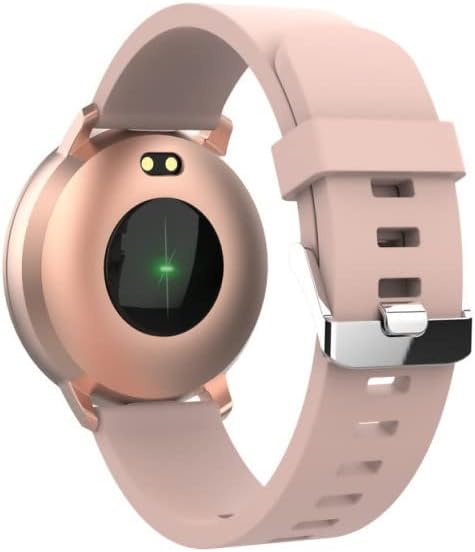
3.1-сүрөт: Арткы view of the SB-315, highlighting the heart rate sensor.
- Активдүүлүккө көз салуу: Tracks steps taken, distance covered, and calories burned throughout the day.
- Уйкунун мониторинги: Automatically monitors your sleep patterns, including deep sleep, light sleep, and awake times. Access detailed sleep analysis in the companion app.
- Спорт режимдери: Select from various sports modes such as running, cycling, climbing, and walking to track specific workout data.
- Гидрация жөнүндө эскертүү: Set reminders to ensure you drink enough water throughout the day.
3.3 Smart өзгөчөлүктөрү
- Эскертмелер: Receive instant notifications for incoming calls, SMS messages, and alerts from social media applications directly on your wrist.
- Камераны алыстан башкаруу: Use your smartwatch as a remote shutter for your smartphone's camera.
- Музыкалык башкаруу: Смартфонуңуздагы музыканы ойнотууну (ойнотуу, тындыруу, тректерди өткөрүп жиберүү) түздөн-түз сааттан башкарыңыз.
- Саат жүзүн ыңгайлаштыруу: Personalize your watch by choosing from various watch faces available through the companion app.
- Ойготкуч саат: Set silent vibrating alarms to wake you up or remind you of important events.
4. Техникалык тейлөө
4.1 Тазалоо жана кам көрүү
To ensure the longevity and proper functioning of your SB-315 smartwatch, follow these cleaning and care guidelines:
- Тазалоо: Саат экранын жана боону жумшак, гamp, lint-free cloth. Avoid using harsh chemicals, abrasive cleaners, or solvents.
- Кургатуу: Ensure the watch is completely dry before charging or wearing, especially after exposure to water.
- Боону багуу: If the strap is removable, clean it separately. Allow it to air dry completely before reattaching.
4.2 Сууга туруктуулук (IP67)
The SB-315 smartwatch is rated IP67, meaning it is protected from dust and can withstand immersion in water up to 1 meter for up to 30 minutes. While it is water-resistant, it is not waterproof for prolonged submersion or high-pressure water activities.
- Do not wear the watch while showering with hot water, in saunas, or steam rooms.
- Суу астында баскычтарды басуудан качыңыз.
- If the watch gets wet, wipe it dry thoroughly before charging.
4.3 Батареяга кам көрүү
Батареянын иштөө мөөнөтүн жана иштешин жогорулатуу үчүн:
- Саатты биринчи жолу колдонуудан мурун толук кубаттаңыз.
- Батареяны бат-баттан толук түгөтүп коюудан алыс болуңуз.
- Саатты узак убакытка колдонбогондо салкын, кургак жерде сактаңыз.
- Берилген заряддоо кабелин гана колдонуңуз.
5. Кыйынчылыктарды
If you encounter issues with your SB-315 smartwatch, refer to the following common problems and solutions:
| Көйгөй | Мүмкүн себеп | Чечим |
|---|---|---|
| Саат күйбөйт | Батареясы аз; түзмөк иштебей калды | Charge the watch for at least 30 minutes. If still unresponsive, try a soft reset (refer to app or manufacturer's webконкреттүү көрсөтмөлөр үчүн сайт). |
| Смартфон менен жупташтыруу мүмкүн эмес | Bluetooth off; app not running; watch not discoverable; interference | Ensure Bluetooth is on for both devices. Restart both the watch and phone. Make sure the app is open and searching. Forget previous pairings on phone. |
| Билдирмелер алынган жок | App permissions not granted; notification settings off; app not running in background | Check app permissions in phone settings. Verify notification settings within the companion app. Ensure the app is running in the background. |
| Inaccurate heart rate/step count | Improper fit; sensor obstruction; software glitch | Ensure the watch is worn snugly on the wrist, about one finger's width above the wrist bone. Clean the sensor on the back of the watch. Restart the watch. |
| Батареянын иштөө мөөнөтү кыска | Frequent use of features; high brightness; constant notifications | Reduce screen brightness. Limit continuous heart rate monitoring. Turn off unnecessary notifications. Ensure background app refresh is optimized. |
If the problem persists, please contact FOREVER customer support for further assistance.
6. Техникалык шарттар
Key technical specifications for the FOREVER SB-315 Fitband Smartwatch:
| Өзгөчөлүк | Деталь |
|---|---|
| Модель аты | SB-315 |
| Бренд | ТҮБӨЛҮК |
| Түс | Кызгылт |
| Байланыш технологиясы | Bluetooth 5.0 |
| Дисплей өлчөмү | 0.96" (or 1.3", depending on specific model variant) - 240 x 240 pixels |
| Батарея сыйымдуулугу | 155 мАч Литий-полимер |
| Максималдуу күтүү убактысы | 10 күнгө чейин |
| Сууга туруктуулук рейтинги | IP67 |
| Шайкеш түзмөктөр | Smartphones (iOS ≥ 10.0, Android ≥ 5.0) |
| Өзгөчөлүктөр | Heart Rate Monitor, Sleep Monitor, Notification, Alarm Clock, Activity Tracker, Remote Camera/Music Control |
| Таза Салмак | 57г |
7. Кепилдик жана колдоо
For warranty information, please refer to the warranty card included in your product packaging or contact your point of purchase. Warranty terms and conditions may vary by region and retailer.
For technical support, troubleshooting assistance beyond this manual, or inquiries about spare parts, please visit the official FOREVER webсайтка же кардарларды тейлөө бөлүмүнө кайрылыңыз. Байланыш маалыматтары, адатта, өндүрүүчүнүн сайтында болот webсайт же продукт таңгак.
Manufacturer: TelForceOne


