1. Киришүү
The Keychron Q7 is a wired custom mechanical keyboard featuring a 70% layout. It is designed for users seeking a compact yet fully functional keyboard with advanced customization options. The Q7 supports QMK/VIA open-source firmware for key remapping and macro creation, and features a hot-swappable design for easy switch replacement. Its double-gasket mount structure and CNC machined aluminum case contribute to a premium typing experience. This manual provides instructions for setting up, operating, and maintaining your Keychron Q7 keyboard.
2. Пакеттин мазмуну
Please verify that all items listed below are included in your package. If any items are missing or damaged, contact Keychron support.

Image: Contents of the Keychron Q7 package, including the keyboard, cables, and tools.
- Баскычтоп:
- 1x Толугу менен чогултулган клавиатура
- Including: 1x Aluminum Case, 1x PCB, 1x Steel Plate, 1x Sound Absorbing Foam, 1x Case Foam, 10x Gaskets (6 Installed and 4 in the Box)
- Баскыч капкактары: 1 set x Keycaps (Double-Shot PBT)
- Которгучтар: 1 комплект x Которгучтар (Gateron G Pro)
- Стабилизаторлор: 5 комплект x Стабилизаторлор
- Кабель:
- 1x Type-C - Type-C кабели
- 1x Type-A to Type-C адаптер
- Куралдар:
- 1x Которгуч тарткыч
- 1x Баскыч капкагын тарткыч
- 1x Screwdriver
- 1x Hex ачкычы
Note: All tools are typically located at the bottom of the product box.
3. Орнотуу
3.1 Баскычтопту туташтыруу
The Keychron Q7 is a wired keyboard. To connect it to your computer:
- Баскычтоптун арткы бетиндеги USB Type-C портун табыңыз.
- Connect one end of the provided Type-C to Type-C cable to the keyboard.
- Connect the other end of the cable to a compatible USB Type-C port on your computer. If your computer only has USB Type-A ports, use the provided Type-A to Type-C adapter.
- Баскычтоп сиздин операциялык тутумуңуз тарабынан автоматтык түрдө таанылышы керек.

Image: The Keychron Q7 keyboard with its USB-C cable connected, ready for use.
3.2 Switching Between Mac and Windows Layouts
The Keychron Q7 is compatible with both macOS and Windows operating systems. A physical switch on the back of the keyboard allows you to toggle between the two layouts, ensuring correct key functionality for your system.
- Locate the "Win/Mac" toggle switch on the rear edge of the keyboard, near the USB-C port.
- Slide the switch to the "Mac" position if you are using a macOS device.
- Slide the switch to the "Win" position if you are using a Windows or Linux device.

Image: Close-up of the Keychron Q7's rear, showing the physical switch to select between Windows and macOS modes.
4. Иштөө нускамалары
4.1 QMK and VIA Support for Customization
The Keychron Q7 fully supports QMK (Quantum Mechanical Keyboard) and VIA firmware, allowing for extensive customization of key functions, macros, and backlighting without requiring programming knowledge. VIA is a graphical user interface that works with QMK firmware.
- Download the VIA software or access the Keychron Launcher Web App from the official Keychron webсайт.
- Connect your Keychron Q7 keyboard to your computer.
- Launch the VIA application or web app. The software should automatically detect your keyboard.
- Use the interface to remap keys, create custom macros, adjust RGB lighting effects, and configure different keyboard layers.

Сүрөт: Keychron Launcherдин скриншоту Web App, demonstrating the interface for key remapping, macro creation, and shortcut customization via QMK/VIA.
4.2 Ыкчам алмаштыруучу которгучтар
The Keychron Q7 features a hot-swappable PCB, allowing you to change mechanical switches without soldering. This enables easy customization of your typing feel.
- The PCB supports both 3-pin and 5-pin MX-style mechanical switches (e.g., Cherry, Gateron, Kailh).
- The keyboard comes pre-installed with factory-lubed Gateron G Pro Brown switches, known for their tactile feedback.

Сүрөт: Жакын план view of the keyboard's PCB with keycaps and switches removed, showing the hot-swappable sockets ready for switch installation.
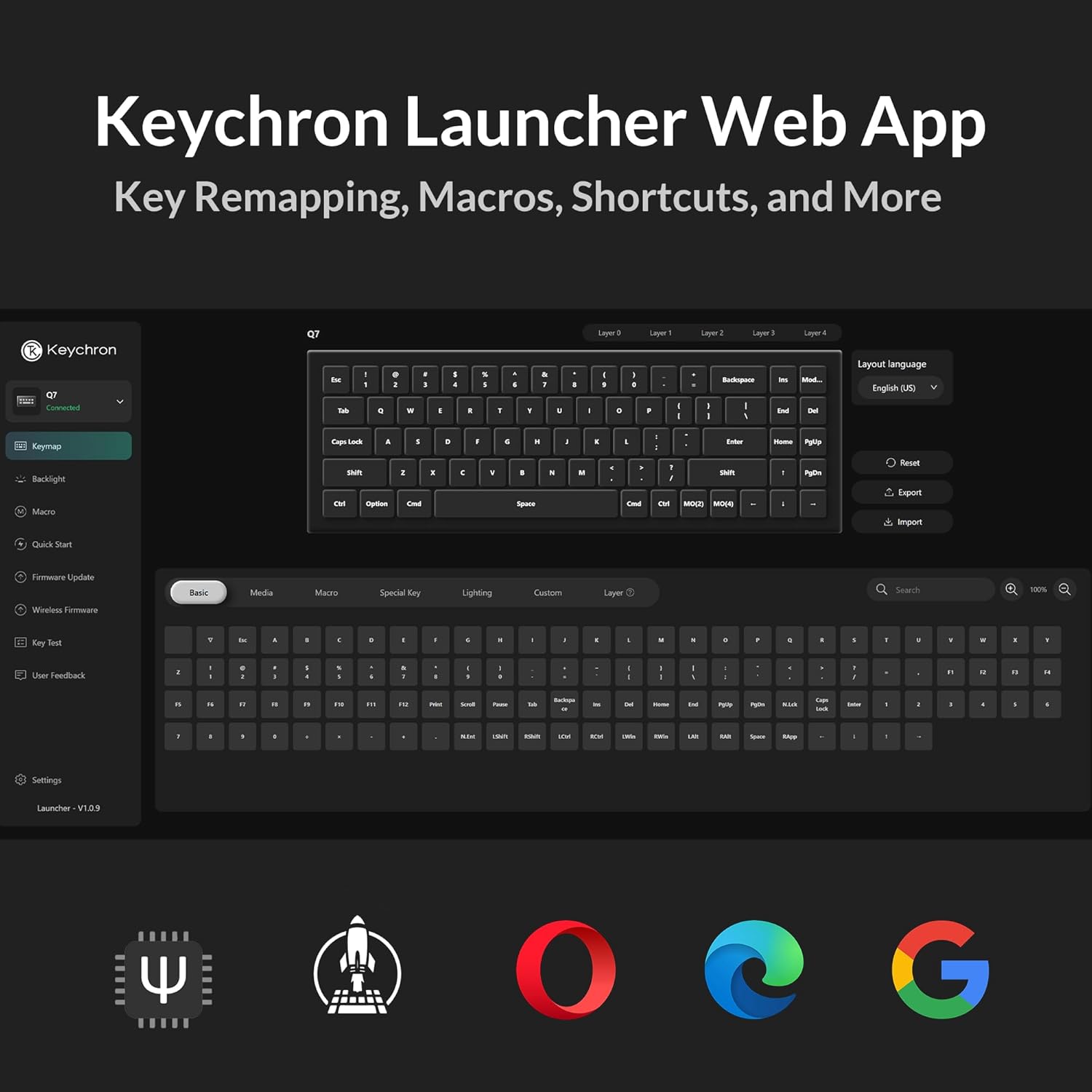
Image: Diagram detailing the specifications of the Gateron G Pro Brown switch, including operating force, pre-travel, travel distance, behavior, lubrication, and sound level.
4.3 Double-Gasket Design
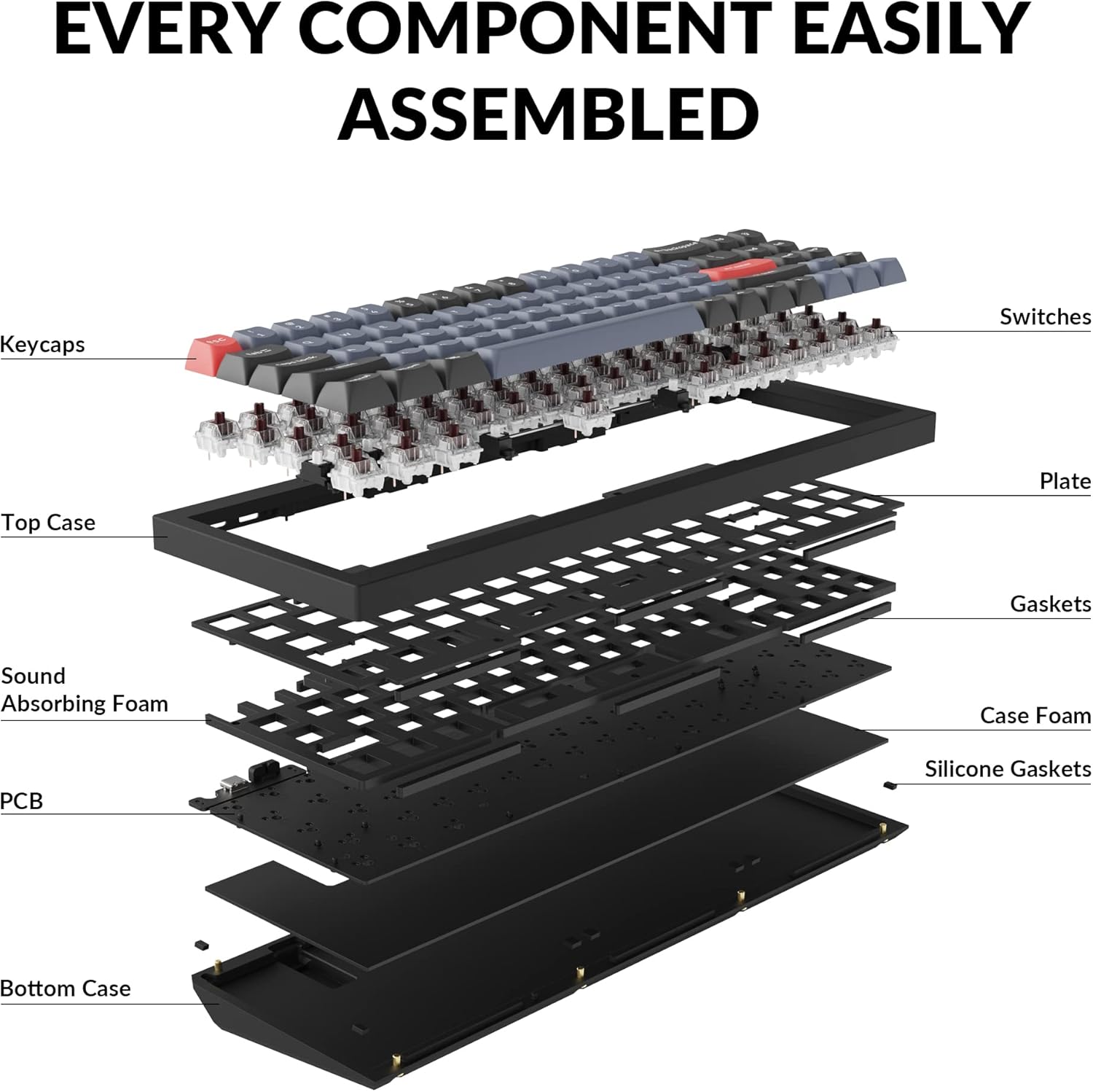
The Keychron Q7 incorporates a double-gasket mount design with silicone pads. This construction enhances typing feel and sound by allowing for more flexibility and dampening vibrations within the aluminum case.

Image: An exploded diagram illustrating the various layers and components of the Keychron Q7 keyboard, including keycaps, switches, plate, gaskets, sound absorbing foam, PCB, and bottom case.
4.4 Double-Shot PBT Keycaps
The keyboard is equipped with durable double-shot PBT keycaps. This material and manufacturing process ensure that the legends will not fade or wear over time, and the keycaps resist shine from prolonged use.
Сүрөт: Жакын план view of the Keychron Q7's keycaps, highlighting their texture and legends.
4.5 South-Facing RGB Backlighting
The Keychron Q7 features south-facing RGB LEDs. This design provides even backlighting and ensures compatibility with most custom keycap sets, as it prevents interference with Cherry-profile баскычтар.

Image: Close-up of several switches on the Keychron Q7, showing the vibrant RGB backlighting emanating from beneath the keycaps.
4.6 70% Layout
The 70% layout of the Keychron Q7 retains essential function keys while offering a significantly reduced footprint compared to full-size keyboards. This design optimizes desk space for mouse movement and promotes a cleaner workspace.

Image: A visual comparison illustrating the compact 70% layout of the Keychron Q7 next to a standard full-size keyboard, highlighting the space-saving benefits.
5. Техникалык тейлөө
5.1 Жалпы тазалоо
Үзгүлтүксүз тазалоо клавиатуранын иштешин жана көрүнүшүн сактоого жардам берет.
- Чаңды тазалоо: Баскыч капкактарынын ортосундагы чаңды жана калдыктарды үйлөө үчүн кысылган аба банкасын колдонуңуз.
- Бетти тазалоо: Gently wipe the keycaps and keyboard case with a soft, lint-free cloth dampаз өлчөмдөгү суу же жумшак, абразивдүү тазалоо эритмеси менен тазалаңыз. Ашыкча нымдуулуктан сактаныңыз.
- Терең тазалоо: For thorough cleaning, keycaps can be removed (see 5.2 Keycap Removal/Replacement) and cleaned separately.
5.2 Keycap Removal/Replacement
To remove keycaps:
- Use the provided keycap puller.
- Gently hook the puller onto opposite sides of the keycap.
- Pull straight up with even pressure until the keycap detaches from the switch stem.
Баскычтопторду алмаштыруу үчүн:
- Align the keycap's cross-shaped stem with the switch's stem.
- Press down firmly and evenly until the keycap clicks into place.
5.3 Коммутаторду алмаштыруу (ысык алмаштырууга болот)
The hot-swappable design allows for easy switch replacement without soldering.
- Баскыч капкагын алып салуу: First, remove the keycap from the switch you wish to replace using the keycap puller (refer to 5.2).
- Которуштурууну алып салуу: Use the provided switch puller. Align the prongs of the switch puller with the two clips on the top and bottom of the switch housing. Squeeze the clips and gently pull the switch straight up from the PCB.
- Жаңы которгуч орнотуу: Ensure the pins on the new switch are straight. Align the pins with the holes on the PCB. Gently push the switch straight down until it clicks into place. Do not force it; if resistance is met, check the pins for bending.
- Баскыч капкагын алмаштыруу: Баскыч капкагын кайра жаңы которгучка коюңуз.
6. Кыйынчылыктарды
6.1 Баскычтоп жооп бербейт
- Кабель туташуусун текшерүү: USB-C кабелинин клавиатурага да, компьютериңизге да бекем туташканын текшериңиз. Башка USB портун же кабелин колдонуп көрүңүз.
- Операциондук системаны которуу: Verify that the "Win/Mac" toggle switch on the back of the keyboard is set to the correct operating system (Windows/macOS).
- Компьютерди кайра иштетүү: Sometimes a simple computer restart can resolve connectivity issues.
- Башка компьютерде сыноо: Мүмкүн болсо, көйгөй клавиатурада же баштапкы компьютердин орнотууларында экенин аныктоо үчүн клавиатураны башка компьютерде сынап көрүңүз.
6.2 Катталбаган ачкычтар же эки жолу терүү
- Которгучтарды текшерүү: Since the keyboard is hot-swappable, a switch might not be fully seated or could be faulty. Carefully remove the keycap and then the switch (refer to 5.3) and re-seat it firmly. If the issue persists, try replacing the switch with a spare one.
- Баскычтоптун астын тазалоо: Debris under the keycap or around the switch stem can interfere with key presses. Remove the keycap and clean the area.
6.3 RGB Backlighting Issues
- Check VIA Settings: Ensure that backlighting is enabled and configured correctly within the VIA software.
- Жарыктыкты жөндөө: Use the keyboard's default function keys (if any) or VIA to adjust brightness levels.
- Орнотулган программаны жаңыртуу: Ensure your keyboard's firmware is up to date. Check the Keychron webакыркы микропрограмма жана жаңыртуу нускамалары үчүн сайт.
6.4 QMK/VIA Software Not Detecting Keyboard
- Ensure Wired Connection: VIA requires a direct wired connection to function.
- Re-plug Keyboard: Клавиатураны ажыратып, кайра туташтырыңыз.
- Программалык камсыздоону кайра иштетүү: Close and reopen the VIA application or web колдонмо.
- Драйверди орнотуу: For some operating systems, specific drivers might be required. Refer to the Keychron support page for your model.
7. Техникалык шарттар
| Модел | Keychron Q7 |
| Элемент моделинин номери | Keychron Q7M3 |
| Макет | 70% |
| Байланыш технологиясы | USB-C (Зымдуу) |
| Шайкеш түзмөктөр | Laptop, Mac, PC (Windows, macOS, Linux) |
| Которгучтар | Hot-swappable Gateron G Pro Brown (pre-installed) |
| Баскыч капкактары | Double-Shot PBT |
| Арткы жарыктандыруу | Түштүктү караган RGB |
| Иштин материалы | CNC иштетилген алюминий |
| Монтаждоо стили | Double-Gasket Mount |
| Продукциянын өлчөмдөрү | 13.44 x 4.76 x 1.33 дюйм |
| Элемент Салмагы | 5.21 фунт |
| Өндүрүүчү | Keychron |
8. Кепилдик жана колдоо
8.1 Кепилдик маалыматы
Keychron products typically come with a limited warranty against manufacturing defects. The specific warranty period and terms may vary by region and product. Please refer to the official Keychron webКепилдик жөнүндө толук маалымат алуу үчүн сайтка же сатып алуу документтерине кайрылыңыз.
To claim warranty service:
- Retain your proof of purchase (e.g., invoice, order number).
- Contact Keychron customer support through their official channels.
8.2 Кардарларды колдоо
For technical assistance, troubleshooting, or general inquiries regarding your Keychron Q7 keyboard, please visit the official Keychron support page:
The Keychron website also provides FAQs, firmware updates, and additional resources for product customization and maintenance.


