Introduction
Welcome to the user manual for your Behringer MonoPoly 4-voice Analog Synthesizer. This manual provides essential information for setting up, operating, maintaining, and troubleshooting your instrument.
The MonoPoly is a powerful analog synthesizer featuring four Voltage Controlled Oscillators (VCOs), a Voltage Controlled Filter (VCF), and two Envelope Generators (EGs), offering a rich palette of sounds from classic analog warmth to complex textures.
Маанилүү коопсуздук нускамалары
- Бул нускамаларды окуңуз.
- Бул көрсөтмөлөрдү сактаңыз.
- Бардык эскертүүлөргө кулак сал.
- Бардык нускамаларды аткарыңыз.
- Бул аппаратты суунун жанында колдонбоңуз.
- Кургак чүпүрөк менен гана тазалаңыз.
- Эч кандай желдетүүчү тешиктерди жаап албаңыз. Өндүрүүчүнүн көрсөтмөлөрүнө ылайык орнотуу.
- Радиаторлор, жылуулук регистрлери, мештер же башка аппараттар (анын ичинде) сыяктуу жылуулук булактарынын жанына орнотпоңуз ampкөтөргүчтөр) жылуулукту пайда кылуучу.
- Поляризацияланган же жерге туташтыруу тибиндеги сайгычтын коопсуздук максатын жокко чыгарбаңыз.
- Электр шнурын басуудан же кысып калуудан сактаңыз.
- Өндүрүүчү тарабынан көрсөтүлгөн тиркемелерди/аксессуарларды гана колдонуңуз.
- Бул аппаратты чагылгандуу бороондордо же узак убакыт бою колдонбогондо электр розеткасынан ажыратыңыз.
- Бардык тейлөөлөрдү квалификациялуу тейлөө кызматкерлерине тапшырыңыз.
Жайгашуу
Пакеттен чыгаруу
Carefully unpack your MonoPoly synthesizer and ensure all components are present. Retain the original packaging for future transport or storage.
Power Connection
Connect the provided power adapter to the DC input on the rear panel of the MonoPoly. Plug the adapter into a suitable power outlet.
Аудио байланыштар
Use a standard 1/4" TS cable to connect the MonoPoly's main audio output to your mixer, audio interface, or ampөмүрлүү.
MIDI байланыштары
The MonoPoly supports MIDI In, Out, and Thru for integration with other MIDI devices or a computer. Connect MIDI cables as required for your setup.
Баштапкы жайгаштыруу
Place the synthesizer on a stable, flat surface, ensuring adequate ventilation around the unit.
Operating the MonoPoly
The Behringer MonoPoly features a comprehensive control panel for sound design and performance.
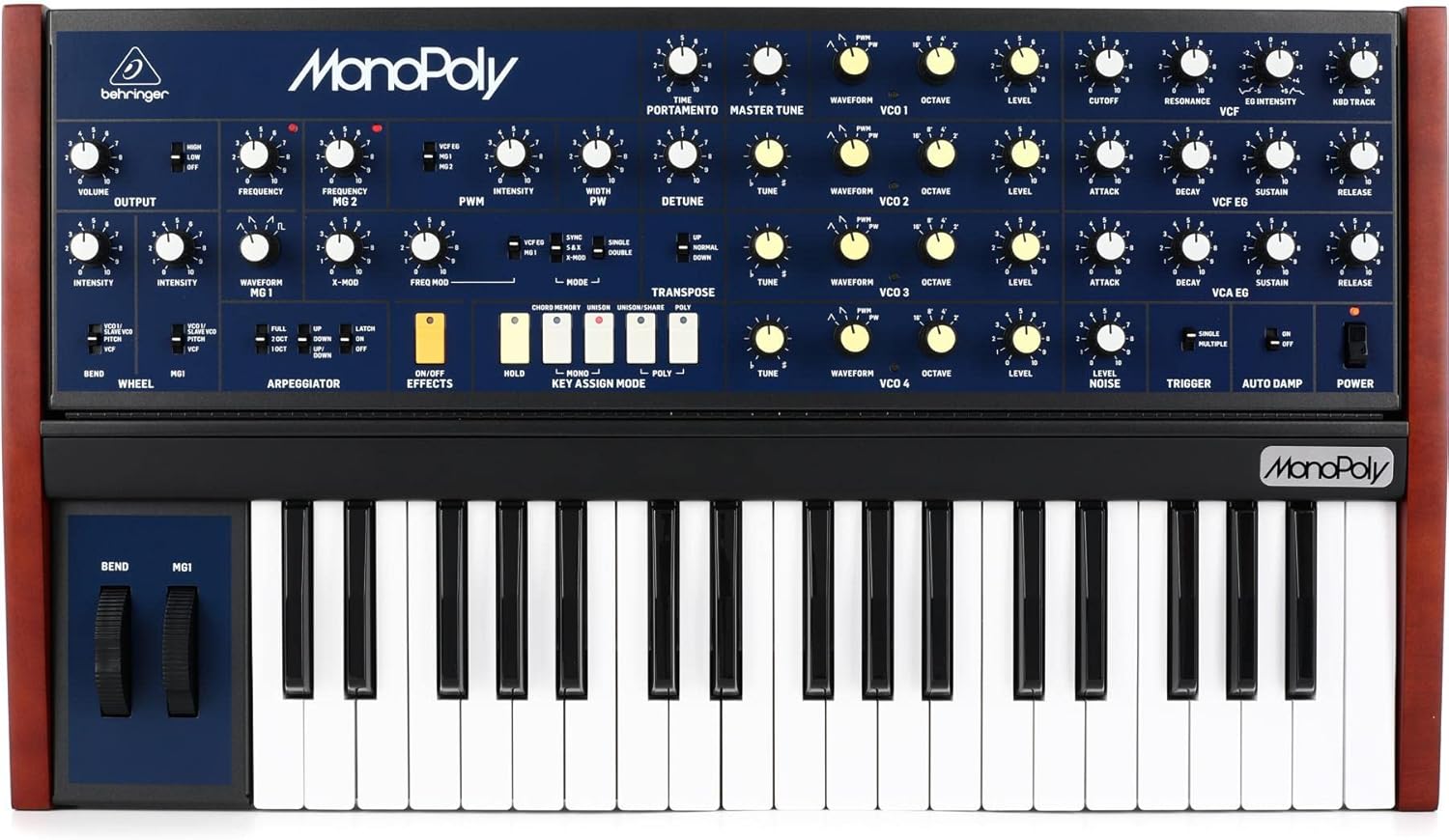
This image displays the full front panel of the Behringer MonoPoly synthesizer, showing the keyboard, pitch bend and modulation wheels, and the extensive array of knobs and switches for controlling the oscillators, filter, envelopes, and other parameters.
Күйгүзүү/өчүрүү
табыңыз КҮЧ switch on the far right of the control panel. Flip the switch to the ON position to power on the unit.
Осцилляторлор (VCO)
The MonoPoly features four Voltage Controlled Oscillators (VCOs), each with controls for:
- КОНУН: Adjusts the pitch of the oscillator.
- WAVEFORM: Selects the oscillator waveform (e.g., sawtooth, pulse, triangle).
- ОКТАВА: Sets the octave range for the oscillator.
- LEVEL: Controls the output level of the oscillator.
Тtage Controlled Filter (VCF)
The VCF section shapes the timbre of the sound. Key controls include:
- КЫСУУ: Determines the filter's cutoff frequency.
- РЕЗОНАНС: Adds emphasis at the cutoff frequency.
- мис. ИНТЕНСИЯ: Controls the amount of envelope modulation applied to the VCF.
- KBD TRACK: Adjusts how much the filter cutoff tracks the keyboard pitch.
Конверт генераторлору (EGs)
The MonoPoly has two Envelope Generators: VCF EG and VCA EG. Each features standard ADSR (Attack, Decay, Sustain, Release) controls to shape the filter and amplifier contours.
- АТАК: Time for the sound to reach its peak level.
- ЧЫРУУ: Time for the sound to fall from peak to sustain level.
- ТОКТОЙТ: Level at which the sound holds while a key is pressed.
- ЧЫГАРУУ: Time for the sound to fade out after the key is released.
arpeggiator
The arpeggiator creates rhythmic patterns from held notes. Controls include:
- FULL/2 OCT/1 OCT: Sets the arpeggio range.
- ЖОГОРУ/ТӨМӨН/ЖОГОРУ-ТӨМӨН: Selects the arpeggio direction.
- LATCH ON/OFF: Toggles latching behavior.
Ачкычтарды дайындоо режими
The MonoPoly offers various key assignment modes:
- MONO: Monophonic operation.
- UNISON: All four VCOs play the same note for a thick sound.
- UNISON/SHARE: Distributes VCOs across multiple notes.
- POLY: Polyphonic operation, allowing up to four notes simultaneously.
Техникалык тейлөө
Тазалоо
To clean the unit, use a soft, dry cloth. Do not use abrasive cleaners, solvents, or waxes.
Сактагыч
When not in use for extended periods, store the MonoPoly in a cool, dry place, ideally in its original packaging or a protective case.
Орнотулган программаны жаңыртуу
Берингерди текшериңиз website periodically for firmware updates that may enhance functionality or address issues. Follow the instructions provided with the update carefully.
Проблемаларды чечүү
| Көйгөй | Мүмкүн себеп | Чечим |
|---|---|---|
| Үн жок | Power not connected/on, Volume low, Cables incorrect | Check power connection and switch. Increase volume. Verify audio cable connections. |
| Distorted Sound | Input/Output levels too high, Faulty cable | Reduce levels. Try a different audio cable. |
| MIDI жооп бербей жатат | Incorrect MIDI settings, Cable issues | Check MIDI In/Out connections. Verify MIDI channel settings on both devices. |
| Arpeggiator not working | Arpeggiator not enabled, No notes held | Ensure arpeggiator is active. Hold down keys on the keyboard. |
Техникалык шарттар
| Өзгөчөлүк | Деталь |
|---|---|
| Модел | MonoPoly |
| Type | 4-voice Analog Synthesizer |
| Осцилляторлор | 4 x VCO (Voltage Башкарылуучу осциллятор) |
| Баскычтоп | 37-ачкыч |
| Өлчөмдөрү (L x W x Y) | 31.25 x 19.5 x 6.5 дюйм |
| Салмагы | 22 фунт |
| Туташтыргычтар | 1/4" Audio Out, MIDI In/Out/Thru, DC In |
| Күч | Тышкы адаптер |
| Дене материалы | Пластик |
| UPC | 644216642205 |
Кепилдик жана колдоо
Кепилдик жөнүндө маалымат жана техникалык колдоо алуу үчүн, расмий Behringer сайтына кириңиз webсайтына кириңиз же жергиликтүү дистрибьюторуңузга кайрылыңыз. Кепилдик талаптары үчүн сатып алганыңызды тастыктаган документти сактап коюңуз.
Online resources and FAQs may also be available on the Behringer support page: www.behringer.com/support


