1. Киришүү
This manual provides essential information for setting up, operating, and maintaining your TECLAST X11 2-in-1 Laptop/Tablet. The TECLAST X11 is a versatile device designed to function as both a portable tablet and a compact laptop, running on Windows 10 Home. It features a 10.1-inch Full HD display, an Intel N4020 processor, 6GB RAM, and 128GB of internal storage.
2. Кутуда эмне бар
- TECLAST X11 Tablet
- Кубаттуу адаптер
- USB кабели
- Колдонуучунун Колдонмосу (бул документ)
Note: The keyboard and stylus pen are sold separately and are not included in the standard package.
3. Продукт бүтүп калдыview
3.1 Негизги өзгөчөлүктөрү
- 2-ин-1 Дизайн: Seamlessly switch between tablet and laptop modes.
- Дисплей: 10.1-inch IPS Full HD (1920x1200) touchscreen.
- Процессор: Intel Gemini Lake Reflash N4020 CPU (up to 2.8GHz).
- Эстутум жана сактоо: 6GB RAM, 128GB eMMC ROM (expandable up to 256GB via TF card).
- Операция системасы: Pre-installed Windows 10 Home.
- Байланыш: Dual-band 2.4G/5G WiFi, Bluetooth 4.2.
- Камералар: 5 МП арткы камера, 2 МП алдыңкы камера.
- Порттор: USB 3.0, Mini-HDMI, Headphone Jack, DC Port.
- Кикстенд: Adjustable U-shaped kickstand (0° to 145°).
3.2 Түзмөктүн жайгашуусу
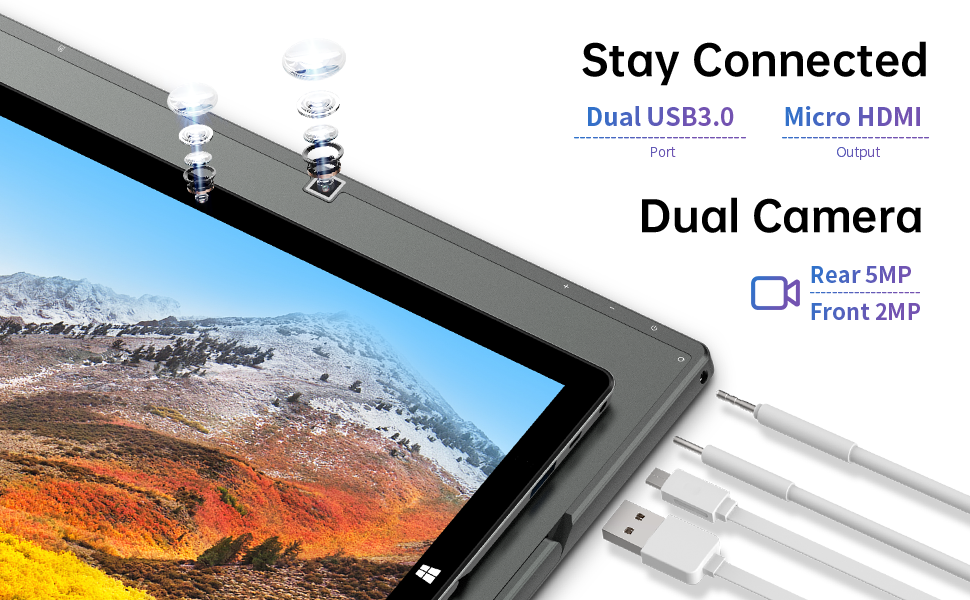
Сүрөт: каптал view of the TECLAST X11 tablet highlighting the USB 3.0 port, Micro HDMI output, and front/rear cameras.

Сүрөт: деталдуу view of the TECLAST X11's side ports, including USB 3.0, Mini-HDMI, DC power input, and headphone jack.
4. Орнотуу
4.1 Алгачкы заряддоо
Before first use, fully charge your TECLAST X11 tablet. Connect the provided power adapter to the DC port on the device and plug it into a power outlet. The charging indicator will illuminate.
4.2 Күйгүзүү/өчүрүү
- Күйгүзүү үчүн: Экран күйгүчө кубат баскычын басып, кармап туруңуз.
- Өчүрүү үчүн: Press and hold the Power button, then select "Shut down" from the on-screen options. Alternatively, go to Start Menu > Power > Shut down.
- Уйку режими: Түзмөктү уйку режимине өткөрүү же ойготуу үчүн Кубат баскычын кыскача басыңыз.
4.3 Windowsту баштапкы орнотуу
Upon first power-on, follow the on-screen instructions to complete the Windows 10 setup process. This includes selecting your region, language, connecting to a Wi-Fi network, and creating a user account.
5. Иштөө нускамалары
5.1 Режимдердин ортосунда которулуу
The TECLAST X11 is designed for flexibility, allowing you to switch between tablet and laptop modes.
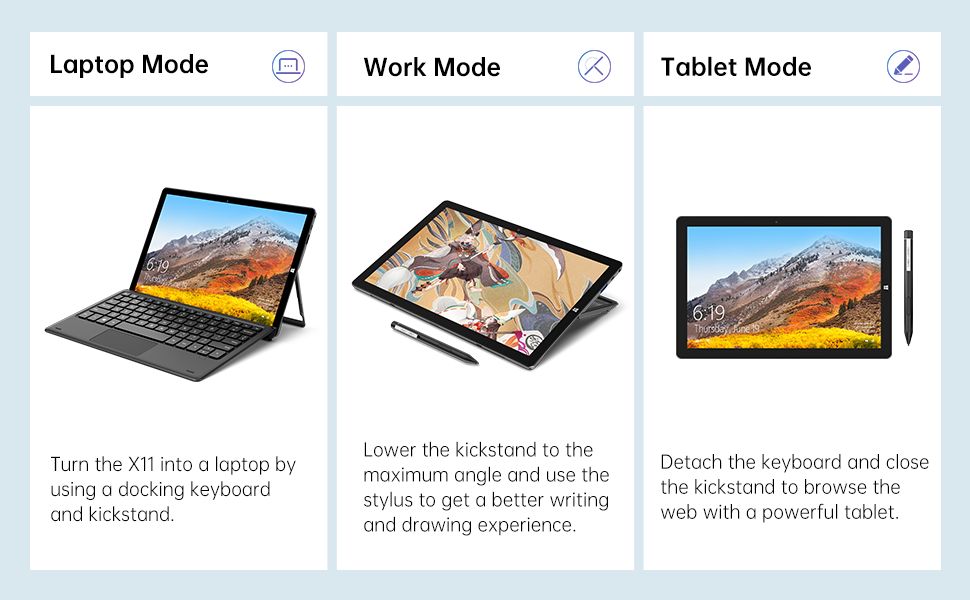
Image: The TECLAST X11 in laptop mode with the keyboard attached and kickstand deployed.
Ноутбук режими: Attach the magnetic docking keyboard and deploy the integrated kickstand. The device will automatically detect the keyboard and switch to laptop interface.

Image: A user holding the TECLAST X11 in tablet mode, interacting with the touchscreen.
Планшет режими: Detach the keyboard. The device will automatically switch to tablet mode, optimizing the interface for touch input.

Сүрөт: Арткы view of the TECLAST X11 showing the adjustable kickstand extended.
Колдонуу: The integrated U-shaped kickstand can be adjusted from 0° to 145° for comfortable viewing or typing angles.
5.2 Сенсордук экранды колдонуу
The 10.1-inch IPS display supports 10-point multi-touch. Use standard touch gestures for navigation, zooming, and interaction with applications.
5.3 Тышкы байланыш
- USB 3.0: Connect external devices such as USB drives, mice, or printers.
- Mini-HDMI: Чоңураак дисплей үчүн тышкы мониторго же телевизорго туташыңыз.
- Bluetooth 4.2: Pair with Bluetooth-enabled accessories like headphones or speakers.
- Wi-Fi: Connect to wireless networks for internet access. Supports 2.4G and 5G bands.
5.4 Видео көрсөтүү
Video: An official TECLAST video demonstrating the features and versatility of the X11 Windows tablet with its detachable keyboard and various usage scenarios.
6. Техникалык тейлөө
6.1 Аппаратты тазалоо
- Экранды жана сырткы беттерди тазалоо үчүн жумшак, түксүз чүпүрөктү колдонуңуз.
- өжөр белгилери үчүн, бир аз гampчүпүрөктү суу же экранга коопсуз тазалоо эритмеси менен жабыңыз.
- Катуу химиялык заттарды, абразивдүү материалдарды же ашыкча нымдуулукту колдонуудан алыс болуңуз.
6.2 Батареяга кам көрүү
- Батареянын иштөө мөөнөтүн узартуу үчүн, өтө жогорку температурадан алыс болуңуз.
- Аппаратты узак убакытка толук кубатталган же кубаты бүткөн бойдон калтырбаңыз.
- Түпнуска же тастыкталган шайкеш кубаттагычты гана колдонуңуз.
6.3 Программалык камсыздоо жаңыртуулары
Regularly check for and install Windows updates to ensure optimal performance, security, and access to the latest features. Go to Start Menu > Settings > Update & Security > Windows Update.
7. Кыйынчылыктарды
| Маселе | Мүмкүн чечим |
|---|---|
| Түзмөк күйбөйт | Ensure the device is charged. Connect the power adapter and try again. If unresponsive, press and hold the Power button for 10-15 seconds to perform a hard reset. |
| Wi-Fi туташуу маселелери | Check if Wi-Fi is enabled in Windows settings. Restart your router and the tablet. Ensure you are within range of the Wi-Fi signal. |
| Баскычтоп жооп бербей жатат | Ensure the keyboard is securely attached to the magnetic docking port. Restart the tablet. Verify that the keyboard was purchased separately and is compatible. |
| Жай аткаруу | Close unnecessary applications. Check for Windows updates. Ensure sufficient free storage space. Run a disk cleanup. |
| Screen rotation not working | Check if auto-rotate is enabled in Windows Action Center (swipe in from the right edge of the screen or click the icon in the taskbar). |
8. Техникалык шарттар
| Өзгөчөлүк | Деталь |
|---|---|
| Модель аты | X11 2-in-1 Tablet |
| Screen Size | 10.1 дюйм |
| Screen Resolution | 1920 x 1200 пиксел (FHD IPS) |
| Процессор | Intel Gemini Lake Reflash N4020 (1.1GHz - 2.8GHz) |
| RAM | 6 ГБ DDR4 SDRAM |
| Катуу диск | 128 GB eMMC (expandable up to 256GB via TF card) |
| Графикалык карта | Интеграцияланган Intel UHD Graphics 600 |
| Операция системасы | Windows 10 Home |
| Зымсыз түрү | Bluetooth 4.2, Dual-band WiFi (2.4G + 5G) |
| Арткы Webcam Resolution | 5 депутат |
| Фронт Webcam Resolution | 2 депутат |
| Порттар | USB 3.0, Mini-HDMI, Headphone Jack, DC Port |
| Элемент Салмагы | 2.31 фунт (болжол менен 1.05 кг) |
| Батареялар | 1 Литий Полимердик батарейка (кошулган) |
9. Кепилдик жана колдоо
TECLAST provides a 12 айлык кепилдик кызматы for the X11 2-in-1 Laptop/Tablet. If you encounter any issues or have questions regarding your device, please contact TECLAST customer support. Refer to the contact information provided with your product packaging or visit the official TECLAST webколдоо чоо-жайы үчүн сайт.


