1. Киришүү
This manual provides detailed instructions for the setup, operation, and maintenance of your ITECH Fusion 2 S Smartwatch and accompanying Wireless Headphones. The ITECH Fusion 2 S is designed to help you monitor your health and fitness goals, offering features such as heart rate tracking, step counting, sleep monitoring, and multi-sport modes. The included wireless headphones provide an integrated audio experience.
2. Пакеттин мазмуну
Пакетиңизде бардык буюмдар бар экенин текшериңиз:
- ITECH Fusion 2 S Smartwatch
- Зымсыз кулакчындар
- USB Charging Cable (for smartwatch)
- USB Charging Cable (for headphones)
- Колдонуучунун Колдонмосу (бул документ)

Image: The ITECH Fusion 2 S Smartwatch and Wireless Headphones displayed within their retail packaging.
3. Түзмөк бүттүview
3.1. ITECH Fusion 2 S Smartwatch

Image: The ITECH Fusion 2 S Smartwatch with a grey camouflage band shown alongside the matching wireless headphones.
The smartwatch features a touch screen display, a side button for navigation, and sensors on the rear for health monitoring. The display shows time, date, activity data, and notifications.

Image: A close-up of the ITECH Fusion 2 S Smartwatch display, highlighting features such as heart rate monitor, apps and notifications, multi-sports modes, water resistance, calorie tracker, music remote, pedometer, sleep monitor, hydration reminder, and extended 14-day battery life.
3.2. Wireless Headphones
The wireless headphones are over-ear style with cushioned earcups and an adjustable headband. Controls for audio playback and calls are located on the earcup.

Сүрөт: бир тарап view of the ITECH Wireless Headphones, illustrating features like powerful sound quality, convenient controls, comfort for hours, and a go-anywhere design.

Сүрөт: деталдуу view of the ITECH Wireless Headphones, emphasizing noise isolating fit, built-in microphone, Bluetooth wireless technology, and up to 8 hours of playback.

Image: A diagram of the ITECH Wireless Headphones highlighting the flexible headband, comfortable ear cushion, foldable design, and convenient controls, along with key technical specifications.
4. Орнотуу
4.1. Аспаптарыңызды кубаттоо
Before first use, fully charge both your smartwatch and wireless headphones.
- Акылдуу саат: Connect the USB charging cable to the charging port on the back of the smartwatch and to a USB power source. The battery icon on the screen will indicate charging status.
- Wireless Headphones: Connect the USB charging cable to the charging port on the headphones and to a USB power source. An indicator light will show charging status and turn off when fully charged.
4.2. Күйгүзүү/өчүрүү
- Акылдуу саат: To power on, press and hold the side button until the screen illuminates. To power off, navigate to the 'Settings' menu on the smartwatch, then select 'Power Off'.
- Wireless Headphones: To power on, press and hold the power button until the indicator light flashes. To power off, press and hold the power button again until the indicator light turns off.
4.3. Pairing the Smartwatch with Your Smartphone
The ITECH Fusion 2 S Smartwatch is compatible with both iPhone and Android devices.
- жүктөп алыңыз iTECH Wearables Apple App Store же Google Play дүкөнүнөн колдонмо.
- Смартфонуңузда Bluetooth иштетилгенин текшериңиз.
- Open the iTECH Wearables app and follow the on-screen instructions to create an account and pair your smartwatch.
- The app will guide you through connecting the smartwatch via Bluetooth. Confirm the pairing request on both your phone and smartwatch.
4.4. Pairing the Wireless Headphones
- Наушниктердин өчүрүлгөнүн текшериңиз.
- Жупташтыруу режимин көрсөткөн индикатор жарыгы тез күйүп-өчкөнгө чейин кубат баскычын басып, кармап туруңуз.
- On your smartphone or other Bluetooth-enabled device, go to Bluetooth settings and search for available devices.
- Select "ITECH Headphones" (or similar name) from the list to connect. The indicator light will change to a steady blue when successfully paired.
5. Акылдуу саатты иштетүү
5.1. Навигация
- Сенсордук экран: Менюларды жана функцияларды чабыттоо үчүн солго/оңго, өйдө/ылдый сүрүңүз. Тандоо үчүн таптаңыз.
- Каптал баскычы: Үй экранына кайтуу же аппаратты ойготуу үчүн басыңыз.
5.2. Watch Faces
Customize your smartwatch display by changing watch faces. On the home screen, press and hold the display, then swipe left or right to browse available watch faces. Tap to select your preferred design.
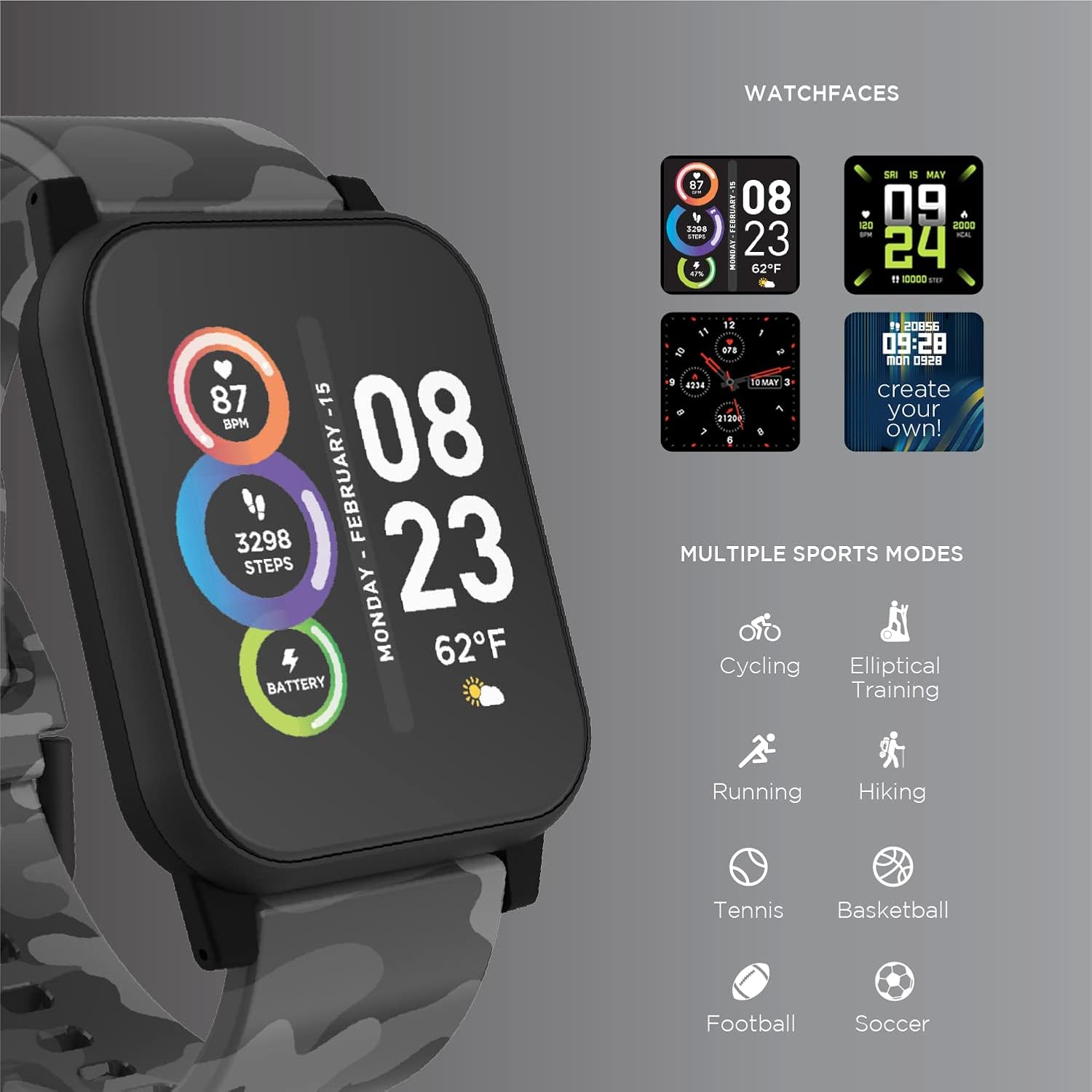
Image: The ITECH Fusion 2 S Smartwatch display showing various customizable watch faces and icons representing multiple sports modes including cycling, elliptical training, running, hiking, tennis, basketball, football, and soccer.
5.3. Негизги өзгөчөлүктөр
- Жүрөктүн кагышын көзөмөлдөөчү: Access the heart rate feature on your smartwatch to measure your heart rate using the built-in optical sensor. Ensure the watch is snug on your wrist for accurate readings.
- Кадам эсептегич (кадам өлчөгүч): The smartwatch automatically tracks your daily steps, distance, and calories burned. View your progress on the device or in the iTECH Wearables app.
- Уйку монитору: Wear your smartwatch to bed to track your sleep patterns, including light and deep sleep stages. Data is synchronized with the app for detailed analysis.
- Көп спорт режимдери: Select from various sports modes (e.g., running, cycling, hiking) to track specific workout data, including duration, distance, and calories.
- Билдирүү эскертмелери: Receive notifications for calls, texts, and app alerts directly on your smartwatch when connected to your smartphone.
- Калорияны көзөмөлдөөчү: Monitors calories burned throughout the day based on your activity level.
- Гидрация жөнүндө эскертүү: Set reminders to drink water at regular intervals through the app.
- Музыкалык пульт: Control music playback on your smartphone directly from your smartwatch (play, pause, skip tracks).
5.4. Колдонмолорду интеграциялоо
комплекстүү үчүн view of your health and fitness data, regularly sync your smartwatch with the iTECH Wearables app. The app allows you to set goals, view historical data, customize settings, and manage notifications.
6. Operating the Wireless Headphones
6.1. Башкаруу
The headphones feature intuitive controls for media playback and call management:
- Кубат баскычы: Күйгүзүү/өчүрүү үчүн басып туруңуз. Ойнотуу/тындыруу үчүн кыска басыңыз.
- Үн баскычтары: Үндү катуулатуу үчүн "+", ал эми үндү азайтуу үчүн "-" баскычын басыңыз.
- Track Control: Press and hold '+' for next track, '-' for previous track.
- Чалууларды башкаруу: Short press power button to answer/end calls. Press and hold to reject calls.
6.2. Аудио өзгөчөлүктөрү
- Күчтүү үн сапаты: Designed to deliver clear and rich audio.
- Noise Isolating Fit: The over-ear design helps to reduce external noise for an immersive listening experience.
- Камтылган микрофон: Үнсүз чалууну иштетет.
6.3. Батареянын иштөө мөөнөтү
The wireless headphones provide up to 8 hours of playback on a single charge, depending on usage and volume levels.

Image: A person wearing the ITECH Fusion 2 S Smartwatch on their wrist and the matching wireless headphones, demonstrating typical use.
7. Техникалык тейлөө
7.1. Тазалоо
- Акылдуу саат: Wipe the screen and band with a soft, damp, мамыксыз кездеме. Катуу химиялык заттардан же абразивдүү материалдардан алыс болуңуз.
- Наушник: Кулакчындарды жана баш боону жумшак, кургак чүпүрөк менен акырын сүртүңүз. Сууга салбаңыз.
7.2. Water Resistance (Smartwatch)
The ITECH Fusion 2 S Smartwatch is IP67 water resistant. This means it is protected against dust and can withstand immersion in water up to 1 meter for up to 30 minutes. It is suitable for daily use and light splashes, but not recommended for swimming, showering, or prolonged water immersion.
7.3. Сактоо
Store your devices in a cool, dry place away from direct sunlight and extreme temperatures when not in use.
8. Кыйынчылыктарды
If you encounter issues with your ITECH Fusion 2 S devices, please refer to the following common solutions:
- Түзмөк күйбөй жатат: Ensure the device is fully charged. Try connecting it to a different USB power source.
- Smartwatch not pairing with phone: Ensure Bluetooth is enabled on your phone and the smartwatch is within range. Restart both devices and try pairing again through the iTECH Wearables app.
- Кулакчындар жупташкан жок: Ensure headphones are in pairing mode (rapidly flashing indicator light). Check your device's Bluetooth settings and try reconnecting.
- Inaccurate heart rate/step readings: Акылдуу сааттын билегиңизге бекем тагылганын, өтө тар же өтө кенен эмес экенин текшериңиз. Сааттын арткы бетиндеги сенсорду тазалаңыз.
- Эскертмелер көрүнбөй жатат: Check app permissions on your smartphone to ensure the iTECH Wearables app has access to notifications. Verify notification settings within the app.
- Audio issues with headphones: Ensure headphones are fully charged and properly paired. Check volume levels on both the headphones and the connected device.
If problems persist, consider performing a factory reset (refer to the smartwatch settings menu or contact customer support for headphones). For further assistance, please contact Itech customer support.
9. Техникалык шарттар
| Өзгөчөлүк | Деталь |
|---|---|
| Продукциянын өлчөмдөрү | 22.86 x 5.08 x 22.86 см; 621 г |
| Элемент моделинин номери | 900366B-40-G57 |
| Операция системасы | Android (Compatible with iPhone and Android) |
| Өзгөчөлүктөр | Heart Rate Monitor, Step Counter, Sleep Monitor, Message Notifications, Multi-Sport Modes |
| Байланыш технологиясы | USB |
| Зымсыз байланыш стандарты | Bluetooth |
| Батарея клеткасынын курамы | Литий ион |
| GPS | Туура |
| Smartwatch Shape | Square |
| Smartwatch Screen Size | 1.3 дюйм |
| Бренд | ITech |
| Модель аты | Fusion 2 Bundle |
| Суу каршылык | IP67 |
| Headphones Playback Time | 8 саатка чейин |
| Headphones Driver Diameter | 40мм |
| Headphones Connection Type | Bluetooth® 5.0 |
| Наушниктердин импедансы | 32 Ом ±15% |
| Кулакчындар Frequency Response | 20Гц - 20КГц |
10. Кепилдик жана колдоо
Your ITECH Fusion 2 S Smartwatch and Wireless Headphones are covered by a manufacturer's warranty. Please refer to the warranty card included in your package or visit the official Itech webдеталдуу кепилдик шарттары жана шарттары үчүн сайт.
For technical support, troubleshooting assistance, or warranty claims, please contact Itech customer service through their official webсайт же продукт документациясында көрсөтүлгөн байланыш маалыматы.