
1. Киришүү
Сатып алганыңыз үчүн рахматasing the Soundstream VM-430HB 4.3" 1-DIN Mechless Headunit. This manual provides essential information for the proper installation, operation, and maintenance of your new car stereo. Please read this manual thoroughly before use to ensure optimal performance and to prevent damage.
2. Коопсуздук боюнча маанилүү маалымат
- Орнотуу: Ensure professional installation or follow wiring diagrams carefully to avoid electrical shorts or damage. Disconnect the vehicle's battery before installation.
- Электр камсыздоо: This unit is designed for a 12V DC negative ground electrical system.
- Операция: Агрегатты айдоодон алаксыта тургандай иштетпеңиз. Ар дайым жол коопсуздугун биринчи орунга коюу.
- Тазалоо: Тазалоо үчүн жумшак, кургак чүпүрөктү колдонуңуз. Абразивдүү тазалагычтардан же эриткичтерден качыңыз.
- Температура: Түзмөктү узак убакыт бою өтө жогорку температурага же түз күн нуруна дуушар кылбаңыз.
3. Пакеттин мазмуну
Пакетте бардык буюмдар бар экенин текшериңиз:
- Soundstream VM-430HB Headunit
- Wiring Harnesses (Power/Speaker, RCA)
- Монтаждык жең
- Алыстан башкаруу
- Колдонуучунун Колдонмосу (бул документ)
4. Продукт бүтүп калдыview
4.1 Алдыңкы панелдин башкаруу элементтери

This image displays the front panel of the Soundstream VM-430HB headunit, featuring the 4.3-inch display, a central rotary control knob, USB and auxiliary input ports, and various function buttons for menu navigation and media control.
- 4.3" Display: Shows current source, track information, menu options, and video output.
- Rotary Control Knob: Үндү тууралайт, менюларды карап чыгат жана тандоолорду ырастайт.
- USB порт: Медиа ойнотуу үчүн USB сактагыч түзүлүштөрдү туташтыруу үчүн.
- Микро SD карта слоту: For playing media from Micro SD cards (located behind the panel or on the side).
- AUX киргизүү: Тышкы аудио түзүлүштөрдү туташтыруу үчүн 3.5 мм уяча.
- Menu/Mode Buttons: Access various settings and switch between input sources.
4.2 Арткы панелдин туташуулары
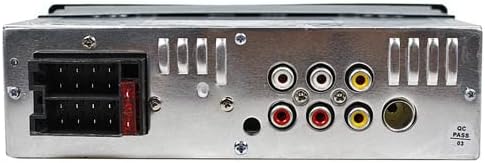
арткы view of the headunit shows the main power and speaker wiring harness connector on the left, along with multiple RCA output jacks for audio and video connections, and a fuse.
- Main Wiring Harness Connector: Connects to the vehicle's power, ground, and speaker wires.
- RCA Audio Outputs: Тышкы туташтыруу үчүн ampкөтөргүчтөр (алдыңкы сол/оң, арткы сол/оң, сабвуфер).
- RCA Video Output: Тышкы мониторго туташуу үчүн.
- RCA Video Input: For connecting a reverse camera or other video source.
- Антенна киргизүү: For connecting the vehicle's radio antenna.
5. Орнотуу боюнча колдонмо
Proper installation is crucial for the performance and longevity of your headunit. If you are unsure about any steps, consult a professional installer.
5.1 Mounting the Headunit
- Унаанын аккумуляторунун терс терминалын ажыратыңыз.
- Унааңыздын учурдагы стереосун башкаруу панелинен алып салыңыз.
- Insert the provided mounting sleeve into the dashboard opening and bend the tabs to secure it.
- Slide the headunit into the mounting sleeve until it locks into place.
5.2 Зымдарды туташтыруу
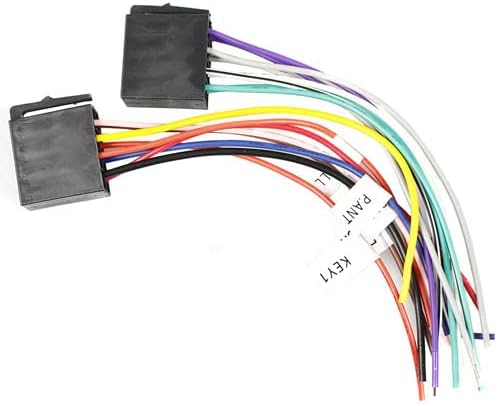
This image illustrates the two main wiring harnesses provided with the headunit. Each wire is color-coded and labeled for specific functions such as power, ground, speaker outputs, and accessory connections, facilitating correct installation.
- Power/Ground: Connect the yellow wire (constant 12V) to the vehicle's constant 12V supply, the red wire (accessory 12V) to the ignition switch, and the black wire to a good chassis ground.
- Баяндамачылар: Connect the speaker wires (e.g., white/white-black for front left, gray/gray-black for front right, green/green-black for rear left, purple/purple-black for rear right) to the corresponding vehicle speaker wires. Ensure correct polarity.
- Антенна: Connect the vehicle's antenna cable to the antenna input on the headunit.
- RCA байланыштары: Эгерде тышкы колдонулса amplifiers or monitors, connect the appropriate RCA cables.
- Арткы камера: Connect the reverse camera video output to the dedicated video input on the headunit. Connect the reverse trigger wire to the vehicle's reverse light circuit.
Бардык байланыштар жасалгандан кийин, унаанын аккумуляторун кайра туташтырыңыз жана блокту сынаңыз.
6. Негизги операция

The included infrared remote control features buttons for power, volume adjustment, source selection, track navigation, mute, equalizer settings, and other functions, allowing convenient operation from a distance.
6.1 Күйгүзүү/өчүрүү
- басыңыз КҮЧ аппаратты күйгүзүү же өчүрүү үчүн алдыңкы панелдеги баскычты же пультту басыңыз.
6.2 Үндү башкаруу
- айлантыңыз VOLUME алдыңкы панелдеги баскычты колдонуңуз же VOL + / VOL- buttons on the remote control to adjust the audio level.
6.3 Булакты тандоо
- басыңыз РЕЖИМ button on the front panel or remote control to cycle through available sources (Radio, USB, Micro SD, AUX, Bluetooth, PhoneLink).
7. Өркүндөтүлгөн функциялар
7.1 Bluetooth байланышы

This image emphasizes the headunit's Bluetooth 4.0 capabilities for hands-free calling and audio streaming, as well as its versatile media playback options via USB, Micro SD, and auxiliary inputs.
- Жупташтыруу: Select the Bluetooth source. On your mobile device, search for available Bluetooth devices and select "VM-430HB". Enter "0000" if a PIN is required.
- Hands Free Чалуу: Answer, reject, or end calls directly from the headunit's screen or remote control.
- Аудио агым: Play music from your paired device wirelessly. Use the headunit controls for track navigation.
7.2 Android PhoneLink (2-Way Device Screen Mirroring)

This image highlights the 2-Way Android PhoneLink feature, enabling screen mirroring and control of compatible Android devices directly from the headunit's display.
- Connect your Android smartphone to the headunit via USB.
- Экранды чагылдырууну иштетүү үчүн экрандагы көрсөтмөлөрдү аткарыңыз.
- Control your phone's interface directly from the headunit's touchscreen.
7.3 Media Playback (USB/Micro SD/Aux)
- USB/микро SD: Insert a USB drive or Micro SD card into the respective slot. The unit will automatically switch to the USB/SD source and begin playback.
- AUX киргизүү: Connect an external audio device using a 3.5mm audio cable. Select the AUX source to listen to audio from the connected device.
7.4 RGB LED Illuminated Keys & Accents
- Access the system settings menu to customize the color of the illuminated keys and accents. Choose from 7 available RGB colors to match your vehicle's interior or personal preference.
8. Техникалык тейлөө
- Дисплейди тазалоо: Use a soft, lint-free cloth to gently wipe the display. For stubborn smudges, slightly dampчүпүрөккө суу же электроника үчүн арналган экран тазалагыч.
- Жалпы тазалоо: Wipe the unit's exterior with a dry, soft cloth. Avoid using harsh chemicals, solvents, or abrasive cleaners.
- Сактагычты алмаштыруу: If the unit does not power on, check the fuse located on the rear panel. Replace it with a fuse of the same amperage rating (e.g., 10A).
9. Кыйынчылыктарды
Жалпы маселелер жана аларды чечүү үчүн төмөнкү таблицага кайрылыңыз.
| Көйгөй | Мүмкүн себеп | Чечим |
|---|---|---|
| Күч жок | Blown fuse; incorrect wiring; loose connection | Check and replace fuse; verify power and ground connections; ensure all wires are securely connected. |
| Үн жок | Үн өтө төмөн; үнсүз иштетилген; туура эмес динамик зымдары; ampкөтөрүүчү маселелер | Increase volume; deactivate mute; check speaker connections and polarity; verify external ampкөтөргүч күйгүзүлгөн. |
| Bluetooth туташпай жатат | Device not in pairing mode; incorrect PIN; interference | Ensure Bluetooth is enabled on both devices and in pairing mode; re-enter PIN; move closer to the unit. |
| USB/SD ойнобой жатат | Колдоого алынбайт file format; corrupted media; improper connection | Медианы камсыз кылуу files are in supported formats; try a different USB/SD card; ensure device is fully inserted. |
| Экранды чагылдыруу иштебей жатат | Incompatible phone; incorrect USB connection; app not installed | Verify phone compatibility; ensure USB debugging is enabled on Android phone; check for required apps. |
10. Техникалык шарттар
| Өзгөчөлүк | Спецификация |
|---|---|
| Модель номери | VM-430HB |
| Дисплей өлчөмү | 4.3 дюйм |
| Шасси түрү | 1-DIN ISO Mechless |
| Bluetooth версиясы | 4.0 |
| Байланыш | USB, Micro SD, Aux, Bluetooth, RCA |
| PhoneLink | 2-Way Android Device Screen Mirroring |
| Жарыктандыруу | 7 Color RGB LED |
| Аудио чыгаруу режими | Стерео |
| Көлөмдүү үн каналынын конфигурациясы | 2.0 |
| Power талап | 12V DC Negative Ground |
11. Кепилдик жана Кардарларды колдоо
Soundstream products are designed for reliability and performance. For specific warranty details, please refer to the warranty card included with your product or visit the official Soundstream website. For technical assistance or customer support, please contact Soundstream customer service through their official channels.
Кепилдик дооматтары үчүн сатып алганыңыздын далилин сактап коюңуз.


