1. Киришүү
This manual provides detailed instructions for the installation, operation, and maintenance of your Antec NX700 Mid-Tower ATX Gaming Case. Please read this manual thoroughly before beginning assembly to ensure proper setup and safe usage.

Figure 1: Antec NX700 Mid-Tower ATX Gaming Case overview.
Негизги өзгөчөлүктөрү
- 3D Geometric Mesh Front Panel: Designed for optimal airflow and aesthetic appeal.
- Included ARGB Fans: Comes with two 185mm ARGB fans in the front and one 120mm ARGB fan in the rear for effective cooling and customizable lighting.
- Температуралуу айнек каптал панели: A 4mm thick tempered glass side panel provides a clear view сиздин ички компоненттериңиздин.
- Extensive Radiator Support: Supports up to a 360mm radiator for advanced liquid cooling solutions.
- Versatile I/O Panel: Features Power, LED control button, Reset, 2 x USB 3.0 ports, and MIC/HD-AUDIO jacks.
- Motherboard шайкештиги: ATX, Micro-ATX жана Mini-ITX энелик платаларын колдойт.

Figure 2: Close-up of the 3D geometric mesh front panel, designed for enhanced airflow.
2. Орнотуу жана орнотуу
Follow these steps to install your components into the Antec NX700 case.
2.1 Included Fans Installation
The case comes pre-installed with two 185mm ARGB fans at the front and one 120mm ARGB fan at the rear. Ensure these fans are properly connected to your motherboard or a fan controller for power and ARGB functionality.
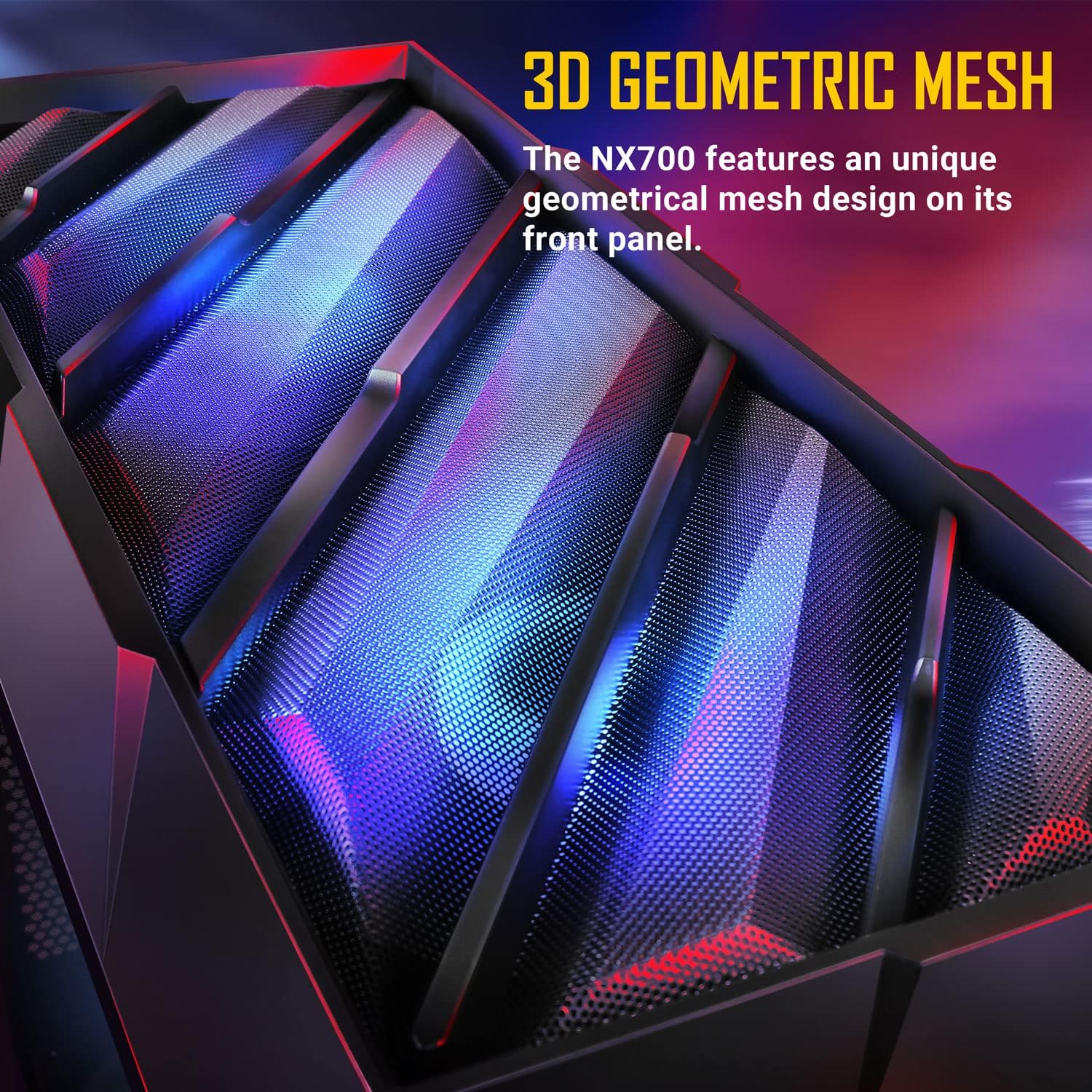
Figure 3: Illustration of the included 2 x 185mm ARGB front fans and 1 x 120mm ARGB rear fan.
2.2 Муздатуу системасын конфигурациялоо
The NX700 supports various fan and radiator configurations to optimize cooling performance.
- Алдыңкы: Supports 3 x 120mm, 3 x 140mm, or 2 x 185mm fans. Radiator support up to 360mm.
- Жогорку: Supports 2 x 120mm or 2 x 140mm fans. Radiator support up to 280mm.
- Арткы: Supports 1 x 120mm or 1 x 140mm fan. Radiator support up to 140mm.
- Кубат менен камсыздоо капкагы: 2 x 120 мм желдеткичтерди колдойт.

Figure 4: Diagram illustrating fan and radiator mounting options within the case.

Figure 5: Illustration showing space for a 360mm radiator installation at the front, even with 185mm fans.
2.3 Компонентти орнотуу
The NX700 offers ample space for various components. Ensure all cables are routed neatly for optimal airflow and aesthetics.
- Motherboard: Supports ATX motherboards (up to 305mm x 275mm).
- CPU муздаткычы: Maximum height of 170mm.
- Графикалык карта (GPU): Maximum length of 340mm.
- Кубат менен камсыздоо (PSU): Supports PSUs up to 200mm (with HDD) or 365mm (without HDD).
- Сактагыч: 2 x 3.5" HDD / 2.5" SSD (convertible) and 4 x 2.5" SSDs.
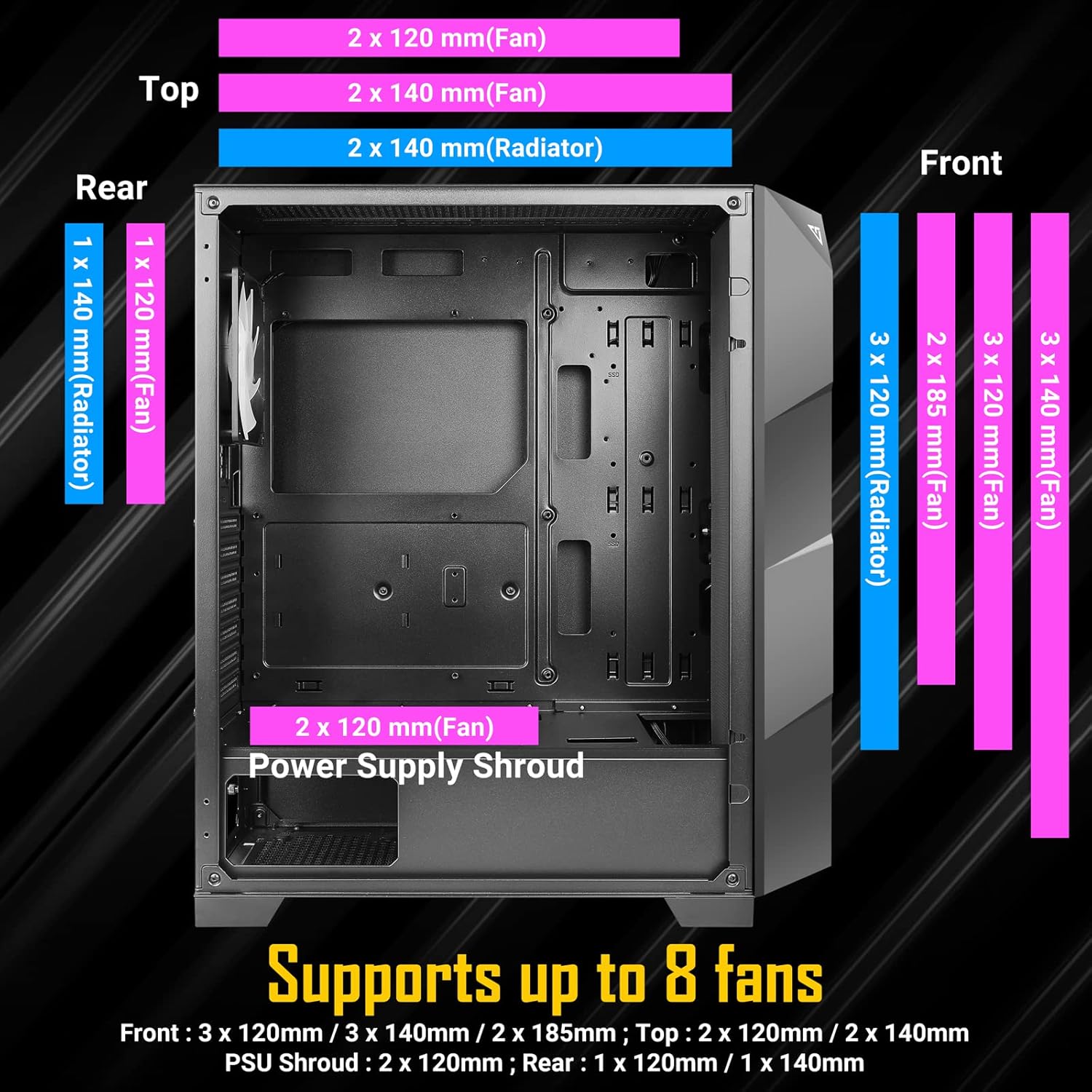
Figure 6: Internal layout showing maximum dimensions for CPU cooler, GPU, and motherboard support.

7-сүрөт: Ички view of the NX700 case with various components installed, demonstrating space and layout.
2.4 Video Guide for Assembly
Watch this official video for a visual guide on the Antec NX700 Mid-Tower ATX Gaming Case features and assembly process.
Видео 1: Расмий бүттүview and assembly guide for the Antec NX700 Mid-Tower ATX Gaming Case.
3. Иштөө нускамалары
3.1 I/O панелинин функциялары
The top I/O panel provides convenient access to essential controls and ports.
- Кубат баскычы: Системаны күйгүзөт же өчүрөт.
- LED башкаруу баскычы: Cycles through various ARGB lighting modes for the included fans.
- Калыбына келтирүү баскычы: Системаны кайра иштетет.
- USB 3.0 порттору (x2): жогорку ылдамдыктагы маалыматтарды берүү үчүн.
- MIC/HD-AUDIO Jacks: Кулакчындарды жана микрофондорду туташтыруу үчүн.

8-сүрөт: Детальдуу view of the top I/O panel with power, LED control, USB 3.0, and audio ports.
3.2 ARGB Fan Control
The included ARGB fans can be controlled either via the dedicated LED button on the I/O panel or synchronized with your motherboard's ARGB software.
- Using the LED Control Button: Press the LED button on the I/O panel to cycle through pre-programmed lighting effects.
- Энелик платаны синхрондоштуруу: To sync with your motherboard, connect the ARGB cables from the fans to a compatible 3-pin 5V ARGB header on your motherboard. Use your motherboard's software (e.g., ASUS Aura Sync, MSI Mystic Light, Gigabyte RGB Fusion) to control the lighting.

Figure 9: The Antec NX700 case showcasing its vibrant ARGB lighting capabilities.
4. Техникалык тейлөө
Regular maintenance helps ensure the longevity and optimal performance of your Antec NX700 case.
- Чаң чыпкалары: Periodically clean the dust filters located at the top and bottom of the case. Gently remove them and use compressed air or a soft brush to clear accumulated dust.
- Case Exterior: Сырткы беттерин жумшак менен сүртүңүз, гamp кездеме. Абразивдүү тазалагычтардан же эриткичтерден качыңыз.
- Температуралуу айнек панели: Clean the tempered glass panel with a microfiber cloth and a glass cleaner designed for electronics. Avoid excessive force or harsh chemicals.
- Ички тазалоо: Every few months, open the case and use compressed air to remove dust from internal components and fan blades. Ensure the system is powered off and unplugged before cleaning.
5. Кыйынчылыктарды
This section addresses common issues you might encounter with your Antec NX700 case.
5.1 Fans Not Spinning or Lighting Up
- Кубат туташуу: Verify that all fan power cables are securely connected to the motherboard fan headers or a fan controller.
- ARGB туташуусу: Ensure ARGB cables are correctly connected to a 3-pin 5V ARGB header on the motherboard or the case's LED controller. Incorrect connection (e.g., to a 4-pin 12V RGB header) can damage the LEDs.
- LED Button Functionality: If using the case's LED button, ensure it is functioning. Try cycling through modes.
- Энелик плата программасы: If using motherboard sync, check your motherboard's ARGB software for fan control and lighting settings.
- Molex Connector: Some fan controllers or hubs may require a Molex connector for power. Ensure this is properly connected to your power supply.
5.2 Системага кубат жок
- PSU Connection: Ensure the power supply is properly installed and connected to the motherboard and all components. Check that the PSU switch is in the 'ON' position.
- Алдыңкы панелдин туташтыргычтары: Verify that the front panel power switch cable is correctly connected to the motherboard's front panel header. Refer to your motherboard manual for the correct pinout.
5.3 Missing Motherboard Mounting Stand-offs
While the case includes standard stand-offs, some motherboard layouts (e.g., certain ATX boards) may require additional stand-offs for full support. Ensure all necessary stand-offs are installed to prevent motherboard flex and potential damage.
6. Техникалык шарттар
Detailed technical specifications for the Antec NX700 Mid-Tower ATX Gaming Case.
| Өзгөчөлүк | Спецификация |
|---|---|
| Бренд | Antec |
| Сериялар | NX700 |
| Модель аты | NX700 |
| Элемент моделинин номери | 0-761345-81072-2 |
| Иштин түрү | Ара Tower |
| Motherboard шайкештиги | ATX, Micro ATX, Mini ITX |
| Материал | SPCC + Plastic, Tempered Glass |
| Продукциянын өлчөмдөрү (LxWxH) | 17.32 x 8.66 x 19.37 дюйм (440 x 220 x 492 мм) |
| Элемент Салмагы | 15.84 фунт (7.2 килограмм) |
| Камтылган күйөрмандар | 2 x 185 мм ARGB (алдыңкы), 1 x 120 мм ARGB (арткы) |
| Алдыңкы желдеткичти колдоо | 3 x 120 мм / 3 x 140 мм / 2 x 185 мм |
| Top Fan Support | 2 х 120mm / 2 x 140mm |
| Rear Fan Support | 1 х 120mm / 1 x 140mm |
| PSU Shroud Fan Support | 2 x 120 мм |
| Алдыңкы радиаторду колдоо | 360 мм чейин |
| Жогорку Радиатор колдоо | 280 мм чейин |
| Арткы радиатор колдоо | 140 мм чейин |
| CPU муздаткычтын максималдуу бийиктиги | 170мм |
| Максималдуу GPU узундугу | 340мм |
| Максималдуу PSU узундугу | 200mm (with HDD) / 365mm (without HDD) |
| Drive Bays | 2 x 3.5" HDD / 2.5" SSD (convertible), 4 x 2.5" SSD |
| I/O панели | Power, LED Control, Reset, 2 x USB 3.0, MIC/HD-AUDIO |

Figure 10: Dimensions of the Antec NX700 Mid-Tower ATX Gaming Case.

11-сүрөт: Арткы view of the Antec NX700, showing expansion slots and fan mount.
7. Кепилдик жана колдоо
For warranty information, technical support, or to inquire about replacement parts, please visit the official Antec website or contact Antec customer service. Keep your proof of purchase for warranty claims.
Antec расмий Webсайт: www.antec.com


