1. Продукт бүтүп калдыview
The Hubble Nursery Pal Cloud is a smart, Wi-Fi enabled baby monitor designed to help parents stay connected with their baby. It features a 5-inch HD color parent unit viewer and can also be accessed via the HubbleClub app on your smartphone. The system includes digital pan, tilt, and zoom capabilities, a room temperature monitor, two-way talk, preloaded nature sounds, lullabies, bedtime stories, and a 7-color night light with a sleep trainer function.


Негизги өзгөчөлүктөрү:
- Remote Baby Monitor Camera: View live stream from the baby camera on the 5-inch parent unit or via the HubbleClub app on your smartphone.
- Sleep Training: Set time-to-rise and time-to-sleep points, and utilize the 7-color night light and soothing sounds for personalized sleep routines.
- HD Video Monitoring: High-definition video feed with built-in 7-color night light, preloaded lullabies, soothing sounds, bedtime stories, and a room temperature sensor.
- Always Stay Connected: Long-range wireless connectivity up to 1000 ft with the parent unit, or unlimited range via Wi-Fi and the HubbleClub app.
- Кошумча өзгөчөлүктөр: Room Temperature Sensor, High sensitivity Microphone, Digital Pan, Tilt, Zoom, Magnetic Mount, and long rechargeable battery life for the parent unit.
2. Пакеттин мазмуну
Ensure all items are present in your package before proceeding with setup:
- Ата-эне бирдиги
- Бөбөк бирдиги (камера)
- Кубат адаптери x2
- Quick Start Guide

3. Баштоо: Орнотуу боюнча колдонмо
3.1 Ата-эне блогун заряддоо
Before initial use, fully charge the Parent Unit for optimal battery performance. Connect one of the provided power adapters to the Parent Unit's charging port and plug it into a power outlet. The battery indicator on the Parent Unit will show charging status.
3.2 Камераны жайгаштыруу
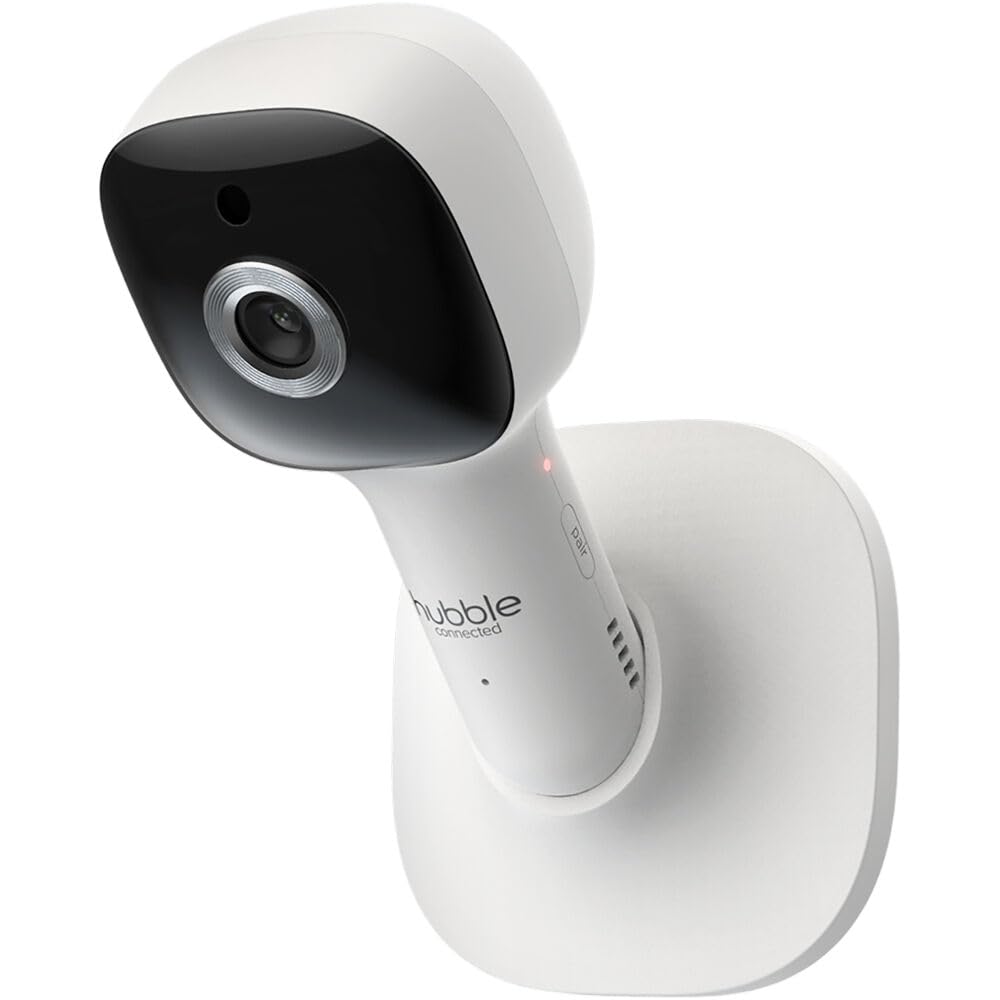
Place the Baby Unit (camera) in a location that provides a clear view of your baby, ensuring it is out of reach of children. The camera can be placed on a flat surface using its magnetic stand or mounted to a wall.
- Столдун үстүнө жайгаштыруу: Ensure the surface is stable and flat.
- Дубалга орнотуу: Use the provided wall mount bracket. Secure the bracket to the wall with appropriate screws, then attach the camera to the bracket. Ensure the camera is securely fastened and positioned for the desired viewбурч.

3.3 Connecting to Wi-Fi and HubbleClub App
Алыскы үчүн viewing and advanced features, connect your Baby Unit to your home Wi-Fi network and set up the HubbleClub app.
- жүктөп алыңыз Өнөктөштөр үчүн HubbleClub App Store (iOS) же Google Play Дүкөнүнөн (Android) колдонмо.
- Каттоо эсебин түзүү же кирүү үчүн колдонмону ачып, экрандагы нускамаларды аткарыңыз.
- Select 'Add Device' and choose your Nursery Pal Cloud monitor.
- Follow the in-app prompts to connect the camera to your Wi-Fi network. This typically involves scanning a QR code generated by the app with the camera.
- Туташкандан кийин, мүмкүн view the live feed and access all smart features from your smartphone.
4. Мониторуңузду иштетүү
4.1 Ата-эне блогунун башкаруу элементтери
The 5-inch parent unit provides direct control over the camera and monitor settings.

- Кубат баскычы: Бирдикти күйгүзүү/өчүрүү үчүн басып туруңуз.
- Меню баскычы: Access settings, lullabies, night light, and other features.
- Чабыттоо баскычтары (өйдө/төмөн/сол/оң): Move through menus and control camera pan/tilt.
- OK баскычы: Тандоолорду ырастаңыз.
- Сүйлөшүү баскычы: Press and hold to use the two-way talk feature.
- Үн баскычтары: Угуу үнүн тууралаңыз.
4.2 Camera Functions (Pan, Tilt, Zoom, Night Vision)
Камера ийкемдүүлүктү сунуштайт viewтандоо параметрлери:
- Digital Pan & Tilt: Use the navigation buttons on the parent unit or the controls in the HubbleClub app to remotely adjust the camera's viewбурч.
- Digital Zoom: Zoom in on your baby for a closer look.
- Инфракызыл түнкү көрүнүш: The camera automatically activates infrared LEDs in low-light conditions, providing a clear black-and-white image of your baby in the dark.
4.3 Эки тараптуу сүйлөшүү
Communicate with your baby or partner in the nursery using the two-way talk feature. Press and hold the Talk button on the parent unit or use the microphone icon in the HubbleClub app to speak. Release the button to listen.
4.4 Бөлмөнүн температурасын көзөмөлдөө
The Baby Unit includes a built-in temperature sensor that displays the room temperature on the Parent Unit and in the HubbleClub app, helping you ensure your baby's comfort.
4.5 Тынчтандыруучу үндөр жана бешик ырлары
Access a selection of preloaded nature sounds, lullabies, and bedtime stories through the parent unit's menu or the HubbleClub app to help soothe your baby to sleep.
4.6 7-Color Night Light and Sleep Trainer
The integrated 7-color night light can be customized to create a calming environment. The sleep trainer function allows you to set visual cues (e.g., light color changes) to help establish consistent sleep and wake-up routines for your child.


4.7 HubbleClub колдонмосунун өзгөчөлүктөрү
The HubbleClub app extends the functionality of your monitor, offering a range of smart features:
- Тирүү жем Viewing: Access the camera's live video feed from anywhere with an internet connection.
- Capture & Download: Take snapshots or record video clips directly from the live feed and save them to your smartphone.
- Activity Notifications: Receive alerts for motion or sound detection in the nursery.
- Sleep Tracking & Insights: Monitor baby's sleep activity and receive personalized insights.
- Parenting Tips: Access expert articles and tips within the app.

5. Кароо жана тейлөө
- Тазалоо: Монитордун жана камеранын беттерин жумшак, кургак чүпүрөк менен тазалаңыз. Абразивдүү тазалоочу каражаттарды же эриткичтерди колдонбоңуз.
- Батареяга кам көрүү: For the Parent Unit's rechargeable battery, avoid extreme temperatures and prolonged periods of non-use. Charge fully before storing for extended periods.
- Сактагыч: If storing the unit for a long time, ensure it is clean, dry, and stored in a cool, dry place away from direct sunlight.
6. Көйгөйлөрдү чечүү боюнча колдонмо
| Көйгөй | Мүмкүн себеп | Чечим |
|---|---|---|
| No power on Parent Unit/Baby Unit | Power adapter not connected or faulty; battery drained. | Ensure power adapters are securely connected to units and power outlets. Charge Parent Unit fully. Try a different outlet. |
| Ата-эне бөлүмүндө сүрөт/үн жок | Units out of range; interference; units not paired. | Move Parent Unit closer to Baby Unit. Reduce interference from other electronic devices. Re-pair units if necessary (refer to Quick Start Guide for pairing instructions). |
| Сүрөттүн сапаты начар | Low light; camera lens dirty; poor Wi-Fi signal (for app viewing). | Ensure adequate lighting or allow night vision to activate. Clean camera lens gently. Improve Wi-Fi signal strength or move camera closer to router. |
| App not connecting to camera | Incorrect Wi-Fi password; camera offline; app outdated. | Verify Wi-Fi password. Ensure camera is powered on and connected to Wi-Fi. Restart camera and router. Update HubbleClub app to the latest version. |
| Эки тараптуу сүйлөшүү иштебейт | Microphone muted; volume too low; button not pressed correctly. | Check volume settings. Ensure the talk button is pressed and held during speaking. |
7. Техникалык шарттар
| Өзгөчөлүк | Спецификация |
|---|---|
| Модель номери | HCSNPCLX |
| Connectivity Protocol | Wi-Fi |
| Ички/тышкы колдонуу | Indoor |
| Ата-эне блогунун экран өлчөмү | 5 дюймдук диагоналдык түстүү экран |
| Видео тартуунун резолюциясы | 720p |
| Power Source | Электр зымдары |
| Монтаж түрү | Столдун үстүнө орнотуучу, дубалга орнотуучу |
| Эки тараптуу байланыш | Ооба |
| Түнкү көрүнүш | Infrared Night Vision |
| Бөлмө температурасы сенсору | Ооба |
| Night Light | 7 түстүү түнкү жарык |
| Preloaded Sounds | Lullabies, Soothing Sounds, Bedtime Stories |
| Ата-эне блогунун батареясынын иштөө мөөнөтү | 24 саатка чейин (күтүү режиминде) |
| Өлчөмдөрү (L x W x Y) | 3.3 x 3.3 x 5.4 дюйм |
| Элемент Салмагы | 12 унция |
| UPC | 810074830133 |
8. Кепилдик жана Кардарларды колдоо
Hubble Connected products are designed for reliability and performance. For specific warranty details, please refer to the warranty card included with your product or visit the official Hubble Connected webсайт. Кепилдик дооматтар үчүн сатып алганыңыздын далилин сактаңыз.
If you encounter any issues or have questions regarding your Nursery Pal Cloud monitor, please contact Hubble Connected customer support. Contact information can typically be found in the Quick Start Guide or on the official Hubble Connected webсайт.
Кошумча булактарды жана көп берилүүчү суроолорду алуу үчүн, сиз баш багсаңыз болот Hubble Connected Store on Amazon.


