Introduction
This manual provides detailed instructions for the setup, operation, and maintenance of your AcuRite Iris (5-in-1) Wireless Weather Station and Add-On Display. This system is designed to monitor various environmental conditions, including indoor and outdoor temperature, humidity, wind speed, wind direction, and rainfall.
Продукт бүттүview
The AcuRite Iris (5-in-1) Weather Station combines multiple sensors into a single outdoor unit, transmitting data wirelessly to an indoor display. The add-on display allows for monitoring conditions from additional locations within your home or office.
Негизги өзгөчөлүктөрү
- Comprehensive weather information with over 55 data points, including historical data, heat index, dew point, 'feels like' temperature, and pressure trends.
- Real-time monitoring of indoor/outdoor temperature and humidity, wind speed/direction, barometric pressure, and rainfall.
- Compatibility with any AcuRite 5-in-1 Weather Sensor, enabling observation of conditions from multiple rooms with additional displays.
- Illuminated color display with manual and auto-dimming brightness, providing a 12 to 24-hour weather forecast.
- Includes mounting hardware for easy setup and features a 2-year battery life for the outdoor sensor (batteries not included).

Image: The AcuRite Iris 5-in-1 Weather Station, showing the outdoor sensor and the indoor display unit. Callouts indicate its ability to accurately measure indoor and outdoor temperature and humidity, monitor wind speed and direction, provide a visual readout of current weather conditions, and offer a real-time weather ticker for straightforward information.
Кутуда эмне бар
Орнотууну улантуудан мурун бардык компоненттер бар экенин текшериңиз.
- AcuRite Iris (5-in-1) Outdoor Sensor
- Санариптик дисплей бирдиги
- Power Adapter for Display
- Орнотуу жабдыктары (сырткы сенсор үчүн)
- Көрсөтмө (бул документ)
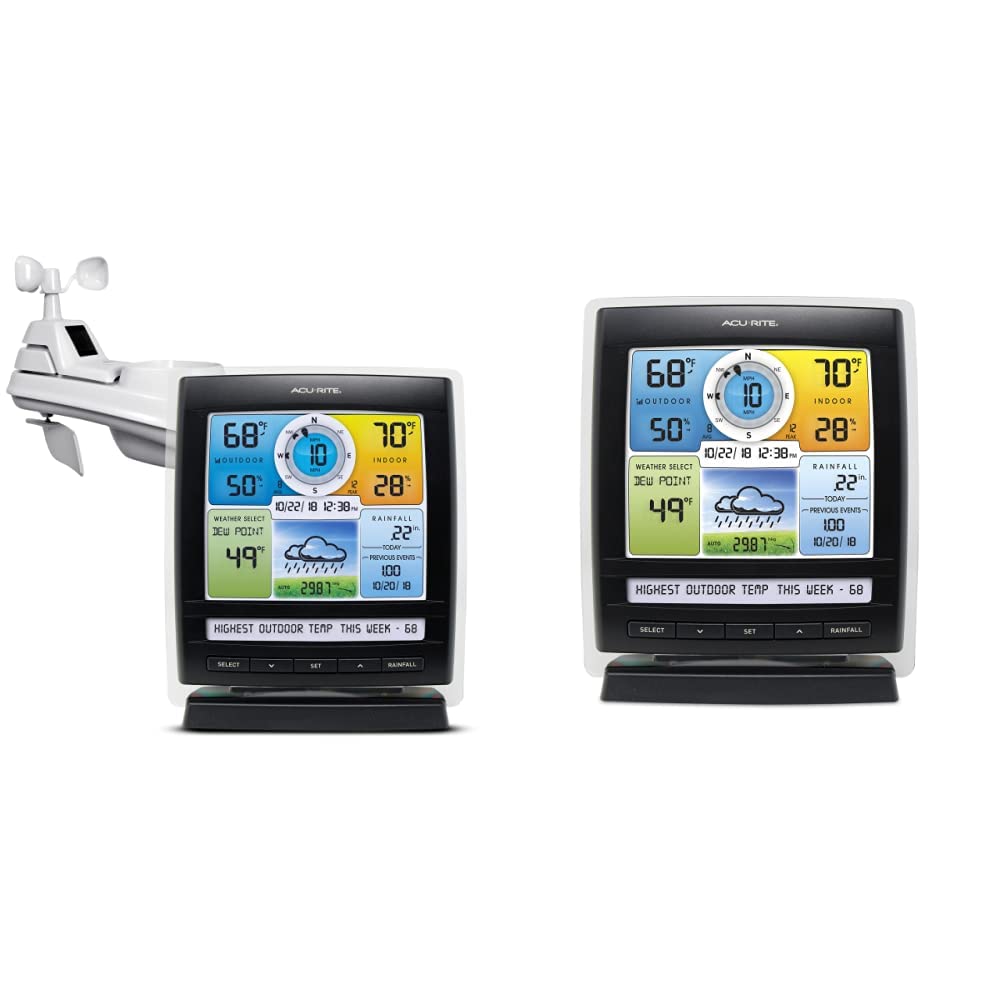
Image: The main components of the AcuRite Iris 5-in-1 Weather Station, featuring the outdoor sensor and the indoor digital display unit.
Жайгашуу
Пакеттен чыгаруу
Бардык компоненттерди таңгактан кылдаттык менен алып салыңыз. Зарыл болсо, кутулоо материалдарын келечекте сактоо же ташуу үчүн сактаңыз.
Дисплейди иштетүү
- Plug the included power adapter into the display unit and then into a standard electrical outlet.
- Optional: For backup power, insert 6 AA alkaline batteries (not included) into the battery compartment on the back of the display.
Сенсорду жайгаштыруу
Proper placement of the 5-in-1 outdoor sensor is crucial for accurate readings. Choose a location that is:
- Жерден жок дегенде 5 фут (1.5 метр) алыстыкта.
- Away from direct heat sources (e.g., exhaust vents, air conditioners).
- Free from obstructions that could block wind or rain (e.g., tall buildings, trees).
- Within 330 feet (100 meters) of the display unit for optimal wireless signal.
Сенсорду орнотуу
Use the included mounting hardware to securely attach the 5-in-1 sensor to a post or pole. Ensure the sensor is level for accurate rainfall measurements.
Иштөө нускамалары
Дисплейview
The illuminated color LCD display presents various weather data in an organized manner. Familiarize yourself with the different sections:
- Сырткы бөлүм: Displays outdoor temperature, humidity, and trend indicators.
- Wind Section: Shows current wind speed, average wind speed, peak wind speed, and wind direction.
- Ички бөлүм: Үйдүн температурасын жана нымдуулугун көрсөтөт.
- Weather Select: мүмкүндүк берет viewing of dew point, heat index, or 'feels like' temperature.
- Rainfall Section: Shows current day's rainfall and historical rainfall data.
- Аба ырайы: Provides a 12 to 24-hour forecast based on barometric pressure changes.

Image: The AcuRite Iris display unit, highlighting sections for weather, humidity, and wind information with trend indicators; dew point, weather forecast, and rainfall visuals; and the date and time.
Негизги навигация
Use the buttons located below the display to navigate through settings and view different data points:
- ТАНДОО: Cycles through various weather data points in the 'Weather Select' area.
- ЖӨНДӨӨ: Enters setup mode for time, date, and other preferences.
- ӨЙДӨ/ТӨМӨН жебелери: Adjusts values during setup or navigates through historical data.
- RAINFALL: Displays daily, weekly, monthly, or yearly rainfall totals.

Сүрөт: ачык фронт view of the AcuRite Iris digital display, showing the color screen with various weather readings and the control buttons at the bottom.
Окууларды түшүнүү
The display provides real-time data. Trend arrows indicate whether temperature, humidity, or pressure are rising, falling, or steady. The self-calibrating forecasting feature improves accuracy over time by analyzing barometric pressure changes.
Weather Ticker
The 'Weather Ticker' at the bottom of the display streams useful environmental information, such as 'feels like' temperature, number of days since last rainfall, and other relevant alerts or data points.
Техникалык тейлөө
Батареяны алмаштыруу
The outdoor 5-in-1 sensor requires 4 AA batteries (not included) and has an estimated battery life of 2 years. Replace batteries when the low battery indicator appears on the display. Ensure to use fresh, high-quality alkaline or lithium batteries (lithium recommended for temperatures below -4°F / -20°C).
Сенсорду тазалоо
Periodically inspect the outdoor sensor for debris, especially in the rain collector funnel and around the wind cups. Clean gently with a damp cloth. Ensure the rain gauge tipping bucket mechanism moves freely.
Проблемаларды чечүү
If you encounter issues with your AcuRite Iris Weather Station, consider the following common solutions:
- Сырткы сенсордун маалыматтары жок: Ensure the sensor is within range of the display (max 330 ft / 100 m) and has fresh batteries. Try relocating the display or sensor to reduce interference.
- Температура/нымдуулуктун так эместиги: Verify the sensor is not exposed to direct sunlight or heat sources. Allow up to 30 minutes for readings to stabilize after setup or relocation.
- Inaccurate Rainfall: Check that the sensor is level and the rain collector funnel is clear of debris.
- Дисплей күйбөйт: Confirm the power adapter is securely connected and the electrical outlet is functional. If using batteries, ensure they are correctly inserted and fresh.
For more detailed troubleshooting guides and support, please visit the official AcuRite webсайт.
Техникалык шарттар
| Бренд | AcuRite |
| Кубат булагы (сенсор) | Battery Powered (4 AA, not included) |
| Кубат булагы (дисплей) | 4.5V Power Adapter (included) or 6 AA batteries (not included) |
| Байланыш технологиясы | Зымсыз |
| Температуранын тактыгы | ±1 °C |
| Жогорку температура рейтинги | 45 градус |
| Дисплей түрү | ЖК түстүү дисплей |
| Камтылган компоненттер | Power Adapter, Stand, Mounting Hardware |
Кепилдик жана колдоо
AcuRite products are designed for reliability and performance. For information regarding product warranty, technical support, or to register your product, please visit the official AcuRite webсайтка же кардарларды тейлөө бөлүмүнө кайрылыңыз. Сатып алганыңыздын далили катары сатып алуу дүмүрчөгүңүздү сактаңыз.
Webсайт: www.acurite.com


