1. Киришүү
Thank you for choosing the Liectroux M7S Pro Robot Vacuum Cleaner. This manual provides important information on how to operate and maintain your robot vacuum cleaner for optimal performance. Please read this manual carefully before using the product and keep it for future reference.
The Liectroux M7S Pro is an intelligent robot vacuum cleaner designed to provide efficient cleaning for your home. It features powerful suction, smart navigation, and a mop function, controllable via a dedicated app, remote control, and voice assistants like Alexa and Google Home.
2. Пакеттин мазмуну
Сураныч, пакеттин мазмунун текшерип, бардык буюмдар бар экенин текшериңиз:
- Liectroux M7S Pro робот чаң соргуч
- Заряддоо док
- Кубаттуу адаптер
- Алыстан башкаруу
- Water Tank and Mop Cloth
- Каптал щеткалары (2 жуп)
- HEPA Filter (1 installed, 1 spare)
- Тазалоо куралы
- User Manual

Image: Liectroux M7S Pro Robot Vacuum Cleaner, remote control, charging dock, mop pad, and app interface.
3. Маанилүү коопсуздук нускамалары
Before using this product, please read all safety instructions. Failure to follow these instructions may result in electric shock, fire, or serious injury.
- Роботту нымдуу чөйрөдө же сууга жакын жерде колдонбоңуз.
- Do not allow children to operate the robot. Supervise children and pets when the robot is operating.
- Кубат адаптери жергиликтүү электр менен камсыздооңузга шайкеш келерин текшериңиз.
- Роботту чоң таштандыларды, суюктуктарды же күйүп жаткан нерселерди чогултуу үчүн колдонбоңуз.
- Оптималдуу иштеши үчүн щеткаларды жана чыпкаларды дайыма тазалаңыз.
- Unplug the robot from the charging dock before cleaning or maintenance.
4. Орнотуу
4.1 Заряддоо докунун жайгашуусу
Place the charging dock against a wall in an open, uncluttered area. Ensure there is at least 0.5 meters (1.6 feet) of clear space on both sides and 1.5 meters (4.9 feet) in front of the dock. Connect the power adapter to the charging dock and plug it into a power outlet.
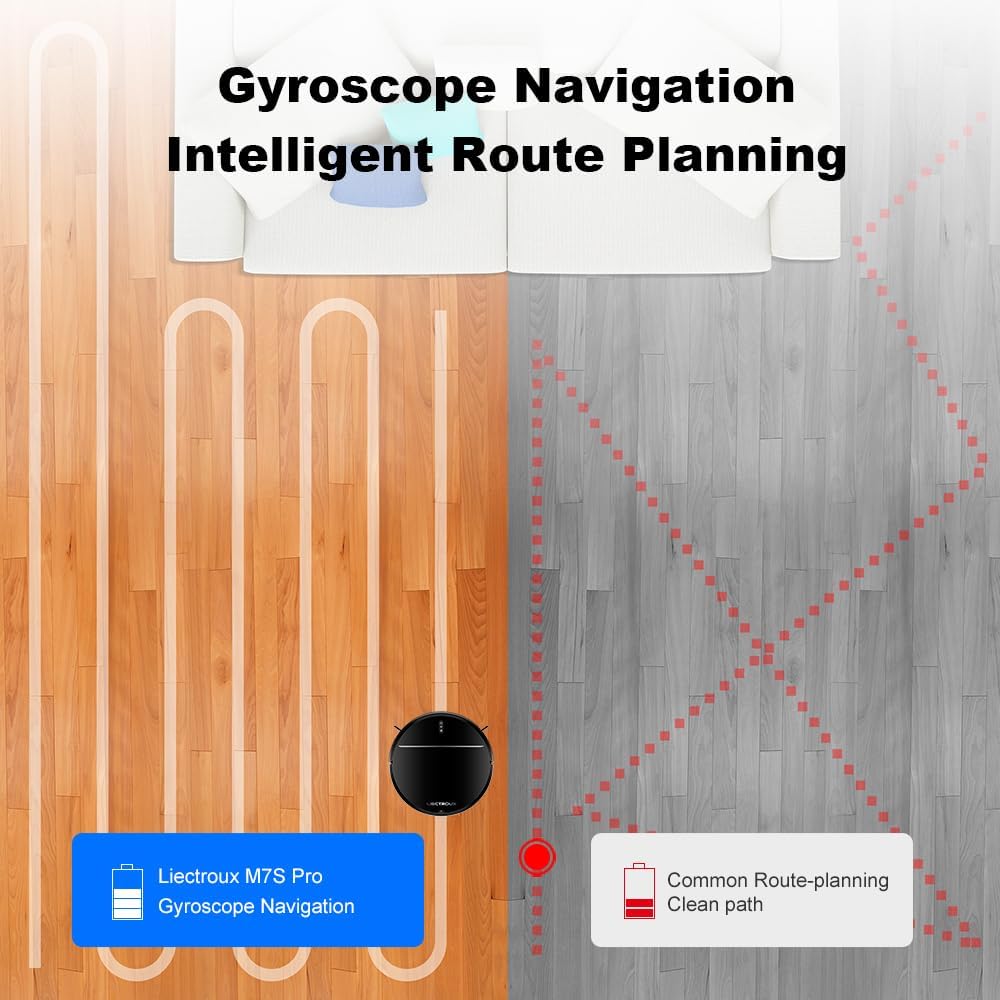
Image: The robot vacuum returning to its charging dock for auto-charging.
4.2 Алгачкы заряддоо
Before first use, fully charge the robot. Place the robot on the charging dock, ensuring the charging contacts align. The indicator light on the robot will show charging status. A full charge typically takes 4-5 hours.
4.3 Каптал щеткаларды орнотуу
Каптал щеткаларды роботтун астыңкы жагындагы тиешелүү мамыларга алар ордуна чыкылдаганча бекитиңиз.
4.4 Колдонмо туташуу (милдеттүү эмес, бирок сунушталат)
For full functionality, download the "TUYA Smart" or "Liectroux" app from your app store. Follow the in-app instructions to connect your robot to your home Wi-Fi network. This enables remote control, scheduling, and map management.

Image: Demonstrates control options including remote control, TUYA app, Google Assistant, and Amazon Alexa.
5. Иштөө нускамалары
5.1 Таза циклди баштоо
- Кол менен баштоо: Press the power button on the robot or the "Clean" button on the remote control.
- Колдонмону башкаруу: Open the app and select the desired cleaning mode (Auto, Spot, Edge, Schedule).
- Үн менен башкаруу: Connect to Alexa or Google Home (refer to app instructions for setup) and use voice commands like "Alexa, start Liectroux robot vacuum."

Image: Illustrates powerful suction and different cleaning modes: Schedule Cleaning, Auto Cleaning, Edge Cleaning, and Spot Cleaning.
5.2 Тазалоо режимдери
- Автоматтык тазалоо: The robot intelligently navigates and cleans the entire floor area.
- Тазалоо: The robot cleans a specific area in a spiral pattern. Useful for concentrated dirt.
- Четтерин тазалоо: Робот дубалдарды жана эмеректердин четтерин тазалайт.
- Пландаштырылган тазалоо: Колдонмо аркылуу роботту автоматтык түрдө тазалоо үчүн белгилүү бир убакыттарды коюңуз.
5.3 Чыпкалоо функциясы
Чыпкалоо функциясын колдонуу үчүн:
- Суу резервуарын таза суу менен толтуруңуз.
- Швабра чүпүрөктү суу сактагычка бекитиңиз.
- Slide the water tank assembly into the back of the robot until it clicks into place.
- Start a cleaning cycle. The robot will automatically mop while vacuuming.
Note: Do not use the mopping function on carpets. Remove the water tank before charging.

Сүрөт: Жакын план view of the robot's underside showing the advanced brush-less suction nozzle and the mop pad, designed to avoid hair entanglement.
6. Техникалык тейлөө
Regular maintenance ensures your Liectroux M7S Pro operates efficiently.
6.1 Таштанды кутусун бошотуу
Press the dustbin release button, pull out the dustbin, and empty its contents. Clean the dustbin with a dry cloth or brush.
6.2 Чыпкаларды тазалоо
Remove the HEPA filter and sponge filter from the dustbin. Tap them gently to remove dust. Do not wash HEPA filters with water. Replace filters every 3-6 months depending on usage.
6.3 Каптал щеткаларды тазалоо
Remove the side brushes and use the cleaning tool to remove any tangled hair or debris. Reinstall them securely.
6.4 Cleaning Main Brush (if applicable)
Open the main brush cover, remove the main brush, and use the cleaning tool to remove hair and debris. Reinstall the main brush and cover.
6.5 Сенсорлорду жана заряддоо контакттарын тазалоо
Wipe the cliff sensors, wall sensors, and charging contacts on both the robot and the charging dock with a clean, dry cloth.
7. Кыйынчылыктарды
| Көйгөй | Мүмкүн себеп | Чечим |
|---|---|---|
| Робот башталбайт | Батареянын аздыгы; Электр өчүрүү; Робот тыгылып калды. | Charge the robot; Turn on the power switch; Clear obstructions. |
| Начар тазалоо көрсөткүчү | Full dustbin; Clogged filters; Tangled brushes. | Empty dustbin; Clean/replace filters; Clean brushes. |
| Робот кубаттагычты таба албайт | док тосулган; Док кубаты жок; Робот өтө алыс. | Ensure clear space around dock; Check power connection; Manually place robot closer. |
| Колдонмого туташуу маселелери | Incorrect Wi-Fi password; Router too far; Robot offline. | Re-enter password; Move robot closer to router; Restart robot and router. |
8. Техникалык шарттар
| Өзгөчөлүк | Деталь |
|---|---|
| Модел | M7S Pro |
| Бренд | LIECTROUX |
| Соруу күчү | 4000Па чейин |
| Өлчөмдөрү (L x W x Y) | 32 x 32 x 7.8 см (12.6 x 12.6 x 3.1 дюйм) |
| Салмагы | 5 килограмм (11 фунт) |
| Батарея түрү | Литий-ион |
| Контролдоо ыкмалары | App Control, Remote Control, Voice Control (Alexa, Google Home) |
| Чыпка түрү | HEPA |
| Навигация түрү | Smart Gyro Navigation |
| Функциялар | Vacuuming, Mopping |
9. Кепилдик жана колдоо
Liectroux products come with a standard manufacturer's warranty. Please refer to the warranty card included in your package for specific terms and conditions. For technical support, troubleshooting assistance, or spare parts, please contact Liectroux customer service through their official webсайтты же кепилдик документтериңизде көрсөтүлгөн байланыш маалыматын.
Өндүрүүчү: LIECTROUX ROBOTICS SA
Webсайт: www.liectroux.com


