1. Introduction and Overview
The AVM FRITZ!Box 7510 is a versatile Wi-Fi 6 DSL router designed to provide a high-performance home network experience. It integrates fast internet access via VDSL Supervectoring 35b, advanced Wi-Fi 6 (WLAN AX) technology for efficient wireless connectivity, and a range of features including WLAN Mesh, a DECT base station for telephony, and a media server.
This manual provides essential information for setting up, operating, and maintaining your FRITZ!Box 7510, ensuring optimal performance and connectivity for your devices.
2. Пакеттин мазмуну
Please verify that all items are present in your FRITZ!Box 7510 package:
- FRITZ!Box 7510 Router
- Электр менен жабдуу бирдиги
- 4-meter DSL Connection Cable
- 1.5-meter LAN Cable
- Installation Instructions (English language may vary by region)
3. Орнотуу
Follow these general steps to set up your FRITZ!Box 7510. For detailed, country-specific instructions, refer to the included installation guide or the AVM webсайт.
3.1 Connecting to the DSL Line
- Connect one end of the 4-meter DSL connection cable to the "DSL" port on the back of your FRITZ!Box 7510.
- Connect the other end of the DSL cable to your DSL wall socket.
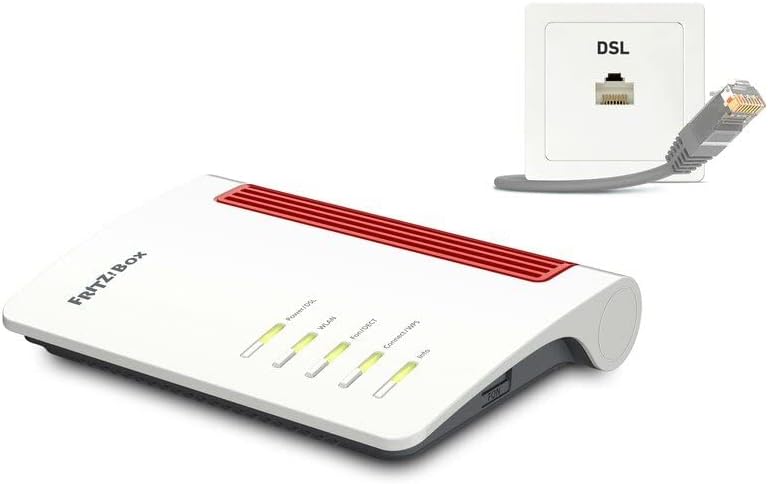
Image: FRITZ!Box 7510 connected to a DSL wall socket. This illustrates the physical connection required for internet access.
3.2 Энергия менен жабдууну туташтыруу
- Connect the power supply unit to the "Power" port on the back of the FRITZ!Box 7510.
- Plug the power supply into an electrical outlet. The "Power/DSL" LED on the front of the router will light up.
3.3 Баштапкы конфигурация
- Connect a computer to the FRITZ!Box 7510 using the included LAN cable or via Wi-Fi (default Wi-Fi name and password are on the bottom of the device).
- ачуу а web браузер жана кирүү fritz.box дарек тилкесинде.
- Follow the on-screen wizard to configure your internet access, Wi-Fi settings, and telephony. Note that automatic configuration for internet providers is primarily supported in Germany.

Сүрөт: алдыңкы view of the FRITZ!Box 7510. The LED indicators provide status information for Power/DSL, WLAN, Fon/DECT, Connect/WPS, and Info.
4. Иштөө нускамалары
4.1 Wi-Fi аркылуу түзмөктөрдү туташтыруу
To connect a device (smartphone, tablet, laptop) to your FRITZ!Box 7510 via Wi-Fi:
- Түзмөгүңүздө жеткиликтүү Wi-Fi тармактарын издеңиз.
- Select the Wi-Fi network name (SSID) of your FRITZ!Box (found on the bottom of the device or in the FRITZ!Box interface).
- Enter the Wi-Fi network key (password) when prompted.
- Alternatively, use the WPS (Wi-Fi Protected Setup) function by pressing the "Connect/WPS" button on the FRITZ!Box and initiating WPS on your device within two minutes.
4.2 Connecting Devices via LAN
The FRITZ!Box 7510 features one Gigabit LAN port:
- Connect one end of a LAN cable to the "LAN" port on the back of the FRITZ!Box.
- Connect the other end to the network port of your computer, smart TV, or other network-enabled device.
4.3 DECT телефониясы
The integrated DECT base station supports up to six cordless telephones:
- To register a DECT phone, put the phone into registration mode.
- Press and hold the "Fon/DECT" button on the FRITZ!Box for about 6 seconds until the "Fon/DECT" LED flashes.
- Complete the registration process on your DECT phone.
4.4 Media Server Functionality
The FRITZ!Box 7510 can act as a media server:
- Connect a USB storage device (e.g., a USB stick or external hard drive) to the USB port on the FRITZ!Box.
- FRITZ!Box колдонуучу интерфейсине кирүү (fritz.box) to configure the media server and share content.
- Compatible devices in your home network (e.g., smart TVs, tablets, HiFi systems) can then stream music, videos, and view images from the connected USB storage.
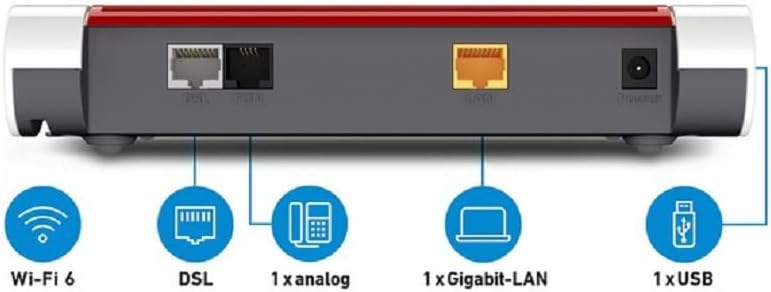
Image: Rear panel of the FRITZ!Box 7510. This view clearly labels the ports for DSL, analog phone, Gigabit LAN, and USB, along with an indication of Wi-Fi 6 capability.
5. Өркүндөтүлгөн функциялар
5.1 Wi-Fi 6 (WLAN AX)
The FRITZ!Box 7510 supports the latest Wi-Fi 6 standard (802.11ax), offering:
- Жогорку ылдамдыктар: Up to 600 Mbps on the 2.4 GHz band, ideal for demanding applications.
- Жакшыртылган натыйжалуулук: Better performance in environments with many connected devices, reducing latency and improving overall network capacity.
- Кеңейтилген диапазон: Optimized signal transmission for broader coverage within your home.
5.2 VDSL Supervectoring 35b
This technology enables internet speeds of up to 300 Mbps over your DSL line, providing fast and reliable broadband access for streaming, gaming, and online work.
5.3 WLAN Mesh
The FRITZ!Box 7510 can serve as the central hub for a FRITZ! Mesh network. This allows you to combine multiple FRITZ! products (e.g., FRITZ!Repeaters) into a single, intelligent Wi-Fi network. Devices automatically connect to the FRITZ! product with the best signal, ensuring seamless coverage and optimal performance throughout your home.
5.4 VoIP Telephone System
The integrated VoIP telephone system offers comprehensive call management features:
- Support for analog, DECT, and IP phones.
- Call blocking for unwanted numbers.
- Call forwarding and dialing rules for flexible accessibility.
- Integration with DECT-enabled smart home devices like switchable sockets and radiator controllers.
6. Техникалык тейлөө
Regular maintenance helps ensure the longevity and optimal performance of your FRITZ!Box 7510.
- Программалык камсыздоонун жаңыртуулары: AVM regularly releases firmware updates that improve performance, add new features, and enhance security. Access the FRITZ!Box user interface (fritz.box) to check for and install available updates.
- Тазалоо: Gently wipe the exterior of the device with a soft, dry cloth. Avoid using liquid cleaners or abrasive materials. Ensure ventilation openings are clear of dust.
- Оптималдуу жайгаштыруу: Place the FRITZ!Box in a central location, away from large metal objects, thick walls, and other electronic devices that may cause interference, to maximize Wi-Fi coverage.
7. Кыйынчылыктарды
If you encounter issues with your FRITZ!Box 7510, try the following basic troubleshooting steps:
- Интернет байланышы жок:
- Check if the "Power/DSL" LED is solid green. If it's flashing or off, verify the DSL cable connection and contact your internet service provider.
- Restart the FRITZ!Box by unplugging the power cord, waiting 10 seconds, and plugging it back in.
- FRITZ!Box колдонуучу интерфейсине кирүү (fritz.box) and check the "Internet" section for connection status and error messages.
- Wi-Fi туташуу маселелери:
- Ensure the "WLAN" LED on the FRITZ!Box is lit. If not, press the "WLAN" button to activate Wi-Fi.
- Verify you are using the correct Wi-Fi network name (SSID) and password.
- Move closer to the FRITZ!Box to rule out range issues.
- Жай Интернет ылдамдыгы:
- Check for active downloads or streaming on other devices in your network.
- FRITZ!Box микропрограммасы жаңыртылганын текшериңиз.
- Consider the placement of your router for optimal Wi-Fi signal.
For more advanced troubleshooting or specific error codes, please consult the AVM support webсайтка же кардарларды тейлөөгө кайрылыңыз.
8. Техникалык шарттар
| Өзгөчөлүк | Деталь |
|---|---|
| Бренд | AVM |
| Модель аты | FRITZ!Box 7510 |
| Элемент моделинин номери | 20002983 |
| Продукциянын өлчөмдөрү | 8.19 x 5.91 x 1.46 дюйм |
| Элемент Салмагы | 11.3 унция |
| Байланыш технологиясы | Wi-Fi, DSL |
| Зымсыз байланыш стандарты | DECT, Wi-Fi 6 (802.11ax) |
| Жыштык тилкесинин классы | Бир тилкелүү (2.4 ГГц) |
| Wi-Fi'дын максималдуу ылдамдыгы | 600 Мбит/сек чейин (2.4 ГГц) |
| Max DSL Speed | Up to 300 Mbps (VDSL Supervectoring 35b) |
| Порттар | 1x Gigabit LAN, 1x USB 2.0, 1x DSL, 1x Analog Phone |
| Өзгөчө өзгөчөлүк | Remote Access, WLAN Mesh, DECT Base, Media Server |
| Шайкеш түзмөктөр | Personal computer, laptop, tablet, smartphone, game console |
| Сунушталган Колдонуулар | Бизнес, Үй |
9. Кепилдик жана колдоо
AVM provides a manufacturer's warranty for the FRITZ!Box 7510. Specific warranty terms and duration may vary by region and retailer. Please retain your proof of purchase for warranty claims.
For technical support, detailed FAQs, and the latest firmware updates, please visit the official AVM webсайт:
You can also find comprehensive documentation and support resources tailored to your specific FRITZ!Box model on their webсайт.


