1. Киришүү
This manual provides comprehensive instructions for the setup, operation, and maintenance of your Bushnell Prime L20 Low Glow Trail Camera. Designed for wildlife monitoring and scouting, this camera captures high-quality images and videos with minimal disturbance to its environment. Please read this manual thoroughly to ensure optimal performance and longevity of your device.
2. Пакеттин мазмуну
Пакетиңизде бардык буюмдар бар экенин текшериңиз:
- Bushnell Prime L20 Low Glow Trail Camera
- Adjustable Mounting Strap
- Колдонуучунун Колдонмосу (бул документ)
3. Камера компоненттери
Familiarize yourself with the key components of your trail camera:

Сүрөт 1: Алдыңкы view of the Bushnell Prime L20 Low Glow Trail Camera, showing the lens, PIR sensor, and IR LEDs.
- Объектив: Сүрөттөрдү жана видеолорду тартат.
- Low Glow IR LEDs: Provide illumination for night vision without a visible flash.
- PIR Кыймыл сенсору: Detects movement to trigger recording.
- Башкаруу панели: Located inside the camera, features an LCD display and navigation buttons for settings.
- Батарея бөлүмү: Houses 8 AA batteries (not included).
- SD карта уячасы: Accepts standard SD cards for storage (up to 32GB recommended).
- External Power Port: For optional external power sources.
- Монтаждоо пункттары: For attaching the camera to a tree or other surfaces using the provided strap or compatible accessories.
4. Баштапкы орнотуу
4.1 Батареяны орнотуу
The Bushnell Prime L20 requires 8 AA batteries for operation. For best performance and battery life, use high-quality alkaline or lithium batteries.

Figure 2: Battery compartment with 8 AA batteries.
- Open the camera's front cover by unlatching the side clips.
- Locate the battery tray at the bottom of the camera.
- Бөлүмдүн ичинде көрсөтүлгөндөй туура полярдуулукту (+/-) камсыз кылып, 8 AA батарейкасын салыңыз.
- Securely close the battery tray and the camera's front cover.
4.2 SD картаны орнотуу
A standard SD card (not included) is required to store photos and videos. The camera supports cards up to 32GB.
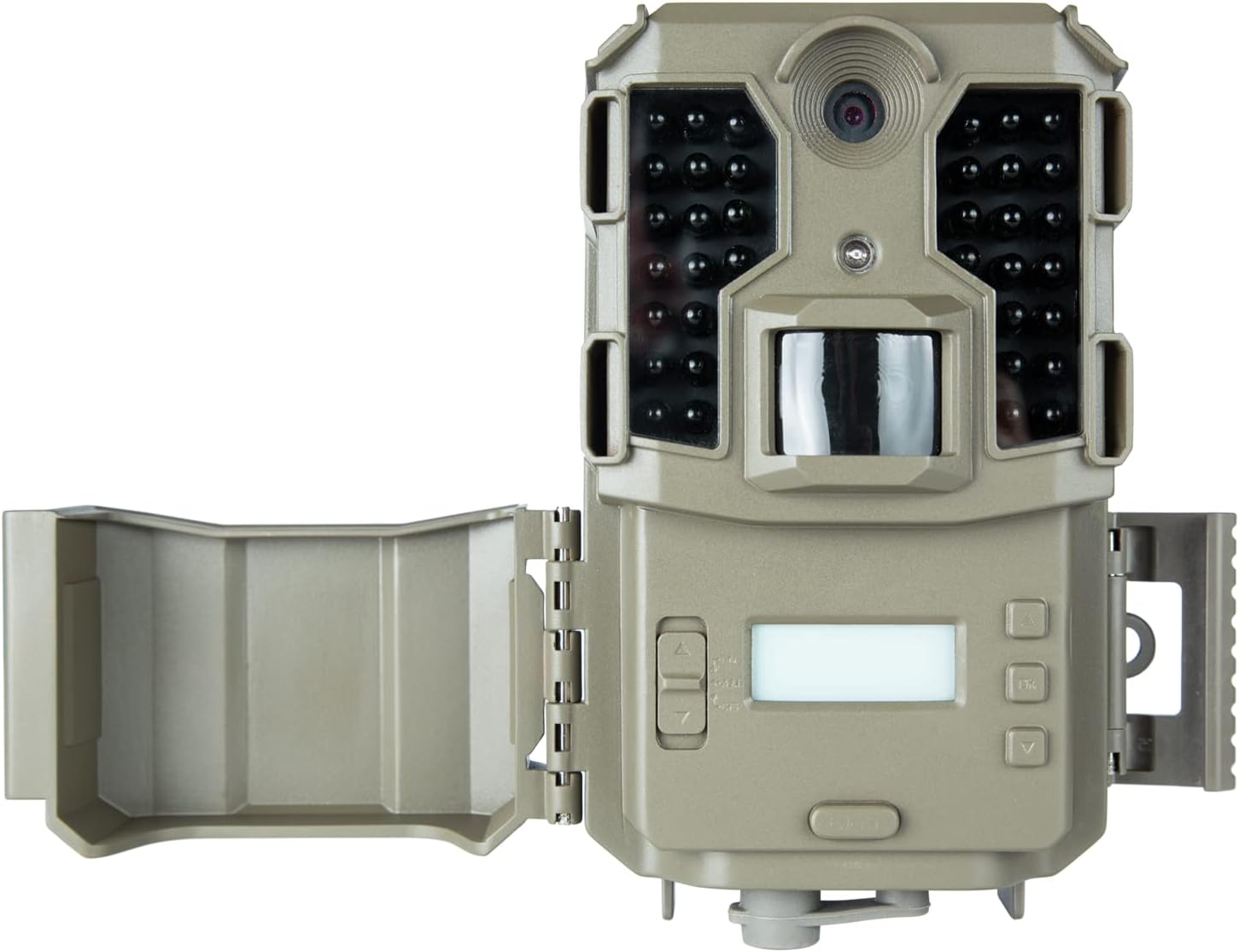
Figure 3: Internal controls and SD card slot.
- With the camera open, locate the SD card slot on the side of the control panel.
- Insert the SD card with the metal contacts facing down until it clicks into place.
- Шайкештигин жана оптималдуу иштешин камсыз кылуу үчүн, биринчи жолу колдонуудан мурун SD картаны камеранын менюсун колдонуп форматтоо сунушталат.
4.3 Камераны орнотуу
The camera can be mounted using the included strap or a compatible tree bracket.

Figure 4: Mounting the camera on a tree.
- Орнотуучу боону камеранын арткы жагындагы уячалардан өткөрүңүз.
- Securely fasten the camera to a tree or post at the desired height and angle.
- Камера туруктуу жана сиз көзөмөлдөгүңүз келген аймакка багытталганын текшериңиз.
5. Иштөө нускамалары
5.1 Күйгүзүү/өчүрүү
To power on the camera, slide the power switch (located inside the camera) from 'OFF' to 'ON'. The LCD screen will illuminate. To power off, slide the switch back to 'OFF'.
5.2 Меню Навигациясы
Use the navigation buttons (MENU, OK, Up/Down/Left/Right arrows) on the control panel to access and adjust settings.
- Press the 'MENU' button to enter the settings menu.
- Use the Up/Down arrow buttons to scroll through menu options.
- Press 'OK' to select an option or enter a sub-menu.
- Use the Left/Right arrow buttons to change values or settings.
- Press 'MENU' again to exit the current menu or save changes.
5.3 Photo and Video Settings
Customize your camera's capture preferences:
- Сүрөт жөндөөлөрү: Choose between 3MP, 12MP, and 20MP resolutions for still photos.
- Видеонун чечилиши: Select 1080p at 30 FPS for detailed video recording.
- Триггер ылдамдыгы: The camera features a 0.4-second trigger speed with a 1-second recovery rate.
- Date, Time, and Temp Stamps: Enable these options to overlay capture details on every photo.
6. Техникалык тейлөө
6.1 Тазалоо
Regularly clean the camera lens and PIR sensor window with a soft, lint-free cloth to ensure clear images and proper motion detection. Avoid abrasive cleaners.
6.2 Батареянын иштөө мөөнөтү
The camera offers an approximate 12-month battery life with optimal usage. Replace batteries when the low battery indicator appears on the display.
6.3 Сактоо
When not in use, store the camera in a cool, dry place. Remove batteries if storing for extended periods to prevent leakage.
7. Кыйынчылыктарды
If you encounter issues with your camera, refer to the table below for common problems and solutions:
| Көйгөй | Мүмкүн чечим |
|---|---|
| Камера күйбөй жатат | Check battery polarity and ensure batteries are fully charged. Verify the power switch is in the 'ON' position. |
| Сүрөттөр/видеолор тартылган жок | Ensure SD card is inserted correctly and formatted. Check PIR sensor sensitivity settings. Verify camera is armed (switch in 'ON' position). |
| Сүрөт/видео сапаты начар | Clean the camera lens and PIR sensor window. Adjust image/video resolution settings. Ensure adequate lighting for daytime captures. |
| Батареянын иштөө мөөнөтү кыска | Use high-quality alkaline or lithium batteries. Reduce the number of photos/videos captured per trigger event. |
8. Техникалык шарттар
| Өзгөчөлүк | Спецификация |
|---|---|
| Модель номери | 119930M |
| Сүрөттүн чечилиши | 3 МП, 12 МП, 20 МП |
| Video Resolution | 1080p @ 30 FPS |
| Триггер ылдамдыгы | 0.4 секунд |
| Калыбына келтирүү ылдамдыгы | 1 секунд |
| Түнкү көрүү диапазону | 100 feet (36 Low Glow LEDs) |
| Гидроизоляция | IPX6 |
| Power Source | 8 АА батарейкалар (киргизилген эмес) |
| Батареянын иштөө мөөнөтү | 12 айга чейин |
| Өлчөмдөр | 8.66 x 5.91 x 2.76 дюйм |
| Салмагы | 1.19 фунт |
9. Кепилдик жана колдоо
9.1 Кепилдик маалыматы
Your Bushnell Prime L20 Low Glow Trail Camera is covered by a manufacturer's warranty against defects in materials and workmanship. Please refer to the product packaging or the official Bushnell webатайын кепилдик шарттары жана шарттары үчүн сайт.
9.2 Кардарларды колдоо
For technical assistance, troubleshooting, or product inquiries, please visit the official Bushnell Store or contact their customer service department. You can find more information at: Bushnell Store on Amazon


