1. Киришүү
This manual provides detailed instructions for the setup, operation, and maintenance of your Marvo M729W Wireless Gaming Mouse. Please read this guide thoroughly before using the product to ensure optimal performance and longevity. This device is designed for gaming and general computer use, offering wireless convenience and customizable features.
2. Пакеттин мазмуну
- Marvo M729W Wireless Gaming Mouse
- USB зымсыз кабыл алгыч
- USB-C заряддоо кабели
- User Manual
3. Продукт бүтүп калдыview
Чычкандын жайгашуусу

The Marvo M729W Wireless Gaming Mouse features a sleek black design with integrated RGB lighting zones. It includes standard left and right click buttons, a scroll wheel, and a DPI adjustment button located centrally.

Жак view of the Marvo M729W mouse highlights its ergonomic shape and the location of the USB wireless receiver, which is stored in a dedicated compartment on the underside for portability.
4. Орнотуу
4.1 Чычканды туташтыруу
- Locate the USB wireless receiver. It is typically stored in a compartment on the underside of the mouse.
- USB ресиверди анын отсегинен алып салыңыз.
- USB ресиверди компьютериңиздеги жеткиликтүү USB портуна сайыңыз.
- Астында жайгашкан кубат которгучу менен чычканды күйгүзүңүз.
- Компьютериңиз керектүү драйверлерди автоматтык түрдө аныктап, орнотушу керек. Чычкан аныкталгандан кийин колдонууга даяр болот.
4.2 Чычканды заряддоо
Before initial use, it is recommended to fully charge the mouse. The Marvo M729W features a 700 mAh rechargeable battery.

жагы проfile of the Marvo M729W mouse illustrates the USB-C charging port located at the front. Connect the provided USB-C cable here to charge the internal battery.
- Connect the small end of the USB-C charging cable to the charging port on the front of the mouse.
- Connect the larger USB-A end of the cable to a USB port on your computer or a USB wall adapter (not included).
- The mouse's RGB lighting may indicate charging status. Refer to the mouse's behavior for specific charging indicators.
- Once fully charged, disconnect the charging cable. The mouse can be used while charging.
5. Иштөө нускамалары
5.1 Негизги функциялар
- Сол чыкылдатуу баскычы: Негизги аракет, тандоо.
- Оң баскычты чыкылдатуу: Secondary action, context menus.
- Жылдыруу дөңгөлөгү: Өйдө/төмөн сыдырыңыз, ортоңку чыкылдатыңыз.
- Алдыга/Артка баскычтары: Чабыттоо web pages or folders (located on the side).
- DPI баскычы: Adjusts mouse sensitivity.
5.2 DPI жөндөө
The Marvo M729W mouse features an adjustable DPI (Dots Per Inch) sensor, allowing you to change the cursor sensitivity to suit your preferences or game requirements. There are 6 adjustable levels up to 4800 DPI.

This image shows the top of the Marvo M729W mouse, clearly indicating the DPI button located below the scroll wheel. Pressing this button cycles through the available DPI settings.
To adjust the DPI, press the DPI баскычы located below the scroll wheel. Each press will cycle through the preset DPI levels. The mouse's RGB lighting may change color or pattern to indicate the current DPI setting.
5.3 RGB жарык режимдери
The Marvo M729W mouse features dynamic RGB lighting with 7 different modes. These modes enhance the aesthetic appeal of the mouse. The lighting typically cycles automatically or can be changed by a specific button combination (if available, refer to product packaging for details not specified here). The lighting will turn off after 3 minutes of idling to conserve battery.
6. Техникалык тейлөө
Proper maintenance ensures the longevity and performance of your gaming mouse.
- Тазалоо: Чычкандын бетин жумшак, кургак чүпүрөк менен сүртүңүз. Өжөр кир үчүн бир аз сүртүңүзamp cloth can be used, but ensure no moisture enters the mouse. Do not use harsh chemicals or abrasive cleaners.
- Сенсорго кам көрүү: Keep the optical sensor on the underside clean and free from dust or debris to ensure accurate tracking.
- Сактагыч: When not in use for extended periods, store the mouse in a dry, cool place.
- Батареяга кам көрүү: Avoid fully discharging the battery frequently. Charge the mouse when the battery indicator suggests it.
7. Кыйынчылыктарды
If you encounter issues with your Marvo M729W mouse, refer to the following common solutions:
- Чычкан жооп бербей жатат:
- Чычкан күйгүзүлгөнүн текшериңиз.
- USB кабыл алгыч иштеп жаткан USB портуна бекем сайылып турганын текшериңиз. Башка USB портун колдонуп көрүңүз.
- Ensure the mouse battery is charged. Connect the charging cable and try again.
- Интерференцияны болтурбоо үчүн чычканды USB кабыл алгычка жакыныраак жылдырыңыз.
- Курсордун туура эмес кыймылы:
- Чычкандын астындагы оптикалык сенсорду тазалаңыз.
- Чычканды ылайыктуу жерде колдонуп жатканыңызды текшериңиз (мисалы, чычкан аянтчасы, чагылдыруучу же тунук бет эмес).
- Check for any wireless interference from other devices.
- RGB жарыктандыруу иштебейт:
- Чычкан күйгүзүлгөнүн текшериңиз.
- The lighting turns off after 3 minutes of idling to save power. Move the mouse to reactivate.
- Check if the battery is low. Charge the mouse.
- Чычкан заряддалбай жатат:
- USB-C кабели чычканга жана кубат булагына туура туташкандыгын текшериңиз.
- Башка USB портун же кубаттоо адаптерин колдонуп көрүңүз.
- Кубаттоочу кабелдин бузулбагандыгын текшериңиз.
8. Техникалык шарттар
Below are the technical specifications for the Marvo M729W Wireless Gaming Mouse:
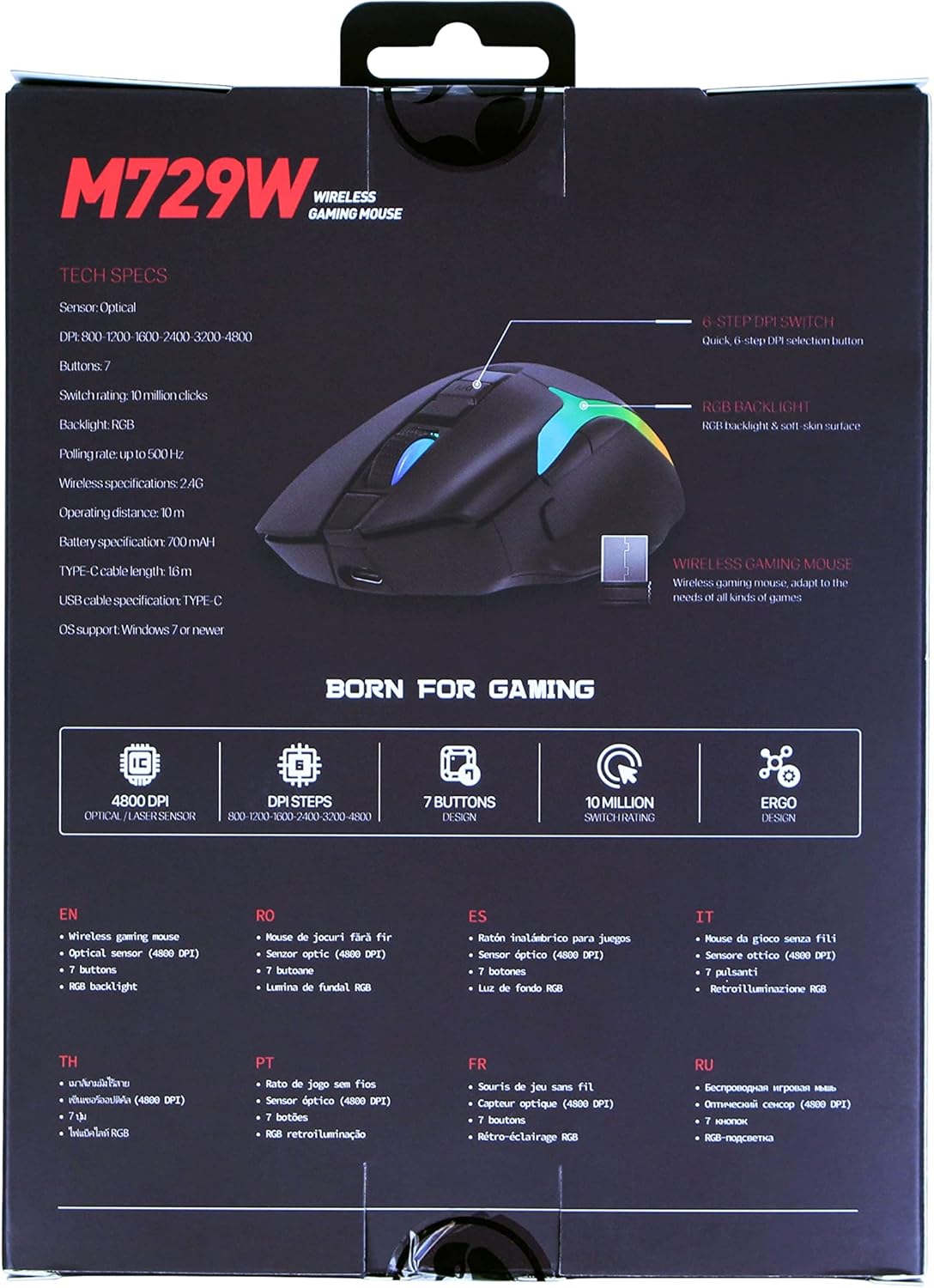
The back of the Marvo M729W product packaging displays key technical specifications and features in multiple languages, including DPI settings, button count, and battery information.
| Өзгөчөлүк | Спецификация |
|---|---|
| Модел | M729W |
| Бренд | MARVO |
| Байланыш | Зымсыз (USB кабыл алгыч) |
| Сенсор түрү | Оптикалык |
| DPI (Дюйм үчүн чекиттер) | 4800 DPI чейин (6 жөнгө салынуучу деңгээл) |
| баскычтардын саны | 7 |
| Которуу рейтинги | 10 миллион чыкылдатуу |
| Добуш берүү көрсөткүчү | 500 Гц чейин |
| Батарея түрү | Заряддалуучу литий-ион |
| Батарея сыйымдуулугу | 700 мАч |
| Заряддоо порту | USB-C |
| Кабелдин узундугу | 1.6m (USB-C to USB-A) |
| RGB жарыктандыруу | 7 режим |
| Колдун багыты | Эки тараптуу |
| OS колдоо | Windows 7 же жаңыраак |
9. Кепилдик маалыматы
The Marvo M729W Wireless Gaming Mouse is covered by a standard return policy, typically offering a 31-day refund or replacement period from the date of purchase. This warranty covers manufacturing defects and malfunctions under normal use. It does not cover damage caused by misuse, accidents, unauthorized modifications, or normal wear and tear. Please retain your proof of purchase for any warranty claims.
10. Колдоо
For technical support, warranty claims, or further assistance with your Marvo M729W Wireless Gaming Mouse, please contact Marvo customer service through their official website or the retailer from whom you purchased the product. Please have your product model number (M729W) and proof of purchase ready when contacting support.


