1. Киришүү
This manual provides comprehensive instructions for the setup, operation, and maintenance of your Emporia KFT20 Analog Telephone. Please read this manual carefully to ensure proper use and to maximize the benefits of your device.
Негизги өзгөчөлүктөрү:
- Large, easy-to-read LCD display (75 x 30 mm).
- Hearing aid compatible (M4/T4) with adjustable extra volume (+30 dB).
- Three programmable speed dial keys with photo slots for quick and intuitive calling.
- Caller ID display.
- Dedicated SOS button for emergency calls.
2. Коопсуздук маалыматы
Аспабыңызга зыян келтирбөө же өзүңүзгө зыян келтирбөө үчүн төмөнкү коопсуздук чараларын сактаңыз:
- Do not expose the telephone to moisture, extreme temperatures, or direct sunlight.
- Берилген кубат адаптерин гана колдонуңуз.
- Аппаратты өзүңүз ачууга же оңдоого аракет кылбаңыз. Бардык тейлөөлөрдү квалификациялуу кызматкерлерге тапшырыңыз.
- Keep the telephone away from medical devices such as pacemakers, as it may cause interference.
- Clean the telephone with a soft, dry cloth. Do not use liquid or aerosol cleaners.
3. Пакеттин мазмуну
Пакетте бардык буюмдар бар экенин текшериңиз:
- Emporia KFT20 Analog Telephone
- Кубаттуу адаптер
- Телефон линиясы
- Колдонуучунун Колдонмосу (бул документ)
4. Орнотуу
4.1. Телефонду туташтыруу
- Телефонду туташтыруу: Plug the coiled cord from the handset into the designated port on the left side of the telephone base.
- Телефон линиясын туташтыруу: Plug one end of the telephone line cord into the "LINE" port on the back of the telephone base and the other end into your wall telephone jack.
- Кубат адаптерин туташтыруу: Plug the power adapter into the "DC IN" port on the back of the telephone base, then plug the adapter into a standard electrical outlet.
- Баштапкы күйгүзүү: The display should illuminate, and the telephone will perform a self-check.
4.2. Дата менен убакытты орнотуу
Refer to the on-screen prompts or the "SET" button for initial date and time configuration. Specific steps may vary slightly.
4.3. Programming Photo Speed Dial Keys
The Emporia KFT20 features three dedicated speed dial keys (labeled 1, 2, 3) where you can insert photos of frequently called contacts.
- Prepare Photos: Print small photos of your contacts to fit the designated slots above keys 1, 2, and 3.
- Сүрөттөрдү киргизүү: Carefully lift the clear plastic cover on each speed dial key and insert the corresponding photo. Replace the cover securely.
- Дүкөндүн номери: басыңыз ДҮКӨН баскычы.
- Номерди киргизиңиз: Dial the telephone number you wish to assign to the speed dial key.
- Ачкычты тандоо: Press the desired speed dial key (1, 2, or 3) to save the number.
- Ырастоо: The display will confirm the number has been saved.
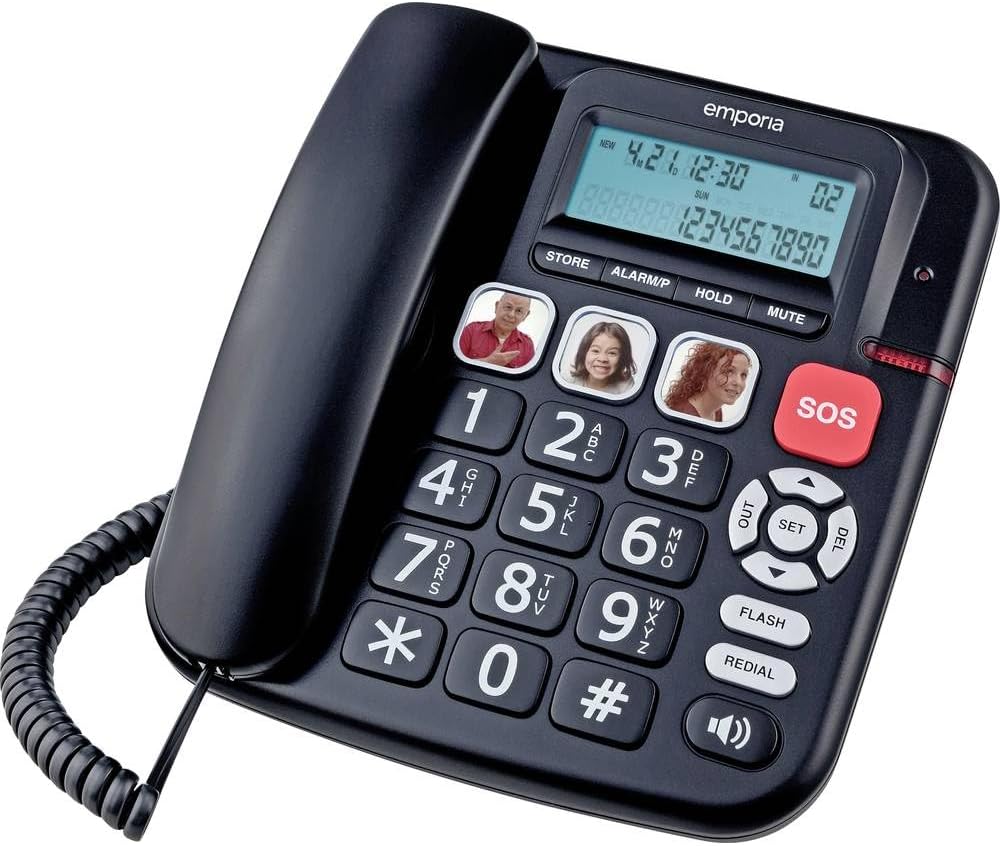
Figure 1: Emporia KFT20 Analog Telephone showing the handset, large keypad, display, and three photo speed dial keys.
5. Иштөө нускамалары
5.1. Чалуу
- Стандарттык терүү: Lift the handset, wait for the dial tone, then dial the desired number using the keypad.
- Тез терүү: Lift the handset, then press the desired photo speed dial key (1, 2, or 3). The stored number will be dialed automatically.
- Кайра терүү: Lift the handset, then press the РЕДИАЛ акыркы терилген номерге чалуу үчүн баскыч.
5.2. Чалууга жооп берүү
When the telephone rings, simply lift the handset to answer the call.
5.3. Үндү тууралоо
- Телефондун үн деңгээли: During a call, use the volume buttons (up/down arrows) located near the "SET" button to adjust the handset listening volume.
- Коңгуроонун үнү: The ringer volume can typically be adjusted via a switch on the side or back of the phone, or through the menu settings.
- Көбөйтүү функциясы: For an extra loud listening experience, press the BOOST button (if available, often integrated with volume control) during a call.
5.4. Using the SOS Button
кызыл SOS button is designed for emergency situations. It can be programmed to dial a pre-set emergency number.
- Programming SOS: Follow a similar procedure to programming speed dial keys, but assign the emergency number to the SOS button. Consult the quick start guide or manufacturer's website for specific programming steps for the SOS button.
- SOSту иштетүү: Шашылыш учурда, баскычын басып, кармап туруңуз SOS button. The telephone will automatically dial the programmed emergency number.
5.5. Caller ID Display
When an incoming call is received, the caller's number (and name, if available and subscribed to caller ID service) will be displayed on the LCD screen.
5.6. Башка функциялар
- КОЛДО: басыңыз БЕРҮҮ button to put an active call on hold. Press again to resume.
- Үнсүз: басыңыз БАСУУ button to temporarily silence your microphone during a call. The other party will not hear you. Press again to unmute.
- ФЛЕШ: Used for certain telephone network services (e.g., call waiting, transferring calls). Consult your telephone service provider for details.
6. Техникалык тейлөө
- Тазалоо: Wipe the telephone with a soft, dry, lint-free cloth. Do not use abrasive cleaners, waxes, or solvents.
- Сактагыч: If storing the telephone for an extended period, disconnect it from the power outlet and telephone line. Store in a cool, dry place.
7. Кыйынчылыктарды
| Көйгөй | Мүмкүн себеп | Чечим |
|---|---|---|
| Терүү үнү жок | Telephone line not connected properly or service issue. | Check telephone line connection. Test with another phone if possible. Contact your service provider. |
| Дисплей бош | Кубат адаптери туташкан эмес же электр кубаты өчүкtage. | Ensure power adapter is securely plugged in. Check power outlet. |
| Чалуу адамды уга албайт / Чалуу мени уга албайт | Volume too low, MUTE activated, or faulty connection. | Adjust handset volume. Check if MUTE button is active. Re-seat handset cord. |
| Speed dial not working | Number not programmed correctly. | Re-program the speed dial key following the instructions in Section 4.3. |
8. Техникалык шарттар
| Өзгөчөлүк | Деталь |
|---|---|
| Модель номери | KFT20 |
| Type | Corded Analog Telephone |
| Дисплей | ЖК, 75 x 30 мм |
| Чалуучунун ID | Ооба |
| Тез терүү баскычтары | 3 with photo slots |
| SOS баскычы | Ооба |
| Угуу аппаратынын шайкештиги | M4/T4 |
| Extra Volume | +30 дБ |
| Power Source | Электр зымы |
| Материал | Пластик |
| Элемент Салмагы | 933 г |
| Пакеттин өлчөмдөрү | 25 x 19 x 5 см |
| Түс | White (Note: Product images may show a black variant.) |
9. Кепилдик жана колдоо
For warranty information and technical support, please refer to the documentation included with your product packaging or visit the official Emporia webсайт. Кепилдик дооматтар үчүн сатып алганыңыздын далилин сактаңыз.


