1. Киришүү
Welcome to the Nerf Bulls-Eye Digital Target user manual. This guide provides essential information for setting up, operating, maintaining, and troubleshooting your new digital target. The Nerf Bulls-Eye Digital Target is designed to enhance your aiming skills with its interactive features, including 6 flip-back targets, a high-scoring bullseye, and an LCD screen for score tracking. It supports both solo and multiplayer gameplay with three distinct game modes.
2. Коопсуздук маалыматы
- Жашы боюнча сунуш: This product is suitable for ages 8 years and up. Adult supervision is recommended for younger users.
- Батареянын коопсуздугу: Use only the specified battery type (3 AAA batteries). Do not mix old and new batteries, or different types of batteries. Insert batteries with correct polarity. Remove batteries if the product is not used for an extended period.
- Максаттуу колдонуу: Use only official Nerf darts with this target. Do not aim at eyes or face.
- Мункунуп калуу коркунучу: Кичинекей бөлүктөрүн жаш балдардан алыс кармаңыз.
3. Пакеттин мазмуну
Сиздин пакетте бардык компоненттер бар экенин текшериңиз:
- One (1) Nerf Bulls-Eye Digital Target unit

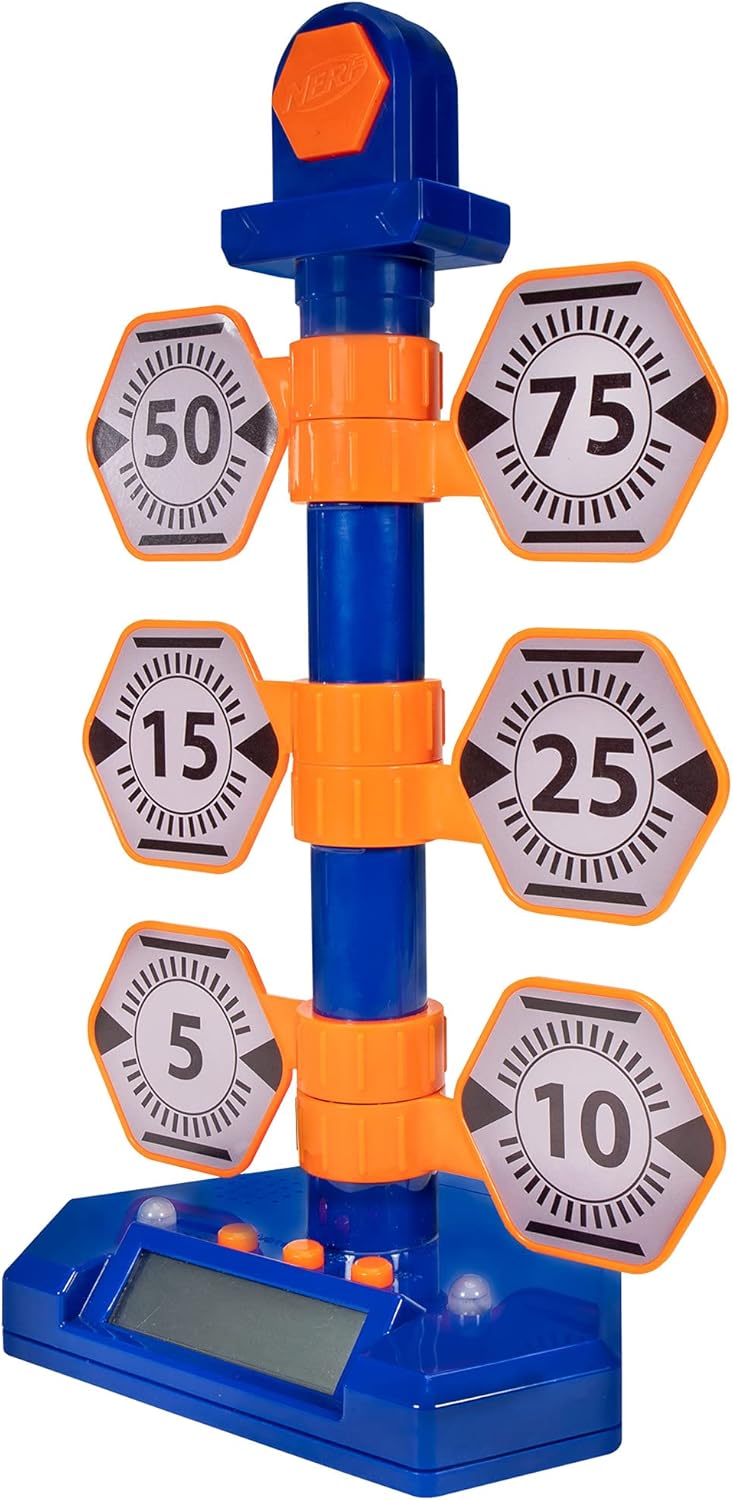
Image: The complete Nerf Bulls-Eye Digital Target, featuring a blue base with an LCD screen, a central blue pole, and six orange and grey hexagonal flip-back targets with various point values.
4. Орнотуу
4.1. Батареяны орнотуу
The Nerf Bulls-Eye Digital Target requires 3 AAA batteries for operation. Batteries are included with the product.
- Locate the battery compartment on the underside of the target base.
- Филлипс баштуу бурагычты колдонуп, батарея бөлүмүнүн капкагын бурап чыгарыңыз.
- Бөлүмдүн ичинде көрсөтүлгөндөй туура полярдуулукту (+/-) камсыз кылып, 3 AAA батарейкасын салыңыз.
- Батарея уясынын капкагын ордуна коюңуз жана аны бурама менен бекитиңиз.
4.2. Ассамблея
No assembly is required for the Nerf Bulls-Eye Digital Target. It comes pre-assembled and ready for use after battery installation.

Image: The Nerf Bulls-Eye Digital Target highlighting its key features: a bullseye that lights up and makes sounds for 100 points, six swinging targets, single or multiplayer gameplay, three different game modes, and an LCD screen for score tracking.
5. Иштөө нускамалары
5.1. Күйгүзүү / Өчүрүү
Press the power button located on the front of the target base to turn the unit on. Press it again to turn it off.
5.2. Оюн режимдери
The Bulls-Eye Digital Target features three interactive game modes to test your skills:
- Point Counter: Accumulate points by hitting the targets. Each target has a designated point value (5, 10, 15, 25, 50, 75). Hitting the top bullseye scores 100 points.
- Stack 'Em: This mode challenges players to hit targets in a specific sequence or to achieve a certain score within a time limit.
- Accuracy Test: Focus on precision as you attempt to hit specific targets or the bullseye under varying conditions.
The LCD screen on the base will display scores and game information, allowing you to focus on the competition. The target provides lights and sounds feedback upon hitting targets, especially the bullseye.
Сүрөт: жакын план view of the Nerf Bulls-Eye Digital Target's base, showing the LCD screen displaying scores and game information, along with the control buttons for selecting game modes and power.

Image: A dynamic shot of the Nerf Bulls-Eye Digital Target, illustrating the flip-back mechanism of the hexagonal targets when hit by a dart.
6. Техникалык тейлөө
To ensure the longevity and optimal performance of your Nerf Bulls-Eye Digital Target, follow these maintenance guidelines:
- Тазалоо: Wipe the target surface with a soft, dry cloth. Do not use abrasive cleaners or immerse the unit in water.
- Сактагыч: Store the target in a cool, dry place away from direct sunlight and extreme temperatures.
- Батареяга кам көрүү: Remove batteries if the target will not be used for an extended period to prevent leakage.
7. Кыйынчылыктарды
If you encounter issues with your Nerf Bulls-Eye Digital Target, refer to the table below for common problems and solutions:
| Көйгөй | Мүмкүн себеп | Чечим |
|---|---|---|
| Target does not power on. | Өлүк же туура эмес орнотулган батарейкалар. | Батареянын полярдуулугун текшериңиз. Жаңы AAA батарейкалары менен алмаштырыңыз. |
| Targets not registering hits. | Darts not hitting targets with enough force; sensor obstruction. | Ensure darts are fired with sufficient velocity. Check for any debris obstructing the target mechanisms. |
| LCD экран бош же жыпылыктап турат. | Low battery power; loose battery connection. | Replace batteries. Ensure batteries are securely seated in the compartment. |
| Sound or lights not working. | Батарея көйгөйү; ички бузук. | Батареяларды алмаштырыңыз. Эгер көйгөй чечилбесе, кардарларды колдоо бөлүмүнө кайрылыңыз. |
8. Техникалык шарттар
| Өзгөчөлүк | Деталь |
|---|---|
| Модель номери | NER0226 |
| Өлчөмдөрү (L x W x Y) | 22.86 x 33.02 x 50.8 см |
| Салмагы | 531 г |
| Power Source | 3 AAA батарейка (кошулган) |
| Материал | көбүк |
| Түс | Orange/Blue |
| Иштөө режими | Автоматтык |
| Өндүрүүчү | Hasbro |
9. Кепилдик жана колдоо
This product is covered by a standard manufacturer's warranty. For specific warranty terms and conditions, please refer to the documentation included with your purchase or visit the official NERF website. If you require technical assistance or have questions not covered in this manual, please contact NERF customer support through their official channels.
Көбүрөөк маалымат алуу жана продукт жаңыртуулары үчүн, төмөнкү дарекке кириңиз NERF Store on Amazon.


