Introduction
The ThermoPro TM02 Digital Kitchen Timer is designed for precise time management in various settings, including cooking, baking, studying, and general household tasks. It features a unique dual countdown/count-up function, a large backlit LCD display for easy readability, adjustable alarm volume, and versatile placement options.
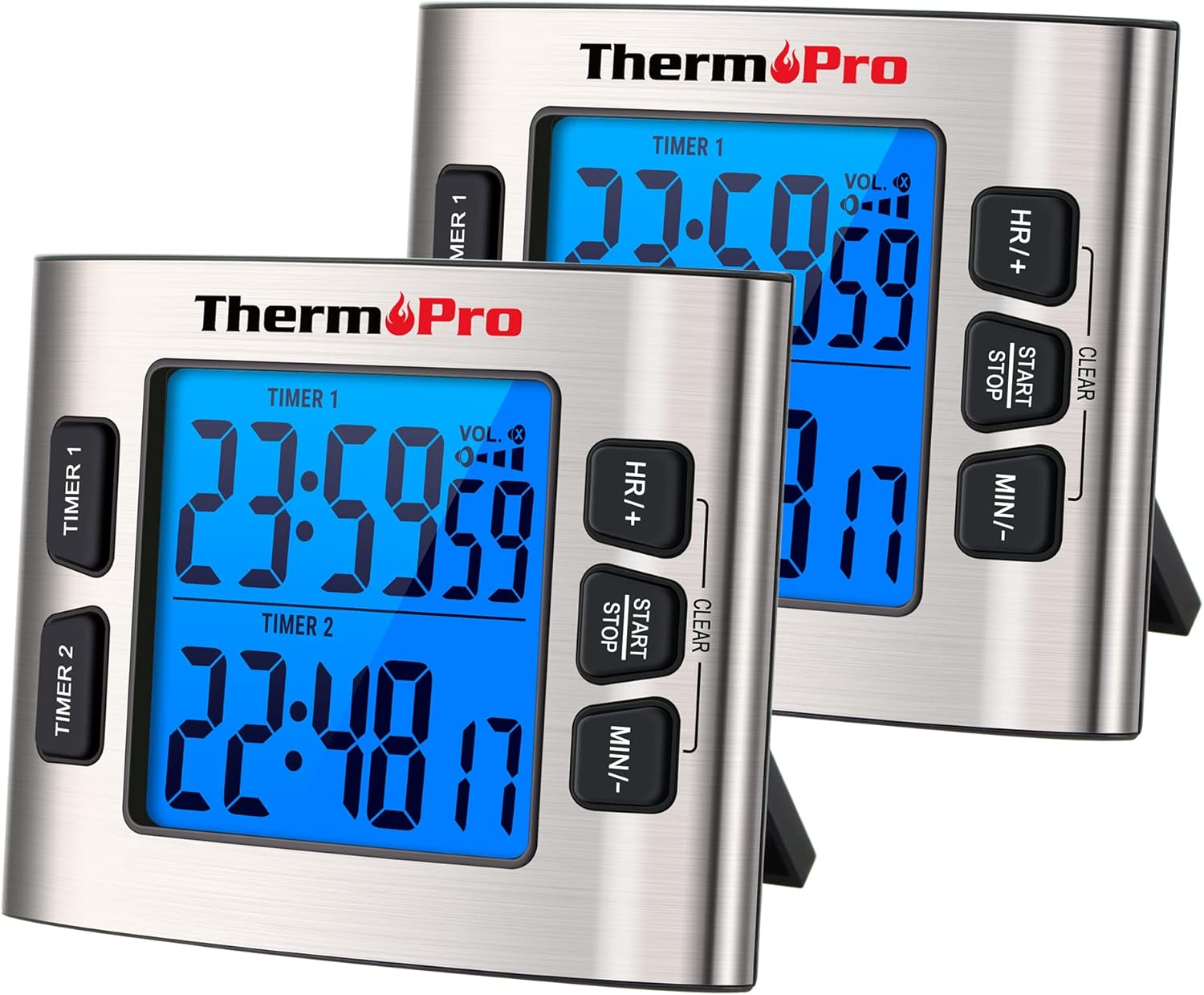
Figure 1: Two ThermoPro TM02 Digital Kitchen Timers. Each timer features a large backlit display, dual timer functionality, and control buttons for setting hours, minutes, and starting/stopping the timer. The timers are shown with their integrated stands extended.
Жайгашуу
Батарея орнотуу
The ThermoPro TM02 timer requires batteries for operation. Locate the battery compartment on the back of the unit. Insert the required batteries, ensuring correct polarity (+/-) as indicated inside the compartment. Close the battery compartment securely.
Жайгаштыруу параметрлери
The timer offers multiple placement options for convenience:
- Магниттик колдоо: The timer features strong embedded magnets with anti-slip pads, allowing it to be securely attached to metallic surfaces such as refrigerators or oven doors without scratching.
- Стол үстүндөгү стенд: An integrated foldable stand on the back of the unit allows the timer to be placed upright on any flat surface, such as a kitchen counter or desk.

Figure 2: The ThermoPro TM02 timer demonstrating its magnetic attachment to a refrigerator and its use with the tabletop stand on a counter.
Иштөө нускамалары
Бүттүview Controls
The ThermoPro TM02 timer features a clear LCD display and intuitive buttons for operation:
- TIMER 1 / TIMER 2 Buttons: Selects which of the two independent timers to set or view.
- HR/+ Button: Adjusts hours or increases value.
- MIN/- Button: Adjusts minutes or decreases value.
- START/STOP баскычы: Starts or stops the selected timer. Also used to clear the timer.
- VOL. Button: Ойготкучтун үнүн тууралайт.
- CLOCK/TIMER Switch: Located on the side/back, switches between Timer mode and Clock mode.
Setting and Using the Timers (Countdown/Count-Up)
The TM02 features two independent timers, Timer 1 and Timer 2, which can operate simultaneously as countdown or count-up timers.
- Таймер режимине которулуу: Ensure the CLOCK/TIMER switch on the side/back of the unit is set to "TIMER".
- Select a Timer: басыңыз ТАЙМЕР 1 or ТАЙМЕР 2 button to select the desired timer. The selected timer's display will become active.
- Артка саноо убактысын коюу:
- Басыңыз Адамдын кадрдык дайындоосу/+ сааттарды коюу.
- Басыңыз MIN/- мүнөт коюу.
- To clear the set time, press and hold the START/STOP баскычы.
- Таймерди баштоо: басыңыз START/STOP button to begin the countdown. The timer will beep and flash when it reaches zero.
- Саноо функциясы: Бассаңыз START/STOP without setting a time, the timer will begin counting up from 00:00.
- Пауза/Резюме: Басыңыз START/STOP during operation to pause the timer. Press again to resume.
- Сигналды токтотуу: When the alarm sounds, press any button to stop it. The timer will automatically reset to the last set time for quick re-use.

Figure 3: The dual timer functionality of the ThermoPro TM02, illustrating simultaneous count-up and countdown operations for different tasks.

Figure 4: Step-by-step guide for setting and starting the timers, including switching to timer mode and clearing the display.
Ойготкучтун үнүн тууралоо
The TM02 offers four volume modes to suit different environments:
- Жогорку: For noisy environments like a busy kitchen.
- Орточо: Standard volume for general use.
- Төмөн: For quiet settings.
- Унчукпай: The alarm will not sound, but the digits on the display will flash to indicate time is up. Ideal for studying or meetings.
басыңыз ТОМ. button repeatedly to cycle through the volume modes.

Figure 5: Illustration of the volume control feature, showing the timer's adaptability for both loud and silent environments.
Using Calendar Clock Mode
The TM02 can also function as a calendar clock, displaying the current time, month, date, and year.
- Switch to Clock Mode: Ensure the CLOCK/TIMER switch on the side/back of the unit is set to "CLOCK".
- Убакыт жана датаны коюу:
- Саат режиминде, баскычын басып кармап туруңуз START/STOP орнотуу режимине өтүү үчүн баскыч.
- Колдонуу Адамдын кадрдык дайындоосу/+ жана MIN/- to adjust the values (Year, Month, Date, Hour, Minute).
- Басыңыз START/STOP ар бир жөндөөнү ырастап, кийинкисине өтүү үчүн басыңыз.
- To switch between 12-hour and 24-hour format, short press START/STOP when setting the hour.
- Орнотуу режиминен чыгуу: The timer will automatically exit setting mode after a few seconds of inactivity, or you can press the CLOCK/TIMER switch to "TIMER" and then back to "CLOCK".

Figure 6: The ThermoPro TM02 operating in Calendar Clock Mode, showing the display of time and date information.
Техникалык тейлөө
Тазалоо
To clean the ThermoPro TM02 timer, wipe it with a soft, damp cloth. Do not immerse the unit in water or use abrasive cleaners, as this can damage the electronic components and the stainless steel casing.
Батареяны алмаштыруу
When the display dims or the timer functions become erratic, it is time to replace the batteries. Follow the battery installation steps outlined in the Setup section.
Сактагыч
Таймерди узак убакыт бою колдонбогондо салкын, кургак жерде сактаңыз. Агып кетпеши үчүн бир нече ай сактасаңыз, батарейкаларды алып салыңыз.

Figure 7: The durable stainless steel casing of the ThermoPro TM02, designed for longevity and easy cleaning.
Проблемаларды чечүү
| Көйгөй | Мүмкүн себеп | Чечим |
|---|---|---|
| Дисплей күңүрт же бош. | Төмөн же өлүп калган батарейкалар. | Туура полярдуулукту камсыз кылуу менен батарейкаларды жаңысына алмаштырыңыз. |
| Сигнализация чырылдабай жатат. | Timer is in Silent mode. | басыңыз ТОМ. button to cycle through volume modes until an audible level is selected. Check for flashing digits. |
| Таймер баскычты басууга жооп бербейт. | Unit may be frozen or batteries are critically low. | Remove and reinsert batteries to reset the unit. If issue persists, replace batteries. |
| Magnetic backing not holding securely. | Бети металл эмес же тегиз эмес. | Ensure the surface is flat and made of a magnetic material. Use the tabletop stand if magnetic attachment is not feasible. |
Техникалык шарттар
- Модел: IC369-BL-2
- Материал: Дат баспаган болот
- Түсү: Silver
- Экрандын өлчөмү: 2.6 дюйм
- Элемент Салмагы: 0.26 килограмм (9.2 унция)
- Пакеттин өлчөмдөрү: 4.45 x 3.5 x 2.28 дюйм
- Таймерлердин саны: 2
- Таймер диапазону: Up to 23 hours, 59 minutes, 59 seconds (for countdown/count-up)
- Alarm Volume Modes: High, Medium, Low, Silent
- Кубат булагы: Batteries (type not specified in input)
- Өзгөчөлүктөрү: Dual Timer, Countdown/Count-up, Calendar Clock Mode, Backlit LCD, Magnetic Backing, Tabletop Stand
Кепилдик жана колдоо
For warranty information, product registration, or technical support, please visit the official ThermoPro website or contact their customer service. Details are typically provided in the product packaging or on the manufacturer's webсайт.
Official ThermoPro Store: Visit ThermoPro Store on Amazon


