Introduction
The DJI RC Pro Smart Controller is engineered for professional-level aerial photography, offering enhanced stability and smoothness through its next-generation processor and increased storage capacity. It integrates powerful O3+ video transmission technology and features control sticks similar to those found on DJI FPV, providing precise and ultra-smooth control. This controller boasts a high-bright display, robust performance, efficient control mechanisms, and superior audio and video capabilities.
Жайгашуу
Кутудан чыгаруу жана алгачкы текшерүү
Upon receiving your DJI RC Pro, carefully unbox the contents. The package includes the DJI RC Pro controller and a USB 3.0 Type-C Cable. Please note that a USB Charger and the DJI Retail Box are not included.
- Inspect the controller for any visible damage.
- Бардык саналган компоненттердин бар экенин текшериңиз.
Attaching Control Sticks and Antennas
The control sticks for the DJI RC Pro are typically stored in the back of the controller for protection during transport. To prepare for use:
- Locate the control sticks on the back of the controller.
- Gently screw each control stick into its designated port on the front of the controller until secure.
- Extend the antennas located on the top rear of the controller to an appropriate angle for optimal signal transmission.

Сүрөт 1: Алдыңкы view of the DJI RC Pro Smart Controller, showcasing the integrated display and control layout.
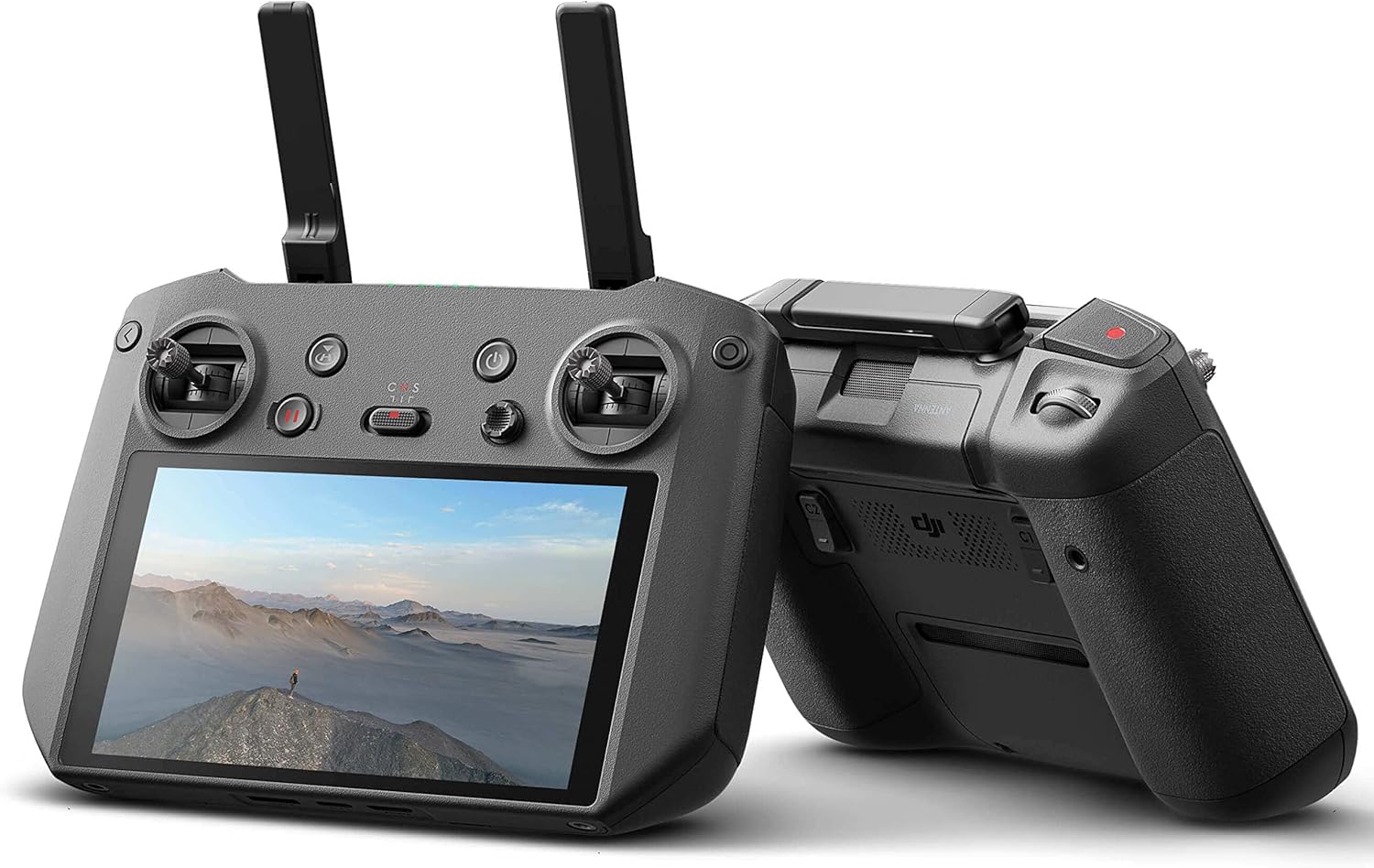
2-сүрөт: Каптал view of the DJI RC Pro Smart Controller, highlighting its ergonomic design and extended antennas.
Контроллерди иштетүү
Негизги өзгөчөлүктөр жана башкаруу элементтери
The DJI RC Pro is designed for intuitive operation, providing a seamless connection to your DJI drone. Familiarize yourself with the main controls:
- Кубат баскычы: Located on the top right, used to turn the controller on and off.
- Үйгө кайтуу (RTH) баскычы: Initiates the drone's return to its takeoff point.
- Учуу режимин которуу: Allows selection between different flight modes (e.g., Normal, Sport, Cine).
- Toggle Joystick: Used for navigating menus and adjusting various functions within the controller's interface.
- Жазуу баскычы: Initiates and stops video recording.
- Camera Movement Toggles: Located on the back, these toggles allow for precise control over camera gimbal movements.
Дисплей жана иштөө
The integrated display is a 5.5-inch, 1080p screen with 1000 nits of brightness, ensuring clear visibility even in bright outdoor conditions. The powerful processor within the controller ensures a smooth and stable connection with your aircraft, enhancing the overall flight experience. The O3+ video transmission technology supports an extended range of up to 15 kilometers between the controller and your drone.
Enhanced Portability and Security
The DJI RC Pro features convenient attachment points on the bottom, allowing for the use of a strap. This feature helps prevent accidental drops and provides added security during operation.
Техникалык тейлөө
To ensure the longevity and optimal performance of your DJI RC Pro Smart Controller, follow these general maintenance guidelines:
- Башкаргычты таза жана чаң менен таштандылардан таза кармаңыз. Тазалоо үчүн жумшак, кургак чүпүрөк колдонуңуз.
- Контроллерди түз күн нурунан жана экстремалдык температурадан алыс салкын, кургак жерде сактаңыз.
- Avoid exposing the controller to water or excessive moisture.
- Regularly check the control sticks and buttons for proper function and responsiveness.
Проблемаларды чечүү
If you encounter any issues with your DJI RC Pro Smart Controller, consider the following:
- Шайкештик: Always verify that your DJI RC Pro is compatible with your specific DJI aircraft model. The DJI RC Pro is compatible with DJI Air 2S and DJI Mavic 3 drones.
- Туташуу маселелери: Ensure both the controller and the drone are fully charged and properly linked. Refer to the drone's manual for specific linking procedures.
- Экрандагы дисплей: If the screen is dim or unresponsive, check the brightness settings and ensure the battery is adequately charged.
- Физикалык зыян: If the controller has been dropped or sustained impact, inspect for physical damage, especially to antennas or control sticks.
For persistent issues, please refer to the official DJI support resources or contact RotorLogic customer service.
Техникалык шарттар
| Өзгөчөлүк | Деталь |
|---|---|
| Продукциянын өлчөмдөрү | 8 x 2 x 6 дюйм |
| Элемент Салмагы | 2.05 фунт |
| Элемент моделинин номери | DJI RC Pro |
| Бренд | RotorLogic |
| Өндүрүүчү | DJI |
| Өзгөчө өзгөчөлүк | Эргономикалык |
| Түс | Кара |
| Колдоого алынган түзмөктөрдүн максималдуу саны | 1 |
| Шайкеш түзмөктөр | DJI Air 2S, DJI Mavic 3 |
| Экран диагоналы | 6" / 14 см |
Шайкештик
The DJI RC Pro Smart Controller is specifically designed for use with the DJI Air 2S жана DJI Mavic 3 drones. It is not compatible with other DJI drone models.
Кутуда эмне бар
The standard package for the DJI RC Pro Smart Controller includes the following items:
- DJI RC Pro Controller x 1
- USB 3.0 Type-C Cable x 1
Please note: USB Charger and Retail Box are not included.
Кепилдик жана колдоо
For information regarding warranty coverage and technical support for your DJI RC Pro Smart Controller, please refer to the official documentation provided by DJI or visit the RotorLogic store on Amazon. You may also contact RotorLogic customer service directly for assistance with product-related inquiries.


