1. Продукт бүтүп калдыview
The WORKPRO 6.5AMP 850W Corded Electric Jig Saw is a versatile power tool designed for precise cutting of various materials, including wood, metal, and plastic. It features a powerful motor, variable speed control, orbital settings, and a tool-free blade change system for enhanced efficiency and user convenience.

Figure 1: WORKPRO 6.5AMP 850W Corded Electric Jig Saw and included accessories.
2. Коопсуздук маалыматы
Электр шаймандарын иштетүүдө ар дайым коопсуздукка артыкчылык бериңиз. Бул электр куралы менен берилген бардык коопсуздук эскертүүлөрүн, нускамаларды, иллюстрацияларды жана спецификацияларды окуп, түшүнүңүз. Төмөндө саналып өткөн бардык көрсөтмөлөрдү аткарбоо электр тогуна, өрткө жана/же олуттуу жаракатка алып келиши мүмкүн.
- Жумуш аймагынын коопсуздугу: Иштеген жериңизди таза жана жарыктандырыңыз. Башаламан же караңгы жерлер кырсыкка чакырат.
- Электр коопсуздугу: Электр шайманынын сайгычтары розеткага дал келиши керек. Эч качан сайгычты эч кандай жол менен өзгөртпөңүз. Жерге туташтырылган же жерге төшөлгөн беттерге денеге тийбеңиз.
- Жеке коопсуздук: Always wear eye protection, dust mask, non-skid safety shoes, hard hat, or hearing protection as appropriate for the conditions.
- Куралды колдонуу жана кам көрүү: Электр аспапты күчтөп албаңыз. Колдонмоңуз үчүн туура электр шайманын колдонуңуз. Кандайдыр бир тууралоолорду жасоодон, аксессуарларды алмаштыруудан же электр шаймандарын сактоодон мурда вилканы кубат булагынан ажыратыңыз.
- Тейлөө: Электр шаймандарын жана аксессуарларын сактаңыз. Кыймылдуу бөлүктөрдүн туура эмес түзүлүшү же байланбагандыгы, тетиктердин сынышы жана электр шайманынын иштешине таасир эте турган башка жагдайлардын бар-жоктугун текшериңиз.
For detailed safety guidelines, refer to the complete user manual provided in the product packaging.
3. Пакеттин мазмуну
Upon opening the package, ensure all items are present and in good condition. The WORKPRO 6.5AMP 850W Corded Electric Jig Saw kit includes:
- 1 × WORKPRO Jigsaw
- 7 × Replaceable T-shank blades (1 for metal, 6 for wood)
- 1 × Scale Ruler
- 1 × Dust Exhaust Pipe
- 1 × Колдонуучунун колдонмосу
- 1 × Аллен ачкычы
Видео 1: кутудан чыгаруу жана андан ашыкview of the WORKPRO 6.5AMP 850W Corded Electric Jig Saw and its included components.
4. Продукциянын өзгөчөлүктөрү
4.1 Жогорку өндүрүмдүү мотор
The jigsaw is equipped with a powerful 6.5 amp motor, delivering a top speed of 3000 Strokes Per Minute (SPM). This high power allows for faster cutting and helps prevent material burn. The 4/5-inch stroke length ensures efficient material removal with each cut. It can cut iron plate up to 10mm and wood board up to 100mm.
4.2 Bevel Cutting & Orbital Settings
The adjustable bottom plate allows for bevel cuts up to ±45 degrees, providing flexibility for various cutting angles. Four orbital settings enable adjustment of cut aggressiveness, suitable for different materials and cutting speeds. Higher orbital settings are ideal for softer materials and faster cuts, while lower settings are for harder materials and slower, more precise cuts.

Figure 2: The adjustable base plate allows for precise ±45° bevel cutting.

Figure 3: Four-position orbital action for varied cutting needs across different materials.
4.3 Tool-less Blade Change & LED Light
Blade changes are quick and easy with the tool-less system; simply press the replacement button. The integrated LED light illuminates the cutting area, ensuring improved visibility and precise cuts, especially in dimly lit environments.

Figure 4: Easy and quick saw blade installation without the need for additional tools.

Figure 5: Built-in LED light provides enhanced visibility for precise cutting.
4.4 User-Friendly Design
The jigsaw includes a dust blower function to keep the cut line clear of debris, improving visibility. The blower switch allows for both blowing and vacuuming functions. A lock-on button is also provided to reduce user fatigue during extended cutting tasks.

Figure 6: Labeled components of the WORKPRO Jig Saw for easy identification.
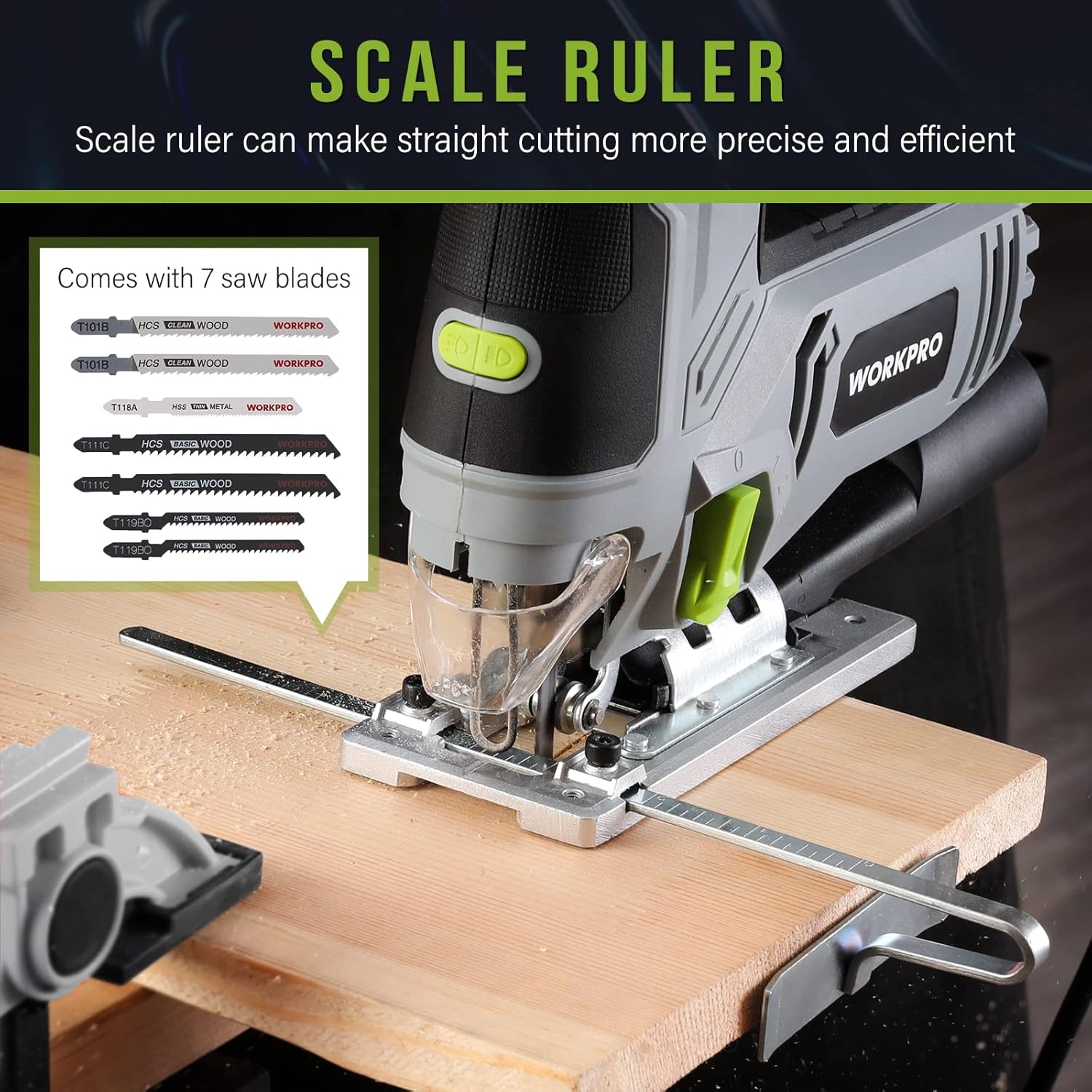
Figure 7: The included scale ruler assists in making straight and precise cuts.
5. Орнотуу
5.1 Чачты орнотуу
- Араа кубат булагынан ажыратылганын текшериңиз.
- Locate the tool-less blade change lever on the front of the saw.
- Push the lever to release the blade clamp.
- Insert the T-shank blade into the blade holder until it clicks securely into place.
- Release the lever to lock the blade. Gently pull on the blade to ensure it is firmly seated.
5.2 Attaching Dust Exhaust Pipe
For dust collection, attach the dust exhaust pipe to the designated port at the rear of the saw. This allows connection to a vacuum system to keep your work area clean.
5.3 Adjusting Base for Bevel Cuts
- Using the included Allen wrench, loosen the screws on the base plate.
- Tilt the base plate to the desired angle (up to ±45 degrees). Use the angle markings on the base for accuracy.
- Tighten the screws firmly to secure the base plate in position.
5.4 Using the Scale Ruler (Edge Guide)
The scale ruler can be inserted into the slot on the base plate to guide straight cuts parallel to an edge. Adjust the ruler to the desired distance from the blade and tighten its locking mechanism.
6. Иштөө нускамалары
6.1 Күйгүзүү/өчүрүү
To turn the jig saw on, press the trigger switch. To turn it off, release the trigger. For continuous operation, press the lock-on button while the trigger is depressed. To release the lock, press the trigger again.
6.2 Өзгөрмө ылдамдыкты башкаруу
Adjust the variable speed dial located on top of the tool to select the appropriate speed for your material. Speeds range from 1 (lowest) to 6 (highest). Use lower speeds for harder materials or intricate cuts, and higher speeds for softer materials or faster cuts.
6.3 Orbital Action Selection
The orbital action lever allows you to choose from four settings (0-3). Setting 0 provides no orbital action for fine, splinter-free cuts. Higher settings increase the orbital action for faster, more aggressive cuts in softer materials.
6.4 LED жарыгын колдонуу
The LED light can be turned on or off using the dedicated switch near the front of the tool. This feature is useful for illuminating the cutting line in low-light conditions.
6.5 Чаңды башкаруу
Utilize the dust blower switch to direct air away from the cutting line, keeping it clear of sawdust. For more comprehensive dust collection, attach the dust exhaust pipe to a vacuum cleaner.
6.6 General Cutting Tips
- Даярдоо бөлүгүңүздү ар дайым cl менен бекемдеңизampкесүү учурунда кыймылга жол бербөө үчүн.
- Allow the saw to reach full speed before engaging the material.
- Apply steady, even pressure. Do not force the saw, as this can damage the blade or motor.
- For plunge cuts, tilt the saw forward on its base plate, start the cut, and slowly lower the blade into the material.
7. Техникалык тейлөө
Regular maintenance ensures the longevity and optimal performance of your WORKPRO Jig Saw.
- Бычакты алмаштыруу: Replace blades when they become dull or damaged to ensure clean and efficient cuts. Always use appropriate T-shank blades for the material being cut.
- Тазалоо: After each use, unplug the tool and clean any sawdust or debris from the ventilation slots and the blade area. Use a soft brush or compressed air.
- Шнур текшерүү: Электр шнурунун бузулуу белгилерин дайыма текшерип туруңуз. Эгер бузулса, аны квалификациялуу адис оңдоңуз.
- Сактагыч: Store the jig saw in a dry, secure location out of reach of children.
8. Кыйынчылыктарды
If you encounter issues with your jig saw, refer to the following common problems and solutions:
| Көйгөй | Мүмкүн себеп | Чечим |
|---|---|---|
| Сау башталбайт | Электр энергиясы жок; туура эмес өчүргүч. | Check power outlet and cord. If issue persists, contact service. |
| Бычак түз кесилбейт | Dull or bent blade; incorrect orbital setting; forcing the tool. | Replace blade. Adjust orbital setting. Apply less pressure. |
| Ашыкча термелүү | бош бычак; бузулган бычак; эскирген ички компоненттери. | Ensure blade is securely installed. Replace blade. Contact service if vibration continues. |
| Мотордун ысып кетиши | Бөгөттөлгөн желдетүү тешиктери; үзгүлтүксүз оор колдонуу. | Clean ventilation slots. Allow tool to cool down. Reduce load. |
If the problem persists after attempting these solutions, please contact WORKPRO customer support.
9. Техникалык шарттар
| Өзгөчөлүк | Деталь |
|---|---|
| Бренд | WORKPRO |
| Модель номери | W124748A |
| Power Source | Электр зымдары |
| Учурдагы рейтинг | 6.5 Amps |
| Ватtage | 850 ватт |
| Тtage | 120 вольт |
| Ылдамдык | 3000 SPM (Мүнөтүнө соккулар) |
| Кесүү бурчу | ±45 градус |
| Орбиталык орнотуулар | 4 Positions |
| Бычактын материалы | Металл |
| Surface Recommendation | Жыгач |
| Элемент Салмагы | 5.44 фунт |
| Продукциянын өлчөмдөрү | 8.86"L x 11.22"W x 3.15"H |
| Өзгөчө өзгөчөлүк | Tool-less Blade Change, LED Light, Dust Blower |
| UPC | 820909772569 |
10. Кепилдик жана колдоо
The WORKPRO 6.5AMP 850W Corded Electric Jig Saw comes with a limited warranty. For specific warranty terms and conditions, please refer to the warranty card included in your product packaging or visit the official WORKPRO webсайт.
For technical support, replacement parts, or any inquiries regarding your product, please contact WORKPRO customer service. Contact information can typically be found in your user manual or on the WORKPRO brand webсайт.


