FANTECH MAXFIT67 Mechanical Gaming Keyboard User Manual
Модел: MK858
Бренд: FANTECH
Introduction
The FANTECH MAXFIT67 is a versatile 65% (67-key) mechanical gaming keyboard designed for an enhanced typing and gaming experience. It features 3-mode connectivity (wired, 2.4GHz wireless, Bluetooth), hot-swappable sockets, RGB backlighting, and a programmable macro knob. This manual provides detailed instructions for setting up, operating, maintaining, and troubleshooting your MAXFIT67 keyboard.

Image: FANTECH MAXFIT67 keyboard in off-white with RGB backlighting and included extra keycaps.
Кутуда эмне бар
Upon unboxing your FANTECH MAXFIT67 keyboard, please ensure all the following items are present:
- FANTECH MAXFIT67 Keyboard
- Баскыч капкагын тарткыч
- Extra DYE-SUB PBT Keycaps (gift)
- USB Wireless Dongle
- USB Type-C кабели
- Switch Puller

Image: The FANTECH MAXFIT67 keyboard and its accessories, including the USB cable, wireless dongle, keycap puller, and extra keycaps, laid out on a surface.
Жайгашуу
Баштапкы орнотуу
- Кутучадан клавиатураны жана бардык аксессуарларды ачыңыз.
- Choose your preferred connection method: Wired, 2.4GHz Wireless, or Bluetooth.
- Ensure the keyboard is fully charged for optimal wireless performance. Connect the USB Type-C cable to the keyboard and a USB port on your computer.
Байланыш режимдери
The MAXFIT67 keyboard supports three distinct connection modes for maximum flexibility:
- Зымдуу режим: Connect the keyboard directly to your computer using the provided USB Type-C cable. This mode offers the most stable connection and charges the keyboard's battery.
- 2.4 ГГц зымсыз режими: Insert the USB Wireless Dongle into an available USB port on your computer. The keyboard will automatically connect. This mode provides a low-latency wireless experience ideal for gaming.
- Bluetooth режими: The keyboard can connect to up to 5 devices via Bluetooth 5.0. To pair, switch the keyboard to Bluetooth mode and follow your device's Bluetooth pairing instructions. The keyboard will appear as 'MAXFIT67'.

Image: The FANTECH MAXFIT67 keyboard connected to a laptop, tablet, and smartphone, illustrating its 3-mode connectivity (wired, 2.4GHz, Bluetooth).
Key Features & Components
Hot-Swappable Sockets
The MAXFIT67 features high-quality Gateron hot-swappable sockets, allowing you to easily change switches without soldering. It supports both 3-pin and 5-pin mechanical switches from various brands, enabling full customization of your typing feel.

Image: A hand using a switch puller to remove a mechanical switch from the FANTECH MAXFIT67 keyboard, highlighting its hot-swappable design.
Programmable Rotary Encoder Knob
The aluminum macro knob on the MAXFIT67 is fully programmable. Beyond standard volume control, you can customize it to assign macros, control media playback, adjust productivity settings, or even function as a weapon wheel in games.

Сүрөт: деталдуу view of the programmable rotary encoder knob on the FANTECH MAXFIT67 keyboard, emphasizing its metallic finish and functionality.
DYE-SUB PBT Keycaps and South-Facing RGB
The keyboard comes equipped with high-quality DYE-SUB PBT keycaps, known for their durability and resistance to wear and shine. The south-facing RGB LED lights provide vibrant illumination and are compatible with a wider range of aftermarket keycaps and switches.

Сүрөт: үстүнкү view of the FANTECH MAXFIT67 keyboard, showcasing its DYE-SUB PBT keycaps, 65% form factor, and south-facing RGB lighting.
Adjustable 3-Step Height
Customize your typing angle with the keyboard's adjustable 3-step height feet, providing ergonomic comfort for extended use.
Double Sound Absorbing Foam
The MAXFIT67 incorporates a 2-piece sound dampening foam design, significantly reducing unwanted acoustic resonance and providing a more solid and pleasant typing sound profile.
Image: An exploded diagram of the FANTECH MAXFIT67 keyboard's internal structure, illustrating the placement of the double sound-absorbing foam layers and adjustable feet.
Иштөө нускамалары
Негизги функциялар
- Function Key (Fn): The Fn key is used in combination with other keys to access secondary functions, such as media controls, lighting adjustments, and connection mode switching.
- RGB жарыкты башкаруу: Use Fn key combinations to cycle through various RGB lighting modes, adjust brightness, and change speed. Refer to the quick start guide for specific key combinations.
- Үндү көзөмөлдөө: Rotate the programmable knob to adjust the system volume. Press the knob to mute/unmute.
- Switching Devices (Bluetooth): If multiple Bluetooth devices are paired, use the designated Fn key combinations to switch between them quickly.
Программалык камсыздоону ыңгайлаштыруу
The FANTECH MAXFIT67 offers extensive personalization options through its dedicated software. This software allows you to:
- Adjust RGB spectrum modes.
- Баскыч функцияларын кайра дайындоо.
- Create and edit macro scripts.
The MAXFIT67 software is available for download from the official FANTECH webсайт. Note: The software is not compatible with Mac operating systems.
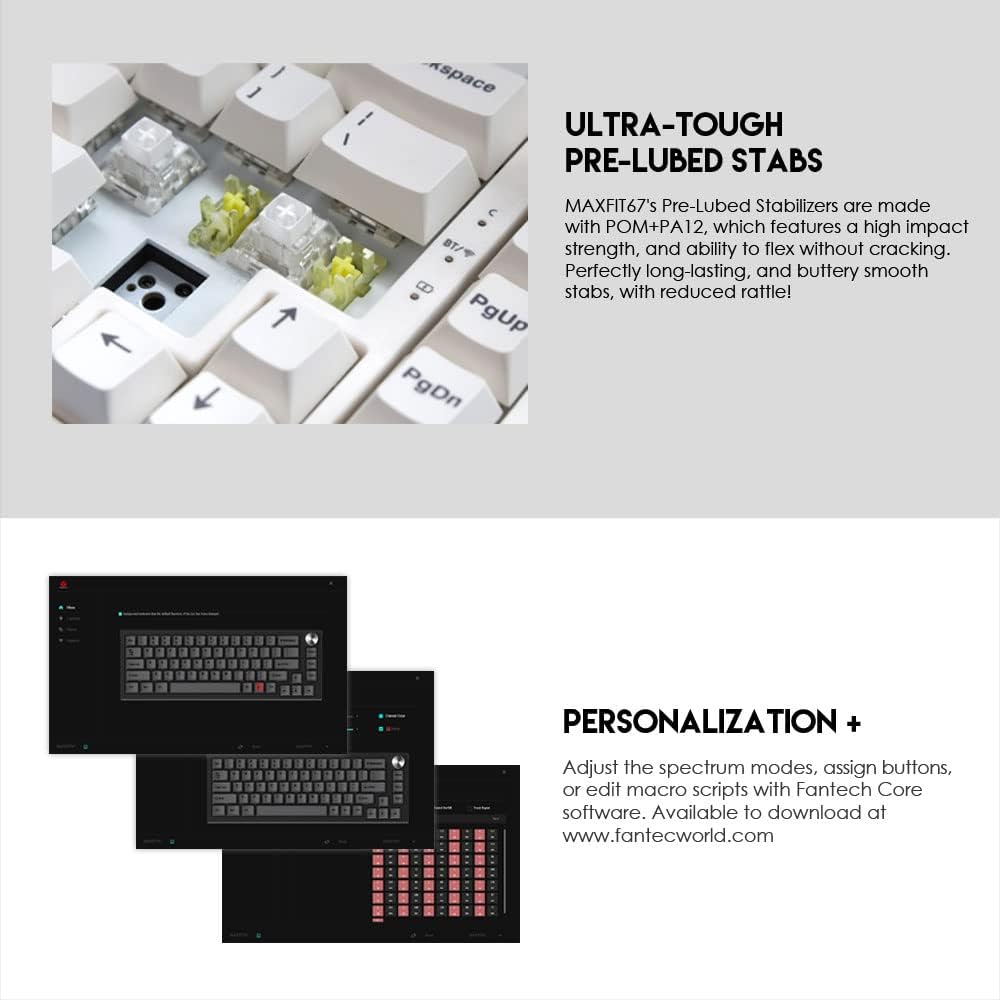
Image: Screenshots of the FANTECH MAXFIT67 software interface, demonstrating options for RGB lighting control, key remapping, and macro programming.
Видео: Продукциянын расмий көргөзмөсүasing the FANTECH MAXFIT67 RGB Mechanical Hotswap Keyboard's features, including its design, customizable elements, and connectivity options.
Техникалык тейлөө
Тазалоо
- Чаң жана таштандылардын топтолушун алдын алуу үчүн клавиатураңызды үзгүлтүксүз тазалап туруңуз.
- Тазалоодон мурун клавиатураны компьютерден ажыратыңыз.
- Баскычтоптордун ортосундагы чаңды кетирүү үчүн жумшак щетканы же кысылган абаны колдонуңуз.
- Өтө кир болсо, баскычтоптун капкактарын жарнама менен акырын сүртүңүзamp cloth and mild cleaning solution. Ensure the keycaps are completely dry before reattaching or using the keyboard.
Которуу жана клавиатура алмаштыруу
Thanks to the hot-swappable design, replacing switches and keycaps is straightforward:
- Каалаган баскычтоптун капкагын этияттык менен алып салуу үчүн берилген баскычтоптун капкагын тартуучу каражатты колдонуңуз.
- Use the provided switch puller to gently extract the switch from its socket.
- Align the pins of the new switch with the holes in the PCB and press firmly until it clicks into place.
- Place the new keycap onto the switch stem and press down until secure.
Проблемаларды чечүү
Жалпы маселелер жана чечимдер
- Баскычтоп жооп бербей жатат: Ensure the USB cable is securely connected (wired mode) or the wireless dongle is properly inserted and the keyboard is powered on (wireless modes). Check battery level if in wireless mode.
- Bluetooth байланыш көйгөйлөрү: Ensure Bluetooth is enabled on your device and the keyboard is in pairing mode. Remove previous pairings and try re-pairing. Keep the keyboard within the effective range (up to 10m).
- RGB жарыктандыруу иштебейт: Check if RGB is enabled via Fn key combinations. Ensure the keyboard is not in a low-power mode if battery is low.
- Катталбаган ачкычтар же эки жолу терүү: This could indicate a faulty switch. Utilize the hot-swappable feature to replace the problematic switch. Ensure switches are fully seated.
- Программа клавиатураны аныктабай жатат: Ensure the keyboard is connected via wired mode when attempting to use the software. Restart the software and/or your computer.
Техникалык шарттар
| Өзгөчөлүк | Деталь |
|---|---|
| Продукт аты | MAXFIT67 MK858 |
| Ачкычтардын саны | 67 Ачкычтар |
| Которуу түрү | Mechanical (Kailh Box White) |
| Anti-Ghosting | Бардык ачкычтар |
| Байланыш | Wired, 2.4GHz, BT 5.0 (Up to 5 devices) |
| Батарея сыйымдуулугу | 4000mAh |
| Зымсыз аралык | 10 м чейин |
| Өлчөмү (L x W x Y) | 330(L) x 115(W) x 37(H)mm (13 x 4.53 x 1.46 inches) |
| Салмагы | 764 г (2.4 фунт) |
| Батареянын иштөө мөөнөтү | 240hr with RGB off, 70hr with RGB on |
| Шайкеш түзмөктөр | Mac, PC |
Кепилдик жана колдоо
FANTECH products are designed for durability and performance. For detailed warranty information and support, please visit the official FANTECH webсайтка же түздөн-түз кардарларды тейлөөгө кайрылыңыз.
Сиз да зыярат кылсаңыз болот FANTECH Store on Amazon көбүрөөк продукт маалымат жана колдоо ресурстар үчүн.


