1. Киришүү
The Technaxx Full HD Birdcam TX-165 is designed for recording and observing birds with its short lens focus (2" to 6") and wide viewing angle (100°). It features fast trigger time, slow motion video capabilities, and night recording with 940 nm LEDs. This manual provides detailed instructions for setting up, operating, and maintaining your birdcam.

Figure 1.1: Technaxx Full HD Birdcam TX-165 in its protective feeder housing.
2. Кутуда эмне бар
Пакетти ачканда, сиз төмөнкү компоненттерди табышыңыз керек:
- Technaxx FULL HD Birdcam TX-165
- Микро USB кабели
- Монтаждык кур
- Дубалга орнотуу
- Корпуска
- 3 x screws & 3 x dowels
- 4 x AA батарейкалар
- User Manual
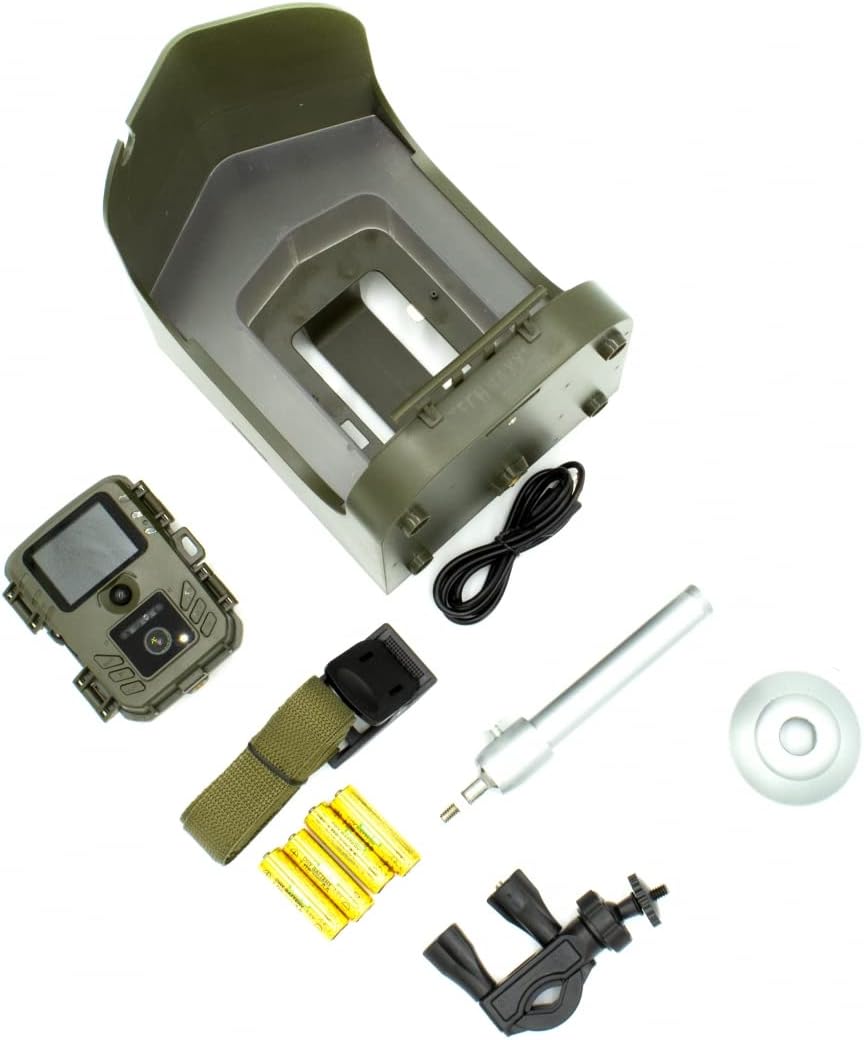
Figure 2.1: ашыкview of all included accessories and the birdcam unit.
3. Орнотуу
3.1. Battery and MicroSD Card Installation
- Open the battery compartment on the back of the birdcam unit.
- Insert 4 AA batteries, ensuring correct polarity. The camera is battery-operated for both indoor and outdoor use.
- Locate the MicroSD card slot. Insert a MicroSD card (up to 512GB, not included) into the designated slot.
- Close the battery compartment securely to maintain the IP56 water resistance.


Figure 3.1: Battery and MicroSD card installation.
3.2. Монтаждоо параметрлери
The birdcam offers versatile mounting options:
- Дарак тоосу: Use the provided mounting belt and wall mount accessory to secure the feeder to a tree.
- Railing Mount: Attach the feeder to a railing using the railing mount accessory.
- Дубалга орнотуу: Utilize the wall mount and screws to fix the feeder to a wall.
- Штатив орнотуу: The camera unit itself has a standard 1/4" screw site at the bottom, allowing it to be mounted on a tripod.
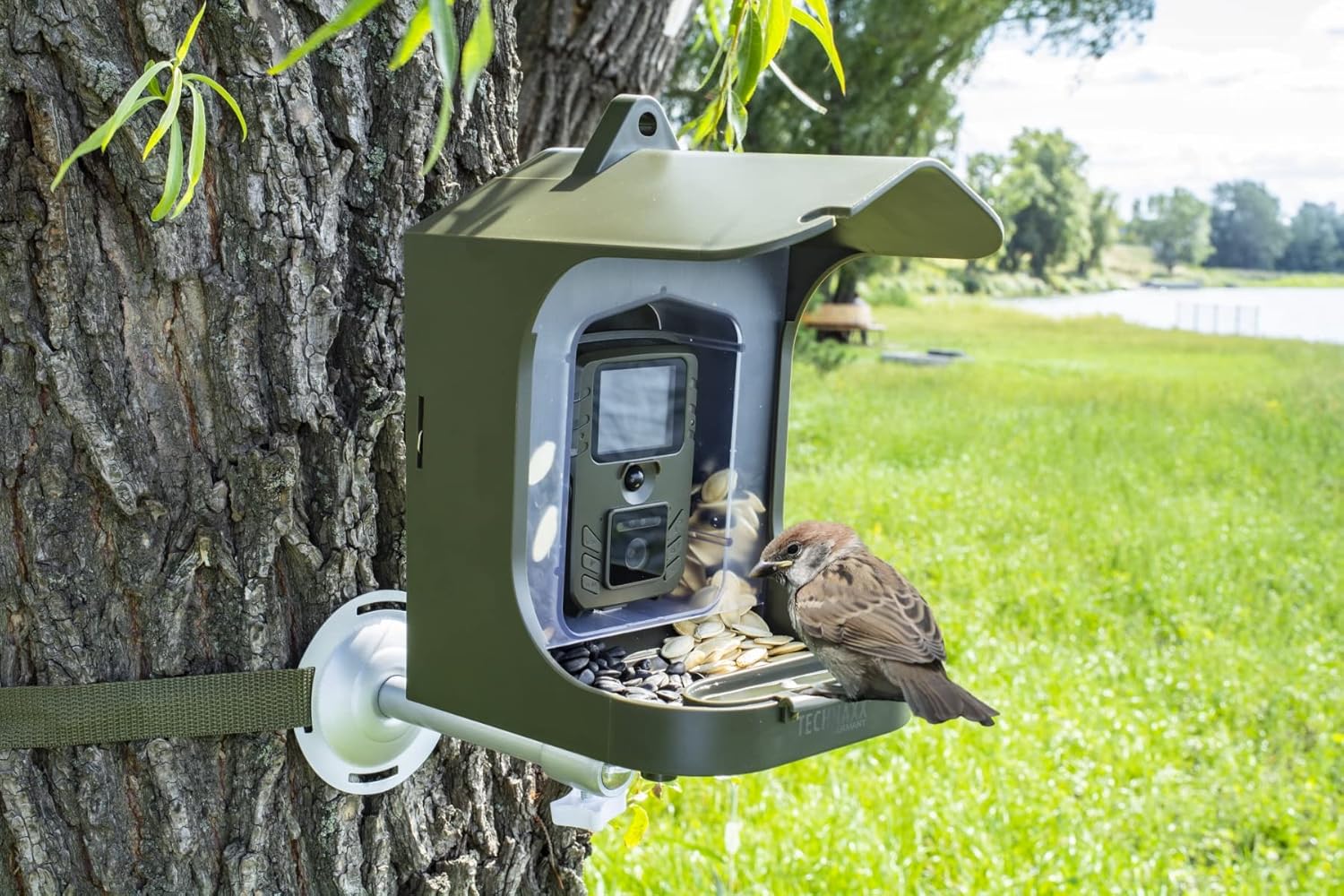

3.2-сүрөт: Мисamples of tree and railing mounting.
Video 3.1: Official product video demonstrating various mounting options for the Technaxx Full HD Birdcam TX-165.
3.3. Filling the Bird Food Container
The birdcam features a removable bird food container for approximately 150g of bird food and a removable water basin.
- Open the locks on the back of the feeder housing.
- Take the clear food container out.
- Fill the container with your desired bird food (e.g., sunflower seeds, pumpkin seeds).
- Place the food container back inside the housing and lock the locks.
- Open the food flap with a lock in the front to allow food to flow into the feeder tray.
- Fill the removable water basin таза суу менен.

Figure 3.3: Visual guide for filling the bird food container.
4. Иштөө нускамалары
4.1. Camera Modes and Features
The Birdcam TX-165 offers several recording functions:
- Видео режими: Records Full HD 1080p video.
- Сүрөт режими: Captures 8 Megapixel photos (3264x2448 resolution).
- Video and Photo Mode: Takes a photo first, then records video upon motion detection.
- Жай кыймыл: Records videos with up to 25 frames per second for detailed observation of bird movements.
The camera features a built-in microphone and speaker for audio recording and playback.


Figure 4.1: The 2.0" TFT LCD display (528x220) allows for easy setup and viewing.
4.2. Motion Detection and Night Vision
The birdcam is equipped with a PIR sensor (7.7") for motion detection and an IR range (19.7") with 940 nm LEDs for clear night recordings.
- The fast trigger time of 0.3 seconds ensures you capture quick movements.
- The 940 nm LEDs provide invisible infrared light for discreet night vision without disturbing the birds.

Figure 4.2: Day and Night mode comparison, highlighting the night vision capability.
5. Техникалык тейлөө
- Regularly clean the bird food container and water basin to ensure hygiene for the birds.
- Check battery levels periodically. The working time is up to 6 months depending on usage. Consider using rechargeable AA batteries for sustainability.
- Ensure the MicroSD card has sufficient space. Transfer recordings to a computer and format the card regularly.
- Keep the camera unit's lens and PIR sensor clean for optimal performance.
6. Кыйынчылыктарды
- No images/videos recorded:
- Батареялар туура салынганын жана заряддалганын текшериңиз.
- Ensure a MicroSD card is inserted and has free space.
- Verify the camera mode is set correctly (Video, Photo, or Video and Photo).
- Check PIR sensor for obstructions or dirt.
- Сүрөт/видео сапаты начар:
- Камера линзасын тазалаңыз.
- Ensure sufficient lighting during daytime recordings.
- For night recordings, ensure no objects are too close to the IR LEDs causing reflection.
- Кыйынчылык viewing images/videos:
- Remove the MicroSD card and view content on a computer or compatible device.
7. Техникалык шарттар
| Өзгөчөлүк | Деталь |
|---|---|
| Бренд | Technaxx |
| Модель номери | TX-165 |
| Video Resolution | Full HD 1080p |
| Сүрөттүн резолюциясы | 8 Mpixels (3264x2448) |
| Жай кыймыл | 25 кадр/сек чейин |
| Lens Focus | 2" to 6" (6-15cm) |
| Viewбурч | 100° |
| Trigger убакыт | 0.3 секунд |
| PIR сенсорунун диапазону | 7.7" |
| IR диапазону | 19.7" with 940 nm LEDs |
| Дисплей | 2.0" TFT Color Display (528x220) |
| Сактагыч | MicroSD Card up to 512GB (not included) |
| Power Source | 4 AA батарейка (кошулган) |
| Жумуш убактысы | 6 айга чейин |
| Коргоо классы | IP56 (Сууга туруктуу) |
| Продукциянын өлчөмдөрү | 9.25"L x 8.25"W x 6.25"H |
| Элемент Салмагы | 2.9 фунт |
| Материал | Acrylonitrile бутадиен Styrene |

Сүрөт 7.1: Продукциянын өлчөмдөрү.
8. Коопсуздук маалыматы
Сураныч, төмөнкү коопсуздук эрежелерин окуп, аткарыңыз:
- Батареяларды этияттык менен колдонуңуз.
- Keep the device away from water except as specified (IP56 rating indicates resistance to water jets, not submersion).
- Аппаратты ажыратууга же өзгөртүүгө аракет кылбаңыз.
- Батареяларды жана электрондук тетиктерди жергиликтүү эрежелерге ылайык таштаңыз.
9. Кепилдик жана колдоо
For warranty information and technical support, please refer to the official Technaxx webсайтка же кардарларды тейлөөгө кайрылыңыз. Сатып алганыңыздын далили катары сатып алуу дүмүрчөгүңүздү сактаңыз.
зыярат кылыңыз Technaxx Store көбүрөөк өнүмдөр жана маалымат үчүн.


