1. Киришүү
The STRONG LEAP-S1+ Android TV Box transforms your television into a smart TV, providing direct access to the Google Play Store. Running on the latest Android 10, this Google-certified device offers a vast array of applications, games, and streaming services. Enjoy your favorite content from platforms like Netflix, YouTube, Prime Video, and Disney+. The LEAP-S1+ supports 4K UHD resolution, H.265 decoding, dual-band Wi-Fi 5, and built-in Chromecast functionality. Its integrated Google Assistant allows for voice control of playback, searching for shows, and answering queries. Connectivity options include 2 USB ports (1 x 3.0, 1 x 2.0), Bluetooth 4.2, a Micro SD card slot, HDMI, and Ethernet, ensuring a comprehensive and user-friendly TV experience.

Image: The STRONG Leap-S1+ Android TV Box and its accompanying remote control, showcasing the sleek design of both components.
2. Пакеттин мазмуну
Пакеттин мазмунун кылдат текшериңиз. Эгерде кандайдыр бир буюмдар жок же бузулуп калса, сатуучуга кайрылыңыз.
- STRONG LEAP-S1+ Android TV Box
- Bluetooth Remote Control (requires 2 AAA batteries, often included)
- Кубаттуу адаптер
- HDMI кабели
- Quick Start Guide

Image: An illustration showing the contents of the STRONG Leap-S1+ package, including the TV box, Bluetooth remote control, power adapter, and HDMI cable.
3. Баштапкы орнотуу
Follow these steps to set up your STRONG LEAP-S1+ Android TV Box:
- Сыналгыга туташуу: Connect one end of the HDMI cable to the HDMI OUT port on the LEAP-S1+ box and the other end to an available HDMI IN port on your television.
- Туташуу кубаты: Plug the power adapter into the DC IN port on the LEAP-S1+ box, then plug the adapter into a wall outlet.
- Күйгүзүү: The device should power on automatically. If not, press the Power button on the remote control or the device.
- Баштапкы конфигурация: Баштапкы орнотууну аяктоо үчүн экрандагы нускамаларды аткарыңыз, анын ичинде:
- Pairing the Bluetooth remote control.
- Тилиңизди тандоо.
- Connecting to your Wi-Fi network or Ethernet.
- Google аккаунтуңуз менен кирүү.
- Installing essential apps.
- Тармак туташуусу: For optimal performance, connect the device to your home network. You can use Wi-Fi (supports 2.4GHz and 5GHz) or an Ethernet cable for a wired connection.

Image: Visual representation of the STRONG Leap-S1+ supporting both 2.4GHz and 5GHz Wi-Fi bands for stable internet connectivity.
4. Иштөө нускамалары
4.1. Android TV багыттоо
The Android TV interface is designed for easy navigation. Use the directional pad on your remote to move between apps, content, and settings.
- Башкы экран: Сунушталган мазмунду, орнотулган колдонмолорду жана киргизүү булактарын көрсөтөт.
- Колдонмолор: Бардык орнотулган колдонмолоруңузга кириңиз.
- Орнотуулар: Configure network, display, sound, accounts, and device preferences.

Image: A screenshot of the Android TV home screen, showing various streaming apps and content recommendations, as seen on the STRONG Leap-S1+.
4.2. Google Жардамчыны колдонуу
The remote control features a dedicated Google Assistant button. Press and hold this button to activate voice commands.
- Издөө мазмуну: Say "Find action movies" or "Play The Crown."
- Ойноону көзөмөлдөө: Say "Pause," "Resume," "Fast forward 30 seconds."
- Open Apps: Say "Open Netflix" or "Launch YouTube."
- Get Information: Ask "What's the weather?" or "Tell me about the Eiffel Tower."

Image: The remote control with an overlay indicating the Google Voice Assistant functionality, demonstrating how to use voice commands to control the TV box.
4.3. Стриминг кызматтары
The LEAP-S1+ comes with pre-installed apps for popular streaming services and allows you to download more from the Google Play Store.
- Netflix, Prime Video, Disney+, YouTube: Access these services directly using the dedicated buttons on the remote or by selecting their apps.
- Google Play дүкөнү: Download thousands of additional apps, games, and content.
- Chromecast камтылган: Cast content from your compatible smartphone, tablet, or computer directly to your TV via the LEAP-S1+.

Image: The STRONG Leap-S1+ box and remote, surrounded by logos of supported streaming services and features like Netflix, YouTube, Zattoo, Google Play, Prime Video, Disney+, Dolby Atmos, Dolby Audio, 4K Ultra HD, Chromecast built-in, and Google Assistant.

Image: A collage of various streaming service logos and movie/TV show thumbnails, illustrating the vast content library available through the Android TV platform on the LEAP-S1+.
5. Байланыш жана порттор
The STRONG LEAP-S1+ offers a variety of ports for connecting external devices and ensuring robust network connectivity.
- HDMI чыгышы: For connecting to your TV or display.
- USB 3.0 порт: High-speed data transfer for external storage devices.
- USB 2.0 порт: For connecting peripherals like keyboards, mice, or additional storage.
- Микро SD карта слоту: Expand storage for apps and media.
- Ethernet (LAN) порту: For a stable wired internet connection (10/100 Mbps).
- Санарип аудио чыгышы (оптикалык): Тышкы аудио системаларга же саундбарларга туташуу үчүн.
- Аудио/видео чыгаруу: For older TVs using analog connections.
- IR (Infrared) Port: For external IR receiver.
- Кубат баскычы: Аппаратты күйгүзүү/өчүрүү үчүн.
- Кубаттуу адаптердин кириши: Электр булагы туташтыруу үчүн.
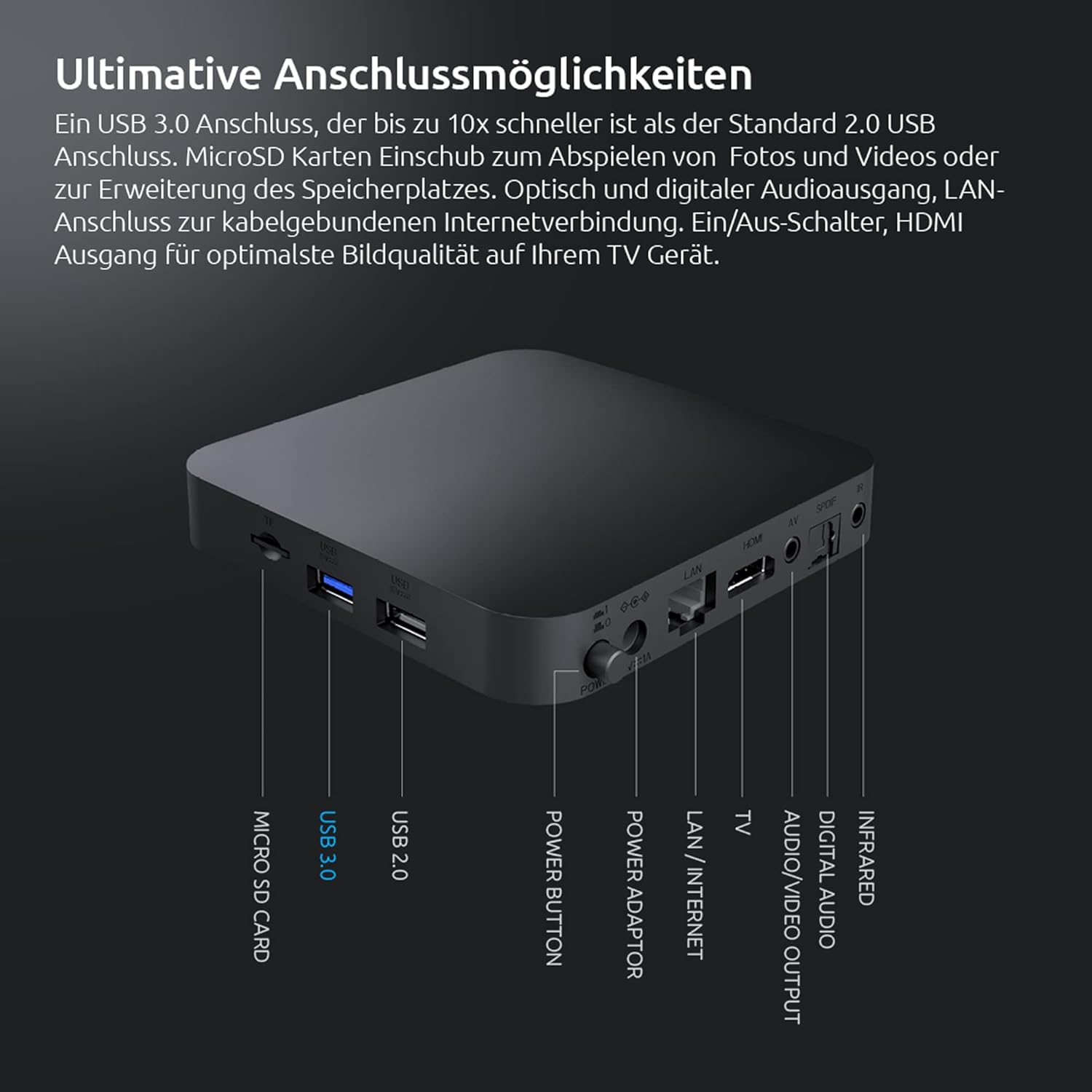
Image: A detailed diagram of the rear and side ports on the STRONG Leap-S1+ Android TV Box, labeling Micro SD Card, USB 3.0, USB 2.0, Power Button, Power Adaptor, LAN/Internet, TV (A/V), Digital Audio, Infrared, and HDMI ports.
6. Техникалык шарттар
| Өзгөчөлүк | Спецификация |
|---|---|
| Модель аты | Leap-S1+ |
| Бренд | Күчтүү |
| Операция системасы | Android TV 10.0 |
| Резолюция | 4K UHD (3840 x 2160 pixels) with HDR10 |
| Процессор | Quad Core Cortex-A53 (1.8 GHz) |
| Эс | DDR4 RAM |
| Ички сактагыч | Expandable via Micro SD card |
| Wi-Fi туташуусу | Dual-band Wi-Fi 5 (2.4GHz & 5GHz) |
| Bluetooth | Bluetooth 4.2 |
| USB порттору | 1 х USB 3.0, 1 х USB 2.0 |
| Видеону чечмелөө | H.265 |
| Өзгөчөлүктөр | Chromecast Built-in, Google Voice Assistant, Netflix, Prime Video, YouTube, Disney+ support |

Image: A visual representation of the powerful Quad-Core A53 1.8 GHz processor, highlighting the internal hardware that ensures smooth performance for the STRONG Leap-S1+.
7. Кыйынчылыктарды
If you encounter issues with your STRONG LEAP-S1+ Android TV Box, try the following solutions:
- Кубат жок:
- Кубат адаптери аспапка жана иштеген электр розеткасына бекем туташып турганын текшериңиз.
- Башка электр розеткасын колдонуп көрүңүз.
- Сүрөт/үн жок:
- Check HDMI cable connections at both the TV box and the TV.
- Сыналгыңыз туура HDMI киргизүү булагына коюлганын текшериңиз.
- Restart the TV box by unplugging it for 10 seconds and plugging it back in.
- Check TV volume and audio settings.
- Алыстан башкаруу жооп бербейт:
- Пульттагы батарейкаларды алмаштырыңыз.
- Пульт менен телевизор кутучасынын ортосунда эч кандай тоскоолдуктар жок экенин текшериңиз.
- Re-pair the Bluetooth remote control if necessary (refer to initial setup or device settings).
- Тармакка туташуу маселелери:
- For Wi-Fi, check your router and ensure it's broadcasting. Try restarting your router.
- If using Ethernet, ensure the cable is securely connected to both the box and your router.
- Go to Network settings on the device and try reconnecting or forgetting and re-adding the network.
- Колдонмонун катып калуусу/бузулуусу:
- Колдонмону жаап, кайра ачыңыз.
- Орнотуулар > Колдонмолор бөлүмүнөн колдонмонун кэшин жана дайындарын тазалаңыз.
- Колдонмонун Google Play Дүкөнүнөн эң акыркы версиясына жаңыртылганын текшериңиз.
8. Кароо жана тейлөө
To ensure the longevity and optimal performance of your STRONG LEAP-S1+ Android TV Box, follow these care guidelines:
- Тазалоо: Түзмөктү тазалоо үчүн жумшак, кургак, мамыксыз чүпүрөктү колдонуңуз. Суюк тазалоочу каражаттарды же аэрозольдорду колдонбоңуз.
- Жайгашкан жери: Place the device on a stable, flat surface with adequate ventilation. Avoid placing it in direct sunlight, near heat sources, or in humid environments.
- Вентиляция: Do not block any ventilation openings. Proper airflow prevents overheating.
- Колдонулбаганда өчүрүү: If you plan not to use the device for an extended period, it is advisable to unplug it from the power outlet.
- Программалык камсыздоо жаңыртуулары: Regularly check for and install software updates to ensure the device has the latest features and security patches.
9. Кепилдик жана колдоо
Information regarding specific warranty terms and conditions for the STRONG LEAP-S1+ Android TV Box is typically provided with your purchase documentation or can be found on the official STRONG webсайт.
For technical support, product registration, or further assistance, please refer to the contact information provided by STRONG in your product packaging or visit their official support channels.
Note: Specific warranty duration and support contact details are not available in this manual. Please consult your product's official documentation.


