Introduction
This manual provides detailed instructions for the installation, operation, and maintenance of your SECRUI Wireless Doorbell System M520+F55. This system includes two wireless push buttons (transmitters) and two plug-in receivers, designed to provide reliable notification for visitors in various environments such as homes, offices, and classrooms. Please read this manual thoroughly before use to ensure proper function and longevity of your device.

Сүрөт: бүттүview of the SECRUI Wireless Doorbell System M520+F55, showing two black push buttons and two black plug-in receivers.
Пакеттин мазмуну
Сиздин пакетте бардык компоненттер бар экенин текшериңиз:
- 2 × Wireless Push Buttons (Transmitters) (CR2032 battery included)
- 2 × Plug-in Receivers
- 2 × жабышчаак тасмалар
- 4 × Бурамалар
- 4 × Анкерлер
- 1 × Колдонуучунун колдонмосу
Продукт өзгөчөлүктөрү
- Кеңейтилген диапазон: Up to 1000 feet (300 meters) in open areas, suitable for large homes, offices, and multiple-floor buildings.
- Бир нече коңгуроо: 58 selectable melodies to suit personal preferences.
- Жөнгө салынуучу Көлөмү: 5 levels of volume adjustment, ranging from 0 dB (mute) to 110 dB.
- LED көрсөткүчү: Visual alert for the hearing impaired or when the receiver is in mute mode.
- Эстутум функциясы: Retains selected melody and volume level after power loss.
- Аба ырайына чыдамдуу дизайн: IP55 rated push button, resistant to dust and water splashes, operating effectively in temperatures from -4°F to 140°F (-20°C to 60°C).
- ийкемдүү күч: Receivers are AC powered (120 Volts), push buttons are battery-powered (CR2032, included).
- Оңой орнотуу: Options for adhesive tape or screw mounting for the push button.

Image: Diagram illustrating the 1000-foot wireless range of the doorbell system, showing receivers placed in different rooms of a house.

Image: A doorbell push button shown in a weather-resistant context, highlighting its IP55 waterproof rating and operational temperature range from -4°F to 140°F.
Коопсуздук маалыматы
- Always follow manufacturer's advice when using power tools and wear suitable protective equipment (e.g., safety goggles) when drilling holes.
- Дубалдарга тешиктерди бургулоодон мурун, катылган электр кабелдерин жана суу түтүктөрүн текшериңиз. Эгерде шектенүү жаралса, кабель/түтүк локаторун колдонуу сунушталат.
- The receiver operates on 120 Volts AC. Ensure proper electrical safety practices are followed when plugging into an outlet.
- Keep the product away from extreme heat sources or open flames.
- Аппаратты өз алдынча бөлүүгө же оңдоого аракет кылбаңыз. Жардам алуу үчүн кардарларды колдоо бөлүмүнө кайрылыңыз.
Орнотуу жана орнотуу
1. Кабылдагычты орнотуу
- Select a suitable indoor electrical outlet for your receiver. Consider central locations for optimal sound distribution.
- Plug the receiver into the 120V AC outlet. The receiver will light up, indicating it is powered on.
2. Push Button (Transmitter) Installation
Choose between adhesive mounting or screw mounting:
Клей монтаждоо:
- Каалаган монтаждоо бетинде чаң жана ным жок болушу үчүн кылдат тазалаңыз.
- Peel off one side of the provided double-sided adhesive tape and attach it to the back of the push button.
- Peel off the other side of the adhesive tape and firmly press the push button onto the cleaned surface for at least 30 seconds.
Бурама орнотуу:
- Open the back cover of the push button.
- Арткы капкакты шаблон катары колдонуп, тешиктерди бургулоочу жерлерди белгилеңиз.
- Drill two holes at the marked positions. Insert the plastic anchors if mounting on masonry or drywall.
- Secure the back cover to the wall using the provided screws.
- Snap the push button onto the secured back cover.

Image: A visual guide demonstrating the simple installation process, showing a hand pressing the outdoor push button and a receiver plugged into an indoor wall outlet.

Image: Step-by-step illustrations for both adhesive patch mounting and screw mounting methods for the wireless doorbell push button.
Иштөө нускамалары
1. Мелодияларды өзгөртүү
To cycle through the 58 available melodies:
- Press the "Melody Selection" button (often marked with a music note icon) on the side of the receiver.
- Each press will play the next melody. Stop pressing when you hear your desired chime.
2. Үндү тууралоо
Үн деңгээлин тууралоо үчүн:
- Press the "Volume Control" button (often marked with a speaker icon) on the side of the receiver.
- There are 5 volume levels, including a mute mode (0 dB). Cycle through them until you reach your preferred setting.
3. Pairing Additional Devices (Optional)
Your system comes pre-paired. If you wish to add more push buttons or receivers, or re-pair existing ones:
- Ресиверге сайыңыз.
- Ресивердеги "Үндү башкаруу" баскычын LED индикатору тез күйүп-өчкөнгө чейин болжол менен 5 секунд басып туруңуз. Бул жупташтыруу режимин билдирет.
- Immediately press the push button you wish to pair. The receiver will chime, confirming successful pairing.
- Repeat for any additional push buttons. Each receiver can be paired with up to 20 transmitters.
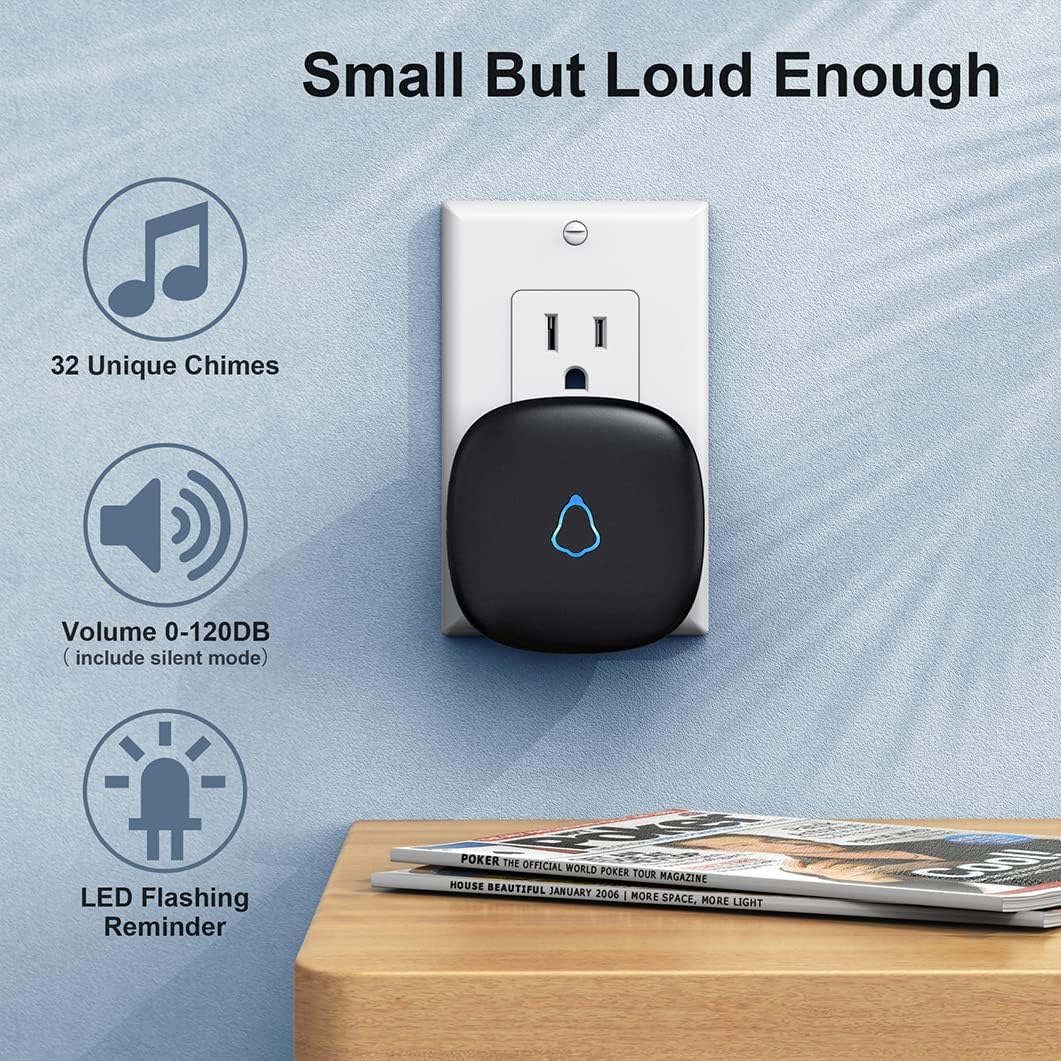
Image: A close-up of the doorbell receiver, illustrating its features including 32 unique chimes, adjustable volume (0-120dB), and an LED flashing reminder.
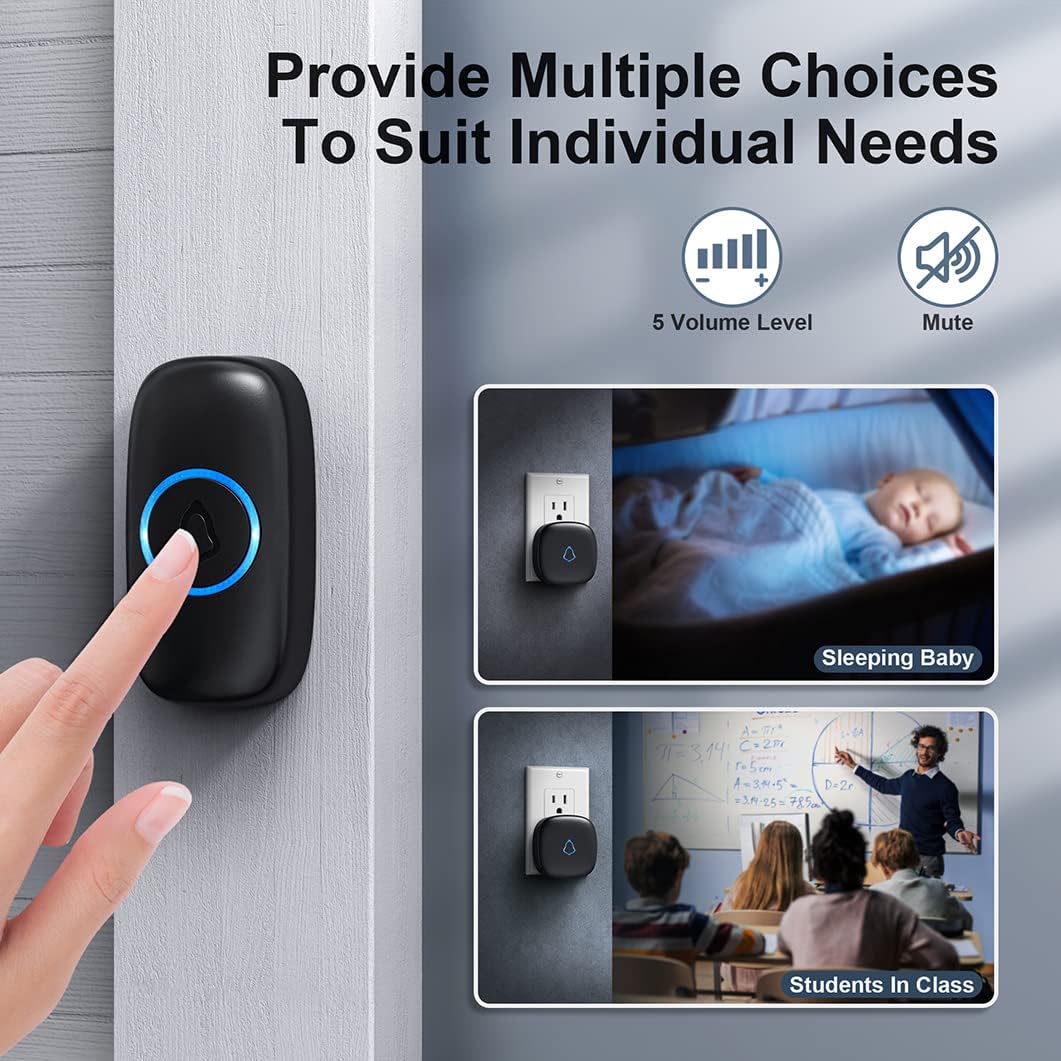
Image: Depiction of the doorbell's 5 volume levels and mute option, showing its suitability for various situations like a sleeping baby or a classroom setting.
Техникалык тейлөө
1. Тазалоо
Эшиктин коңгуроо блокторун жумшак, кургак чүпүрөк менен сүртүңүз. Абразивдүү тазалоочу каражаттарды же эриткичтерди колдонбоңуз.
2. Push Button Battery Replacement
The push button uses a CR2032 lithium battery, which typically lasts for about 3 years. When the push button's LED indicator no longer lights up or the range decreases significantly, it's time to replace the battery.
- Carefully open the back cover of the push button.
- Эски CR2032 батареясын алып салыңыз.
- Жаңы CR2032 батареясын оң (+) тарабын өйдө каратып салыңыз.
- Арткы капкакты бекем жабыңыз.
Проблемаларды чечүү
| Көйгөй | Мүмкүн себеп | Чечим |
|---|---|---|
| Кабыл алуучу коңгуроо бербейт. |
|
|
| Кыска иштөө диапазону. |
|
|
| Жалган сигналдар. |
|
|
Техникалык шарттар
- Модел: M520+F55
- Бренд: SECRUI
- Өткөргүчтүн кубат булагы: 1 x CR2032 литий батарейкасы (кошулган)
- Кабылдагычтын кубат булагы: AC 120V
- Зымсыз диапазон: Ачык абада 300 метрге (1000 фут) чейин
- Обондор: 58 тандалган коңгуроо
- Үн деңгээли: 5 (0 dB to 110 dB)
- Суу өткөрбөөчүлүк рейтинги (баскыч): IP55
- Иштөө температурасы: -4°F – 140°F (-20°C – 60°C)
- Материал: ABS
- Орнотуу ыкмасы: Self-Adhesive & Screw-In
Кепилдик жана колдоо
SECRUI products are designed for reliability and performance. For any questions, technical support, or warranty claims, please contact SECRUI customer service through the retailer where the product was purchased or visit the official SECRUI webбайланыш маалыматы үчүн сайт.
Кепилдик максатында сатып алуунун далили катары сатып алуу дүмүрчөгүңүздү сактап коюңуз.
Эскертүү: Кепилдиктин конкреттүү шарттары аймакка жана сатуучуга жараша өзгөрүшү мүмкүн.


