Introduction
This manual provides detailed instructions for the setup, operation, maintenance, and troubleshooting of your Timex Ironman Triathlon T200 42mm Watch. Please read this guide thoroughly to ensure proper use and to maximize the functionality of your timepiece.

Сүрөт 1: Алдыңкы view of the Timex Ironman Triathlon T200 watch.
Компоненттерди көрүү
Familiarize yourself with the buttons and display elements of your watch:
- MODE баскычы: Ар кандай саат режимдери (Убакыт, Хронограф, Таймер, Ойготкуч) аркылуу циклдерди айланып өтөт.
- SET/RECALL Button: Used to set values in setting modes and recall lap/split times.
- INDIGLO Button: Activates the Indiglo night-light.
- START/LAP Button: Starts and stops the chronograph, records lap times.
- ТОКТОТУУ/КАЙРА ОРНОТУУ баскычы: Stops the chronograph or timer, resets values.
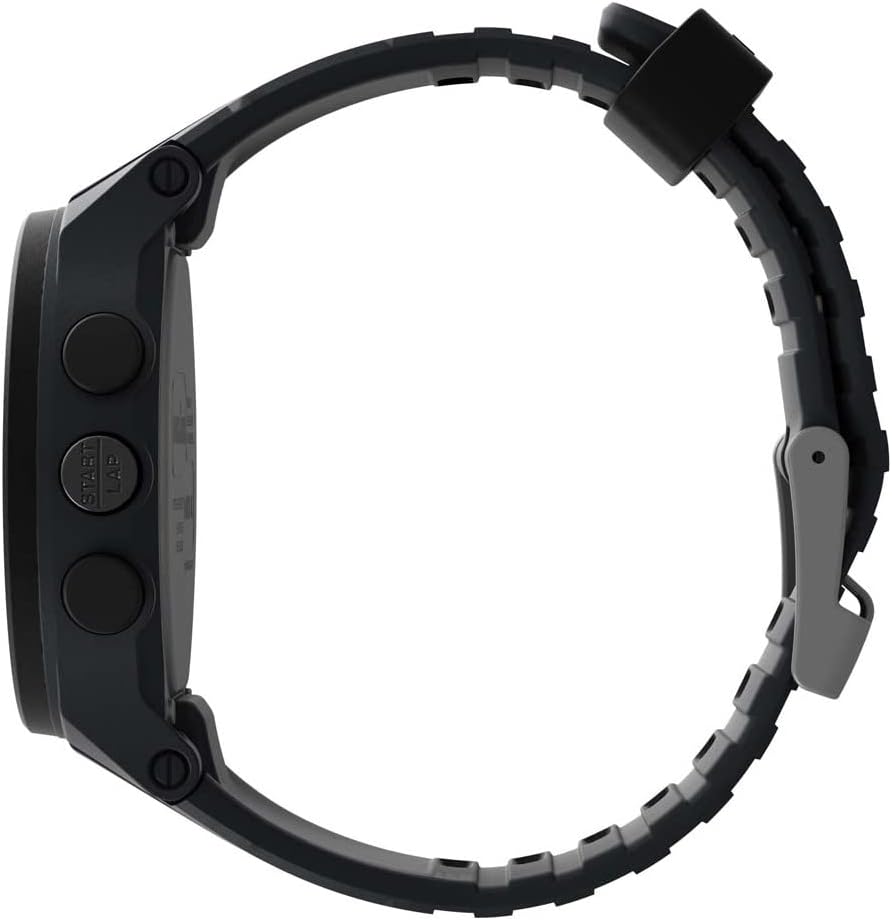
2-сүрөт: Каптал view баскычтардын жайгашуусун көрсөтөт.
Жайгашуу
1. Баштапкы убакытты жана күндү коюу
- Убакыт режиминде, баскычын басып, кармап туруңуз ОРНОТУ/КАЙТЫРУУ баскычы дисплей жарк этмейинче.
- басыңыз БАШТАЛУУ/БАШТАУ or ТОКТОТ/КАЛЫПТАҢЫР button to adjust the flashing segment (e.g., hour, minute, year, month, day).
- басыңыз РЕЖИМ button to advance to the next segment.
- Бардык орнотуулар аяктагандан кийин, басыңыз ОРНОТУ/КАЙТЫРУУ Орнотуу режиминен чыгуу үчүн баскычты басыңыз.
2. Боону тууралоо
The watch features an adjustable silicone strap designed for comfort and secure fit. Adjust the buckle to fit your wrist circumference, ensuring it is snug but not overly tight.
Иштөө нускамалары
1. Убакытты эсепке алуу режими
This is the default display mode, showing the current time, day, and date. Press the ИНДИГЛО button to activate the backlight for visibility in low-light conditions.
2. Хронограф (Секундомер)
Хронограф 200 айлампалуу эс тутуму менен 100 саатка чейинки убакытты өлчөйт.
- Убакыт ченегич режиминен баскычын басыңыз РЕЖИМ button until 'CHRONO' or stopwatch icon appears.
- Басыңыз БАШТАЛУУ/БАШТАУ убакытты баштоо үчүн.
- Басыңыз БАШТАЛУУ/БАШТАУ again to record a lap time while the chronograph continues running.
- Басыңыз ТОКТОТ/КАЛЫПТАҢЫР Хронографты тындыруу үчүн басыңыз. БАШТАЛУУ/БАШТАУ кайра баштоо же ТОКТОТ/КАЛЫПТАҢЫР нөлгө кайра коюу үчүн.
- Айлампа убакыттарын эстеп калуу үчүн, баскычын басыңыз ОРНОТУ/КАЙТЫРУУ хронограф токтоп турганда.
3. Interval Training Timer
The watch supports interval training with customizable warm-up, interval, and cool-down segments.
- Убакыт ченегич режиминен баскычын басыңыз РЕЖИМ button until 'INTERVAL' or interval icon appears.
- Басып кармап туруңуз ОРНОТУ/КАЙТЫРУУ to enter setting mode for intervals.
- Adjust warm-up, interval duration, number of repeats, and cool-down times using БАШТАЛУУ/БАШТАУ or ТОКТОТ/КАЛЫПТАҢЫР, and advance with РЕЖИМ.
- Басыңыз ОРНОТУ/КАЙТЫРУУ орнотууларды сактоо үчүн.
- Басыңыз БАШТАЛУУ/БАШТАУ to begin the interval training sequence.
4. Артка эсептөө таймери
A 24-hour countdown timer is available for various activities.
- Убакыт ченегич режиминен баскычын басыңыз РЕЖИМ button until 'TIMER' or timer icon appears.
- Басып кармап туруңуз ОРНОТУ/КАЙТЫРУУ каалаган саноонун узактыгын орнотуу үчүн.
- Басыңыз БАШТАЛУУ/БАШТАУ саноону баштоо үчүн.
- The watch will emit an alert when the countdown reaches zero.
5. Ойготкучтар
Set up to 3 daily, weekday, or weekend alarms.
- Убакыт ченегич режиминен баскычын басыңыз РЕЖИМ button until 'ALARM' or alarm icon appears.
- Басыңыз РЕЖИМ to cycle through Alarm 1, Alarm 2, Alarm 3.
- Басып кармап туруңуз ОРНОТУ/КАЙТЫРУУ to set the alarm time and type (daily, weekday, weekend).
- Басыңыз БАШТАЛУУ/БАШТАУ ойготкучту күйгүзүү/өчүрүү үчүн.
6. Dual Time Zones
The watch allows for tracking two different time zones.
- Убакыт ченегич режиминен баскычын басыңыз РЕЖИМ button until 'T2' or dual time icon appears.
- Басып кармап туруңуз ОРНОТУ/КАЙТЫРУУ to adjust the second time zone.
Техникалык тейлөө
1. Тазалоо
Саатыңызды жумшак, d менен тазалаңызamp cloth. Avoid harsh chemicals or abrasive materials that could damage the case or strap. For water-resistant models, rinse with fresh water after exposure to salt water or chlorine.
2. Сууга туруктуулук
This watch is water resistant to 100 meters (330 feet), making it suitable for swimming and snorkeling. It is not recommended for diving. Do not press any buttons while the watch is submerged to prevent water intrusion.
3. Батареяны алмаштыруу
The watch uses one Lithium Metal battery (CR2025). Battery replacement should be performed by a qualified watch technician to ensure water resistance is maintained. Attempting to replace the battery yourself may void the warranty and compromise the watch's water resistance.

Figure 3: Case back detailing water resistance and battery type.
Проблемаларды чечүү
- Дисплей бош же күңүрт: The battery may be low or depleted. Replace the battery as described in the Maintenance section.
- Баскычтар жооп бербейт: Ensure the watch is not in a locked mode (if applicable, refer to specific model features). If the issue persists, a soft reset may be required by pressing all four side buttons simultaneously for a few seconds.
- Indiglo light not working: This could indicate a low battery or a malfunction. If battery replacement does not resolve the issue, contact customer support.
- Туура эмес убакыт/дата: Re-enter the time and date settings as described in the Setup section. Ensure the correct time zone is selected.
Техникалык шарттар
| Модель номери | TW5M48900SO |
| Иштин диаметри | 42мм |
| Иштин материалы | чайыр |
| Линзанын материалы | Акрил |
| Боо материалы | Силикон |
| Суу каршылык | 100 метр (330 фут) |
| Хронограф | 200 айлампалуу эс тутуму менен 100 сааттык |
| Таймер | 24-hour countdown |
| Ойготкучтар | 3 күнүмдүк, жуманын ичиндеги же дем алыш күндөрүндөгү ойготкучтар |
| Арткы жарык | Indiglo жарыктандыруучу саат циферблаты |
| Батарея түрү | 1 литий-металл батареясы (CR2025) |
Кепилдик жана колдоо
Your Timex watch is covered by a limited warranty. For specific warranty details, service, or support, please refer to the warranty information included with your purchase or visit the official Timex webсайт. Кепилдик дооматтар үчүн сатып алганыңыздын далилин сактаңыз.
Кошумча жардам алуу үчүн, сиз иш сапары менен болот Amazon'догу Timex дүкөнү or the official Timex customer support portal.


