Продукт бүттүview
The blurams A31 Indoor Wi-Fi Camera is a versatile security solution designed for indoor monitoring. It offers high-resolution video, comprehensive coverage, and smart detection features to keep your home secure and connected.

The blurams A31 camera, shown next to a smartphone displaying its live feed, highlights its compact design and monitoring capabilities.

An overview of the blurams Wi-Fi Camera's key features, including dual-band Wi-Fi, AI detection, 2K resolution, pan/tilt functionality, and various security options.
Негизги өзгөчөлүктөрү:
- 360° Панорамалык View & 2K High-Quality Video: Captures clear video day and night with up to 7 meters night vision. Offers 360° horizontal and 95° vertical rotation for full room coverage.
- Intelligent AI Detection & Instant Alerts: Automatically tracks movement and sends instant alerts for human, motion, or abnormal sound detection. Records alert videos to the cloud.
- Акылдуу интеграция: Compatible with Amazon Alexa, Google Assistant, and IFTTT for voice control and smart home automation.
- Enhanced blurams App: Жашоого мүмкүндүк берет viewing of up to four cameras simultaneously, video sharing with family members, and two-way audio communication.
- Flexible Storage & Privacy Protection: Supports 24/7 CVR cloud recording and up to 128 GB local storage via microSD card (not included). Features a privacy mode to disable recording.
Пакеттин мазмуну
Пакетте бардык компоненттер бар экенин текшериңиз:
- blurams A31 Indoor Wi-Fi Camera
- Электр кабели
- Кубаттоочу баш (кубат адаптери)
- Колдонуучунун Колдонмосу (бул документ)
- Монтаждык топтом
Орнотуу колдонмосу
1. Камераны күйгүзүү
- Connect the provided power cable to the camera's power port.
- Plug the charging head into a standard electrical outlet.
- Wait for the camera's indicator light to show a stable status, indicating it is ready for setup.
2. Downloading and Installing the blurams App
The blurams app is essential for controlling and managing your camera. It is available for both iOS and Android devices.


Издөө "blurams" in your device's app store and follow the installation prompts.
3. Wi-Fiга туташуу
- Open the blurams app and create an account or log in.
- Жаңы түзмөк кошуу үчүн "+" сөлөкөтүн таптаңыз.
- Follow the on-screen instructions to connect your camera to your home Wi-Fi network. The camera supports both 2.4GHz and 5GHz Wi-Fi bands.
- Ensure your Wi-Fi signal is strong in the camera's intended location for optimal performance.
Иштөө нускамалары
1. Түз эфир View жана панорамалоо/кыйшайтуу башкаруусу
Access the live video feed and control the camera's movement directly from the blurams app.
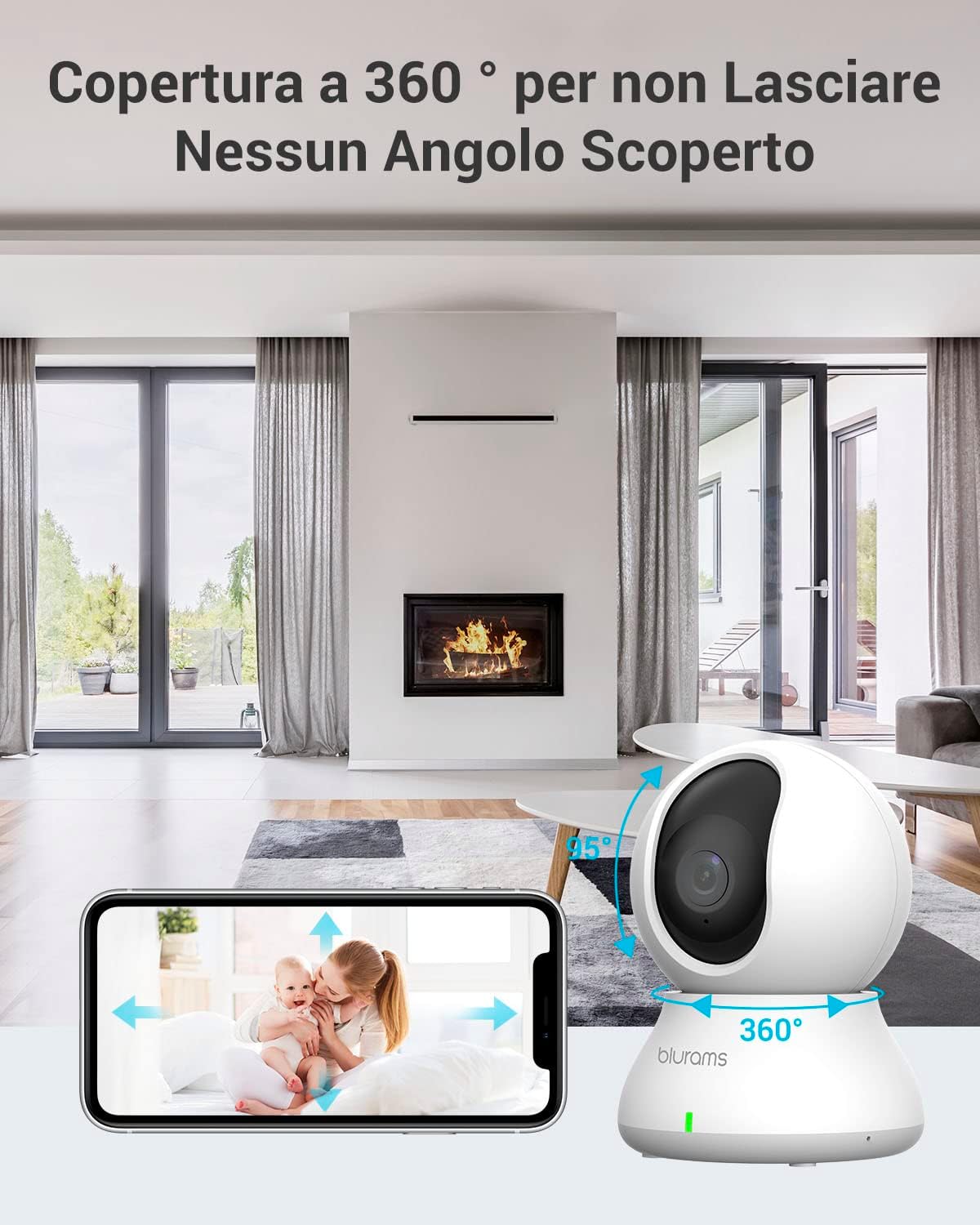
The camera offers 360° horizontal and 95° vertical rotation, allowing comprehensive coverage of your indoor space, controllable via the app.
- Open the blurams app and select your camera from the device list.
- The live feed will appear. Use the on-screen joystick or swipe gestures to pan (horizontal) and tilt (vertical) the camera lens.
- Сенин колуңдан келет view up to 4 cameras simultaneously within the app.
2. Эки тараптуу аудио
Communicate with people or pets in the camera's vicinity using the two-way audio feature.

The two-way audio function allows you to speak and listen through the camera, providing real-time communication.
- Түз эфирде view, камера аркылуу сүйлөшүү үчүн микрофон сүрөтчөсүн таптаңыз.
- Камеранын чөйрөсүнөн аудио угуу үчүн динамик сүрөтчөсүн таптаңыз.
3. Кыймылды аныктоо жана эскертүүлөр
The camera can detect various types of motion and send instant notifications to your phone.

The camera's intelligent AI can differentiate between human and animal motion, sending specific alerts to your device.
- AI аныктоо: The camera can identify human movement, general motion, and abnormal sounds.
- Motion Tracking: When motion is detected, the camera can automatically track the moving object.
- Ыкчам эскертүүлөр: Receive push notifications on your smartphone when an event is detected.
- Custom Activity Zones: Камеранын ичинде белгилүү бир аймактарды аныктаңыз view to focus detection and reduce false alarms. Adjust sensitivity levels (Low, Normal, High) as needed.

Customize activity zones to monitor specific areas and adjust sensitivity to prevent unnecessary alerts.
4. Жаздыруу жана сактоо
The blurams camera offers flexible recording and storage options.

Choose between secure cloud storage or local storage via a microSD card to keep your recordings safe.
- Булуттагы сактагыч: Supports 24/7 Continuous Video Recording (CVR) to the cloud. This prevents loss of footage due to physical damage to a memory card.
- Жергиликтүү сактагыч: Supports up to a 128 GB microSD card (not included) for local recording.
- Recordings can be easily searched by time, event type, or camera name within the app.
5. Купуялык режими
Activate privacy mode to temporarily stop recording and disable the camera's lens.

The privacy mode allows you to physically retract the camera lens or disable it via the app, ensuring your privacy when needed.
- You can activate privacy mode through the blurams app.
- Alternatively, you can manually move the lens upwards to interrupt recording.
Техникалык тейлөө
Proper maintenance ensures the longevity and optimal performance of your blurams camera.
- Тазалоо: Use a soft, dry cloth to clean the camera lens and body. Avoid using liquid cleaners or abrasive materials that could damage the surface.
- Жайгашкан жери: Ensure the camera is placed in a stable location, away from direct sunlight, excessive heat, or moisture.
- Программалык камсыздоо жаңыртуулары: Regularly check the blurams app for firmware updates. Keeping your camera's software up-to-date ensures access to the latest features and security enhancements.
- Сактагычты башкаруу: Эгер microSD картасын колдонсоңуз, анын абалын мезгил-мезгили менен текшерип, жазуу натыйжалуулугун сактоо үчүн зарыл болсо форматтаңыз. Маанилүү файлдын камдык көчүрмөсүн сактаңызtage форматтоодон мурун.
Проблемаларды чечүү
If you encounter issues with your blurams camera, refer to the following common solutions:
| Көйгөй | Мүмкүн себеп | Чечим |
|---|---|---|
| Камера оффлайн режиминде/Wi-Fi'га туташа албай жатат | Weak Wi-Fi signal, incorrect Wi-Fi password, router issues, camera too far from router. |
|
| Видеонун сапаты начар | Insufficient lighting, dirty lens, weak internet connection. |
|
| Кыймылды аныктоо эскертүүлөрү жок | Detection settings disabled, sensitivity too low, activity zones not configured correctly. |
|
| Эки тараптуу аудио иштебейт | Microphone/speaker disabled in app, volume too low, network latency. |
|
Техникалык шарттар
| Өзгөчөлүк | Деталь |
|---|---|
| Модель номери | A31 |
| Колдонуу чөйрөсү | Indoor |
| Видео тартуунун резолюциясы | 1440p (2K) |
| Натыйжалуу Video Resolution | 1440 |
| Frame Rate | 15 кадр/сек |
| Viewбурч | 360 градус (айлантуу/жөлөктөө) |
| Түнкү көрүү диапазону | 7 метр |
| Connectivity Protocol | Wi-Fi (2.4 ГГц/5 ГГц) |
| Power Source | Электр зымдары (5 вольт, 7 ватт) |
| Шайкеш түзмөктөр | Tablets, Smartphones, Laptops, Televisions |
| Controller Type | IFTTT, Amazon Alexa |
| Монтаж түрү | Ceiling, Freestanding |
| Түс | Ак |
| Материал | Пластик |
| Элементтин өлчөмдөрү (LxWxH) | 22.4 x 22.4 x 41.1 cm (Product: 22.35 x 22.35 x 41.15 cm) |
| Элемент Салмагы | 340 г |
Кепилдик жана колдоо
Кепилдик маалымат
Specific warranty details for the blurams A31 Indoor Wi-Fi Camera are typically provided with your purchase documentation. Please refer to the warranty card or information included in your product packaging for terms and conditions.
Кардарларды колдоо
For technical assistance, troubleshooting, or any product-related inquiries, please contact blurams customer support. You can find contact information on the official blurams website or through the blurams app.
blurams is committed to providing high-quality products and attentive service, and they are pleased to resolve any issues you may encounter.


