Introduction
This manual provides detailed instructions for the setup, operation, and maintenance of your Pyle PDA69BU Stereo Amplifier Audio Receiver. Please read this manual thoroughly before using the device to ensure proper function and to maximize your audio experience. Keep this manual for future reference.
Продукт бүттүview
The Pyle PDA69BU is a versatile 2.0 channel stereo amplifier designed for home audio systems. It features Bluetooth streaming, MP3/USB/SD card playback, FM radio, and multiple input options including RCA and Aux. It also includes microphone and headphone jacks, along with adjustable bass, treble, delay, and reverb controls.

Figure 1: Pyle PDA69BU Stereo Amplifier and Remote Control.
Бул сүрөт алдыңкы жагын көрсөтөт view of the Pyle PDA69BU stereo ampкөтөргүч, көрсөтүүчүasing its control panel, digital display, and various input ports. The included remote control is also visible, highlighting the comprehensive control options available to the user.
Алдыңкы панелдин өзгөчөлүктөрү

Сүрөт 2: Алдыңкы жана арткы панелдин үстүндөview.
This diagram illustrates the key features of both the front and rear panels of the PDA69BU amplifier. The front panel includes USB and SD card slots, microphone inputs, a headphone output, and various control knobs. The rear panel shows the FM antenna connection, speaker outputs, RCA audio inputs/outputs, and an auxiliary input.
- Кубатты күйгүзүү / өчүрүү Агрегаттын кубаттуулугун которуштуруу.
- Digital LED дисплей: Учурдагы режимди, трек маалыматын жана жөндөөлөрдү көрсөтөт.
- USB/SD карта уячалары: For playing digital audio files (MP3, WAV, WMA, APE).
- MIC1/MIC2 Inputs: Микрофондорду туташтыруу үчүн 1/4'' уячалар.
- MIC VOL, DELAY, REVERB Controls: Adjust microphone volume and effects.
- BASS/TREBLE Controls: Adjust low and high frequency response.
- BALANCE Control: Adjusts left/right channel balance.
- КУЛАКЧАНЫК УЯСЫ: 1/4'' output for private listening.
- Киргизүү тандагыч: Rotary knob to select audio source (DVD, CD, AUX, BT/FM/USB/SD).
- MASTER VOL Control: Жалпы чыгаруу көлөмүн тууралайт.
- FOLDER/TRACK Knob: Navigates folders and tracks for USB/SD playback.
Арткы панелдин өзгөчөлүктөрү
- FM АНТЕННА: Connection for the included FM antenna.
- AUDIO INPUT (DVD, CD, LINE): RCA stereo inputs for external audio sources.
- АУДИО ЧЫГУУ: RCA stereo output for connecting to another ampөмүр же жаздыруучу түзмөк.
- AUX киргизүү (3.5 мм): Stereo mini-jack input for portable devices.
- Спикерлердин чыгышы: Screw-type banana plug speaker jacks for connecting passive speakers (4-8 Ohm impedance).
- BT ANT.: Bluetooth антеннасы.
- ТОМTAGE CONVERSION POWER INPUT: Selectable AC115V/60Hz or AC230V/50Hz power input.
Орнотуу нускамалары
Follow these steps to properly set up your Pyle PDA69BU ampөмүрлүү.
1. Speaker Connection
- камсыз кылуу amplifier is powered off and unplugged from the wall outlet.
- Пассивдүү динамиктериңизди туташтырыңыз Спикерлердин чыгышы terminals on the rear panel. Match the positive (+) terminal of the amplifier to the positive (+) terminal of the speaker, and the negative (-) to the negative (-). Ensure a secure connection for optimal sound quality. The amplifier supports speakers with an impedance of 4-8 Ohms.
2. Audio Source Connection
Connect your desired audio sources using the appropriate inputs:
- RCA Inputs (DVD, CD, LINE): Use RCA cables to connect devices like DVD players, CD players, or other audio components to the corresponding RCA input jacks on the rear panel.
- AUX киргизүү (3.5 мм): Use a 3.5mm audio cable to connect portable devices such as smartphones or tablets to the AUX input on the rear panel.
- USB/SD карта: Insert a USB flash drive or SD card into the respective slots on the front panel for digital media playback.
- Микрофондор: Эки 1/4 дюймга чейин микрофонду туташтырыңыз MIC1 жана MIC2 алдыңкы панелдеги киргизүүлөр.
3. FM антеннага туташуу
Камтылган FM антеннасын туташтырыңыз FM антенна terminal on the rear panel for improved FM radio reception.
4. Power Connection
- Текшериңиз ТОМTAGE CONVERSION POWER INPUT арткы панелдеги которгуч туура томго коюлганtage for your region (AC115V/60Hz or AC230V/50Hz).
- Электр шнурунун розеткага сайыңыз.
Иштөө нускамалары
Күйгүзүү/өчүрүү
басыңыз POWER ON/OFF switch on the front panel to turn the unit on or off.
Аудио булагын тандоо
айлантыңыз Киргизүү тандагыч knob on the front panel or use the "MODE" button on the remote control to choose your desired audio source: DVD, CD, AUX, or BT/FM/USB/SD.
Volume and Tone Control
- Adjust the overall sound level using the МАСТЕР ТОМ баскыч.
- Fine-tune the low frequencies with the БАС control and high frequencies with the ҮЧЧҮ контролдоо.
- колдонуу БАЛАНС control to adjust the relative volume between the left and right speakers.

Figure 3: Front Panel Precision Controls.
This image highlights the independent control knobs for Delay, Reverb, Bass, and Treble on the front panel, allowing users to precisely adjust audio characteristics.
Bluetooth агымы
- Select "BT" mode using the Input Selector or remote. The digital display will show "BLUE".
- On your Bluetooth-enabled device (smartphone, tablet, etc.), search for "Pyle Audio" or "PDA69BU" in the Bluetooth settings.
- Pair with the device. Once connected, you can stream audio wirelessly.
- The wireless range is approximately 45 feet.

Figure 4: Wireless Bluetooth Streaming.
Бул сүрөт көрсөтөт amplifier's Bluetooth streaming capability, showing a smartphone connected wirelessly to the PDA69BU, with music playing through connected speakers. It highlights the convenience of wireless audio playback.
USB/SD карта ойнотуу
- Insert a USB flash drive or SD card containing MP3, WAV, WMA, or APE audio files тиешелүү уячага киргизиңиз.
- The unit will automatically switch to USB/SD mode and begin playback.
- колдонуу FOLDER/TRACK knob to navigate through folders and tracks. The remote control also provides playback controls (play/pause, next/previous track).
FM радиосунун иштеши
- Select "FM" mode using the Input Selector or remote.
- Press the "AUTO" button on the remote control to automatically scan and store available FM stations.
- Use the "CH-" or "CH+" buttons on the remote to navigate through stored stations.
Микрофон жана караоке функциялары

Figure 5: Microphone Inputs for Karaoke.
This image highlights the dual microphone inputs (MIC1 and MIC2) on the front panel, along with the MIC VOL control, indicating the amplifier's karaoke capabilities. It shows two individuals using microphones with the ampөмүрлүү.
- микрофондорду туташтыруу MIC1 or MIC2 киргизүүлөр.
- Микрофондун үнүн төмөнкү аркылуу тууралаңыз MIC VOL баскыч.
- Apply echo effects using the КЕЧИКТИРҮҮ жана REVERB controls to enhance vocal performance.
Наушник колдонуу
Plug 1/4'' headphones into the НАУШНИК jack for private listening. Connecting headphones will mute the main speaker outputs.
Техникалык тейлөө
- Тазалоо: Агрегаттын сыртын тазалоо үчүн жумшак, кургак чүпүрөктү колдонуңуз. Суюк тазалагычтарды же эриткичтерди колдонбоңуз.
- Вентиляция: айланасында жетиштүү желдетүүнү камсыз кылуу amplifier to prevent overheating. Do not block ventilation openings.
- Сактагыч: Эгерде аппаратты узак убакытка сактасаңыз, аны розеткадан сууруп, салкын, кургак жерде сактаңыз.
- Электр кабели: Электр шнурунун бузулушуна дайыма текшерип туруңуз. Эгерде бузулса, колдонууну токтотуп, кардарларды колдоо кызматына кайрылыңыз.
Проблемаларды чечүү
| Көйгөй | Мүмкүн себеп | Чечим |
|---|---|---|
| Күч жок | Электр зымы туташкан эмес; Электр өчүрүү; Туура эмес томtage жөндөө. | Ensure power cord is securely plugged in. Turn power switch ON. Verify voltage селектору туура коюлган. |
| Үн чыгышы жок | Incorrect input selected; Speaker wires loose; Volume too low; Headphones connected. | Select the correct input source. Check speaker wire connections. Increase MASTER VOL. Disconnect headphones. |
| Bluetooth туташпай жатат | Not in BT mode; Device too far; Device already paired with another unit. | камсыз кылуу amplifier is in BT mode. Move device closer to amplifier. Disconnect from other Bluetooth devices. |
| FM кабыл алуу начар | FM antenna not connected or poorly positioned. | Connect the FM antenna securely. Adjust antenna position for better reception. |
| USB/SD ойнотуу көйгөйлөрү | Колдоого алынбайт file формат; Бузулган fileс; USB/SD карта туура эмес салынган. | камсыз кылуу files are MP3, WAV, WMA, or APE. Reinsert USB/SD card. Try a different USB/SD card. |
Техникалык шарттар
| Өзгөчөлүк | Деталь |
|---|---|
| Модель номери | PDA69BU |
| Power Output | 38W x 2 RMS |
| Bluetooth версиясы | 5.0 |
| Зымсыз диапазон | 45 метрге чейин |
| Аудио киргизүү | RCA (DVD, CD, LINE), 3.5mm AUX, USB, SD Card, (2) 1/4'' Microphone |
| Аудио чыгуулар | RCA, 1/4'' Headphone |
| Динамик импедансы | 4-8 Ом |
| Санариптик медиа File Колдоо | MP3, WAV, WMA, APE |
| Продукциянын өлчөмдөрү | 9.8 x 9.8 x 3.9 дюйм |
| Элемент Салмагы | 8.07 фунт |
| Электр камсыздоо | AC115V/60Hz or AC230V/50Hz (selectable) |
Кутуда эмне бар
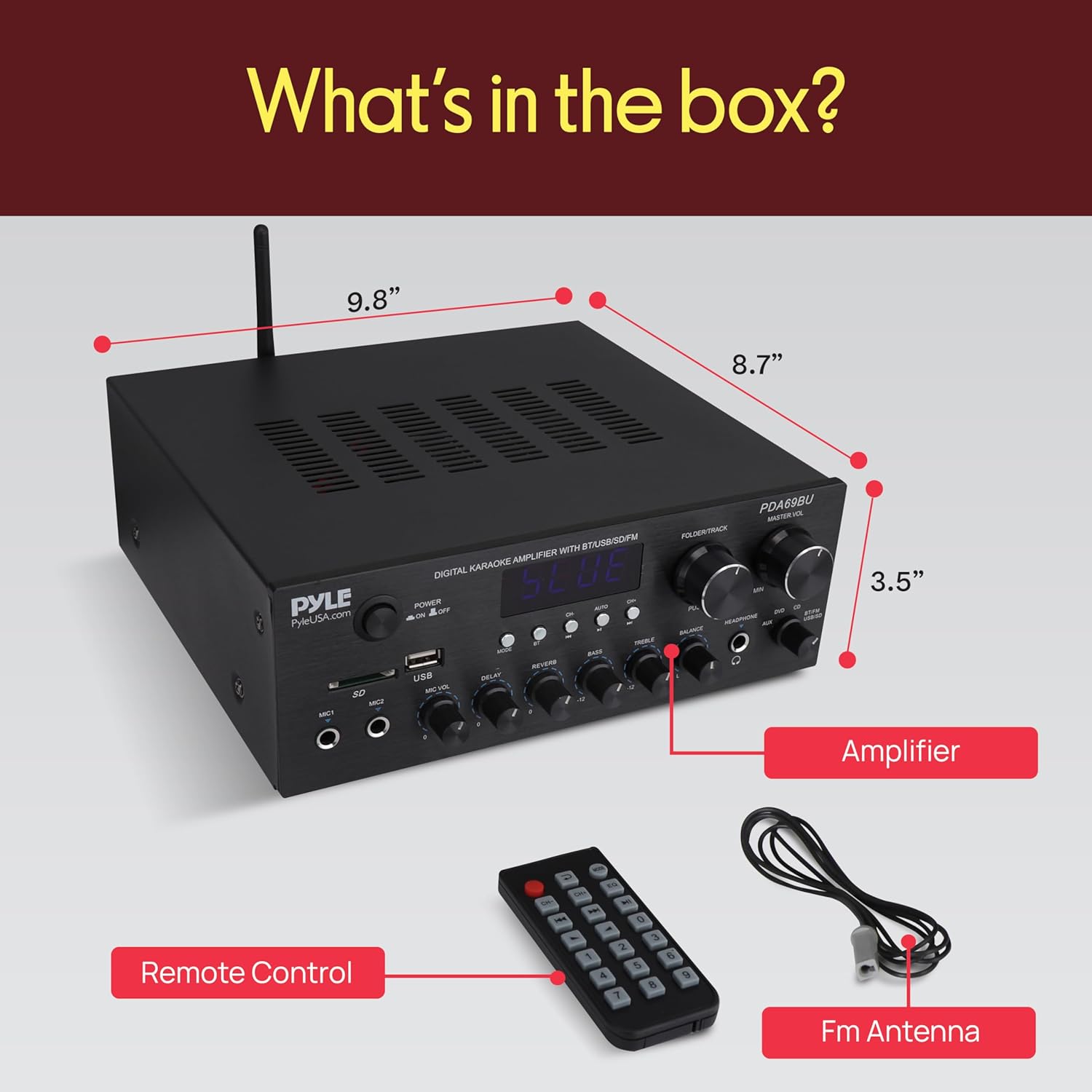
6-сүрөт: Камтылган компоненттер.
This image displays the contents of the Pyle PDA69BU package, including the amplifier unit, remote control, and FM antenna.
- Pyle PDA69BU Stereo Ampкөтөргүч алуучу
- Алыстан башкаруу
- FM антеннасы
Кепилдик жана колдоо
Pyle products typically come with a manufacturer's warranty. For specific warranty details, registration, or technical support, please visit the official Pyle webсайтка же кардарларды тейлөө бөлүмүнө кайрылыңыз.
Онлайн колдоо: www.pyleusa.com


