1. Киришүү
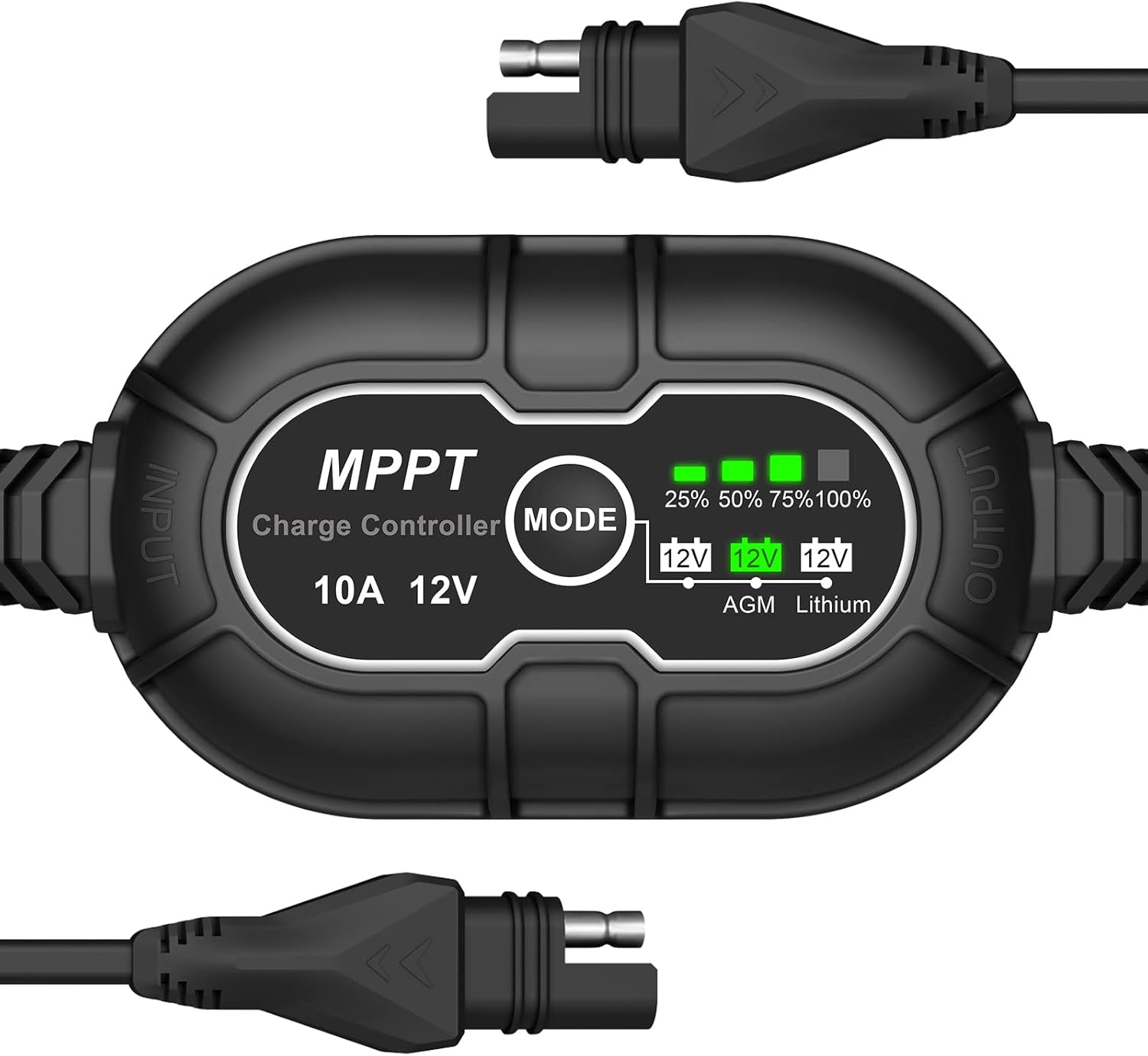
This manual provides essential information for the safe and efficient operation of your Allto Solar Intelligent 10A MPPT Solar Charge Controller. This device is designed to optimize power harvesting from solar panels and safely charge various 12V battery types, including Wet, Gel, AGM, and Lithium (LiFePO4).
2. Коопсуздук маалыматы
Сураныч, орнотуудан жана иштетүүдөн мурун бардык коопсуздук нускамаларын окуп, түшүнүңүз. Бул нускамаларды аткарбоо электр шокуна, өрткө же олуттуу жаракатка алып келиши мүмкүн.
- Электр кубатын колдонуудан мурун, бардык туташуулардын бекем жана туура экенин текшериңиз.
- Do not disassemble or attempt to repair the controller. Contact qualified personnel for service.
- Install the controller in a well-ventilated area, away from flammable materials and moisture.
- Always connect the battery to the controller алгачкы, then the solar panel. Disconnect in the reverse order: solar panel first, then battery.
- Батареянын көлөмүн текшериңизtage and type compatibility with the controller before connection.
3. Продукциянын өзгөчөлүктөрү
- MPPT технологиясы: Күн панелдеринен энергия алууну максималдуу түрдө көбөйтөт.
- Компакт дизайн: Approximately 25% smaller than regular 10A PWM charge controllers.
- Жогорку натыйжалуулугу: Up to 95% efficiency, 15-30% higher than PWM controllers.
- Бир нече батареянын шайкештиги: Supports 12V Wet/Gel Cell, Flooded, Maintenance-free, Deep cycle, AGM, and Lithium (LiFePO4) batteries.
- Комплекстүү коргоо: Includes over-temperature, over-voltage, over-current, short circuit, discharge, and over-charge protection.
- 3-Сtage Заряддоо: Improved Bulk-Absorption-Float charging algorithm to extend battery lifespan.
- Zero Discharge: Powered by sunlight, preventing parasitic battery drain.
- Автоматтык эс тутум: Automatically returns to the last selected battery mode.
4. Пакеттин мазмуну
- Allto Solar Intelligent 10A MPPT Solar Charge Controller
- Колдонуучунун Колдонмосу (бул документ)
5. Орнотуу жана орнотуу
Туура орнотуу үчүн бул кадамдарды аткарыңыз:
- Батареяны туташтыруу: Connect the controller's output cable (marked 'OUTPUT') to your 12V battery. Ensure correct polarity. The controller will power on.
- Батарея түрүн тандоо: Press the 'MODE' button to cycle through the battery types (AGM, Lithium). The corresponding LED will illuminate. Select the type that matches your connected battery.
- Күн панелин туташтыруу: Connect your 12V solar panel to the controller's input cable (marked 'INPUT'). Ensure correct polarity. The controller will begin charging if sufficient sunlight is available.
Important: Always connect the battery first and disconnect the solar panel first to prevent damage to the controller or battery.

6. Иштөө нускамалары
Once connected, the controller operates automatically. It will detect the solar panel input and begin charging the battery according to the selected battery type.
6.1 Батареянын түрүн тандоо
The controller supports different 12V battery chemistries. To select the appropriate battery type:
- басыңыз РЕЖИМ button located on the controller.
- Each press will cycle through the available battery types: АГМ жана Литий.
- The corresponding LED indicator (12V AGM or 12V Lithium) will light up to confirm your selection.
- The controller will remember your last selection even after power disconnection (Auto Memory feature).

6.2 Charging Level Indicators
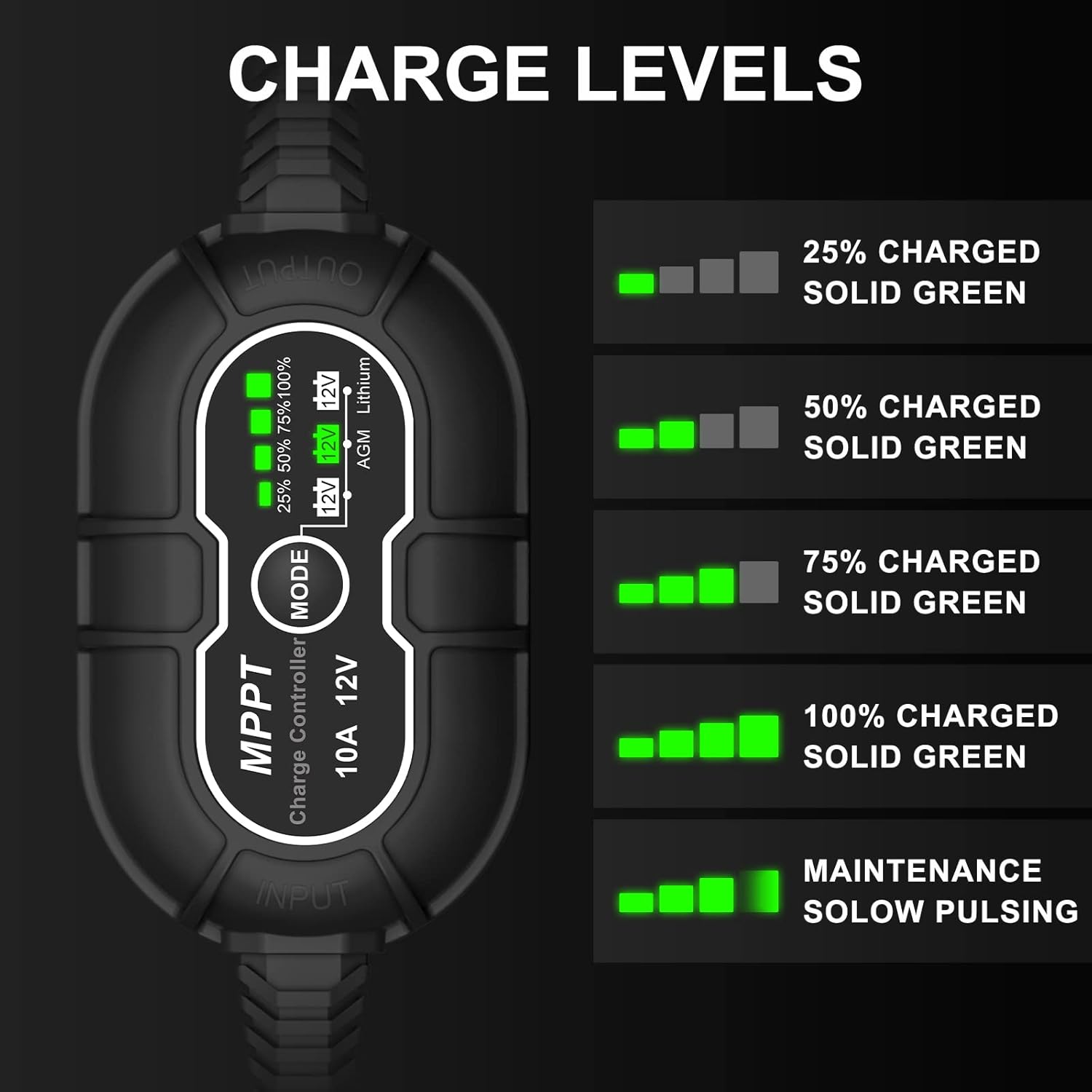
The controller features a series of green LEDs to indicate the battery's charge level:
- 25% алынат: First LED solid green.
- 50% алынат: First two LEDs solid green.
- 75% алынат: First three LEDs solid green.
- 100% алынат: All four LEDs solid green.
- Тейлөө режими: All four LEDs slowly pulse green, indicating the battery is fully charged and receiving a maintenance charge.
7. Техникалык тейлөө
Regular maintenance ensures optimal performance and longevity of your charge controller:
- Keep the controller clean and free from dust and debris.
- Periodically check all cable connections for tightness and corrosion.
- Ensure the installation area remains well-ventilated.
- Inspect cables for any signs of wear or damage. Replace if necessary.
8. Кыйынчылыктарды
Эгер көйгөйлөргө туш болсоңуз, төмөнкү жалпы көйгөйлөрдү жана чечимдерди караңыз:
| Көйгөй | Мүмкүн себеп | Чечим |
|---|---|---|
| Контроллер күйбөй жатат | Батарея туташкан эмес же кубаты азtage | Ensure battery is connected correctly and has sufficient voltage (12V системалары үчүн 8V жогору). |
| Батарея заряддалбай жатат | No solar input, incorrect battery type, or faulty connections | Check solar panel connection and sunlight. Verify correct battery type is selected. Inspect all wiring. |
| Charge level indicators not accurate | Incorrect battery type selected | Press the 'MODE' button to select the correct battery type for your system. |
| Ашыкча температурадан коргоо иштетилди | Начар желдетүү же чөйрөнүн жогорку температурасы | Relocate the controller to a cooler, well-ventilated area. Reduce load if possible. |
9. Техникалык шарттар
| Өзгөчөлүк | Спецификация |
|---|---|
| Бренд | Allto Solar |
| Модел | 10A MPPT Күн зарядын башкаруучу |
| Тtage | 12 вольт |
| Продукциянын өлчөмдөрү | 5.51 x 1.97 x 0.98 дюйм |
| Элемент Салмагы | 5 унция |
| Батареялар талап кылынат | No (for controller operation, but charges external batteries) |
10. Кепилдик жана колдоо
Allto Solar products are designed for reliability and performance. For warranty information or technical support, please refer to the contact details provided with your purchase or visit the official Allto Solar webсайт. Кепилдик дооматтар үчүн сатып алганыңыздын далилин сактаңыз.


