Introduction
Thank you for choosing the HyperGear Vibe Bluetooth Wireless Headphones. These headphones are designed to provide a superior audio experience with advanced features for comfort and convenience. This manual will guide you through the setup, operation, and maintenance of your new headphones.

Image: HyperGear Vibe Bluetooth Wireless Headphones in white, highlighting its sleek design and packaging.
Коопсуздук маалыматы
Бул продуктуну колдонуудан мурун бардык коопсуздук эскертүүлөрүн жана көрсөтмөлөрүн кунт коюп окуп чыгыңыз. Келечекте колдонуу үчүн бул колдонмону сактап коюңуз.
- Наушниктерди экстремалдык температурага, нымдуулукка же суюктукка тийгизбеңиз.
- Кулакчындарды түшүрүүдөн же катуу тийүүдөн сактаныңыз.
- Наушниктерди ажыратууга же өзгөртүүгө аракет кылбаңыз. Бул кепилдикти жокко чыгарат.
- Clean the headphones with a soft, dry cloth only.
- Жогорку үн менен көпкө угуу угуунун бузулушуна алып келиши мүмкүн. Үндү коопсуз деңгээлге тууралаңыз.
Кутуда эмне бар
Сиздин пакетте төмөнкү нерселердин бардыгы камтылганын текшериңиз:
- HyperGear Vibe Bluetooth Wireless Headphones
- USB-C заряддоо кабели
- Колдонуучунун Колдонмосу (бул документ)
Продукт бүттүview & Негизги өзгөчөлүктөрү
The HyperGear Vibe headphones are engineered for an immersive audio experience with user-friendly controls and a comfortable design.
Негизги өзгөчөлүктөрү:
- Премиум үн сапаты: Enjoy deep bass and clear sound with high-definition stereo audio.
- Ызы-чуу изоляциясы: Over-ear design with memory foam ear cups provides excellent noise isolation, blocking out distractions.
- Камтылган микрофон: Seamlessly transition between music and calls with the integrated microphone.
- Интуитивдик башкаруулар: Easy access on-ear controls for music playback, volume, and calls.
- Зымсыз эркиндик: Bluetooth connectivity for untethered listening.
- Узак мөөнөттүү батарея: Бир кубаттоо менен 10 саатка чейин үзгүлтүксүз ойнотуу.
- Бүктөлүүчү Дизайн: Оңой сактоо жана саякаттоо үчүн компакттуу жана көчмө.
- Ар тараптуу шайкештик: Connects with smartphones, tablets, laptops, and other Bluetooth-enabled devices.

Image: Visual representation of the Vibe Wireless Headphones' core features, including sound quality, battery, and design.

Image: Highlighting the high-fidelity sound and wireless freedom, with a diagram of the easy access controls on the earcups.
Видео: Продукциянын расмий көргөзмөсүasing the HyperGear Vibe Bluetooth Wireless Headphones, demonstrating their features and design.
Жайгашуу
1. Наушниктерди заряддоо
Before first use, fully charge your HyperGear Vibe headphones. Use the included USB-C charging cable.
- Connect the USB-C end of the cable to the charging port on the headphones.
- Connect the USB-A end to a compatible USB power source (e.g., wall adapter, computer USB port).
- The LED indicator on the headphones will show charging status (refer to LED behavior in Specifications section for details).
- Толук кубаттоо болжол менен талап кылынат 2 саат жана чейин камсыз кылат 10 саат of continuous playback.

Image: Illustrates the long-lasting power of the headphones, indicating 10 hours of play time and 2 hours of charge time.
2. Bluetooth Жупташтыруу
Гарнитураңызды Bluetooth иштетилген түзмөк менен жупташтыруу үчүн бул кадамдарды аткарыңыз:
- Наушниктердин өчүрүлгөнүн текшериңиз.
- басып, кармап туруңуз Күйгүзүү/ӨЧҮРҮҮ button until the LED indicator flashes rapidly (usually blue and red), indicating pairing mode.
- On your device (smartphone, tablet, laptop), go to Bluetooth settings and turn Bluetooth ON.
- Издөө available devices and select "HyperGear Vibe" from the list.
- Туташтырылгандан кийин, кулакчындардагы LED индикатору көк түскө айланат же жаркылдабай калат.
- Эгер түзмөктүн Bluetooth функциясы активдүү болсо жана анын жеткиликтүүлүк аралыгында болсо, кулакчындар күйгүзүлгөндө акыркы жупташтырылган түзмөккө автоматтык түрдө кайра туташат.

Image: Demonstrates the wide compatibility of the HyperGear Vibe headphones with various devices such as cellphones, tablets, and laptops.
Иштөө нускамалары
Familiarize yourself with the controls located on the earcups for seamless operation.
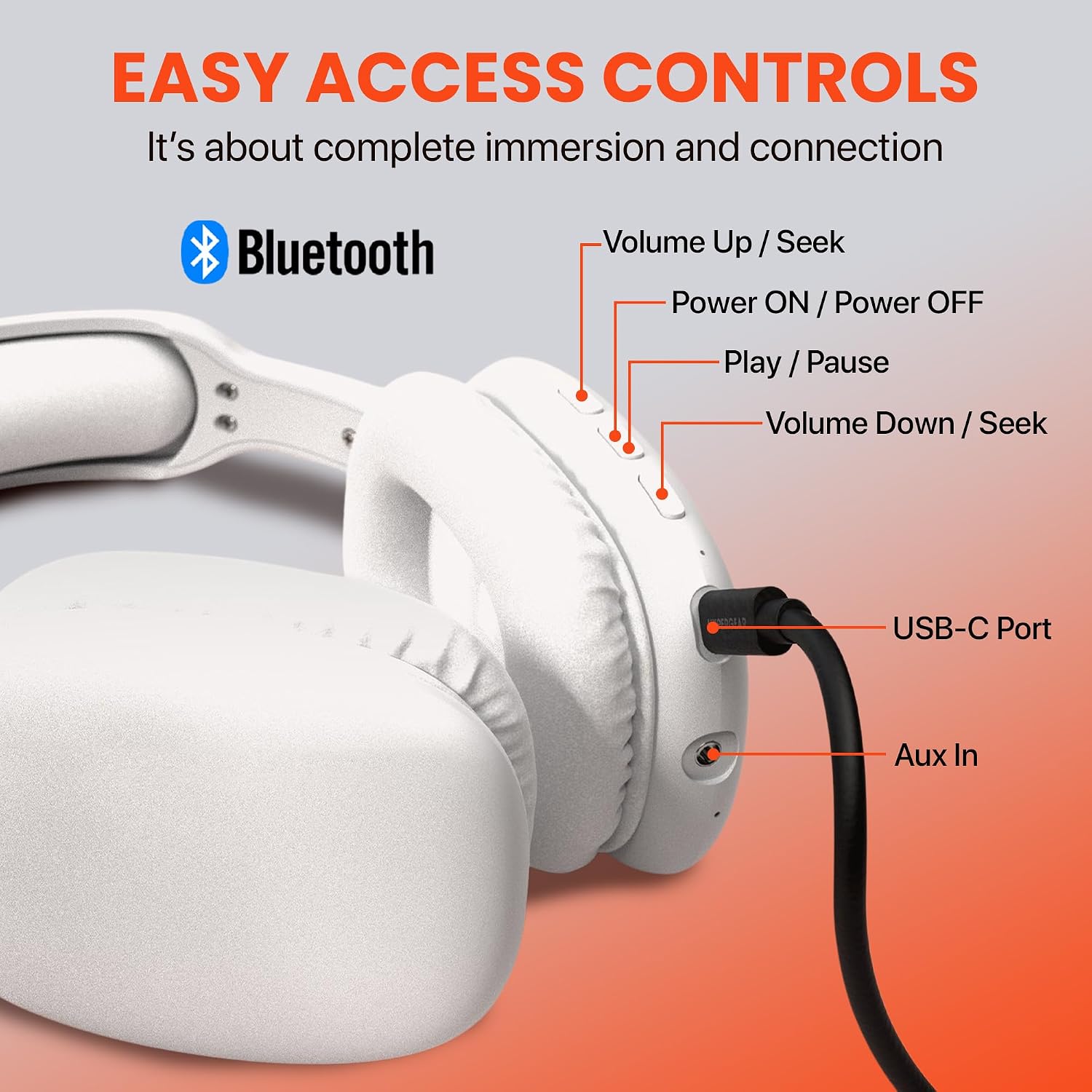
Image: Detailed diagram illustrating the location and function of all control buttons and ports on the HyperGear Vibe headphones.
Негизги башкаруу элементтери:
| Баскыч/Аракет | Функция |
|---|---|
| Күйгүзүү/ӨЧҮРҮҮ баскычы (Басуу жана кармоо) | Күйгүзүү/өчүрүү, жупташтыруу режимине кириңиз |
| Ойнотуу/тындыруу баскычы (Бир жолу басуу) | Музыка ойнотуу/тындыруу, Чалууга жооп берүү/аяктоо |
| Volume Up / Seek Button (Бир жолу басуу) | Үнүн жогорулатуу |
| Volume Up / Seek Button (Басуу жана кармоо) | Кийинки трек |
| Volume Down / Seek Button (Бир жолу басуу) | Үндү азайтуу |
| Volume Down / Seek Button (Басуу жана кармоо) | Мурунку трек |
| USB-C порту | Заряддоо киргизүү |
| Aux In Port | Connect via 3.5mm audio cable (not included) for wired listening |
Чалууларды кабыл алуу жана кабыл алуу:
- Чакырууга жооп берүү: басыңыз Ойнотуу/тындыруу баскычы бир жолу.
- Чакырууну аяктоо: басыңыз Ойнотуу/тындыруу баскычы чалуу учурунда бир жолу.
- Чакырууну четке кагуу: басып, кармап туруңуз Ойнотуу/тындыруу баскычы 2 секундга.
- Акыркы номерди кайра терүү: эки жолу басыңыз Ойнотуу/тындыруу баскычы.
Техникалык тейлөө
Proper care will ensure the longevity and optimal performance of your headphones.
- Тазалоо: Кулакчындарды жумшак, бир аз нымдуу аарчыңызamp cloth. Do not use harsh chemicals or abrasive cleaners. Ensure no liquid enters the ports.
- Сактагыч: Колдонулбаганда, наушниктерди салкын, кургак жерде, тике күндүн нурунан жана өтө температурадан алыс сактаңыз. Бүктөлүүчү дизайн компакт сактоого мүмкүндүк берет.
- Батареяга кам көрүү: Батареянын иштөө мөөнөтүн сактоо үчүн, кулакчындарды көп колдонбосо дагы, дайыма заряддап туруңуз. Батареяны узак убакытка толук зарядсыздандырбаңыз.
Проблемаларды чечүү
Эгер кандайдыр бир көйгөйгө туш болсоңуз, төмөнкү жалпы көйгөйлөрдү жана чечимдерди караңыз:
| Көйгөй | Чечим |
|---|---|
| Кулакчындар күйбөйт. | Наушниктердин толук заряддалганын текшериңиз. Кубат булагына туташып, кайра аракет кылыңыз. |
| Түзмөк менен жупташтыруу мүмкүн эмес. | Кулакчындар жупташтыруу режиминде экенин текшериңиз (LED жарыгы күйүп-өчүп турат). Түзмөгүңүздөгү Bluetooth'ду өчүрүп, күйгүзүңүз. Кулакчындарды түзмөккө жакындатыңыз. Түзмөгүңүздөгү мурунку жупташтырууларды унутуп, кайра аракет кылыңыз. |
| Үн жок же үнү төмөн. | Check volume levels on both headphones and your device. Ensure headphones are properly paired. Try playing different audio sources. |
| Үн бурмаланган же үзүлүп калган. | Move closer to your device to avoid interference. Check for obstacles between headphones and device. Ensure headphones are fully charged. |
| Микрофон иштебей жатат. | Ensure headphones are properly connected. Check microphone settings on your device. |
Техникалык шарттар
| Өзгөчөлүк | Деталь |
|---|---|
| Модель аты | Vibe |
| Байланыш технологиясы | Зымсыз (Bluetooth) |
| Bluetooth версиясы | 5.0 |
| Bluetooth диапазону | 10 метр (болжол менен 33 фут) |
| Батареянын иштөө мөөнөтү | 10 Hours (continuous playback) |
| Заряддоо убактысы | 2 саат |
| Аудио драйвер түрү | Динамикалык драйвер |
| Жыштык диапазону | 20Гц - 20,000Гц |
| Noise Control | Үн изоляциясы |
| Кулак жайгаштыруу | Кулак үстүндө |
| Материал | Эстутум көбүгү (кулакчындар) |
| Элемент Салмагы | 11.7 унция |
| Продукциянын өлчөмдөрү | 7.17 x 3.43 x 9.85 дюйм |
| Шайкеш түзмөктөр | Уюлдук телефондор, планшеттер, ноутбуктар, рабочий компьютерлер |
| Камтылган компоненттер | USB-C заряддоо кабели |
| UPC | 633755156137 |
Кепилдик жана колдоо
HyperGear products are built with quality and reliability in mind. For information regarding warranty coverage, technical support, or customer service, please visit the official HyperGear webсайтка же түздөн-түз кардарларды колдоо менен байланышыңыз. Сатып алганыңыздын далили катары сатып алуу дүмүрчөгүңүздү сактаңыз.
For further assistance, you may also refer to the product's detail page on Amazon.com: https://www.amazon.com/dp/B09SBTDD9Z


