Introduction
Logitech MX Keys Mini – бул чыгармачыл адамдар үчүн иштелип чыккан компакттуу, минималисттик зымсыз жарыктандырылган клавиатура. Ал Perfect Stroke баскычтары, акылдуу жарыктандыруу жана көп түзмөктө, көп ОС менен шайкештик менен мыкты терүү тажрыйбасын сунуштайт. Бул колдонмо клавиатураңызды орнотуу, иштетүү, техникалык тейлөө жана мүчүлүштүктөрдү оңдоо боюнча маанилүү маалыматтарды берет.
Кутуда эмне бар
- Logitech MX Keys Mini Keyboard
- USB-C заряддоо кабели
- Маанилүү маалымат документи

Сүрөт: Logitech MX Keys Mini клавиатурасы, USB-C кубаттоочу кабели жана документтер таңгакталгандай.
Жайгашуу
1. Баскычтопту заряддоо
Алгачкы жолу колдонуудан мурун, MX Keys Mini клавиатураңызды берилген USB-C кубаттоо кабелин колдонуп толугу менен кубаттаңыз. Кабелдин бир учун клавиатуранын арткы жагындагы USB-C портуна, ал эми экинчи учун USB-C кубат булагына (мисалы, компьютер, дубал адаптери) туташтырыңыз.
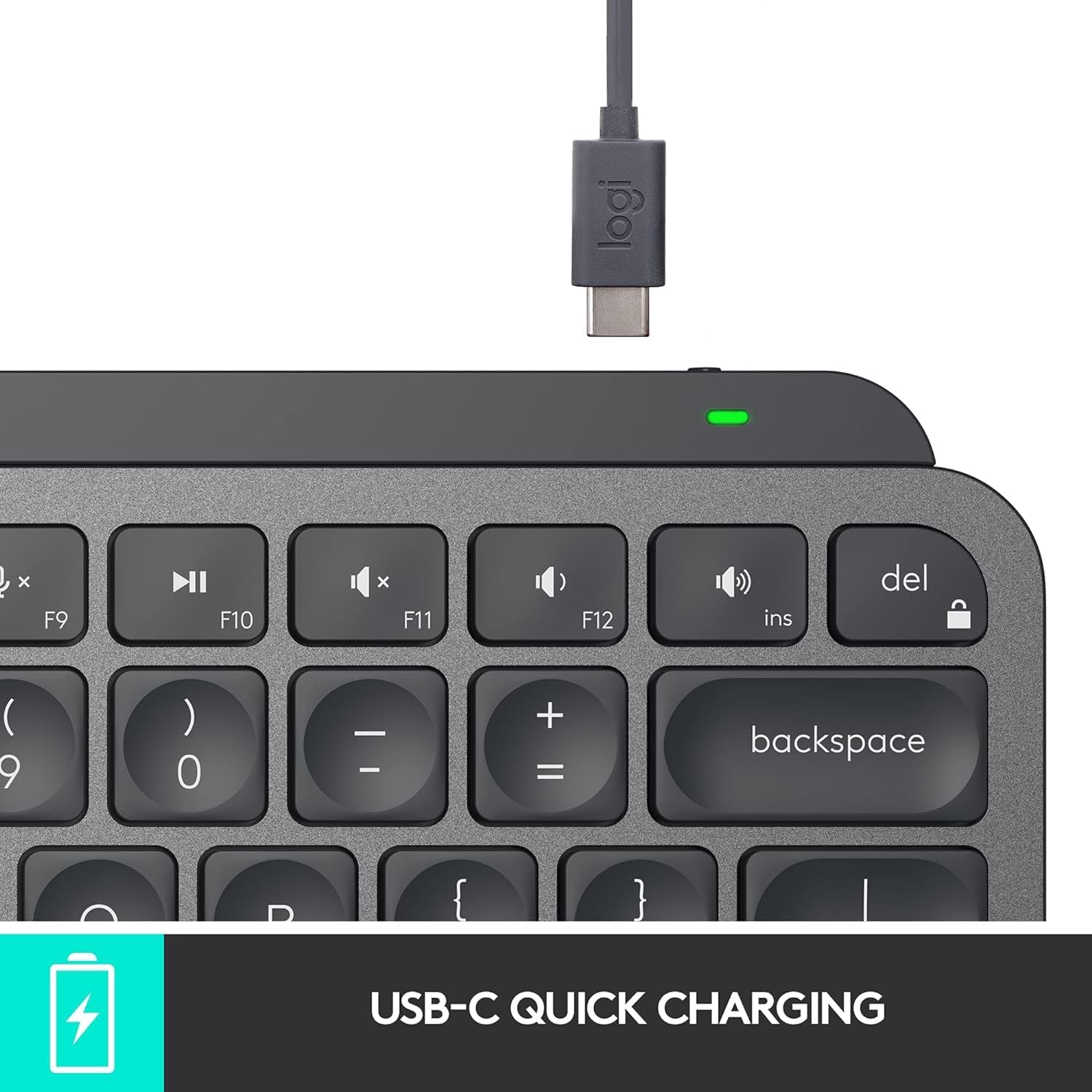
Сүрөт: Logitech MX Keys Mini клавиатурасындагы USB-C кубаттоо порту, кубаттоо кабели сайылган.
2. Түзмөктөргө туташуу (Bluetooth)
- Артында жайгашкан кубат которгучу менен клавиатураны күйгүзүңүз.
- Easy-Switch баскычтарынын бирин (F1, F2 же F3) баскычтын үстүндөгү LED индикатору тез күйүп-өчө баштаганга чейин үч секунд басып туруңуз. Бул жупташтыруу режимин билдирет.
- Түзмөгүңүздө (компьютер, планшет, смартфон) Bluetooth жөндөөлөрүн ачып, жеткиликтүү түзмөктөрдүн тизмесинен "MX Keys Mini" тандаңыз.
- Жупташтыруу процессин аяктоо үчүн экрандагы көрсөтмөлөрдү аткарыңыз. LED индикатору 5 секундга туруктуу күйүп, андан кийин өчөт, бул жупташтыруунун ийгиликтүү болгонун билдирет.
- Башка Easy-Switch баскычтарын колдонуп, эки кошумча түзмөк үчүн кайталаңыз.
MX Keys Mini Bluetooth Low Energyди колдойт жана Apple macOS, iOS, Windows, Linux жана Android операциялык системалары менен шайкеш келет.

Сүрөт: Logitech MX Keys Mini клавиатурасы үч башка операциялык система менен көп түзмөктүн туташуусун көрсөтөт.
Кошумча: Logi Bolt USB кабыл алгычы
Коопсуз, жогорку өндүрүмдүү зымсыз байланыш үчүн сиз Logi Bolt USB кабыл алгычын (өзүнчө сатылат) колдоно аласыз. Кабыл алгычты компьютериңиздеги USB портуна сайып, Logitech Options программасын колдонуп клавиатураны жупташтырыңыз.
Өзгөчөлүктөрү
- Идеалдуу баскычтар: Баскычтар манжаларыңыздын формасына дал келүү үчүн тоголок формада жайгаштырылган, бул канааттандырарлык жана так терүү тажрыйбасын камсыз кылат.
- Акылдуу ачкычтар: Үн менен текстке диктант жазуу, микрофонду өчүрүү/үнсүз режимге коюу жана эмодзиге мүмкүнчүлүк алуу үчүн интеграцияланган баскычтар.
- Минималисттик форма фактору: Чычкандын жакшыраак абалда болушуна өбөлгө түзгөн жана эргономикалык абалда болушуна мүмкүндүк берген компакттуу дизайн.
- Акылдуу жарыктандыруу: Арткы жарыктандырылган баскычтар колуңуз жакындаганда автоматтык түрдө күйүп, айлана-чөйрөнүн жарыктыгына жараша жарыктыгын тууралайт.
- Көп түзмөктүү жана көп операциялык системалуу: Ар кандай операциялык тутумдарда үч жупташтырылган түзмөктүн ортосунда оңой которулуңуз.
- Агымдын шайкештиги: Бир эле суюк жумуш агымында бир нече компьютерлерде терүү үчүн Logitech Flow иштетилген чычкандары (мисалы, MX Master 3 же MX Anywhere 3) менен иштейт.
- USB-C кайра заряддалуучу: Ыңгайлуу USB-C кубаттоосу менен узак убакытка созулган батареянын иштөө мөөнөтү.

Сүрөт: үстүнкү view Logitech MX Keys Mini клавиатурасынын негизги өзгөчөлүктөрүн жана жайгашуусун баса белгилейт.
Иштөө нускамалары
Түзмөктөрдүн ортосунда которулуу
Жупташкан түзмөктөрүңүздүн ортосунда которулуу үчүн, жөн гана тиешелүү Easy-Switch баскычын (F1, F2 же F3) бир жолу басыңыз. Клавиатура тандалган түзмөккө заматта туташат.
Акылдуу жарыктандыруу башкаруусу
Баскычтоптун арткы жарыгы айланадагы жарыкка автоматтык түрдө туураланат. Жогорку катардагы атайын арткы жарык баскычтарын (F4 жана F5) колдонуп, жарыктыкты кол менен тууралай аласыз. Арткы жарыкты өчүрүү жана батареяны үнөмдөө үчүн Logitech Options программасын колдонсоңуз болот.

Сүрөт: Logitech MX Keys Mini клавиатурасы акылдуу жарыктандыруу функциясын көрсөтүп турат, ал баскычтарды аз жарыкта жарыктандырат.
Smart ачкычтарды колдонуу
- Диктант (F6): Шайкеш колдонмолордо үн менен текстке диктантты иштетүү үчүн басыңыз.
- Микрофонду үнсүз кылуу/үнсүз кылуу (F7): Чалуулар же жаздыруулар учурунда микрофонуңузду тез үнсүз кылыңыз же күйгүзүңүз.
- Эмодзи (F8): Эмодзилерди тез киргизүү үчүн эмодзилер менюсуна кириңиз.
Logitech Options Программасы
Logitech Options программасын расмий Logitech сайтынан жүктөп алып, орнотуңуз webклавиатураңызды ыңгайлаштыруу үчүн сайт. Бул программа сизге төмөнкүлөргө мүмкүндүк берет:
- Функциялык баскычтарды белгилүү бир аракеттерге же баскычтоптун кыска жолдоруна кайра жайгаштырыңыз.
- Батареянын иштөө мөөнөтүн узартуу үчүн аны өчүрүүнү кошо алганда, арткы жарыктын жөндөөлөрүн тууралаңыз.
- Easy-Switch түзмөктөрүнүн туташууларын башкарыңыз.
- Шайкеш келген чычкандар менен Flow функциясын иштетүү.
Техникалык тейлөө
Батареянын иштөө мөөнөтү жана заряддоо
MX Keys Mini жарыктандыруу күйгүзүлгөндө толук кубатталганда 10 күнгө чейин же жарыктандыруу өчүрүлгөндө 5 айга чейин батареянын иштөө мөөнөтүн сунуштайт. Батареянын индикатору кубаттуулуктун аздыгын көрсөткөндө, берилген USB-C кабелин колдонуп, клавиатураны кубаттаңыз.
Тазалоо
Клавиатураңызды тазалоо үчүн, баскычтарды жана анын бетин жумшак, мамыксыз чүпүрөк менен акырын сүртүңүз. Катуу химиялык заттарды же абразивдүү материалдарды колдонуудан алыс болуңуз.
Проблемаларды чечүү
Байланыш маселелери
- Баскычтоп кубатталып, күйгүзүлгөнүн текшериңиз.
- Түзмөгүңүздө Bluetooth иштетилгенин текшериңиз.
- Easy-Switch баскычын өчүп-өчкөнгө чейин кармап туруп, андан кийин түзмөгүңүздүн Bluetooth жөндөөлөрүнөн тандап, баскычтопту кайра жупташтырыңыз.
- Эгер Logi Bolt кабыл алгычын колдонсоңуз, анын туура сайылганын жана клавиатура Logitech Options аркылуу жупташтырылганын текшериңиз.
Арткы жарык иштебейт
- Батареянын деңгээлин текшериңиз; батарея аз болгондо жарык өчүрүлүшү мүмкүн.
- Logitech Options программасында жарыктандыруу кол менен өчүрүлбөгөнүн же өчүрүлбөгөнүн текшериңиз.
- Айланадагы жарык сенсору тосулуп калбагандыгын текшериңиз.
Техникалык шарттар
| Бренд | Logitech |
| Модель номери | 920-010388 |
| Байланыш технологиясы | Bluetooth, USB-C |
| Шайкеш түзмөктөр | Ноутбук (жана башка Bluetooth иштетилген түзмөктөр) |
| Keyboard Description | Мембрана |
| Өзгөчө өзгөчөлүк | Арткы жарыктандырылган, кайра заряддалуучу |
| Түс | Графит |
| Продукциянын өлчөмдөрү | 11.65"L x 5.19"W x 0.83"H (29.59 x 13.18 x 2.11 см) |
| Элемент Салмагы | 1.5 фунт (0.68 кг) |
| Батареялар | 1 Литий Полимердик батарейка талап кылынат (киргизилген) |
Кепилдик жана колдоо
Кепилдик жөнүндө маалымат, техникалык колдоо жана кошумча ресурстар үчүн, өнүмүңүздүн таңгагында камтылган "Маанилүү маалымат документин" караңыз же расмий Logitech колдоо кызматына кайрылыңыз. webсайт. Logitech өнүмдөрдүн оптималдуу иштешин камсыз кылуу үчүн кардарларды колдоо жана ресурстар менен камсыз кылат.


