1. Киришүү
This manual provides comprehensive instructions for the setup, operation, and maintenance of your Tera 9200-Wired Omnidirectional Desktop Barcode Scanner. This device is designed for efficient and hands-free scanning of 1D, 2D, and QR barcodes in various environments such as retail stores, warehouses, and offices.
2. Продукт бүтүп калдыview
The Tera 9200-Wired scanner is a high-performance, plug-and-play device engineered for reliability and ease of use. Its omnidirectional scanning capability allows for quick and accurate barcode reading from various angles.
2.1 Негизги өзгөчөлүктөрү
- Plug and Play: No driver or software installation required. Simply connect the USB cable to your computer, POS system, or cash register.
- Hands Free сканерлөө: Designed as a desktop platform scanner, it allows for convenient, hands-free operation, improving efficiency for both cashiers and customers.
- Туруктуу дизайн: Equipped with four small non-slip pads on the bottom and an internal iron slab, ensuring stability during operation.
- Кеңири шайкештик: Compatible with various operating systems including Windows XP, Windows 7, Windows 8, Windows 10, Android, and Linux. Works with PCs, laptops, iPads, and smartphones.
- Multi-Language Keyboard Support: Supports keyboard layouts for US, UK, German, French, Italian, Spanish, Japanese, and more.
- Powerful Decoding Ability: Capable of reading a wide range of 1D and 2D barcodes, including those that are reflective, smudged, damaged, or fuzzy.
2.2 Пакеттин мазмуну
- Tera 9200-Wired Desktop Barcode Scanner
- USB 2.0 Data Cable (integrated)
- Көрсөтмө (бул документ)
2.3 Продукт диаграммасы

Сүрөт 2.3.1: Алдыңкы view of the Tera 9200-Wired Desktop Barcode Scanner, showing its compact, black and white design with the scanning window.
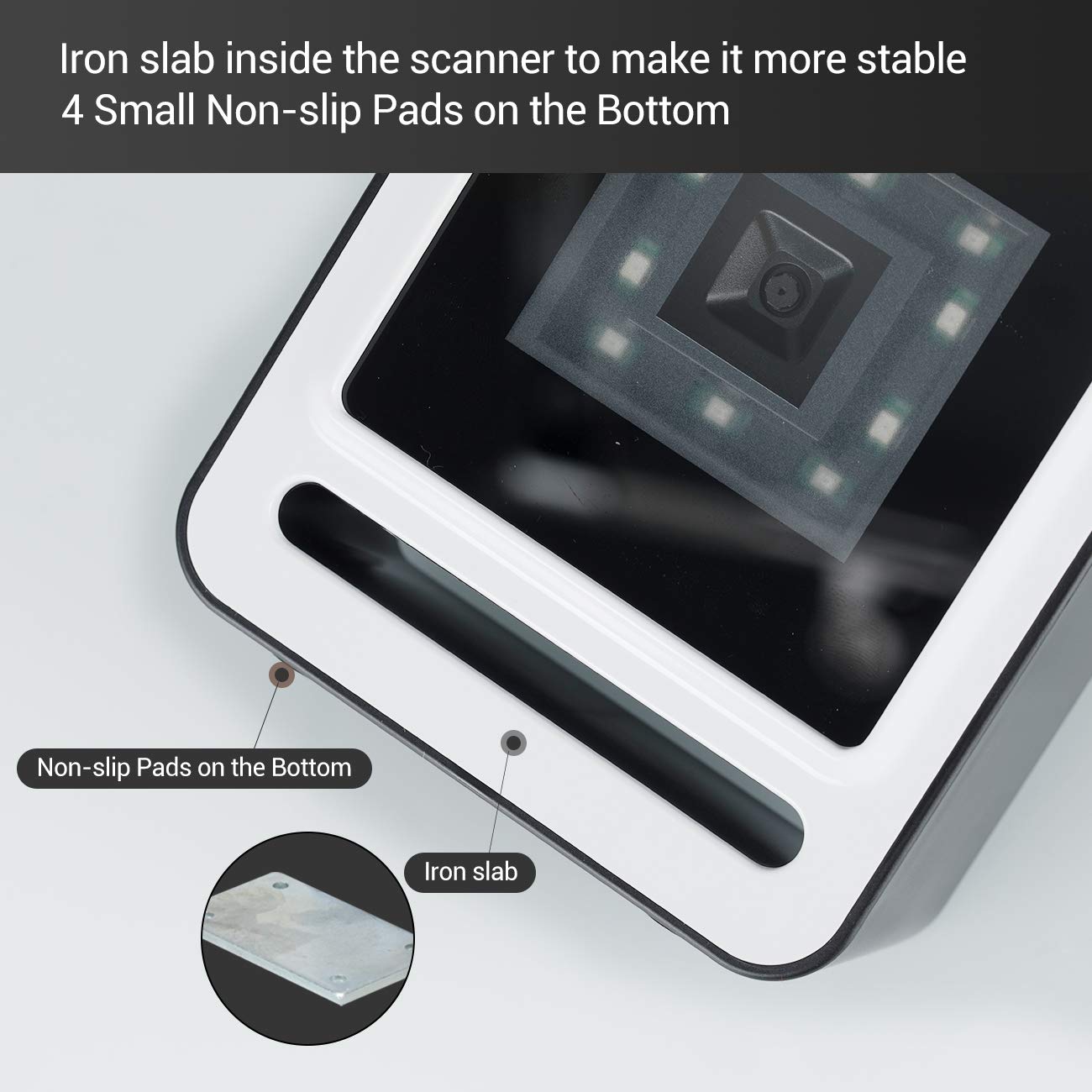
Сүрөт 2.3.2: Жакын пландан view of the scanner's base, highlighting the four non-slip pads and the internal iron slab designed for enhanced stability.
3. Орнотуу
The Tera 9200-Wired barcode scanner is designed for quick and easy setup, requiring no special drivers or software installation.
- Сканерди таңгактан чыгаруу: Сканерди таңгагынан кылдаттык менен чыгарып алыңыз.
- USB кабелин туташтыруу: Insert the integrated USB 2.0 data cable into an available USB port on your computer, POS system, or cash register.
- Системаны таануу: The operating system will automatically detect and configure the scanner. This process typically takes a few seconds.
- Колдонууга даяр: Once recognized, the scanner is ready for immediate use.

Figure 3.1: The scanner connected via USB to a laptop, demonstrating its plug-and-play functionality and compatibility with Windows, Android, and Linux systems, as well as PCs, laptops, iPads, and phones.
4. Иштөө нускамалары
The Tera 9200-Wired scanner offers hands-free operation for efficient barcode reading.
4.1 Негизги сканерлөө
- Position the Item: Place the barcode of the item directly in front of the scanner's window.
- Автоматтык сканерлөө: The scanner will automatically detect the barcode and emit a successful scan indication (e.g., a beep or light change).
- Маалыматтарды өткөрүү: The scanned data will be transmitted to your connected device (computer, POS system) as if typed via a keyboard.

Figure 4.1: A smartphone displaying a QR code being scanned by the Tera 9200-Wired scanner, illustrating its hands-free capability for digital barcodes.
4.2 Колдоого алынган штрих-коддун түрлөрү
The scanner supports a wide array of 1D and 2D barcode symbologies:
- 1D Decode Capability: Codabar, Code 11, Code93, MSI, Code 128, UCC/EAN-128, Code 39, EAN-8, EAN-13, UPC-A, ISBN, Industrial 25, Interleaved 25, Standard 25, 2/5 Matrix.
- 2D Decode Capability: QR Code, PDF417, Data Matrix, Aztec code, Maxi Code.

Figure 4.2: Visual representation of the scanner's advanced decoding capabilities, showing its ability to read challenging barcodes such as reflective, smudged, damaged, and fuzzy ones.
4.3 Advanced Settings (via Configuration Codes)
The scanner can be configured for various settings by scanning specific configuration barcodes (not provided in this manual, refer to a separate programming guide if available from manufacturer). These settings may include:
- Баскычтоп тили: Adjust the output keyboard language to match your system (e.g., US, UK, German, French, Italian, Spanish, Japanese).
- Виртуалдык COM порту: Enable virtual COM port mode for specific software applications.
- Prefix/Suffix: Сканерленген маалыматтарга чейин же кийин ыңгайлаштырылган белгилерди кошуңуз.
- Hide Characters: Configure the scanner to hide certain characters from the output.
- Көлөмдү жөндөө: Adjust the volume of the scan confirmation beep.

Figure 4.3: The scanner illustrating its support for multiple keyboard languages, including English, Spanish, German, Japanese, French, and Italian, allowing for versatile international use.
5. Техникалык тейлөө
Туура тейлөө сиздин штрих-код сканериңиздин узак иштөөсүн жана оптималдуу иштешин камсыз кылат.
- Сканерлөө терезесин тазалоо: Regularly clean the scanning window with a soft, lint-free cloth. For stubborn smudges, slightly dampкездемени суу же жумшак, абразивдүү эмес тазалоочу каражат менен сүртүңүз. Катуу химиялык заттарды же абразивдүү материалдарды колдонбоңуз.
- Жалпы тазалоо: Сканердин сыртын кургак же бир аз кургак чүпүрөк менен сүртүңүзamp чаңды жана кирди тазалоо үчүн кездеме.
- Экстремалдуу шарттарды болтурбоо: Do not expose the scanner to extreme temperatures, humidity, or direct sunlight for prolonged periods.
- Этияттык менен мамиле кылуу: Сканерди түшүрүүдөн же катуу таасирлерге дуушар кылуудан качыңыз.
6. Кыйынчылыктарды
If you encounter issues with your Tera 9200-Wired scanner, refer to the following common problems and solutions:
| Көйгөй | Мүмкүн себеп | Чечим |
|---|---|---|
| Сканер күйбөйт. | USB кабели туура эмес туташкан же USB порту бузук. | USB кабелинин сканерге да, компьютерге да бекем сайылганын текшериңиз. Башка USB портун колдонуп көрүңүз. |
| Сканер штрих-коддорду окубайт. | Barcode is damaged, smudged, or poorly printed. Scanner window is dirty. Туура эмес штрих-код символологиясы иштетилген. | Try scanning a different, known-good barcode. Clean the scanning window. Ensure the barcode type is supported and enabled (if configurable). |
| Сканерленген маалыматтар туура эмес же толук эмес. | Keyboard language mismatch. Data format settings incorrect. | Verify your computer's keyboard language matches the scanner's setting. Check for any prefix/suffix settings. |
| Сканер сигнал берет, бирок эч кандай маалымат өткөрүлбөйт. | Application not in focus or not accepting input. | Ensure the cursor is in the correct input field of your application (e.g., notepad, word processor, POS software). |
7. Техникалык шарттар
| Өзгөчөлүк | Деталь |
|---|---|
| Бренд | Тера |
| Модел | 9200-Зымдуу |
| Type | 1D 2D QR Omnidirectional Desktop Barcode Scanner |
| Байланыш | Зымдуу USB 2.0 |
| Декоддоо мүмкүнчүлүгү (1D) | Codabar, Code 11, Code93, MSI, Code 128, UCC/EAN-128, Code 39, EAN-8, EAN-13, UPC-A, ISBN, Industrial 25, Interleaved 25, Standard 25, 2/5 Matrix |
| Декоддоо мүмкүнчүлүгү (2D) | QR Code, PDF417, Data Matrix, Aztec code, Maxi Code |
| Шайкештик | Windows XP/7/8/10, Android, Linux (PC, Laptops, iPad, Phone) |
| Баскычтоп тилдери | US, UK, German, French, Italian, Spanish, Japanese, etc. |
| Пакеттин өлчөмдөрү | 18.21 x 12.29 x 8.61 см |
| Элемент Салмагы | 449 г |
| Батареялар талап кылынат | Жок |
8. Кепилдик жана колдоо
For warranty information and technical support, please refer to the documentation provided with your purchase or contact Tera customer service directly. Keep your purchase receipt as proof of purchase for warranty claims.
For the most up-to-date support resources, visit the official Tera webсайт.


