1. Киришүү
The Amazon Echo Show 5 (3rd Gen) is a smart display designed to integrate seamlessly into your daily life. It features a 5.5-inch screen and enhanced audio capabilities, providing visual and auditory interactions with Alexa. This device is refurbished, tested, and certified to function like a new unit, and comes with the same limited warranty.
The device is constructed with sustainability in mind, utilizing 100% post-consumer recycled polyester yarn for its fabric and 100% recycled aluminum. Its packaging is also 100% recyclable.
2. Кутуда эмне бар
Upon unboxing your Amazon Echo Show 5 (3rd Gen), you should find the following items:
- Echo Show 5 (3-муундагы) түзмөгү
- Power adapter (22W) and cable (4.9ft)
- Quick Start Guide
3. Орнотуу колдонмосу
Echo Show 5ди орнотуу үчүн төмөнкү кадамдарды аткарыңыз:
- Күйгүзүү: Connect the included power adapter to your Echo Show 5 and plug it into a wall outlet. The device will automatically power on.
- Экрандагы нускамаларды аткарыңыз: The device will guide you through the initial setup process on its 5.5-inch touch screen.
- Wi-Fi'га туташуу: Select your Wi-Fi network from the list and enter the password. The Echo Show 5 supports dual-band Wi-Fi (802.11a/b/g/n/ac). It does not support ad-hoc (peer-to-peer) networks.
- Log in to Amazon Account: Enter your Amazon account credentials when prompted.
- Жекелештирүү жөндөөлөрү: Configure your time zone, location, and other preferences.
- Функцияларды изилдөө: Once setup is complete, you can begin interacting with Alexa and exploring the device's capabilities.
The device utilizes Amazon Wi-Fi Simple Setup technology for an easier connection process to your Wi-Fi network.
4. Эхо Шоуңузду иштетүү 5
The Echo Show 5 allows for various interactions through voice commands and its touch screen.
4.1. Дисплей өзгөчөлүктөрү
The 5.5-inch touch screen provides visual information and controls:
- Бир караганда маалымат: View news headlines, weather forecasts, and calendar events.
- Photo Display: Set the background to a rotating slideshow of your favorite photos. You can invite family and friends to share photos.
- Мазмун Viewing: Stream shows, view song titles, and follow along with recipes.

4.2. Аудио өзгөчөлүктөрү
The device features a full-range 1.75-inch built-in speaker, offering enhanced bass and clearer vocals for audio playback.
- Музыка жана подкасттар: Stream audio content from services like Amazon Music and Spotify.
- Bluetooth байланышы: Advanced Audio Distribution Pro колдойтfile (A2DP) мобилдик түзмөгүңүздөн Echo Show 5ге же Echo Show 5ден Bluetooth динамигине аудиону агылтуу үчүн. Аудио/Видео алыстан башкаруу Profile (AVRCP) туташкан мобилдик түзмөктөрдү үн менен башкарууга мүмкүндүк берет. PIN коддорду талап кылган Bluetooth динамиктери колдоого алынбайт.


4.3. Камеранын өзгөчөлүктөрү
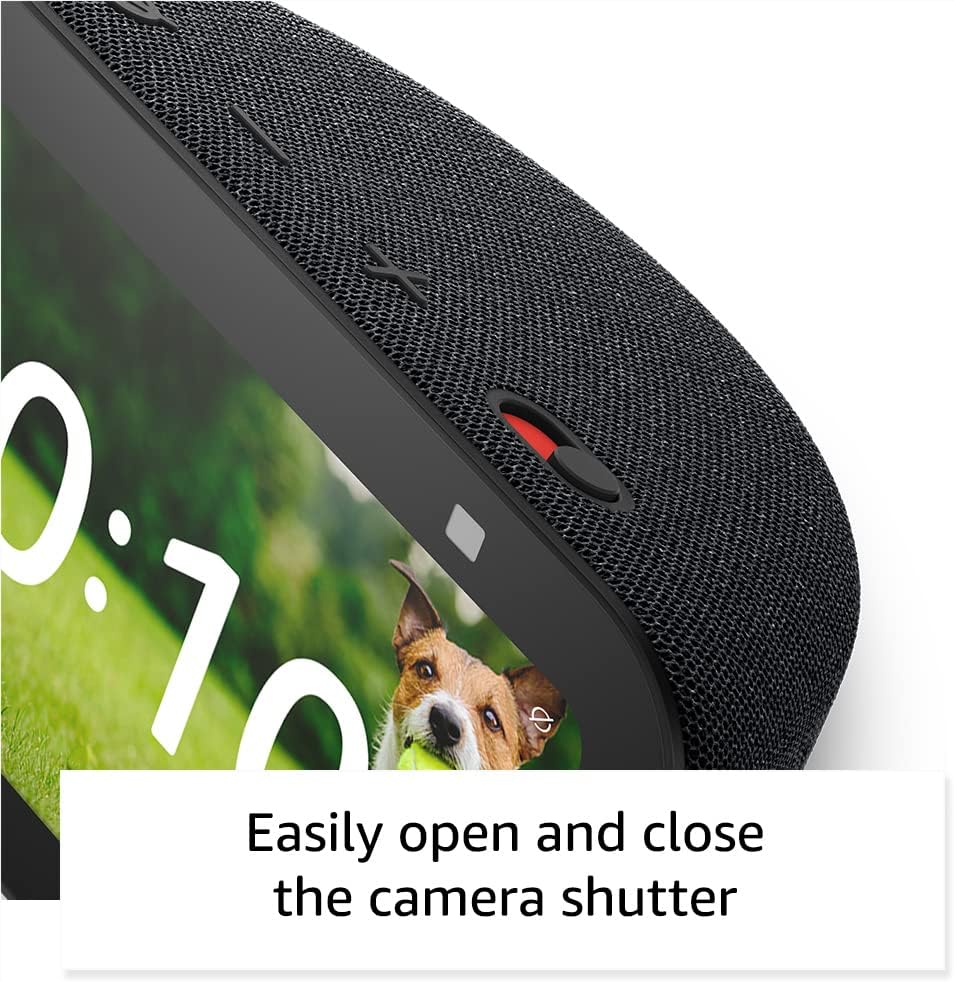
The Echo Show 5 includes a 2 MP camera with a built-in shutter.
- Видео чалуу: Use the camera to make video calls to friends and family who have the Alexa app or another Echo device with a screen.
- Үй мониторинги: Check in on your home, family, or pets using the built-in camera. You can also view compatible video doorbells.


4.4. Акылдуу үйдү башкаруу
Control compatible smart devices such as lights and thermostats using voice commands or the touch screen, even when you are away from home. The device supports Wi-Fi, Bluetooth Low Energy Mesh, and Matter for smart home compatibility.
4.5. Купуялык функциялары
The Echo Show 5 incorporates multiple layers of privacy controls:
- Микрофонду/Камераны өчүрүү баскычы: Микрофонду жана камераны электрондук түрдө ажыратуу үчүн физикалык баскыч.
- Камерага орнотулган жапкыч: Камера линзасын жаап турган физикалык жылдыргыч.
- Wake Word технологиясы: The device only begins recording and sending audio to the cloud after detecting the wake word (e.g., "Alexa").
- Агым индикаторлору: Visual indicators show when the device is actively streaming to the cloud.
- Үн жаздырууну башкаруу: жөндөмдүүлүгү view жана үн жаздырууларыңызды өчүрүңүз.
- Ring Video Encryption: колдойт viewing end-to-end encrypted Ring video.
4.6. Жеткиликтүүлүктүн өзгөчөлүктөрү
Echo Show 5 Alexa'ны сиздин жөндөмүңүзгө ылайыкташтыруу үчүн ар кандай жеткиликтүүлүк функцияларын камтыйт. Аларга төмөнкүлөр аркылуу кирүүгө болот Орнотуулар → Атайын мүмкүнчүлүктөр.
- Alexa'га өтүү үчүн басыңыз: Экрандагы плиткалар же клавиатура аркылуу тийүү аркылуу Alexaга кириңиз.
- Адаптивдүү угуу: Алекса жооп бергенге чейин сүйлөп бүтүрүүгө көбүрөөк убакыт берет.
- Сүйлөөнүн артыкчылыктуу ылдамдыгы: Алексанын канчалык тез же жай сүйлөгөнүн көзөмөлдөңүз.
- Субтитрлөө: Alexa Captioning, Call Captioning, and Closed Captioning provide text captions for supported content.
- Көрсөт жана айт: Helps users who are blind or visually impaired identify products by saying "Alexa, what am I holding."
- ҮнView Screen Reader: Көрүүсү начар же сокур колдонуучулар үчүн мүмкүнчүлүк берет.
- Экран чоңойткуч: Экранды чоңойтууга/кичирейтүүгө жана айлантууга мүмкүндүк берет.
- Жакын жерде болгондо кабарлаңыз: Түзмөктүн жанында аныкталганда эскертме үндөрүн ойнотот.
- Kindle үн чыгарып окуу: Алекса Kindle китептерин үн чыгарып окуй алат.
- Чыныгы убакыттагы текст: Enables typing live text in a video call.
- Additional features include Color Inversion, Color Correction, and Request Sound.
5. Техникалык тейлөө
Echo Show 5 түзмөгүңүздүн узак мөөнөттүү иштешин жана оптималдуу иштешин камсыз кылуу үчүн, төмөнкү техникалык тейлөө көрсөтмөлөрүн аткарыңыз:
- Тазалоо: Use a soft, lint-free cloth to gently wipe the screen and exterior. Avoid abrasive cleaners, solvents, or aerosol sprays.
- Жайгашкан жери: Place the device on a stable, flat surface away from direct sunlight, heat sources, and excessive moisture. Ensure adequate ventilation around the device.
- Программалык камсыздоо жаңыртуулары: The device receives guaranteed software security updates for at least four years after its last availability for purchase as a new unit. Ensure your device is connected to Wi-Fi to receive these updates automatically.
- Power Cycle: If the device becomes unresponsive, unplug it from the power outlet, wait for 10 seconds, and then plug it back in.
6. Кыйынчылыктарды
If you encounter issues with your Echo Show 5, try the following solutions:
- Кубат жок: Кубат адаптери аспапка да, жумушчу розеткага да бекем туташып турганын текшериңиз. Башка розеткадан аракет кылып көрүңүз.
- Wi-Fi туташуу маселелери:
- Wi-Fi роутериңиз туура иштеп жатканын текшериңиз.
- Роутериңизди жана модемиңизди өчүрүп күйгүзүңүз.
- On the Echo Show 5, go to Settings → Network and try reconnecting to your Wi-Fi network.
- Түзмөк Wi-Fi роутериңиздин диапазонунда экенин текшериңиз.
- Alexa жооп бербейт:
- Ensure the microphone is not muted (the light ring will be red). Press the mic/camera off button if it is.
- Түзмөккө так жана түз сүйлөңүз.
- Try restarting the device by unplugging and replugging it.
- Дисплей маселелери: If the screen is unresponsive or frozen, try restarting the device.
- Үн көйгөйлөрү:
- Check the volume level on the device.
- Ensure no external Bluetooth speakers are connected if you intend to use the internal speaker.
- Камера иштебейт: Ensure the camera shutter is open and the camera is not disabled via the mic/camera off button.
For further assistance, refer to the Amazon support webсайтка же кардарларды тейлөөгө кайрылыңыз.
7. Техникалык шарттар
| Өзгөчөлүк | Деталь |
|---|---|
| Модел | Echo Show 5 (3-муундагы) - 2023-жылы чыккан |
| Өлчөмдөрү (W x D x H) | 5.8" x 3.6" x 3.2" (147 мм x 91 мм x 82 мм) |
| Салмагы | 16.1 унция (456 грамм) |
| Дисплей | 5.5 ”сенсордук экран |
| Камера | 2 MP with built-in shutter |
| Процессор | MediaTek MT 8169 B |
| Wi-Fi туташуусу | Кош тилкелүү 802.11a/b/g/n/ac (ad-hoc тармактарын колдобойт) |
| Bluetooth байланышы | A2DP support for audio streaming, AVRCP for voice control (Bluetooth speakers requiring PIN codes not supported) |
| Аудио | Толук диапазондогу 1.75 дюймдук орнотулган динамик |
| Smart Home шайкештиги | Wi-Fi, Bluetooth Low Energy Mesh, Matter |
| Тилди колдоо | Англис жана испан |
8. Кепилдик жана колдоо
Your Amazon Echo Show 5 (3rd Gen) comes with a 1-year limited warranty and service. As a refurbished device, it receives the same limited warranty as a new device.
For detailed warranty information and terms of service, please refer to the documentation provided with your device or visit the official Amazon support website. Information regarding software security updates is also available through Amazon's official channels.


