1. Киришүү
Thank you for choosing the Trisa T0070 Cordless Handheld Vacuum Cleaner. This manual provides essential information for the safe and efficient use, maintenance, and troubleshooting of your new appliance. Please read these instructions carefully before first use and keep them for future reference.
2. Коопсуздук нускамалары
Өрт, электр шок же жаракат алуу коркунучун азайтуу үчүн электр шаймандарын колдонууда ар дайым негизги коопсуздук чараларын сактаңыз.
- Шайманды колдонуудан мурун бардык нускамаларды окуп чыгыңыз.
- Чаң соргучту сыртта же нымдуу жерде колдонбоңуз.
- Балдарга чаң соргучту иштетүүгө уруксат бербеңиз. Балдардын жанында колдонулганда тыкыр көзөмөл керек.
- Бензин сыяктуу күйүүчү же күйүүчү суюктуктарды албаңыз же алар болушу мүмкүн болгон жерлерде колдонбоңуз.
- Тамеки, ширеңке, ысык күл сыяктуу күйүп жаткан же чылым чеккен нерселерди албаңыз.
- Чаң чөйчөгү жана чыпкасы жок колдонбоңуз.
- Turn off the appliance before connecting or disconnecting the charger.
- Өндүрүүчү тарабынан берилген заряддагычты гана колдонуңуз.
- Заряддоочу түзүлүштү же шайманды нымдуу колдор менен кармабаңыз.
- Шайманды үй ичинде салкын, кургак жерде сактаңыз.
3. Пакеттин мазмуну
Carefully unpack your Trisa T0070 and check that all items are present and in good condition.
- Trisa T0070 Cordless Handheld Vacuum Cleaner
- Заряддоо кабели (1.8 м)
- Жарака куралы
- Brush Nozzle
- Дубалга орнотуу кронштейн
- User Manual

Image: The Trisa T0070 vacuum cleaner shown with its included crevice tool and brush nozzle attachments, ready for various cleaning tasks.
4. Продукт бүтүп калдыview
Familiarize yourself with the main components of your Trisa T0070 vacuum cleaner.
- Кубат баскычы: Activates and deactivates the vacuum, and switches between power levels.
- Чаң контейнери: Чаң жана таштандыларды чогултуу үчүн тунук идиш.
- HEPA чыпкасы: Located inside the dust container, filters fine particles.
- Заряддоо порту: Заряддоо кабелин туташтыруу үчүн.
- Соплолорду чыгаруу баскычы: To detach the dust container or attachments.

Сүрөт: жакын план view of the Trisa T0070 cordless handheld vacuum cleaner, highlighting its sleek white and black design and the prominent power button.
5. Орнотуу
5.1. Батареяны заряддоо
Before first use, fully charge the vacuum cleaner's battery. The integrated Lithium-Ion battery requires approximately 4 hours for a full charge.
- Заряддоо кабелин чаң соргучтагы заряддоо портуна туташтырыңыз.
- Заряддоо кабелинин экинчи учун ылайыктуу розеткага сайыңыз.
- The charging indicator light will illuminate (refer to product for specific light behavior).
- Толук заряддалгандан кийин заряддагычты ажыратыңыз.
5.2. Аксессуарларды тиркөө
The Trisa T0070 comes with various attachments for different cleaning needs.
- To attach a nozzle (crevice tool or brush nozzle), align it with the vacuum's suction opening and push firmly until it clicks into place.
- To remove, press the nozzle release button and pull the attachment off.
5.3. Дубалга орнотуу (кошумча)
The vacuum cleaner can be conveniently stored using the included wall mount bracket.
- Choose a suitable location on a wall, ensuring it is near a power outlet for easy charging.
- Дубалга орнотулган кронштейн үчүн бургулоочу жерлерди белгилеңиз.
- Тешиктерди бургула жана дубал тыгындарын салгыла (зарыл болсо).
- Дубалга орнотулган кронштейнди бурамалар аркылуу дубалга бекитиңиз.
- Hang the vacuum cleaner on the bracket for storage and charging.
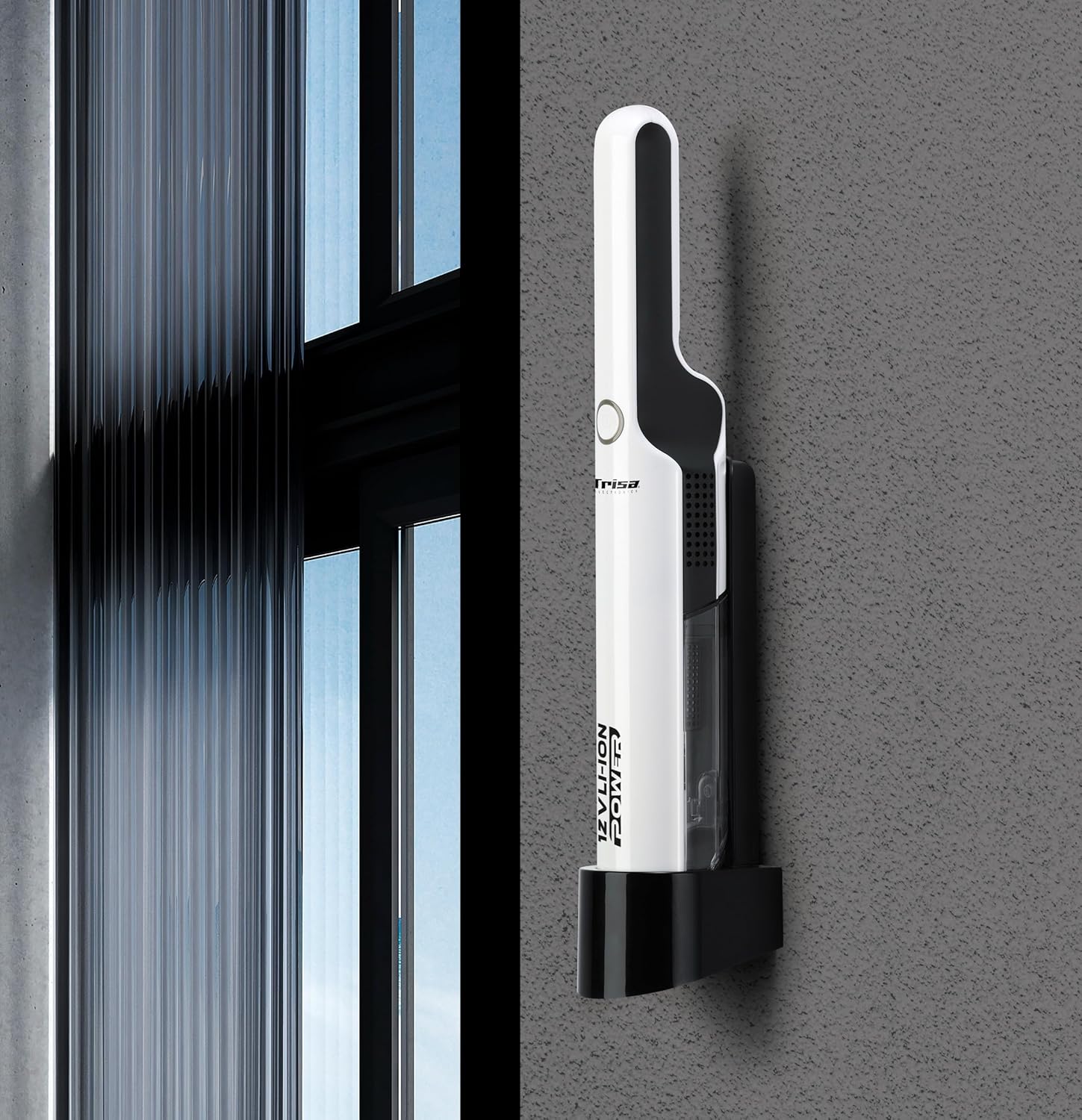
Image: The Trisa T0070 vacuum cleaner securely placed on its wall-mounted charging and storage bracket, demonstrating its compact storage solution.
6. Иштөө нускамалары
6.1. Күйгүзүү/Өчүрүү жана Соруу деңгээли
The Trisa T0070 features two power levels for versatile cleaning.
- Press the power button once to turn on the vacuum cleaner at the standard suction level.
- Press the power button a second time to switch to the higher suction level.
- Press the power button a third time to turn off the vacuum cleaner.
6.2. Жалпы колдонуу
This handheld vacuum is ideal for quick clean-ups and hard-to-reach areas, such as upholstery and car interiors.
- Select the appropriate attachment for the surface you are cleaning.
- Move the vacuum nozzle slowly over the surface to effectively pick up dust and debris.
- For stubborn dirt, use the higher suction level.
- The maximum run time on a full charge is approximately 30 minutes, depending on the power level used.

Image: A hand demonstrates using the Trisa T0070 handheld vacuum cleaner to efficiently clean small crumbs from a wooden table surface.
7. Техникалык тейлөө
Үзгүлтүксүз тейлөө оптималдуу иштешин камсыз кылат жана чаң соргучуңуздун иштөө мөөнөтүн узартат.
7.1. Чаң контейнерин бошотуу
Empty the dust container regularly, especially when it reaches its maximum capacity of 0.22 L, to maintain strong suction.
- Чаң соргучтун өчүрүлгөнүн текшериңиз.
- Locate the dust container release button (usually near the nozzle).
- Press the release button and detach the dust container from the main unit.
- Hold the dust container over a waste bin and open its lid or flap to empty the contents.
- Close the dust container and reattach it to the vacuum cleaner, ensuring it clicks securely into place.

Image: A hand demonstrates the process of emptying the transparent dust container of the Trisa T0070 vacuum cleaner directly into a trash receptacle.
7.2. HEPA чыпкасын тазалоо
The HEPA filter should be cleaned periodically to prevent clogging and maintain suction efficiency.
- After emptying the dust container, remove the HEPA filter.
- Tap the filter gently over a waste bin to dislodge dust and debris.
- If heavily soiled, the filter can be rinsed under cold running water. Ensure it is completely dry before reinserting it into the vacuum cleaner. Do not use detergents or hot water.
- Reinsert the dry HEPA filter into the dust container, then reattach the dust container to the vacuum.
7.3. Жалпы тазалоо
Чаң соргучтун сыртын жумшак менен сүртүңүз, гamp кездеме. Абразивдүү тазалагычтарды же эриткичтерди колдонбоңуз.
8. Кыйынчылыктарды
If you encounter issues with your Trisa T0070, refer to the following table for common problems and solutions.
| Көйгөй | Мүмкүн себеп | Чечим |
|---|---|---|
| Вакуум күйбөйт | Батарея түгөндү Кубат баскычы туура басылган жок | Батареяны толук заряддаңыз Кубат баскычын бекем басыңыз |
| Соруу күчү төмөн | Чаң контейнери толгон Фильтр бүтүп калган Сопло бөгөттөлгөн | Чаң контейнерин бошотуңуз HEPA чыпкасын тазалаңыз же алмаштырыңыз Remove any obstructions from the nozzle |
| Батарея заряддалбай жатат | Заряддоочу туура эмес туташтырылган розетка иштебей жатат Заряддоочу же батарейка туура эмес | Ensure charger is securely connected Розетканы башка шайман менен текшериңиз Көйгөй чечилбесе, кардарларды колдоо кызматына кайрылыңыз |
| Адаттан тышкаркы ызы -чуу | Obstruction in the nozzle or hose Фильтр туура эмес орнотулган | Текшерип, тоскоолдуктарды жок кылыңыз Ensure filter is correctly seated |
9. Техникалык шарттар
Detailed technical specifications for the Trisa T0070 Cordless Handheld Vacuum Cleaner.
| Өзгөчөлүк | Спецификация |
|---|---|
| Модель номери | T0070 (9500701) |
| Тазалоо түрү | Кургак |
| Аба чыпкасынын түрү | HEPA |
| Ызы-чуу деңгээли | 84 дБ |
| Чаң контейнеринин түрү | Баштыксыз |
| Чаң сыйымдуулугу | 0.22 Л |
| Продукт түсү | Ак |
| Power Source | Battery (Cordless) |
| Батарея технологиясы | Литий-ион (Li-Ion) |
| Батарея Voltage | 12 V (11.1 Volts) |
| Батарея сыйымдуулугу | 2 Ah |
| Батарея түрү | Интеграцияланган |
| Max Power | 75 Вт |
| Кубат деңгээли саны | 2 |
| Run Time | 30 мүнөткө чейин |
| Заряддоо убактысы | 4 саат |
| Заряддоо кабелинин узундугу | 1.8 м |
| Салмагы | 1.6 кг |
| Өлчөмдөрү (L x W x Y) | 15 x 8 x 17 см |
| Өзгөчөлүктөр | Compact, Low noise, Wall mountable |
| Сунушталган Колдонуулар | Upholstery, Car interior |
10. Кепилдик маалыматы
Trisa products are manufactured to high-quality standards. For specific warranty terms and conditions, please refer to the warranty card included with your purchase or visit the official Trisa webсайт. Ар кандай кепилдик дооматтары үчүн сатып алганыңыздын далилин сактаңыз.
11. Кардарларды колдоо кызматы
If you have any questions, require assistance, or need to report a problem with your Trisa T0070, please contact Trisa customer support. Contact details can typically be found on the product packaging, the official Trisa webсайт, же сатып алуу документтери.


