1. Киришүү
Thank you for choosing the Clean Air Optima CA-704 SMART Dehumidifier and Air Purifier. This device is designed to improve your indoor air quality by effectively removing excess moisture and filtering airborne pollutants. It combines powerful dehumidification with advanced air purification technology, including a HEPA filter, ionizer, and UV-C lamp, to create a healthier and more comfortable living environment. Please read this manual thoroughly before operating the device to ensure safe and optimal performance.

Image 1.1: The Clean Air Optima CA-704 SMART Dehumidifier and Air Purifier, shown with a smartphone displaying the companion app.
2. Коопсуздук нускамалары
Өрт, электр шок же жаракат алуу коркунучун азайтуу үчүн ар дайым төмөнкү коопсуздук чараларын аткарыңыз:
- Шайманды колдонуудан мурун бардык нускамаларды окуп чыгыңыз.
- электр менен жабдууну камсыз кылуу voltage шаймандагы рейтинг белгисине дал келет.
- Шайманды шнур же сайгыч бузулуп иштетпеңиз.
- Түзмөктү суудан жана башка суюктуктардан алыс кармаңыз.
- Эч кандай тешиктерге нерселерди салбаңыз.
- Тазалоодон же оңдоодон мурун шайманды розеткадан ажыратыңыз.
- Бул шайман үй ичинде гана колдонуу үчүн.
- Аба кирүүчү же чыгуучу жерлерди жаап албаңыз.
- Балдар жетпеген жерде сактаңыз.
3. Продукт бүтүп калдыview
3.1 Компоненттер
The Clean Air Optima CA-704 SMART Dehumidifier and Air Purifier features a multi-stage filtration system and intuitive controls.

Сүрөт 3.1: 5-с иллюстрациялаган диаграммаtage filtration system. (1) Activated Carbon Filter, (2) Pre-filter, (3) TRUE HEPA H13 filter + Nano silver coating, (4) UV-C lamp, (5) Ionizer.
The device incorporates the following key components:
- Башкаруу панели: Located on the top, it allows manual operation and displays current settings.
- Аба кириш/чыгаруу: For air circulation and purification.
- Суу багы: Collects condensed moisture.
- Фильтр бөлүмү: Houses the multi-stage фильтрлер.
- Caster Wheels: Жеңил мобилдүүлүк үчүн.

Сүрөт 3.2: Жогорку view of the control panel with digital display and buttons, alongside a smartphone showing the Clean Air Optima app interface.

Сүрөт 3.3: Алдыңкы view of the device highlighting the circular air quality indicator light, which changes color based on air quality.
4. Орнотуу
Follow these steps to set up your dehumidifier and air purifier:
- Пакеттен чыгаруу: Carefully remove the device from its packaging. Retain packaging for future storage or transport.
- Позициялоо: Place the device on a flat, stable surface. Ensure there is at least 20 cm (8 inches) of clear space around all sides for proper airflow.
- Чыпканы орнотуу: Open the filter compartment (usually located at the back or side). Remove all protective plastic packaging from the filters. Insert the filters in the correct order as indicated by the device or diagram (refer to Image 3.1). Close the compartment securely.
- Кубат туташуу: Электр шнурын жерге туташтырылган электр розеткасына сайыңыз.
- Баштапкы күйгүзүү: Press the power button on the control panel. The device will perform a self-check.
- Smart Function Setup (Optional): Download the Clean Air Optima app from your smartphone's app store. Follow the in-app instructions to connect your device to your Wi-Fi network for remote control and monitoring.

Сүрөт 4.1: Төмөнкү view showing integrated caster wheels for easy movement, and a side view highlighting the recessed handle.
5. Иштөө нускамалары
5.1 Башкаруу панелинин функциялары
The control panel allows you to manage all device functions:
- Кубат баскычы: Аппаратты күйгүзөт же өчүрөт.
- Режим баскычы: Cycles through operating modes (e.g., Dehumidify, Air Purify, Auto).
- Нымдуулук жөндөөсү: Adjusts the desired humidity level (e.g., 30% to 80%). The device will operate until this level is reached.
- желдеткич ылдамдыгы: Желдетүүчү ылдамдыкты тандайт (Төмөн, Орто, Жогорку).
- Таймер: Sets an operating duration (e.g., 1-24 hours).
- UV-C Lamp: UV-C стерилдөө функциясын иштетет же өчүрөт.
- Ионизатор: Ионизатор функциясын иштетет же өчүрөт.
- Уйку режими: Reduces fan speed and dims display lights for quiet operation.
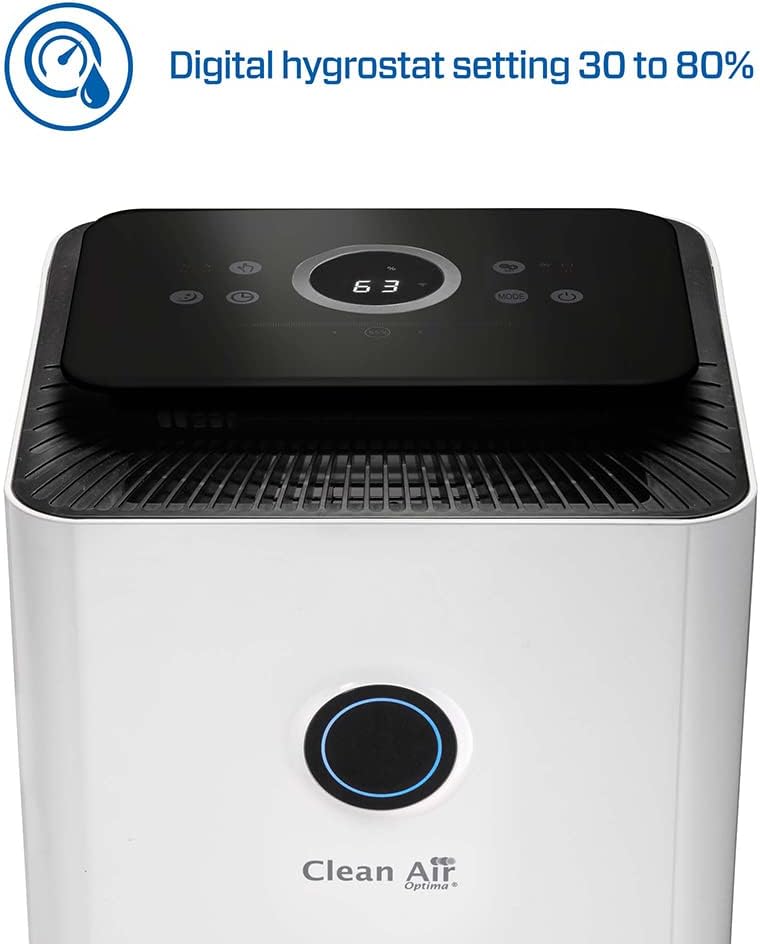
Image 5.1: Close-up of the control panel display showing a digital humidity setting, indicating the adjustable range from 30% to 80%.
5.2 Иштөө режимдери
- Нымсыздандыруу режими: The device will actively remove moisture from the air until the set humidity level is achieved.
- Аба тазалоо режими: The device will continuously filter the air using its multi-stagэлектрондук тутум.
- Авто режим: The device automatically adjusts its operation based on detected humidity and air quality levels.
5.3 Суу резервуары
When the water tank is full, the device will automatically stop operating and an indicator light will illuminate. Carefully remove the water tank, empty it, and reinsert it securely to resume operation.
6. Техникалык тейлөө
Түзмөгүңүздүн үзгүлтүксүз техникалык тейлөөсү анын иштөө мөөнөтүн узартат жана оптималдуу иштөөсүн камсыз кылат.
6.1 Сырты тазалоо
Аппараттын сыртын жумшак, г менен сүртүңүзamp кездеме. Абразивдүү тазалагычтарды же эриткичтерди колдонбоңуз.
6.2 Алдын ала чыпканы тазалоо
The pre-filter should be cleaned every 2-4 weeks, depending on air quality. Remove the pre-filter and rinse it under running water. Allow it to air dry completely before reinserting.
6.3 Фильтрди алмаштыруу
The HEPA and Activated Carbon filters have a limited lifespan and should be replaced every 6-12 months, or when the filter indicator light illuminates. Refer to the product packaging or manufacturer's website for replacement filter models. Always unplug the device before replacing filters.
6.4 Суу резервуарын тазалоо
Clean the water tank regularly to prevent mold and bacterial growth. Rinse with clean water and, if necessary, use a mild detergent. Ensure it is thoroughly rinsed and dried before reinserting.
7. Кыйынчылыктарды
Эгерде сизде көйгөйлөр пайда болсо, төмөнкү таблицаны караңыз:
| Көйгөй | Мүмкүн себеп | Чечим |
|---|---|---|
| Түзмөк күйбөй жатат. | Электр энергиясы жок. | Электр шнурунун бекем сайылганын жана розетка иштеп жатканын текшериңиз. |
| Нымдуулукту жок кылуу керек. | Water tank full or not properly inserted. Humidity setting too high. | Empty and reinsert water tank. Lower the desired humidity setting. |
| Алсыз аба агымы же адаттан тыш ызы-чуу. | Clogged filters. Obstruction in air inlet/outlet. | Clean or replace filters. Remove any obstructions. |
| Smart function not connecting. | Incorrect Wi-Fi password. Device too far from router. | Verify Wi-Fi credentials. Move device closer to router or check router settings. |
Бул чечимдерди колдонуу аракетинен кийин көйгөй чечилбесе, кардарларды колдоо кызматына кайрылыңыз.
8. Техникалык шарттар
Key technical specifications for the Clean Air Optima CA-704 SMART Dehumidifier and Air Purifier:
- Бренд: Таза аба Optima
- Модель номери: CA-704 Smart
- Нымсыздандыруу кубаттуулугу: Up to 10 Litres/day
- Күч: 160 Ватт
- Өлчөмдөрү (L x W x Y): 25 x 25 x 50 см
- Салмагы: 5.66 килограмм
- Сунушталган кабат аянты: 40 чарчы метрге чейин
- Суу резервуарынын көлөмү: 10 литр
- Ылдамдыктардын саны: 2
- Өзгөчөлүктөр: Integrated Hygrostat, Air Purifier Function (5-stage filtration: Activated Carbon, Pre-filter, TRUE HEPA H13 + Nano silver coating, UV-C lamp, Ionizer)

Image 8.1: Diagram illustrating the dimensions of the device: 250 mm (width), 250 mm (depth), and 480 mm (height).
9. Кепилдик жана колдоо
For warranty information, please refer to the documentation provided with your purchase or contact Clean Air Optima customer service directly. Information regarding the availability of spare parts is not provided in this manual. For any technical support or service inquiries, please reach out to the manufacturer or your retailer.


