1. Киришүү
The MARKLIFE P50 is a portable Bluetooth label printer designed for various labeling needs in business, home, and office environments. Utilizing upgraded thermal technology, it offers ink-free printing, producing crisp, dark images and smooth printing effects. This compact device is compatible with both iOS and Android smartphones via the 'Marklife' application, providing a versatile solution for creating custom labels.

Image: The MARKLIFE P50 label maker shown alongside its mobile application interface, demonstrating label creation and printing capabilities. Various label types are also displayed.
2. Продукт бүтүп калдыview
The P50 label maker is a lightweight and compact device, weighing approximately 140 grams with dimensions of 3.5in x 2.7in x 1.2in. It features a built-in 1200mAh high-capacity battery, allowing for continuous operation for up to 5 hours and a standby time of 1 week on a full charge. The device supports various label types, including continuous and gap labels, with a print head manufactured in Japan for reliable performance.
Негизги өзгөчөлүктөрү:
- Термикалык басып чыгаруу технологиясы: Сыя же тонер талап кылынбайт, бул эксплуатациялык чыгымдарды азайтат.
- Bluetooth 4.0 туташуусу: Connects wirelessly to smartphones within a 10-meter range.
- Портативдик дизайн: Small and lightweight for easy carrying.
- Versatile App: The 'Marklife' app offers various texts, graphic symbols, fonts, frames, and supports printing of barcodes and QR codes.
- Туруктуу энбелгилер: Provided label paper is waterproof, oil-proof, wear-resistant, and BPA-free.

Сүрөт: Жакын план view of the MARKLIFE P50's thermal print head mechanism, highlighting the ink-free printing technology.
3. Орнотуу
3.1 Аппаратты заряддоо
Before first use, ensure the MARKLIFE P50 is fully charged. Connect the provided USB cable to the charging port on the device and a suitable power source. The indicator light will show charging status.
3.2 Этикетка кагазын жүктөө
The P50 supports both continuous and gap labels. To load: open the label compartment, insert the label roll with the printing surface facing up, and ensure the leading edge of the label extends slightly out of the printer slot. Close the compartment securely.

Image: Comparison of continuous labels (left) and gap labels (right) for the MARKLIFE P50, illustrating how they are loaded into the device.
3.3 Колдонмону орнотуу
Download the 'Marklife' application from your smartphone's app store. The app is compatible with both iOS and Android devices.
4. Иштөө нускамалары
4.1 Bluetooth аркылуу туташуу
- Смартфонуңузда Bluetooth'ду күйгүзүңүз.
- Open the 'Marklife' app. Маанилүү: Connect Bluetooth within the app, not through your phone's system settings.
- In the app, click the "UNLINK" option (usually in the upper left corner) to search for available devices.
- Select your printer model (e.g., P12_9C3A) from the list to establish the connection. The printer's indicator light will turn blue upon successful connection, and "link" will be displayed in the app.
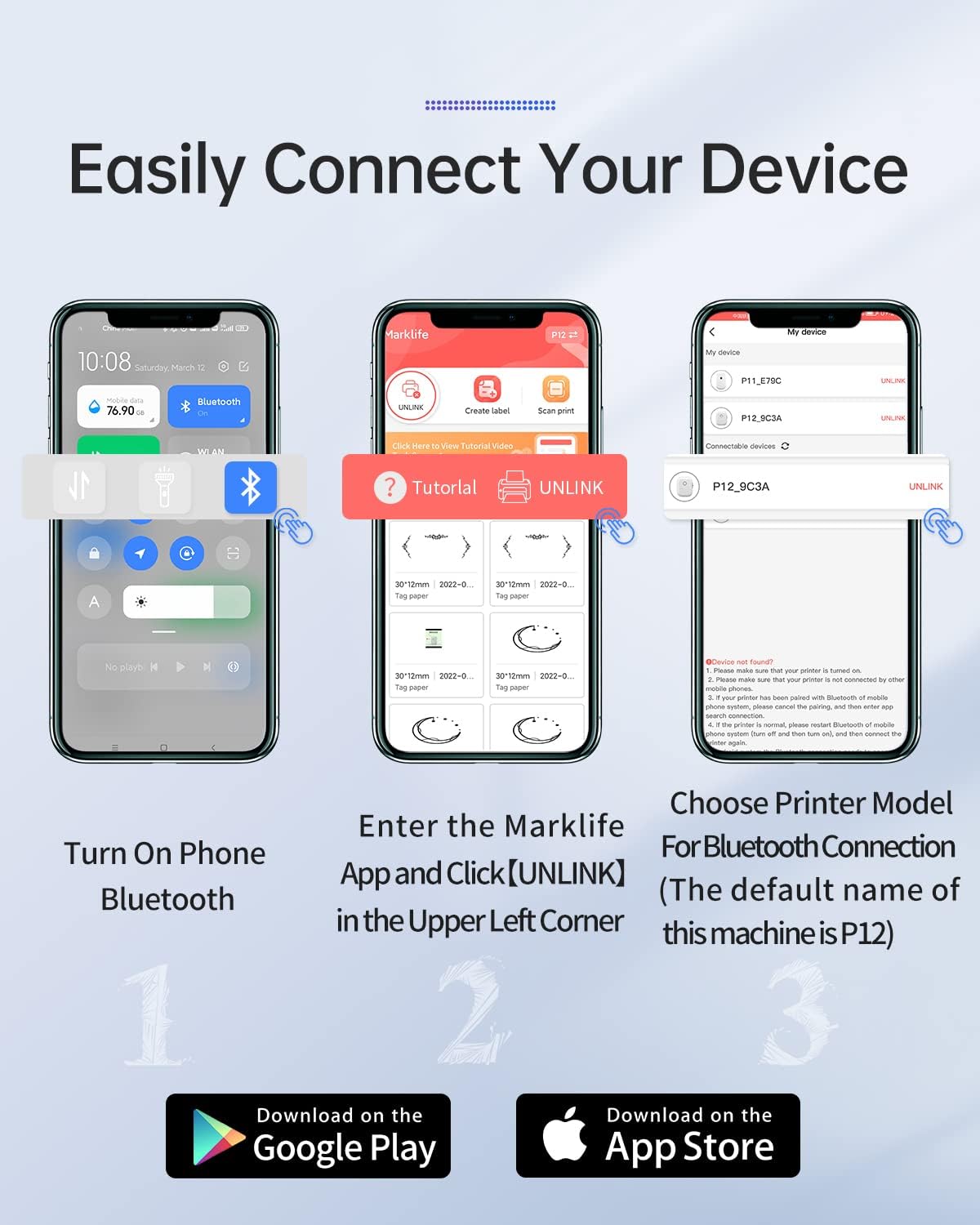
Image: A three-step visual guide demonstrating how to connect the MARKLIFE P50 label maker to a smartphone via Bluetooth using the Marklife app.
4.2 Белгилерди түзүү
The 'Marklife' app provides extensive customization options:
- Текст: Add custom text with various fonts (25+ options) and sizes.
- Дата: Insert current or custom dates.
- Stickers & Symbols: Choose from over 600 graphic symbols and stickers.
- Lines & Shapes: Add decorative lines and shapes.
- Коддор: Generate QR codes and barcodes (e.g., 1234567890).
- Граффити: Draw freehand designs.
- Сүрөттөр: Insert pictures from your phone's album.
- Кадрлар: Apply from 27+ available frames.

Image: The Marklife app's label editing interface, showing options for adding text, date, stickers, lines, codes, graffiti, and various fonts.
4.3 Этикеткаларды басып чыгаруу
After designing your label, select the appropriate label type (Continuous Label or Gap Label) within the app before printing. This ensures correct label retrieval and prevents blank labels.

Image: Various applications of labels created with the MARKLIFE P50, including organizing drawers, classifying cosmetics, and labeling file папкалар.

Сүрөт: Кошумча эксamples of label usage, such as organizing food storage containers in a refrigerator, labeling spice jars, and identifying light switches.
5. Техникалык тейлөө
- Басып чыгаруу башын тазалоо: Regularly clean the thermal print head with a soft, lint-free cloth moistened with rubbing alcohol to ensure optimal print quality.
- Энбелгилердин сактагычы: Store label rolls in a cool, dry place away from direct sunlight and heat to prevent degradation of the thermal coating.
- Батареяга кам көрүү: To prolong battery life, avoid fully discharging the device frequently and store it with some charge if not used for extended periods.
6. Кыйынчылыктарды
| Көйгөй | Мүмкүн себеп | Чечим |
|---|---|---|
| Printer shoots out blank labels after printing. | Incorrect label type selected (e.g., "Gap Label" for continuous paper). | When printing with continuous labels, ensure you select "Continuous Label" mode in the app. If "Gap Label" is selected, the printer will automatically retrieve a blank gap. |
| Cannot connect to the printer via Bluetooth. | Bluetooth not enabled, incorrect connection method, or GPS permission missing. | 1. Ensure Bluetooth is enabled on your phone. 2. Connect Bluetooth гана within the 'Marklife' app, not through your phone's system settings. 3. If the printer cannot be found, ensure "GPS" (location services) is turned on for the app, as it may be required for Bluetooth scanning on some Android devices. |
| Printer does not work after connecting to Bluetooth. | Connection not properly established within the app. | Verify that the printer's indicator light is blue and "link" is displayed in the upper right corner of the app's printing interface. If not, disconnect and reconnect within the app. |
| Басып чыгаруу сапаты начар. | Dirty print head or low battery. | Clean the print head as described in the Maintenance section. Ensure the device is sufficiently charged. |
7. Техникалык шарттар
| Өзгөчөлүк | Деталь |
|---|---|
| Модель номери | P50 |
| Продукциянын өлчөмдөрү | 2"D x 2"W x 2"H (болжол менен) |
| Элемент Салмагы | 4.4 унция |
| Байланыш технологиясы | Bluetooth 4.0 |
| Басма технологиясы | Термикалык |
| Максималдуу медиа өлчөмү | Width range 0.59'' - 2.24'' |
| Батарея сыйымдуулугу | 1200 мАч литий полимери |
| Башкаруу ыкмасы | App (Marklife) |
| Шайкеш түзмөктөр | iOS, Android smartphones |
| Камтылган компоненттер | Label Maker, Labels |
| UPC | 748095515558 |
8. Кепилдик жана колдоо
MARKLIFE provides after-sales service for this product. If you encounter any questions or issues regarding the use of your P50 label maker, please contact the MARKLIFE after-sales team for assistance. Refer to your purchase documentation or the official MARKLIFE webатайын кепилдик шарттары жана байланыш маалыматы үчүн сайт.


