Introduction
This manual provides comprehensive instructions for the setup, operation, maintenance, and troubleshooting of your Oversteel Invar Wireless Gaming Mouse. Designed for precision and comfort, this mouse features a 10000 DPI optical sensor, 8 programmable buttons, and customizable RGB lighting. Please read this manual thoroughly to ensure optimal performance and longevity of your device.

Image: Oversteel Invar Wireless Gaming Mouse, showcasinанын эргономикалык дизайны жана RGB жарыктандыруу.
Пакеттин мазмуну
- Oversteel Invar Wireless Gaming Mouse
- USB зымсыз кабыл алгыч
- USB заряддоо кабели
- Колдонуучунун Колдонмосу (бул документ)
Жайгашуу
1. Чычканды заряддоо
Баштапкы колдонуудан мурун, чычканды толук кубаттоо сунушталат.
- USB кубаттоочу кабелдин кичинекей учун чычкандын алдыңкы жагындагы кубаттоочу портко туташтырыңыз.
- USB кубаттоочу кабелдин чоңураак учун компьютериңиздеги жеткиликтүү USB портуна же USB дубал адаптерине туташтырыңыз.
- The battery indicator lights on the mouse will show charging status. A full charge provides up to 45 hours of gaming use.
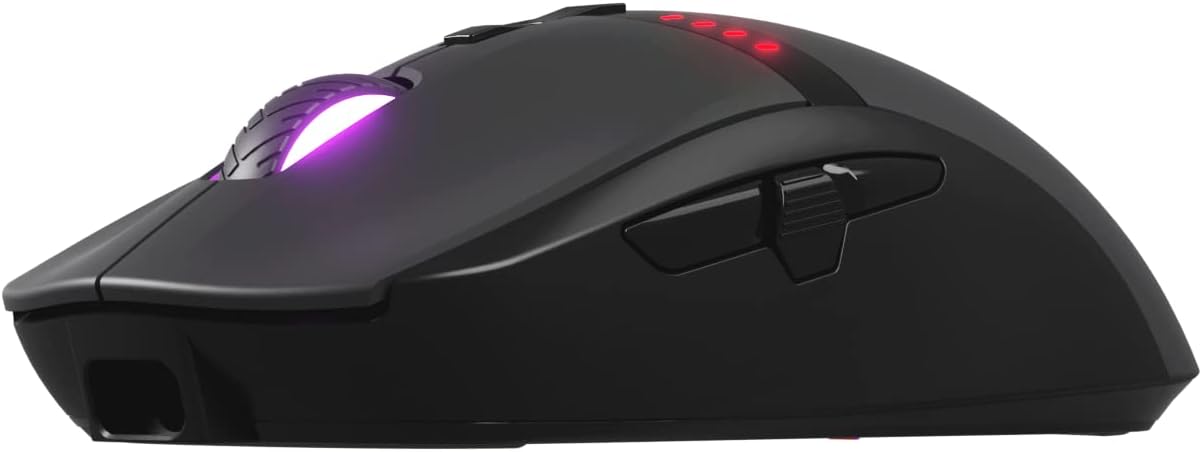
Сүрөт: алдыңкы view of the mouse, highlighting the USB charging port.
2. Чычканды туташтыруу
The Oversteel Invar mouse supports both wireless and wired modes.
Зымсыз режим:
- Locate the USB wireless receiver, typically stored in a compartment on the underside of the mouse.
- USB зымсыз кабыл алгычын компьютериңиздеги жеткиликтүү USB портуна сайыңыз.
- Астында жайгашкан кубат которгучу менен чычканды күйгүзүңүз.
- Компьютериңиз керектүү драйверлерди автоматтык түрдө таап, орнотуп алышы керек.
Зымдуу режим:
To use the mouse in wired mode, simply connect the USB charging cable from the mouse to your computer's USB port. The mouse will function as a wired device and charge simultaneously.
Иштөө нускамалары
1. Баскыч функциялары
The Oversteel Invar mouse features 8 programmable buttons. Default functions are as follows:
- Сол чыкылдатуу: Стандарттык баштапкы аракет.
- Оң чыкылдатуу: Стандарттык экинчилик аракет.
- Ортоңку чыкылдатуу (сыдыруу дөңгөлөгү): Ортоңку чыкылдатуу функциясын иштетет.
- Өйдө/ылдый жылдыруу: Navigates content vertically.
- Алга баскычы: Алга карай жылдырат web браузерлер же file изилдөөчүлөр.
- Артка баскычы: Артка карай багыт алат web браузерлер же file изилдөөчүлөр.
- DPI+ баскычы: DPI сезгичтигин жогорулатат.
- DPI баскычы: DPI сезгичтигин төмөндөтөт.

Image: Software interface illustrating programmable button assignments.
2. DPI тууралоо
The mouse features a Pixart 3325 optical sensor with adjustable DPI up to 10000. Use the dedicated DPI+ and DPI- buttons to cycle through sensitivity levels. The current DPI setting may be indicated by the RGB lighting or a specific indicator on the mouse.
3. RGB жарыктандыруу режимдери
The Oversteel Invar mouse offers up to 10 configurable RGB lighting modes. These modes can typically be cycled through using a combination of buttons (often the DPI button and another, or a dedicated button if available) or through the mouse's software. Refer to the software section for advanced customization.

Image: The mouse displaying its customizable RGB lighting effects.
4. Батарея индикатору
The mouse includes a battery indicator that illuminates red to show the remaining battery percentage. Monitor this indicator to know when recharging is necessary.
Техникалык тейлөө
1. Тазалоо
- Тазалоодон мурун чычканды компьютериңизден ажыратыңыз.
- Чычкандын бетин сүртүү үчүн жумшак, кургак чүпүрөктү колдонуңуз.
- өжөр кир үчүн, бир аз гampчүпүрөктү суу менен. Катуу химиялык заттардан же абразивдүү материалдардан алыс болуңуз.
- Use compressed air to clear dust from around the scroll wheel and sensor area.
2. Батареяга кам көрүү
- Чычканды экстремалдык температурага тийгизүүдөн сактаңыз.
- Ички батареяны өз алдынча алмаштырууга аракет кылбаңыз. Эгерде батарея менен көйгөйлөр жаралса, колдоо кызматына кайрылыңыз.
- Батареянын оптималдуу иштөө мөөнөтү үчүн, бат-баттан батареяны толук түгөтпөңүз.
Проблемаларды чечүү
Чычкан жооп бербейт:
- Чычкан күйгүзүлгөнүн текшериңиз.
- Батареянын деңгээлин текшерип, керек болсо заряддаңыз.
- For wireless mode, ensure the USB receiver is securely plugged into a working USB port. Try a different USB port.
- Зымдуу режим үчүн, USB кабелинин чычканга да, компьютерге да бекем туташтырылганын текшериңиз.
- Компьютериңизди өчүрүп күйгүзүп көрүңүз.
DPI/Сезимталдык маселелери:
- Use the DPI+ and DPI- buttons to adjust sensitivity.
- Чычкан сенсорунун таза жана тоскоолдуксуз экенин текшериңиз.
- Check mouse settings in your operating system or gaming software.
RGB жарыктандыруу иштебейт:
- Чычкандын күйгүзүлгөнүн жана туташтырылганын текшериңиз.
- Cycle through RGB modes using the designated buttons or software.
- Check for any software conflicts or updates.
Программалык камсыздоо/Драйвер маселелери:
- If experiencing issues with button programming or macro functions, ensure you have the latest software/drivers installed from the official Oversteel webсайт.
- Some users have reported software bugs; ensure your software is up-to-date.
Техникалык шарттар
| Өзгөчөлүк | Деталь |
|---|---|
| Модель аты | Oversteel Invar Wireless Gaming Mouse |
| Модель номери | NAT-OV-INVARW |
| Байланыш | Wireless (USB Receiver), Wired (USB Cable) |
| Сенсор түрү | Pixart 3325 оптикалык сенсор |
| DPI диапазону | 10000 DPI чейин (Жөнгө салынуучу) |
| IPS (секундасына дюйм) | 100IPS |
| Ылдамдатуу | 20G чейин |
| Buttons | 8 Программалануучу баскычтар |
| Которуу түрү | Huano Switches (20 million click lifespan) |
| RGB жарыктандыруу | 10 Configurable Modes |
| Батарея сыйымдуулугу | 800 мАч |
| Батареянын иштөө мөөнөтү | Up to 45 hours (gaming) |
| Өлчөмдөр | 20.1 x 14.2 x 6.2 см (болжолдуу таңгак өлчөмдөрү) |
| Салмагы | 104 grams (approximate package weight) |
| Шайкештик | PC/Mac (Windows, macOS) |
Кепилдик жана колдоо
Oversteel products are designed for durability and performance. For specific warranty information, please refer to the warranty card included with your product or visit the official Oversteel webсайт.
For technical support, driver downloads, or further assistance, please visit the Oversteel support page or contact their customer service.
- Официалдуу Webсайт: www.oversteel.com (Эскертүү: Бул толтургуч URL as no specific support link was provided in the product data.)
- Колдоо электрондук почтасы: support@oversteel.com (Note: This is a placeholder email.)


