Introduction
This manual provides detailed instructions for the operation and maintenance of your Midland T10 FRS Walkie Talkie. The T10 is a compact and user-friendly two-way radio designed for reliable communication in various settings, including family activities, camping, and hiking. It features 22 FRS channels, NOAA Weather Alert, and eVOX hands-free operation. Please read this manual thoroughly to ensure proper use and to maximize the performance of your device.
Продукт бүттүview
Негизги өзгөчөлүктөрү:
- 22 FRS Channels for clear communication.
- 38 CTCSS Privacy Codes to minimize interference.
- Колсуз башкаруу үчүн eVOX (Оңой үн жана үн менен иштетүүчү берүү).
- NOAA аба ырайын сканерлөө + аба ырайынын кескин өзгөрүүлөрү жөнүндө эскертүү.
- Channel Scan and Monitor Mode functions.
- Keystroke Tones and Silent Operation options.
- Up to 20-mile range in open areas.
Кутуда эмне бар:
- Midland T10 Two-Way Radios (quantity as purchased, e.g., 4 radios)
- Belt Clips (one per radio)
- Колдонуучунун колдонмосу (бул документ)
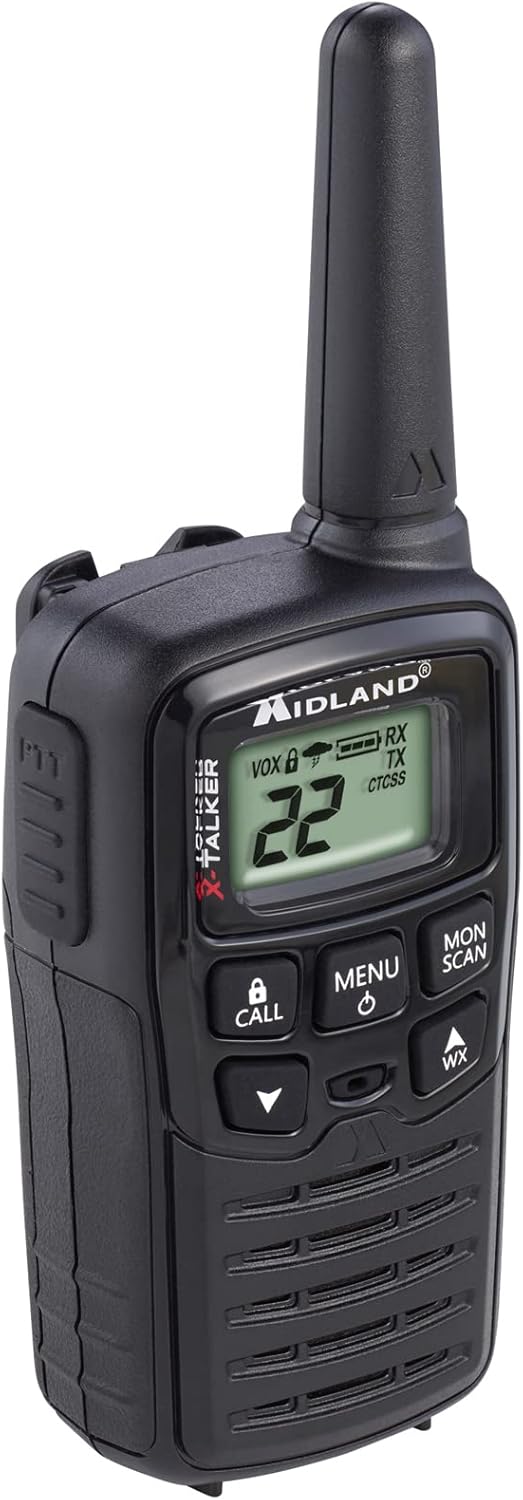
Figure 1: Midland T10 Walkie Talkie, angled front view showing display and buttons.
Жайгашуу
1. Батареяны орнотуу
- Радио өчүрүлгөнүн текшериңиз.
- Радионун артындагы батарея бөлүкчөсүнүн капкагын табыңыз.
- Аны алып салуу үчүн өтмөктү басып, капкакты ылдый жылдырыңыз.
- Insert 3 AAA alkaline batteries (not included) into the compartment, observing the correct polarity (+/-) as indicated.
- Батарея бөлүгүнүн капкагын ордунан чыккыча өйдө жылдырыңыз.
Маанилүү: Use only AAA alkaline batteries. Do not mix old and new batteries, or different types of batteries.
2. Белдемчи клипти чаптоо
- Кур кыскычын радионун арткы жагындагы оюктар менен тегиздеңиз.
- Slide the belt clip upwards until it locks securely into position.
- To remove, push the release tab on the belt clip and slide it downwards.

2-сүрөт: Каптал view of the Midland T10 Walkie Talkie with the belt clip attached.
Иштөө нускамалары
1. Күйгүзүү/өчүрүү
- Күйгүзүү үчүн: басып, кармап туруңуз МЕНЮ/КҮЧ button until the display illuminates and you hear a tone.
- Өчүрүү үчүн: басып, кармап туруңуз МЕНЮ/КҮЧ баскычын дисплей өчмөйүнчө басыңыз.
2. Үндү тууралоо
- басыңыз UP (▲) button to increase the volume.
- басыңыз ылдый (▼) button to decrease the volume.
- The current volume level (1-8) will be displayed.
3. Канал тандоо
- Радио күйүп турганда, басыңыз МЕНЮ баскычын бир жолу. Канал номери жарк этет.
- колдонуу UP (▲) же ылдый (▼) buttons to select one of the 22 FRS channels.
- басыңыз МЕНЮ button again to confirm your selection, or wait 5 seconds for the selection to be automatically saved.
4. Берүү жана кабыл алуу
- Өткөрүш үчүн: басып, кармап туруңуз PTT (Push-To-Talk) button located on the side of the radio. Speak clearly into the microphone. Release the PTT button to stop transmitting.
- Кабыл алуу үчүн: PTT баскычы басылбаганын текшериңиз. Радио тандалган каналдагы сигналдарды автоматтык түрдө кабыл алат.
5. Privacy Codes (CTCSS)
Privacy Codes help reduce interference from other users on the same channel. Your radio has 38 CTCSS codes.
- Каналды тандагандан кийин, басыңыз МЕНЮ баскычын эки жолу басыңыз. Купуялык кодунун номери күйүп-өчүп турат.
- колдонуу UP (▲) же ылдый (▼) buttons to select a privacy code (01-38). Code 00 means no privacy code is active.
- басыңыз МЕНЮ button again to confirm, or wait 5 seconds.
Эскертүү: Both radios must be set to the same channel and privacy code to communicate.
6. eVOX (Hands-Free Operation)
eVOX allows you to transmit without pressing the PTT button.
- басыңыз МЕНЮ button three times. The eVOX sensitivity level will flash (oF, 1-3).
- колдонуу UP (▲) же ылдый (▼) buttons to select a sensitivity level (1 being highest sensitivity, 3 being lowest). Select "oF" to turn eVOX off.
- басыңыз МЕНЮ button again to confirm, or wait 5 seconds.
7. NOAA Weather Scan + Alert
Your radio can receive NOAA Weather Radio alerts.
- To Activate Weather Scan: басыңыз WX button. The radio will scan 10 NOAA weather channels and lock onto the strongest signal.
- To Activate Weather Alert: While in Weather Scan mode, press the МЕНЮ button. The "AL" icon will flash. Use UP (▲) же ылдый (▼) to turn the alert ON or OFF. Press МЕНЮ to confirm. When activated, the radio will sound an alarm if a severe weather alert is broadcast.
- To Exit Weather Mode: басыңыз WX кайра баскычын.
8. Call Alert
басыңыз ЧАЛ button to send an audible call tone to other radios on the same channel and privacy code.
9. Монитор функциясы
The Monitor function allows you to temporarily disable the squelch to listen for weak signals or to check for activity on a channel.
- басып, кармап туруңуз MON/SCAN button to activate the Monitor function.
- Өчүрүү үчүн баскычты коё бериңиз.
10. Скандоо функциясы
The Scan function allows you to scan all 22 channels for activity.
- басыңыз MON/SCAN button once (do not hold). The radio will begin scanning.
- Активдүүлүк аныкталганда, сканерлөө ошол каналда тындырылат.
- басыңыз MON/SCAN скандоону токтотуу үчүн кайра басыңыз.
Техникалык тейлөө
- Тазалоо: жумшак колдонуу, damp cloth to clean the radio's exterior. Do not use abrasive cleaners or solvents.
- Батареяга кам көрүү: Радио агып кетпеши үчүн узак убакыт бою колдонулбай турган болсо, батарейкаларды алып салыңыз.
- Сактагыч: Радиону салкын, кургак жерде, түз күндүн нурунан жана экстремалдык температурадан алыс сактаңыз.
- Суу каршылык: This radio is not water-resistant. Avoid exposure to water or high humidity.
Проблемаларды чечүү
| Көйгөй | Мүмкүн чечим |
|---|---|
| Күч жок. |
|
| Начар диапазон же статикалык. |
|
| Өткөрүүгө болбойт. |
|
| Hearing other conversations. |
|
Техникалык шарттар
| Модель номери | FBA-4PK-T10 |
| Каналдар | 22 FRS каналдары |
| Купуялык коддору | 38 CTCSS коддору |
| Жыштык диапазону | 462.5625 МГц - 462.7250 МГц |
| Сүйлөшүү диапазону максималдуу | Up to 20 Miles (in open areas) |
| Power Source | 3 AAA щелочтуу батарейкалар (кошулган эмес) |
| Элемент Салмагы | 1.23 фунт (4 даана үчүн) |
| Продукциянын өлчөмдөрү | 7 x 7 x 4 дюйм |
| Сууга туруктуулук деңгээли | Сууга чыдамдуу эмес |
Кепилдик жана колдоо
The Midland T10 FRS Walkie Talkie comes with an industry-leading 3 жылдык кепилдик against defects in materials and workmanship. This warranty covers normal use and service. For warranty claims or technical support, please refer to the contact information provided with your purchase or visit the official Midland webсайт.
For additional information, FAQs, or to register your product, please visit www.midlandusa.com.


