Продукт бүттүview
The IFOOTAGE Gazelle TC7 Carbon Camera Tripod is a professional video tripod designed for stability, durability, and ease of use. It features a unique patented ball head quick release system, high-strength carbon fiber and aluminum magnesium alloy construction, and versatile leg adjustments.
Эмне камтылган
- IFOOTAGE Gazelle TC7 Tripod
- Гулжигит Сатыбеков
- Көрсөтмө (бул документ)
- Leg Adjustment Tool
Негизги өзгөчөлүктөрү
- Unique 75mm bowl base patented ball head quick release system for rapid camera removal.
- High-strength carbon fiber and aluminum magnesium alloy construction for increased strength, rigidity, and durability.
- Max load capacity of 19.8 lbs (9 kg) for handling larger cameras and lenses.
- Quick telescopic design with automated locking system and three leg lock angles (22°, 55°, 77°).
- 3-section carbon alloy legs extend from 26" (66 cm) to 61" (155 cm).
- Compact and portable, folding to 26.3" (67 cm) to fit into a 28" wide suitcase.
- Universal non-slip rubber feet with retractable metal spikes for stability on various terrains.
- Stainless steel screws for enhanced durability.
- Integrated spirit level on the fast ball head for precise leveling.
Орнотуу жана чогултуу
Пакеттен чыгаруу
Carefully remove all components from the packaging. Ensure all items listed in "What's Included" are present.
Attaching the Ball Head
The Gazelle TC7 features a patented fast ball head quick release system. To attach or detach the ball head, turn the handle 1 rotation anti-clockwise and press the release button on the handle while pulling down. To re-attach, press the release button and push the handle up towards the ball head, then rotate the handle clockwise to lock.

Буттун бурчтарын тууралоо
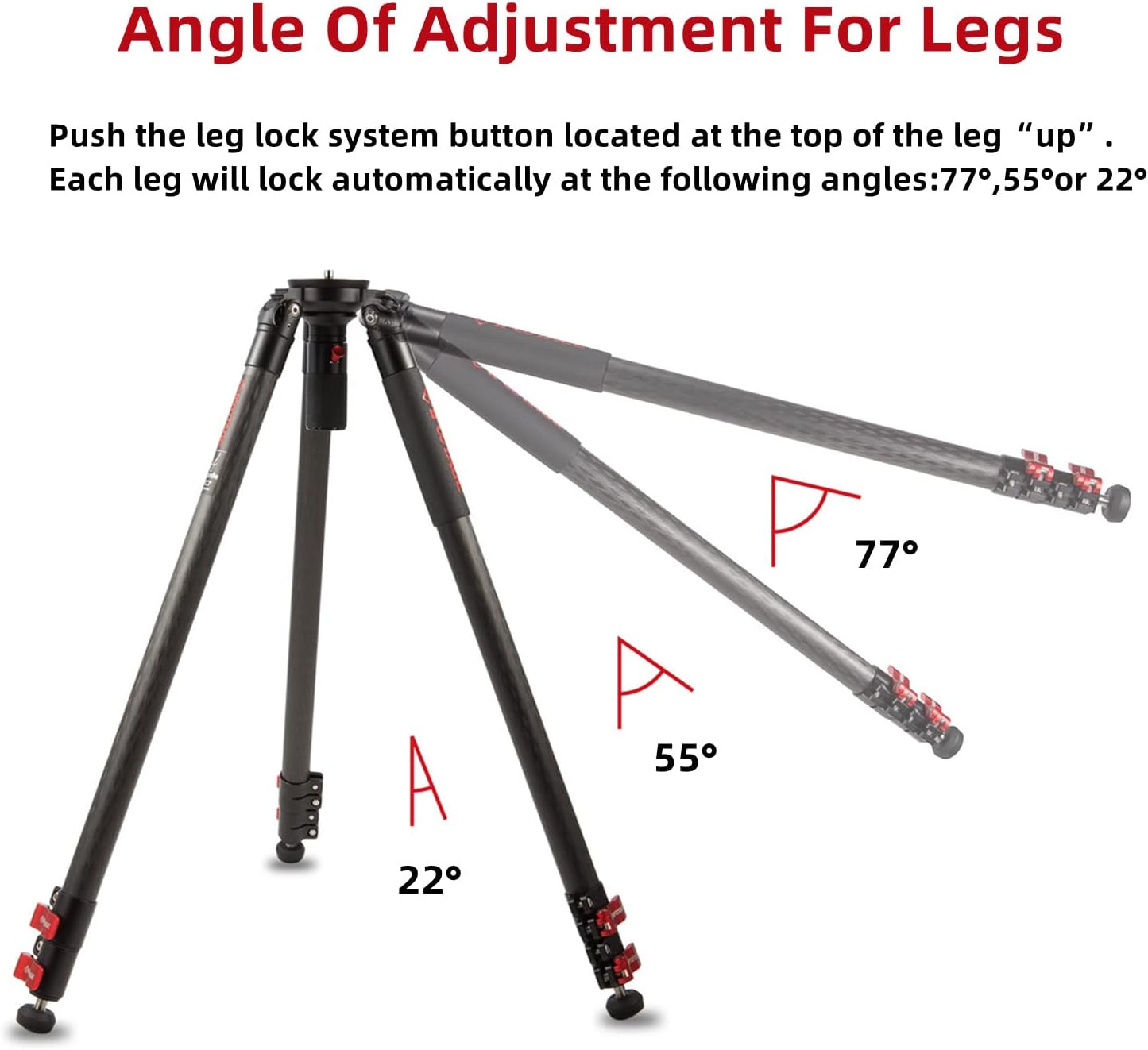
Each leg has an automated locking system. Push the leg lock system button located at the top of the leg "up" to adjust the angle. Each leg will lock automatically at the following angles: 22°, 55°, or 77°. This allows for stable setup on uneven terrain or for achieving low-angle shots.
Extending and Retracting Legs
The 3-section carbon alloy legs feature quick-release buckles for rapid extension and retraction. Simply open the buckle, extend the leg to the desired height, and close the buckle to secure. The tripod can extend from 26 inches (66 cm) to 61 inches (155 cm).

Foot Pad and Spike Adjustment
The tripod is equipped with universal non-slip rubber feet. For increased stability on soft or uneven ground, the rubber feet can be retracted to reveal solid metal spikes.

Иштөө нускамалары
Камераңызды орнотуу
Use the quick release system to securely mount your camera to the ball head. Ensure the camera is firmly attached before use.
Leveling Your Camera
The fast ball head includes a spirit level to assist in leveling your camera for perfectly horizontal shots. Adjust the tripod legs until the bubble in the spirit level is centered.
Using the Tripod in Various Environments
The robust construction and adjustable feet make the Gazelle TC7 suitable for diverse environments, from smooth indoor floors to rugged outdoor terrains.

Расмий продукт Video
Watch the official IFOOTAGE video for a comprehensive overview of the Gazelle TC7/TC9 Carbon Camera Tripod's features and usage.
Техникалык тейлөө
Тазалоо
Штативди жумшак, d менен сүртүңүзamp cloth after each use, especially after outdoor use, to remove dirt and debris. Avoid harsh chemicals.
Түзөтүүлөр
A leg adjustment tool is included to make any minor adjustments to the leg buckles as needed, ensuring they remain secure over time. The aluminum buckles are designed for long-lasting durability, unlike plastic alternatives.
Сактагыч
When not in use, fold the tripod to its compact size (67 cm / 26.3 inches) and store it in the provided high-quality carry bag. The bag features a durable zipper, a toughened extendable end piece for storing with a video head, handles, and a strap for carrying.

Проблемаларды чечүү
Туруктуулук маселелери
- Ensure all leg sections are fully extended and their quick-release buckles are securely locked.
- Verify that the leg angles are properly engaged in one of the three preset positions (22°, 55°, 77°).
- For soft ground, retract the rubber feet to expose the metal spikes for better grip.
- Check that the ball head is securely attached and locked.
Difficulty Adjusting Legs
- Ensure the leg lock system button is fully pulled out before attempting to change leg angles.
- If buckles feel loose or too tight, use the provided leg adjustment tool to fine-tune their tension.
Camera Not Level
- Utilize the integrated spirit level on the ball head to guide your adjustments.
- Make small adjustments to individual leg lengths until the bubble is centered.
Техникалык шарттар
| Өзгөчөлүк | Деталь |
|---|---|
| Модель номери | TC7 |
| Бренд | IFOOTAGE |
| Материал | Carbon Fiber |
| Элемент Салмагы | 6.49 фунт (2.95 килограмм) |
| Салмагы Limit | 19.8 фунт |
| Максималдуу бийиктик | 61 дюйм (155 сантиметр) |
| Минималдуу бийиктик | 26 дюйм |
| Катталган узундук | 26.3 дюйм (67 см) |
| Tripod баш түрү | Ball Heads (75mm bowl base) |
| Шайкеш түзмөктөр | Camcorder, Camera |
| Өзгөчө өзгөчөлүк | Жеңил |
| Түс | Кара |
| Пакеттин өлчөмдөрү | 30 x 6.5 x 6.5 дюйм |
| Дата биринчи жеткиликтүү | 10-март, 2022-жыл |
Кепилдик жана колдоо
Кепилдик маалымат
For detailed warranty information, please refer to the official IFOOTAGE webсайтына кириңиз же кардарларды тейлөө кызматына кайрылыңыз. Кепилдик талаптары үчүн сатып алганыңызды тастыктаган документти сактап коюңуз.
Кардарларды колдоо
If you encounter any issues or have questions not covered in this manual, please contact IFOOTAGE customer support through their official webсайтка же продуктуну сатып алган сатуучуга.


