1. Киришүү
This manual provides comprehensive instructions for the installation, operation, and maintenance of your ESX VN940-4G Autoradio Navigation Naviceiver. Please read this manual thoroughly before using the device to ensure proper and safe operation.
The ESX VN940-4G is a state-of-the-art car radio system featuring a 9-inch touchscreen display, integrated navigation, and Bluetooth connectivity, designed to enhance your in-car entertainment and navigation experience.
2. Коопсуздук маалыматы
Жарааттарды же аппаратты бузууну болтурбоо үчүн ар дайым төмөнкү коопсуздук чараларын сактаңыз:
- Аппаратты айдоодон алаксыта тургандай иштетпеңиз. Ар дайым жол коопсуздугун биринчи орунга коюу.
- Ensure all wiring is correctly connected to prevent short circuits or electrical hazards. Consult a professional for installation if unsure.
- Түзмөктү өтө жогорку температурага, узак убакыт бою түз күн нуруна же ашыкча нымдуулукка дуушар кылбаңыз.
- Avoid disassembling or modifying the unit. This can void the warranty and cause damage.
- Үндүн көлөмүн тышкы трафиктин үндөрүн угууга мүмкүндүк берген деңгээлде кармаңыз.
3. Пакеттин мазмуну
Пакетте бардык буюмдар бар экенин текшериңиз:
- ESX VN940-4G Naviceiver Unit
- Кронштейн орнотуу
- Электр кабели
- GPS антеннасы
- USB кеңейтүү кабели
- Колдонуучунун Колдонмосу (бул документ)
4. Орнотуу жана орнотуу
Proper installation is crucial for the performance and longevity of your ESX VN940-4G. It is recommended to have the unit installed by a qualified professional.
4.1 Агрегатты монтаждоо
Use the provided mounting bracket to secure the Naviceiver in your vehicle's dashboard. Ensure the unit is firmly seated and does not obstruct any vehicle controls or airbags.
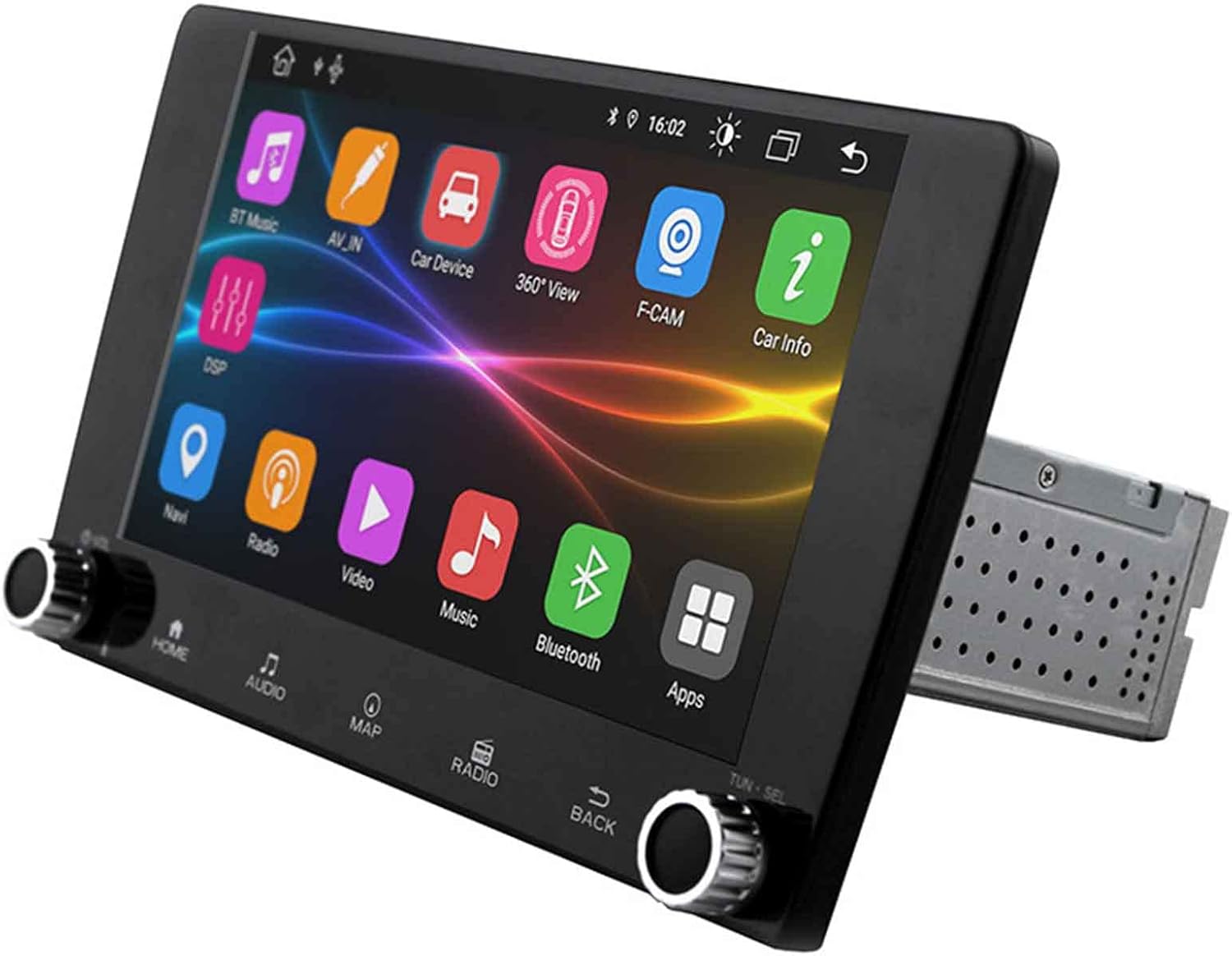
Image: The ESX VN940-4G Naviceiver unit, displaying its side profile and the integrated mounting cage, ready for dashboard installation.
4.2 Зымдарды туташтыруу
Connect the power harness, speaker wires, GPS antenna, and any other auxiliary inputs/outputs according to your vehicle's wiring diagram and the unit's connection ports. Pay close attention to positive and negative terminals.
- Күч (сары): Туруктуу 12V (батарея)
- От алдыруу (Кызыл): Switched 12V (ACC)
- Жер (Кара): Унаанын шассисинин аянты
- Динамиктердин зымдары: Connect to corresponding vehicle speaker wires (e.g., Front Left +, Front Left -).
- GPS антеннасы: Connect to the dedicated GPS antenna port and mount the antenna in a location with a clear view асмандын.
4.3 Баштапкы күйгүзүү жана конфигурация
After installation, turn on your vehicle's ignition. The unit should power on. Follow the on-screen prompts for initial setup, which may include:
- Тил тандоо
- Убакыт жана дата орнотуу
- Radio Region Selection
5. Иштөө нускамалары
This section details the primary functions and operations of your ESX VN940-4G.
5.1 Негизги башкаруу каражаттары
- Кубат баскычы: Бирдикти күйгүзүү/өчүрүү үчүн басып туруңуз. Үнсүз/ачуу үчүн кыска басыңыз.
- Үн баскычы: Үнүн жогорулатуу үчүн сааттын жебеси боюнча, азайтуу үчүн сааттын жебесине каршы буруңуз.
- Үй баскычы: Негизги меню экранына кайтып келет.
- Артка баскычы: Мурунку экранга же менюга кайтат.
5.2 Радио менен иштөө
From the main menu, select the 'Radio' icon. You can manually tune frequencies, scan for stations, or save your favorite stations as presets.
- Скандоо: Automatically searches for and stops at strong signals.
- Алдын ала орнотуулар: Touch and hold a numbered button to save the current station.
5.3 Bluetooth байланышы
Бирдик үнсүз чалуу жана аудио агым үчүн Bluetooth'ду колдойт.
- Go to the 'Bluetooth' menu.
- Мобилдик түзмөгүңүздө Bluetooth'ду иштетиңиз жана жеткиликтүү түзмөктөрдү издеңиз.
- Select 'ESX VN940-4G' from the list on your phone.
- Эгер суралса, жупташтыруу кодун ырастаңыз.
Once paired, you can make/receive calls and stream music wirelessly.
5.4 Навигация системасы
Access the navigation application by selecting the 'Map' or 'Navi' icon from the main menu. The system provides turn-by-turn directions and real-time traffic information (if supported by the map software).

Image: The ESX VN940-4G Naviceiver's touchscreen displaying a detailed navigation map, including current route, speed, and remaining distance to destination.
- Көздөгөн жерди киргизүү: Use the on-screen keyboard to enter addresses or points of interest.
- Маршруттук жетекчилик: Follow the voice prompts and visual cues on the screen.
- Карта View: 2D жана 3D ортосунда которуштуруу views, and adjust zoom levels.
5.5 Медиа ойнотуу
The unit supports media playback from various sources, such as USB drives. Connect your USB device to the designated USB port. The unit will automatically detect compatible audio or video files.
6. Техникалык тейлөө
Regular maintenance ensures the longevity and optimal performance of your Naviceiver.
- Экранды тазалоо: Сенсордук экранды акырын сүртүү үчүн жумшак, мамыксыз чүпүрөктү колдонуңуз. Өжөр тактар үчүн,ampen the cloth slightly with water or a screen-cleaning solution. Do not use abrasive cleaners.
- Программалык камсыздоо жаңыртуулары: Мезгил-мезгили менен өндүрүүчүнүн текшерүү website for available software updates. Updates can improve performance, add new features, or fix bugs. Follow the instructions provided with the update package carefully.
7. Кыйынчылыктарды
If you encounter issues with your ESX VN940-4G, refer to the following common problems and solutions:
| Көйгөй | Мүмкүн себеп | Чечим |
|---|---|---|
| Түзмөк күйбөйт. | Туура эмес зымдар, күйгүзүлгөн сактагыч, унаанын аккумулятору маселеси. | Кубаттуу жана жерге туташууларды текшериңиз. Унаа сактагычтарды текшериңиз. Батарея заряддалганын текшериңиз. |
| Динамиктерден үн жок. | Speaker wires disconnected, volume too low, unit muted. | Динамиктердин туташуусун текшериңиз. Үнүн жогорулатыңыз. Түзмөктүн үнсүз абалда экенин текшериңиз. |
| Bluetooth байланышы ишке ашпай калды. | Bluetooth not enabled on phone/unit, device out of range, interference. | Ensure Bluetooth is active on both devices. Move phone closer. Restart both devices. |
| GPS сигналы жоголду же так эмес. | GPS antenna obstructed, faulty antenna, poor satellite reception. | Relocate GPS antenna to a clear area. Check antenna connection. Wait for clear sky. |
Бул чечимдерди колдонуу аракетинен кийин көйгөй чечилбесе, кардарларды колдоо кызматына кайрылыңыз.
8. Техникалык шарттар
| Өзгөчөлүк | Деталь |
|---|---|
| Модель аты | ESX VN940-4G |
| Бренд | ESX |
| Дисплей өлчөмү | 9 дюйм (22.8 см) |
| Display Resolution | 800 x 480 пиксель |
| Байланыш технологиясы | Bluetooth |
| Монтаж түрү | Dashboard-Mounting |
| Аудио чыгаруу режими | Стерео |
| Унаа кызматынын түрү | Машина |
| Камтылган компоненттер | Кронштейн орнотуу |
| Биринчи жеткиликтүү күн | 10-март, 2022-жыл |
9. Кепилдик жана колдоо
For warranty information, please refer to the documentation provided at the time of purchase or contact your retailer. Warranty terms and conditions may vary by region and seller.
For technical support, troubleshooting assistance beyond this manual, or inquiries about spare parts, please contact the seller or the official ESX customer service. Contact details are typically available on the seller's website or the ESX official webсайт.


